'show password window' issues

Since 2026.3.x (I can't say exactely since when, because we just started with 2026.3.12.0 this week) we had to remark that there are really a lot of UI changes ... among others the 'show password window' minimize button is missing?! 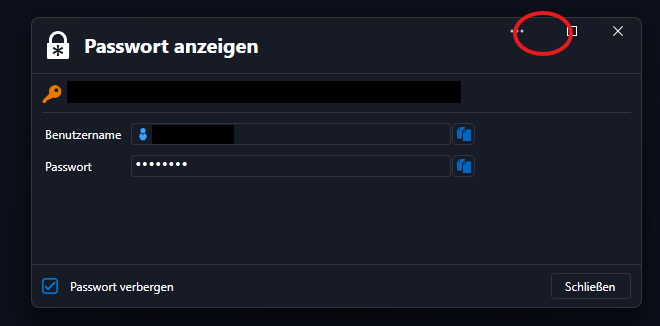 This was somehow comfortable it you have some of them opened and also a litte more secure than show them all on the desktop ...
What leads to the next finding: the 'show password' option in this window is valid for ALL same windows and FOREVER (even closed RDM and opened it again) until one manually change it back?!! This is surely no security improvement!
Can you please tell me, if these 'features' were meant this way? We'd really like to get back the former behaviour! ;)
Thank you!
Clemens
show password window.png
All Comments (1)
Hi Clemens,
Thank you for the report. You were right on both points, and both are fixed. The fix will be in the next minor update, 2026.3.
Minimize button
The View password window lost its minimize button when we redesigned it. That was not intended. The button is back in the fix.
“Show password” state
This comes from the Remember ‘Mask the password’ state setting. It is on by default, so the choice made in one View password window applies to every later window, even after restarting RDM. Older versions behaved the same way. We agree that showing passwords should not be the lasting default, so the setting will now be off by default:
- Every View password window will open with the password masked.
- Showing the password will only affect the window you are in.
- If you have never changed this setting, you don’t need to do anything. You will get the new behavior automatically after updating.
- If you prefer the old behavior, you can turn the setting back on.
Until the update is out
You can get the new behavior today in File – Settings – User interface. Under Security, uncheck Remember ‘Mask the password’ state.
Administrators who want to always mask passwords in this window can also use the DisableMaskPasswordInViewPassword policy.
Thanks again for taking the time to report this.
Best regards,
David Hervieux