is there a need to upgrade from 2022.2.33.0 to version 2023.3.24.0 first, then finally to 2023.3.25.0?
is there a need to upgrade from 2022.2.33.0 to version 2023.3.24.0 first, then finally to 2023.3.25.0?

Hi!
Last week I after the upgrade of our SQL database, I upgrade from 2022.2.33.0 to 2023.3.24.0 (suggested by the update option in RDM - although 2023.3.25.0 was already available). But the connection to the database failed, with the attached error message: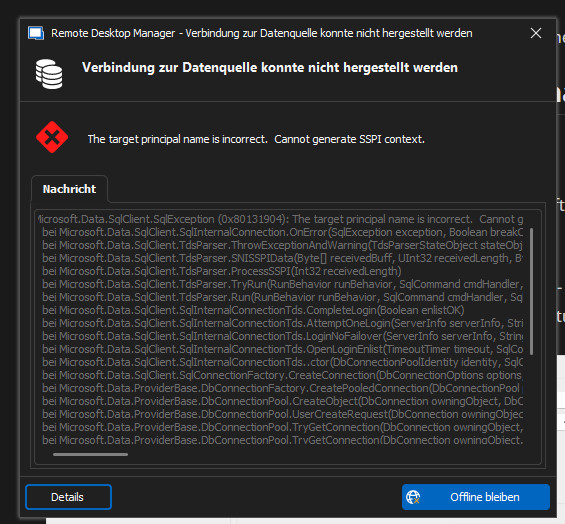
I hit search for updates again and installed 2023.3.25.0 - afterwards the connection to the database was succesful.
Today a colleague has a similar problem (after updating to .24.0), but as far as I got to know, without an error message and he the installed the complete 2023.3.25.0 package downloaded from your website. Even then I'm told he could not connect to the database ... With an older version (2023.3.22.0?) it works again ...
Is there any need to upgrade either with the updater from 2022.2.x.x to 2023.3.24.0 and then to .25.0 or is there a difference (or even possible) to install the 2023.3..25.0 package over the older version?
Thanks!
Best regards,
Clemens
2023-11-16_084426.jpg
All Comments (12)
Short answer, no.
Long answer, the error you are getting The target principal name is incorrect. Cannot generate SSPI context. is a connection issue. Nothing has changed in RDM with regards to the SQL authentication, in fact this code is controlled by Microsoft. In RDM we simply create the connection string and let the MS code take care of the rest.
Why are you even seeing this issue? I have no clue. Then it goes away when you upgrade/downgrade RDM, now this is even odder.
I honestly don't have an answer for you. I'm baffled.
Are you getting any other error messages other than this one?
Best regards,
Stéfane Lavergne
hi Stèfane,
thx for your quick reply! Ok, I thought, that this error message just concerns SQL ... I had no other message, I can ask my colleague tomorrow. Is there any logfile on the client, where maybe such error are collected?
Best regards,
Clemens
Yes, Help > Application Logs, you can click on the Report tab then click Send to Support, please add: Attn: Stefane - Form Topic 40670 to the subject or message if you can so that the error report gets routed back to me faster.
Best regards,
Stéfane Lavergne
Hi Stéfane,
today I got the same error message at the start of RDM, I went offline and tried it again after several minutes. Then I could enter der MFA and it worked again. In the logs (which I sent to you 2 minutes ago) I can't see anything about this ...
Best regards,
Clemens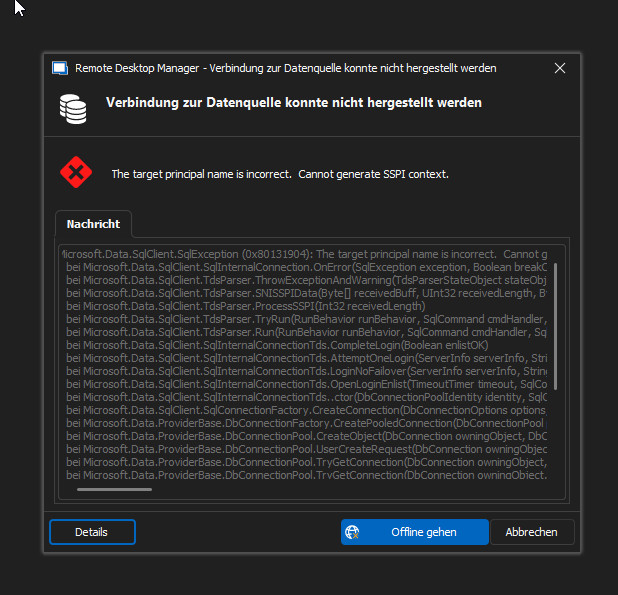
2023-11-21_081554.jpg
Hi Clemens,
Unfortunately there is nothing in the logs that is of much help.
Now, since your issue is intermittent this won't apply: Fix the error with Kerberos Configuration Manager (Recommended)
I would suggest the following:
- Once you get the error with RDM
- Connect via SSMS (SQL Server Management Studio)
- Do you get the same error?
- Try again until it connects with SSMS and/or RDM.
- Once connected run the following in SSMS
SELECT net_transport, auth_scheme
FROM sys.dm_exec_connections
WHERE session_id = @@SPID;
This will output
net_transport : Describes the physical transport protocol that is used by this connection.
auth_scheme : Specifies SQL Server/Windows Authentication scheme used with this connection.
There are many posts/threads available online that talk about trouble shouting tips and possible solutions.
Example of a few I've found. Note: I have not tested any of the suggestions since I can't reproduce the issue please follow with caution.
https://dba.stackexchange.com/questions/93389/error-cannot-generate-sspi-context
https://www.reddit.com/r/SQLServer/comments/1ee9tw/cannot_generate_sspi_contex/
Stéfane Lavergne
ok, I'll give it a try, next time I get the error! thank you!
FYI: We are having the same issue , but if I create a SQL Login (vs Integrated Security) and use that login, it works. Its a work around, but at least we can get in...
@jbrannick
Are you able to connect with Integrated Security to your database/server using SSMS (SQL Server Management Studio)?
Stéfane Lavergne
1) Local Machine - SSMS w/Integrated Security - NO
2) Local Machine - SSMS w/SQL Login - YES
3) RDP'd to SQL Server VM - SSMS w/Integrated Security - YES
4) RDP'd to SQL Server VM - SSMS w/SQLLogin - YES
Connect to RDM - RDP'd to SQL Server VM - w/Integrated Security - NO
Connect to RDM - Local Machine - w/Integrated Security - NO
Connect to RDM - RDP'd to SQL Server VM - w/SQLLogin - YES
Connect to RDM - Local Machine - w/SQLLogin - YES
1) Local Machine - SSMS w/Integrated Security - NO
2) Local Machine - SSMS w/SQL Login - YES
3) RDP'd to SQL Server VM - SSMS w/Integrated Security - YES
4) RDP'd to SQL Server VM - SSMS w/SQLLogin - YES
Given this, RDM should work when SSMS works and not when... well you get the point.
It’s not necessarily an RDM issue but more of a configuration issue.
For example, is the local machine AD-joined? If you start SSMS with runas /netonly /user:domain\username ssms.exe, does that make it work?
Stéfane Lavergne
1) Local Machine - SSMS w/Integrated Security - NO
2) Local Machine - SSMS w/SQL Login - YES
3) RDP'd to SQL Server VM - SSMS w/Integrated Security - YES
4) RDP'd to SQL Server VM - SSMS w/SQLLogin - YES
Given this, RDM should work when SSMS works and not when... well you get the point.
It’s not necessarily an RDM issue but more of a configuration issue.
For example, is the local machine AD-joined? If you start SSMS with runas /netonly /user:domain\username ssms.exe, does that make it work?
When you say "configuration issue" ,,,is that SQL Config or AD Config or VM Config?..and any guidance on where to look?
TYVM!
It all depends. Are you getting the Cannot generate SSPI context error? If so, I would start here:
https://learn.microsoft.com/en-us/troubleshoot/sql/database-engine/connect/cannot-generate-sspi-context-error
If not, please post the exact message so that we can better assist you.
Stéfane Lavergne