MFA improvements
0 vote

Hello Richard,
thanks for the explanation!
Please consider excluding a single user from MFA also without Devolutions Server. This would make life of an admin easier without the possibility to lock yourself out...
Also it would be good to see in the User and Security Management which user already has MFA enabled. Adding a column would be nice.
Brgds Andreas
All Comments (19)
Hello,
Please note I have moved your reply to the Feature request section of the forum, which allows our community to submit/share ideas with our development team, service desk, and management team. It’s also an opportunity for our community to demonstrate an interest in your idea. We use this interest to prioritize the features we implement.
Best regards,
Richard Boisvert
Hello Richard,
Thanks a lot! :)
Brgds Andreas
Hello Andreas,
For the part about seeing which users have MFA configured by showing a column in the user management window, we have received this request recently (link here). I will note your interest for this as well.
For the other part of your request, I have opened a ticket.
Regards,
Hubert Mireault
Hello Hubert,
Thanks a lot!
Brgds Andreas
Hello Hubert,
I have another idea about Database MFA...
At the moment, the MFA is only triggered once at application start when connecting to the database. Would it be possible to add an option to re-trigger Database MFA?
But please not only for the usual things, I would like to have a "timed option". Means after x hours/minutes of inactivity the Database MFA should trigger again.
Means if I lock my PC for lunch and unlock it after 30 Minutes, I must not enter the MFA again, but when I leave the PC on over night and unlock it after 12 hours, I must enter the MFA again.
Brgds Andreas
Hello Andreas,
In the system settings, there are options you can configure to disconnect the datasource under certain circumstances, which would be the way to be prompted for your MFA again.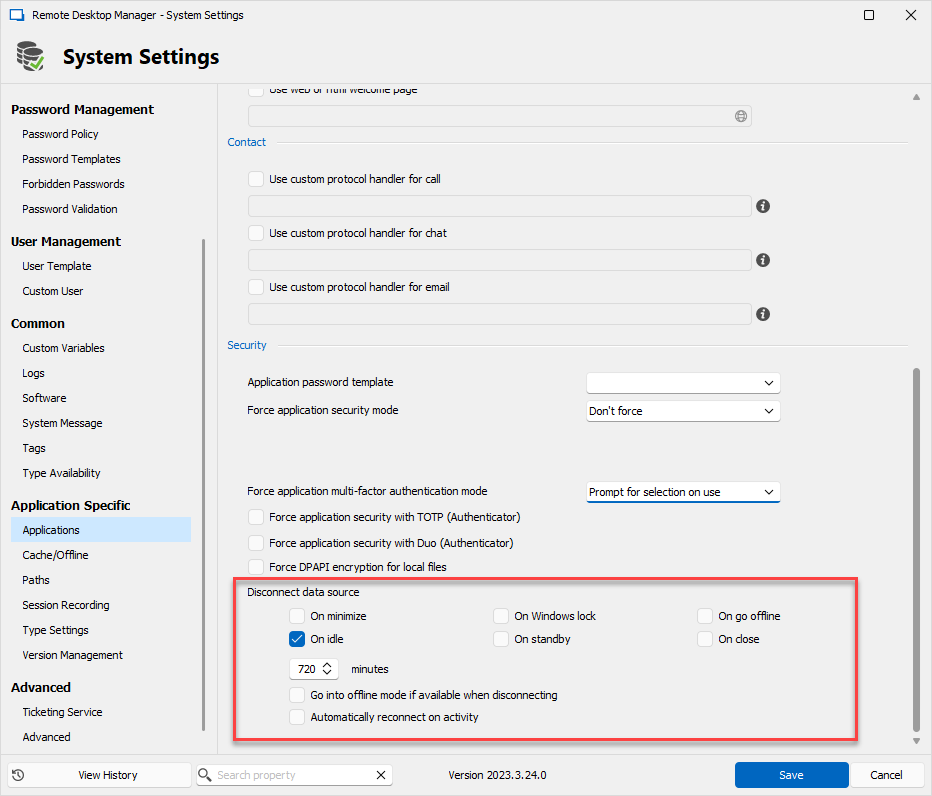
In your case you could try setting the "On idle" option which is when there have been no interaction with the computer for a certain amount of time.
Regards,
Hubert Mireault
687cf153-5e78-416d-904f-3ee2192913a5.png
Hello Hubert,
Oh - I saw those settings in the Application Specific section, but did not realize that they also work for Database MFA...
Yes, that sounds exactly like what I want! :) How is the idle time calculated? Do you take the idle time of the computer, or the RDM application?
When I want to test it manually - is this also something I can set only on my client?
If I can only activate it globally - how does it affect clients not using Database MFA? when will a reconnect be done?
When I set it like you showed above - does this make sense? Wouldn´t it be better to set it like this: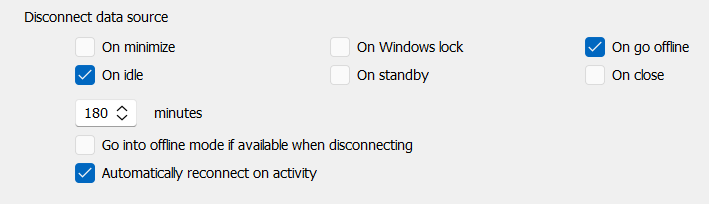
Disconnect after 180 minutes
Disconnect on go offline - why is there a setting for it? How can I go offline without a disconnect?!?
Reconnect on activity - the only question: which activity? General activity on the computer, or that I clicked on the RDM application?
Sorry for all those questions - but I want to understand what I do... ;)
Brgds Andreas
58a2df48-0076-47fb-9c4d-e87191ea90f1.png
I'll go in order for your questions:
> How is the idle time calculated? Do you take the idle time of the computer, or the RDM application?
We use the GetLastInputInfo windows function (https://learn.microsoft.com/en-us/windows/win32/api/winuser/nf-winuser-getlastinputinfo), which means we're looking at the idle time on the computer, not on RDM itself. The moment you perform a keyboard or mouse input, it should reset the timer.
> When I want to test it manually - is this also something I can set only on my client?
It's not possible to use these settings only for certain machines/users, they will apply to every user connecting to this datasource. If you would like to try a similar feature just to see if the "idle" setting could work for example, you could look into the similar options in File > Options > Security: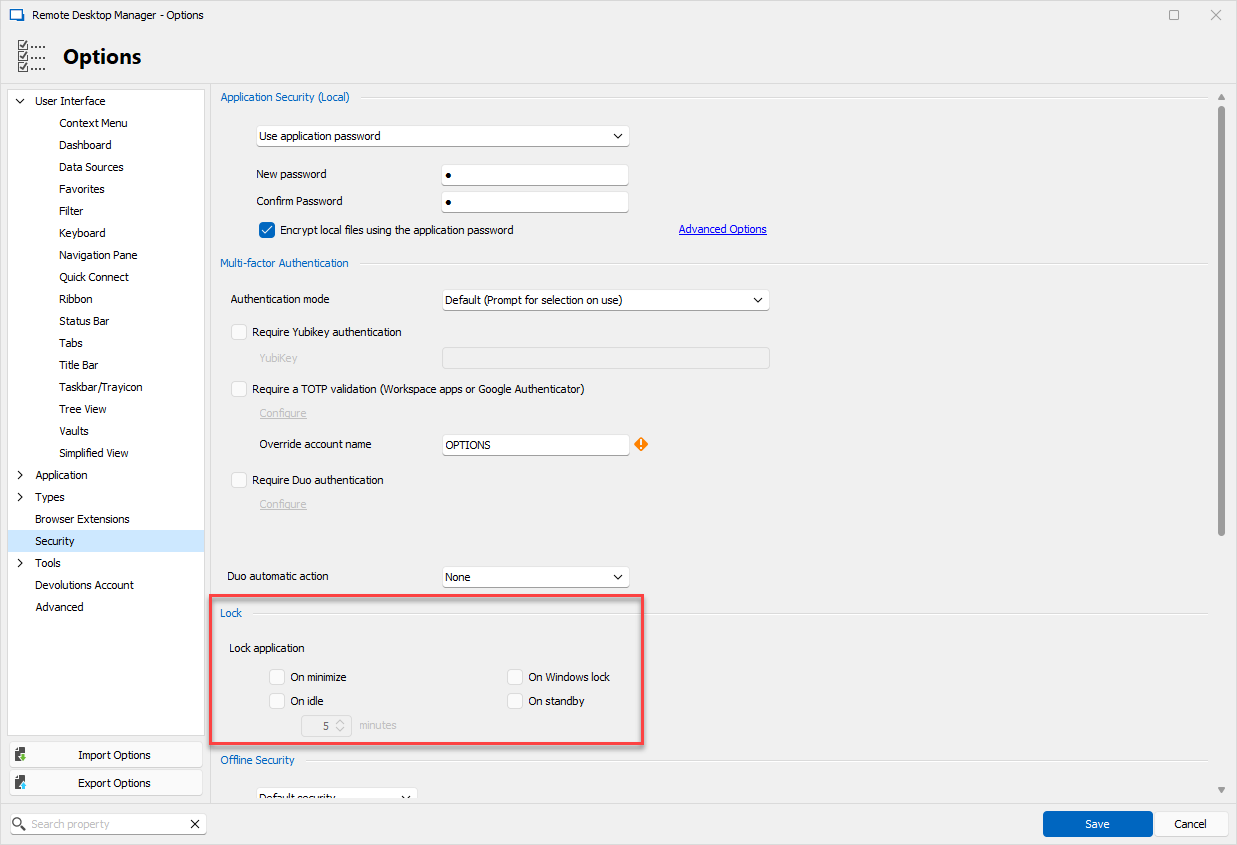
These settings are used for the section above where you can configure an application password or a 2FA for the RDM lock. These are different from the system setting I'm suggesting you use, as they will apply for the "lock" feature (they will not disconnect the datasource), and they only apply to your machine.
> If I can only activate it globally - how does it affect clients not using Database MFA? when will a reconnect be done?
The reconnect will be done in the same way for your users, no matter if they have an MFA or not. They should come back to their datasource being in "not connected" mode, and if they perform a refresh, it should reconnect them. A user with an MFA will need to enter it as it's required, but one without will simply reconnect without any input required.
> Disconnect on go offline - why is there a setting for it? How can I go offline without a disconnect?!?
The "disconnect" in this case is useful to make sure RDM clears all login information when a certain trigger is met. It's possible to go offline without disconnecting, for example you can click the "go offline" button located in the File menu, which will enter the offline mode without necessarily having lost connection to the database. When you come back online, it will not ask for the MFA since it wasn't actually disconnected and the tokens invalidated.
> Reconnect on activity - the only question: which activity? General activity on the computer, or that I clicked on the RDM application?
I looked at the code and it will reconnect under the following circumstances:
- If you maximize or restore RDM
- If disconnected by the "on standby" option, when your computer comes back from sleep or hibernation
- If disconnected by the "on Windows lock" option, when you unlock your computer
I hope this answers your questions, let me know if I missed something or if I was unclear.
Regards,
Hubert Mireault
6b01fb1e-4044-46dc-8776-17864d84efae.png
Hello Hubert,
thanks a lot for your great explanation and help!
Brgds Andreas
Hello,
Letting you know that a column "Has MFA Configured" has been added to the user management window for SQL Server and will be available in our next minor update.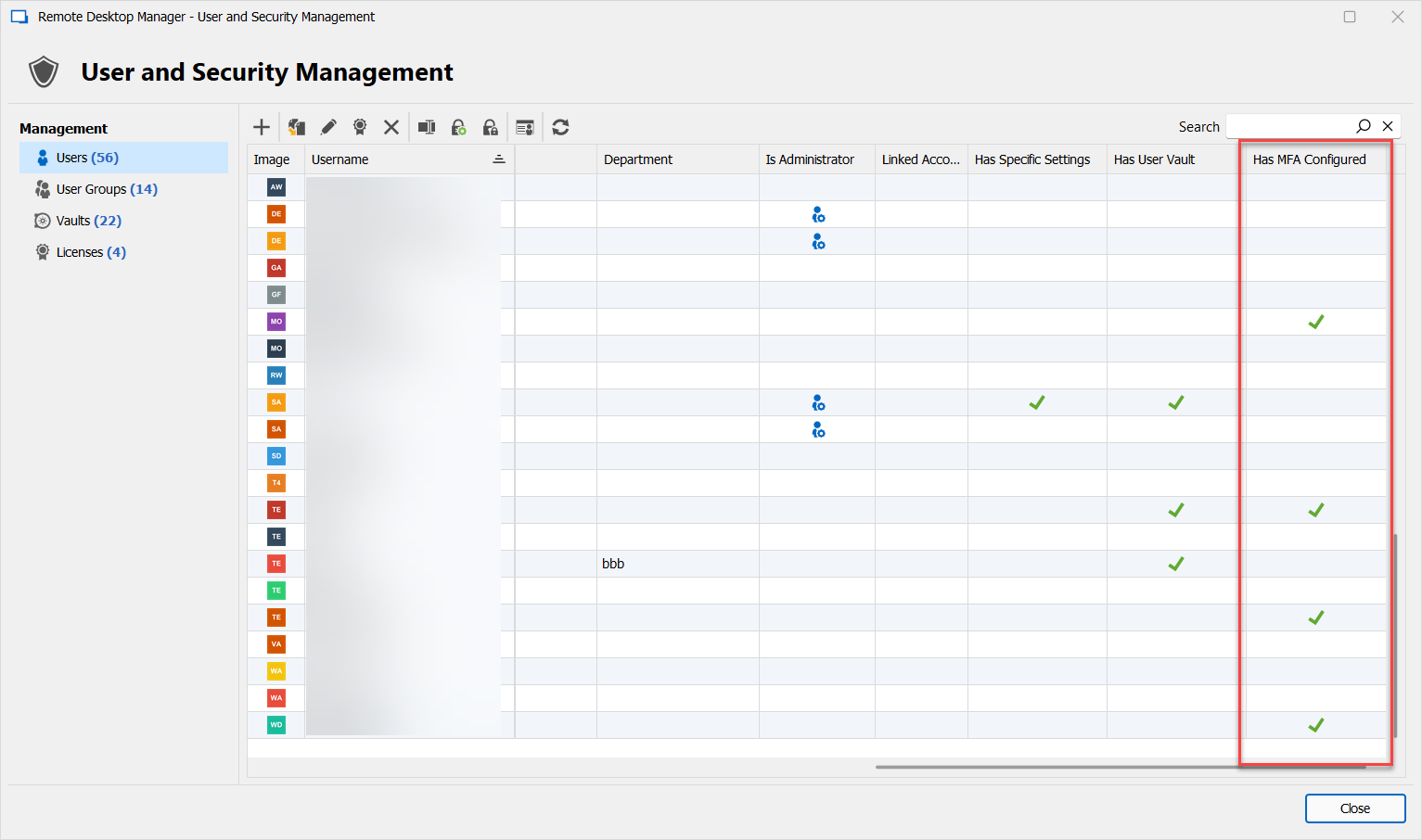
For your other requests about excluding users from the forced MFA feature, the ticket is still opened.
Regards,
Hubert Mireault
4dba32f9-3e13-4570-9fad-44c69f25343f.png
Hello Hubert,
Perfect! Thanks a lot for your quick help! :)
Brgds Andreas
Hi!
We're just be doing MFA activation in our enterprise. One thing the I found out today morning was, that I could'nt connect to the database (this happens sometimes, I don't know why) and RDM suggested starting offline mode. As I did, no MFA was required, only later as I switched to online mode. My colleague told me, that he observe this for a longer time and the behavior as different in different versions of RDM ... I have to mention, that he only changed the settings on the user side (for each user separatly) yet, to solve several problems (like older versions, missing certificates, support at installing/updating/configuration and so on) one by one.
I hope the standard behavior at changing the online/offline state is a re-authentication with the MFA?
Thank you!
Clemens
Hello Clemens,
If you go in the System Settings, in the Cache/Offline tab, you can check the "Prompt for MFA before going offline" option. This will apply to all users connecting to this database.
Please note that if your MFA requires internet access and your machine doesn't have access to the internet, RDM will not be able to let you connect due to failing the MFA validation.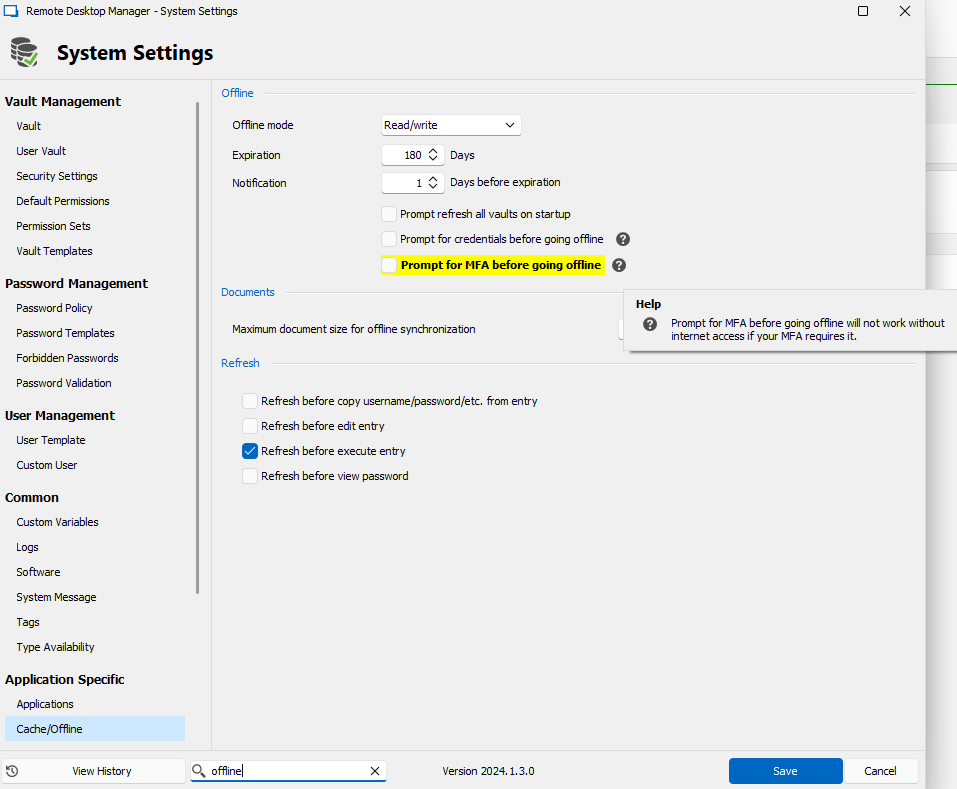
Regards,
Hubert Mireault
3afe44cd-5197-4c0e-b223-8531e4b75fc4.png
Hello Hubert,
thank you for the quick answer! We'll try this out, when we change the option on MFA requirement for the database.
Best regards,
Clemens
Hello Hubert,
I just got an issue with MFA reported by another colleague: he is working with RDM on his Mac (MacOS 14.3.0 and latest RDM version 2023.3.13.4). When he mistypes the authentication code, he gets the error that he has entered a wrong code and after confirmation the authentication window isn't there any more. An empty RDM is shown and when he hits refresh the connection to the database is established (WITHOUT another demand for an authentication code) and all entries are shown! I think this could be a bug?! ;)
Another question that just came up: is there a counter for failed authentication attempts and a lockout for a special amount of time or something?
And one more question concerning tokens: is there any chance to use these tokens to authenticate in RDM: https://www.token2.com/shop/product/token2-c202-hardware-token ?
Thank you!
Best regards,
Clemens
Hello,
For the MFA issue, I will notify the Mac team. As you say, it sounds like a bug and not the expected behavior.
> Another question that just came up: is there a counter for failed authentication attempts and a lockout for a special amount of time or something?
If you are using Devolutions Server, there is, and I believe it's customizable. If you are using Devolutions Hub, there is as well, though the limit is more generous and not customizable. In both cases, if you are using SSO to login with DVLS or Hub, the SSO provider is in charge of these restrictions so it can be configured on that end. For our other datasources like SQL Server, this is not possible.
> And one more question concerning tokens: is there any chance to use these tokens to authenticate in RDM: https://www.token2.com/shop/product/token2-c202-hardware-token ?
From what I understand, these tokens use TOTP, so they should already be supported. What datasource type are you using?
Regards,
Hubert Mireault
Hi!
Thanks for the Mac issue!
For the next two topics: we use SQL Server as datasource ...
Best regards,
Clemens
Hello,
Since you're using SQL Server, it won't be possible to have login restrictions implemented for failed attempts.
For the hardware token, it's my mistake. I thought we already had a way to customize the secret key, but this is a currently unimplemented feature request: https://forum.devolutions.net/topics/41154/database-mfa-with-fixed-seedsecuritykey-with-totp#187061
I will raise the priority for this request. As long as you're able to get the secret key from the token to store in RDM, it will be possible to use them as the 2FA when logging in.
Regards,
Hubert Mireault
Hi Hubert,
sorry for the delay! Thanks for the info and the hint to the other post with the feature request! And especially the raise of the priority for that request! :)
Best regards,
Clemens