
soheil
How define specific job ro run as another user
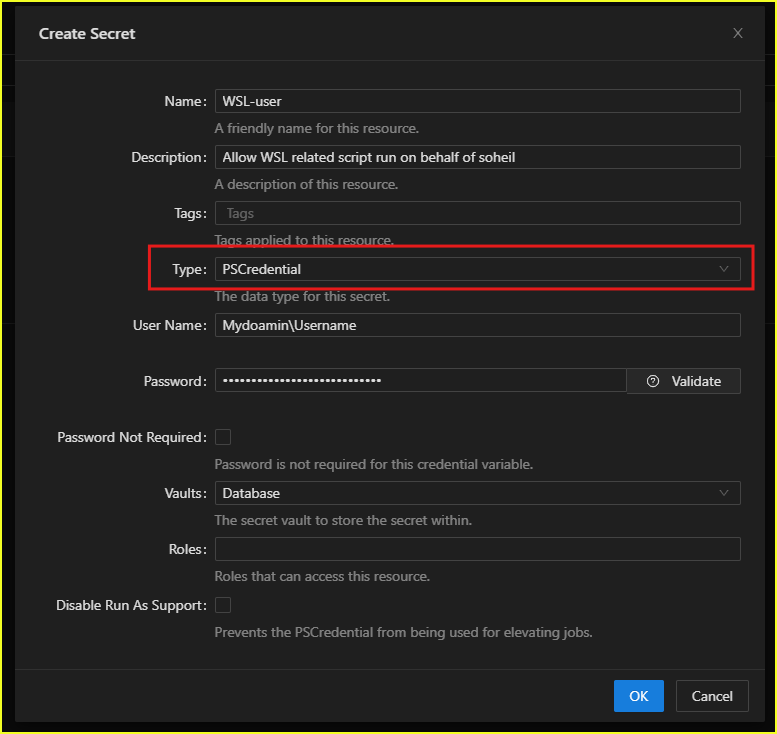
Thanks for your reply. I believe you’re referring to using the secret option in the variable section. Here are the menu and key points.
How define specific job ro run as another user
Product: PowerShell Universal
Version: 5.6.9
Hi guys, I want to run a specific job that includes code to execute on WSL, but I found out that by default it runs under the local service account. How can I change my scheduled job to run as an administrator?
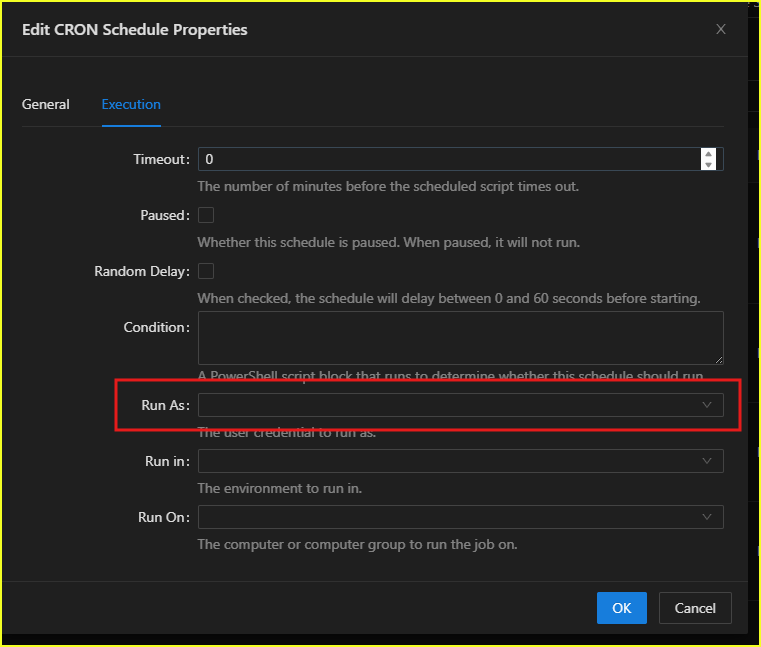
I couldn’t figure out where to define a new user for the “Run as” option.
Devolution server install failed
Hello,
Indeed, thank you for the additional information!
It looks like the issue is related to IIS. Could you please try to remove the entire IIS feature and install it again?
Regards,
Min
@Min Destens
thanks, by cleaning OS i could install the Devolution server successfully.
Devolution server install failed
think IIS is now capable of properly hosting ASP.NET Core apps. However, Devolutions Server (DVLS) still shows the same web.config error (0x8007000D), so the issue must be related to the web.config file rather than missing modules.
PS C:\Users\so.amiri> Get-ChildItem "C:\Program Files\IIS\Asp.Net Core Module\V2\"
Directory: C:\Program Files\IIS\Asp.Net Core Module\V2
Mode LastWriteTime Length Name
---- ------------- ------ ----
d---- 10/17/2025 1:47 PM 19.0.25269
-a--- 9/26/2025 2:50 AM 413752 aspnetcorev2.dll
PS C:\Users\so.amiri> dotnet.exe --list-runtimes
Microsoft.AspNetCore.App 8.0.21 [C:\Program Files\dotnet\shared\Microsoft.AspNetCore.App]
Microsoft.AspNetCore.App 9.0.10 [C:\Program Files\dotnet\shared\Microsoft.AspNetCore.App]
Microsoft.NETCore.App 9.0.9 [C:\Program Files\dotnet\shared\Microsoft.NETCore.App]
Microsoft.NETCore.App 9.0.10 [C:\Program Files\dotnet\shared\Microsoft.NETCore.App]
Microsoft.WindowsDesktop.App 9.0.9 [C:\Program Files\dotnet\shared\Microsoft.WindowsDesktop.App]
Devolution server install failed
i am reviewing DSP.console.log file. i found this information
C:\inetpub\wwwroot\dvls] System.Runtime.InteropServices.COMException (0x8007000D): Filename: \\?\C:\inetpub\wwwroot\dvls\web.config
Error: at Microsoft.Web.Administration.Interop.IAppHostAdminManager.GetAdminSection(String bstrSectionName, String bstrPath)
at Microsoft.Web.Administration.Configuration.GetSectionInternal(ConfigurationSection section, String sectionPath, String locationPath)
at Microsoft.Web.Administration.Configuration.GetSection(String sectionPath)
at DPS.Console.Common.Business.Helper.IIS.IISHelper.IsDelegationAllowed(String section, Configuration configuration)
at DPS.Console.Common.Business.Helper.IIS.IISHelper.IsDelegationAllowed(String siteName, String applicationPath, String section)
at DPS.Console.Common.Business.Helper.IIS.IISHelper.IsHandlersDelegationAllowed(String siteName, String applicationPath)
at DPS.Console.Common.Business.Action.Server.Steps.ConfigureFeatureDelegation.Run()
at DPS.Console.Common.Business.Action.BaseTaskChainStep.Execute()
Devolution server install failed
Hello @Min Destens,
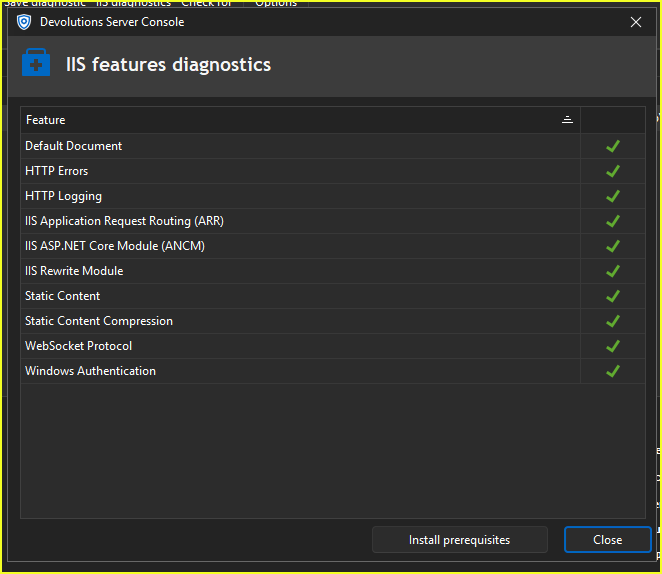
i installed ASP.NET module, and IIS Features diagnostic is green. but i still get same error
Devolution server install failed
Hi,
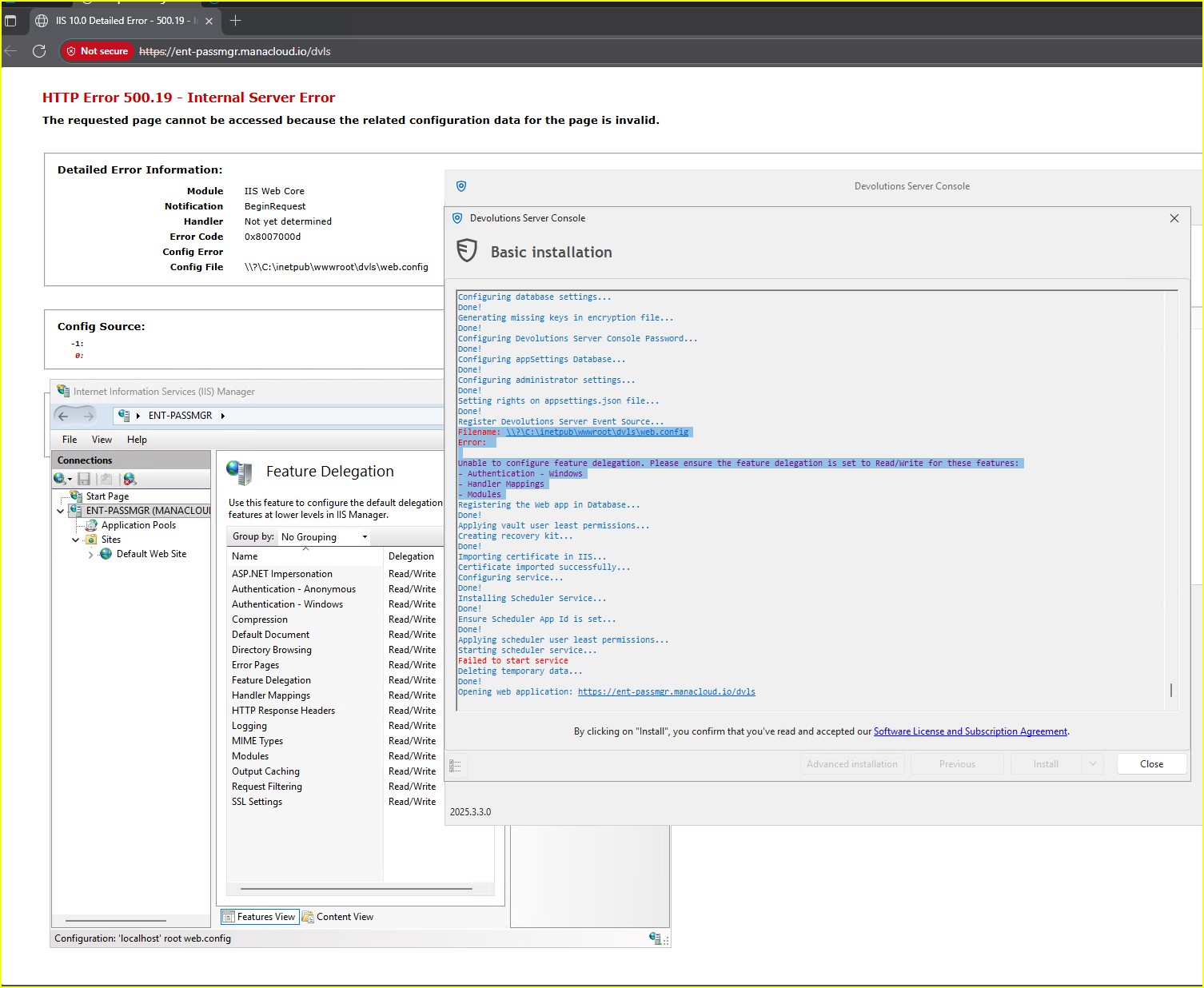
I encounter this error on every installation attempt, and configuring Feature Delegation does not resolve the issue:
Filename: \\?\C:\inetpub\wwwroot\dvls\web.config
Error:
Unable to configure feature delegation. Please ensure the feature delegation is set to Read/Write for these features:
- Authentication - Windows
- Handler Mappings
- Modules
having problem to retrive my password
thank I'm feeling alive again. Thanks for the advice—my problem is finally solved.
having problem to retrive my password
Hello @William Alphonso
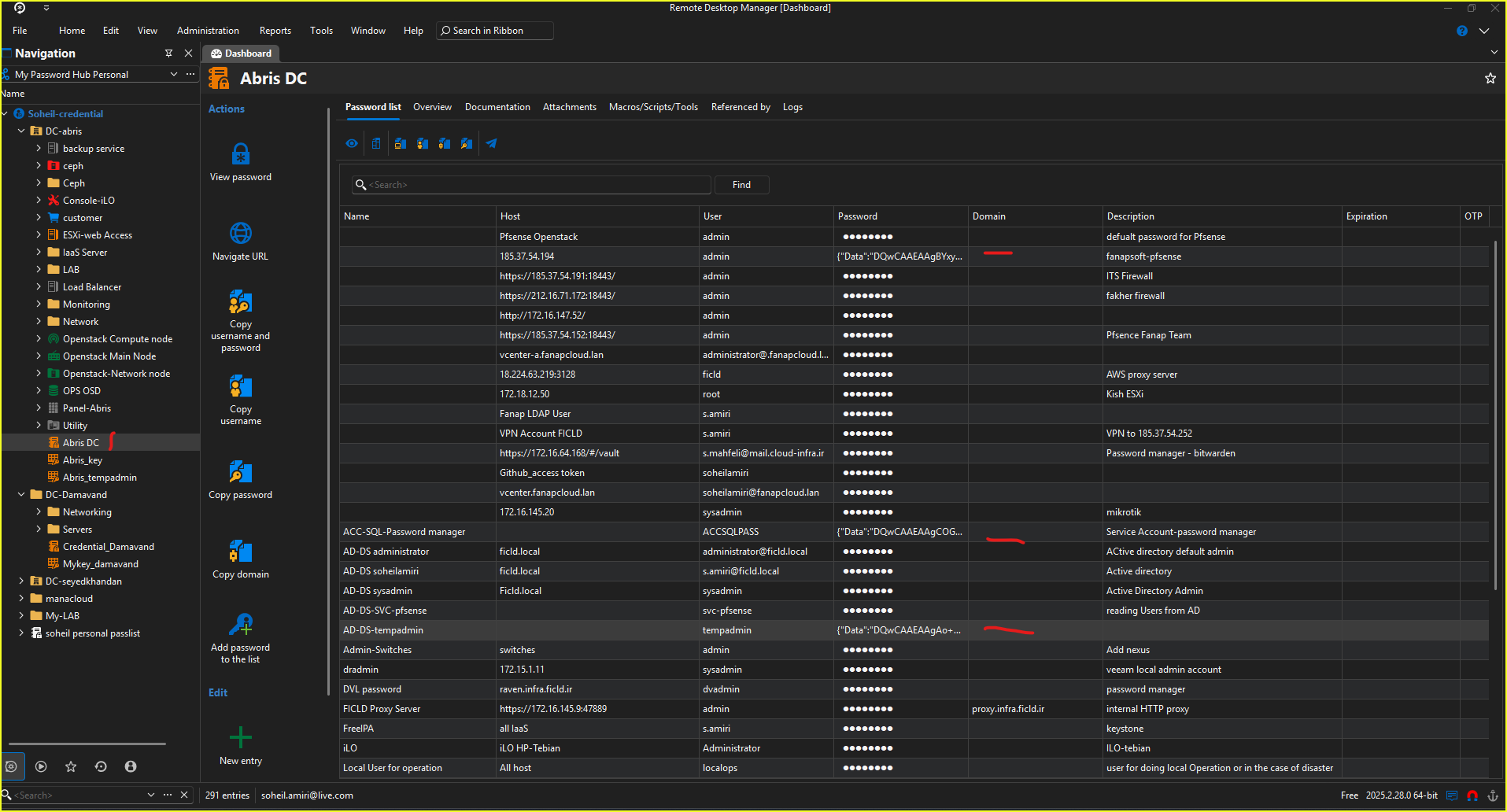
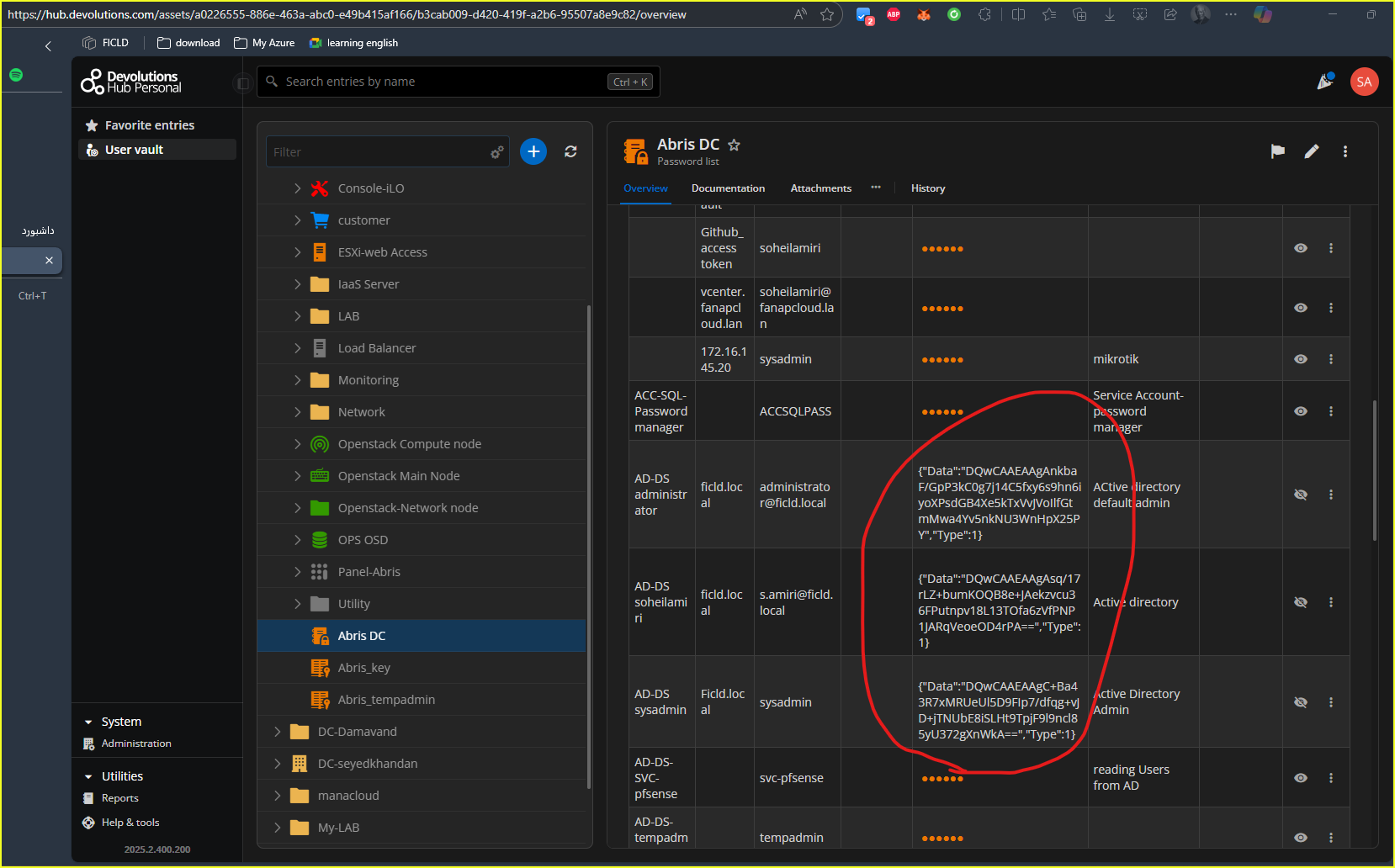
This issue is occurring with my specific password list. All passwords in this list have encountered a problem, while several other password lists are working fine. I receive a notification whenever I try to access any item in the "Abris DC" password list. This issue has appeared on both the app and the portal.
NativeError :
InvalidMac
===Original Message===
Exception of type 'Devolutions.Cryptography.DevolutionsCryptoException' was thrown.
===Original StackTrace===
at Devolutions.Cryptography.Utils.HandleError(Int64 errorCode)
at Devolutions.Cryptography.Managed.Decrypt(Byte[] data, Byte[] key, Byte[] aad, ILegacyDecryptor legacyDecryptor)
at Devolutions.Cryptography.Managed.DecryptWithKeyAsUtf8String(String b64data, Byte[] key, Byte[] aad, ILegacyDecryptor legacyDecryptor)
at Devolutions.RemoteDesktopManager.Managers.DevolutionsHubDataSourceManager.ResolvePassword(Guid dataSourceID, String password)
at Devolutions.RemoteDesktopManager.Business.DataSources.HubConnectionDataSource.ResolvePassword(String password)
having problem to retrive my password
I can't retrieve my saved passwords from RDM or even the personal hub, as all my passwords are encrypted or not
get error after upgrading to 2025.2.20
hello
i want to inform you that issue has been resolved. thanks for your assistance

get error after upgrading to 2025.2.20
Hello Soheil,
That was a mistake on my end. The screenshot I have shown you is only what it will look like in the next major version of RDM (2025.3.x.x). The version you have access to will instead be in Terminal -> Advanced.

Also we would like to know if you use any syntax highlighting in your SSH entries.

Once we have this information as well as the information you have provided us earlier, it should be easier for our terminal expert to fix this issue once he is back from vacation next week.
Best Regards,
@Michael Beaudin
hello
thanks for you help. here is SFTP information

and this is display blade information

if you are looking for syntaxes highlights configuration, YES i change default profile configuration and it apply to all of my sessions.

get error after upgrading to 2025.2.20
Hello,
We cannot reproduce this issue as of now. One thing we would like to know is if you are using either the "Automatically open the file transfer tab" option in your SSH entry's properties or the SFTP toggle button in the opened entry?


If you are, could you try without that option and see if the error still happens?
Another thing we would like to know is if you have any syntax highlighting configured on your entry.
Best Regards,
@Michael Beaudin
Hello @Michael Beaudin
unfortunately i couldn't find SFTP blade

get error after upgrading to 2025.2.20
Hello,
Thank you for contacting Devolutions support.
Could you please confirm the type of authentication you’re using with your SSH entries? Additionally, is this issue occurring with all entries, or only a specific subset?
To help us investigate further, please send us verbose2 logs. You can follow the steps outlined in the following documentation article to retrieve them:
https://docs.devolutions.net/rdm/kb/how-to-articles/send-ssh-logs-verbose/
Best regards,
@Jacob Lafrenière
hello @Jacob Lafrenière
This issue started occurring after I upgraded to version 2025.2, and it affects all my SSH connections when the remote hosts are Windows, not Linux or any other OS. I am using a username and password for authentication.
and here is verbos2 logs
[7/17/2025 7:46:05 PM] Devolutions.ProtocolsSharp: 2025.7.1.1 OS: Windows

[7/17/2025 7:46:05 PM] Terminal font: Consolas [Consolas, fixed=True]

[7/17/2025 7:46:05 PM] Starting SSH, verbose level: 2

[7/17/2025 7:46:05 PM] Setting up connection

[7/17/2025 7:46:05 PM] Connecting to: 172.16.144.2:22 (IPV_ANY)

[7/17/2025 7:46:05 PM] SSH version banner: SSH-2.0-OpenSSH_for_Windows_9.5

[7/17/2025 7:46:05 PM] Sending kex init

[7/17/2025 7:46:05 PM] Received kex init

[7/17/2025 7:46:05 PM] Selected algorithms: curve25519-sha256(strict), ssh-ed25519, chacha20-poly1305@openssh.com, chacha20-poly1305@openssh.com, implicit by cipher, implicit by cipher, none, none

[7/17/2025 7:46:05 PM] Sending Ed25519 kex init

[7/17/2025 7:46:05 PM] Received Ed25519 kex reply

[7/17/2025 7:46:05 PM] Successfully authentified server

[7/17/2025 7:46:05 PM] Sending new keys message

[7/17/2025 7:46:05 PM] Received new keys message

[7/17/2025 7:46:05 PM] Sending userauth service request

[7/17/2025 7:46:05 PM] Received extension info message

[7/17/2025 7:46:05 PM] Server accepts public key types: ssh-ed25519,sk-ssh-ed25519@openssh.com,ecdsa-sha2-nistp256,ecdsa-sha2-nistp384,ecdsa-sha2-nistp521,sk-ecdsa-sha2-nistp256@openssh.com,webauthn-sk-ecdsa-sha2-nistp256@openssh.com,ssh-dss,ssh-rsa,rsa-sha2-256,rsa-sha2-512

[7/17/2025 7:46:06 PM] Received service accepted message

[7/17/2025 7:46:06 PM] Sending userauth init request

[7/17/2025 7:46:06 PM] Received userauth failure: publickey,password,keyboard-interactive

[7/17/2025 7:46:06 PM] Starting interactive authentication

[7/17/2025 7:46:06 PM] Sending userauth interactive request

[7/17/2025 7:46:06 PM] Received userauth failure: publickey,password,keyboard-interactive

[7/17/2025 7:46:06 PM] Starting password authentication

[7/17/2025 7:46:06 PM] Sending userauth password request

[7/17/2025 7:46:06 PM] Received userauth success

[7/17/2025 7:46:06 PM] User authenticated successfuly by password

[7/17/2025 7:46:06 PM] Sending session channel open request: 0|-

[7/17/2025 7:46:06 PM] Received global request: hostkeys-00@openssh.com, no need to reply

[7/17/2025 7:46:06 PM] Received channel open confirmation: 0|0 WS 200000|0 MPS 32000|32768

[7/17/2025 7:46:06 PM] Sending pty request: 0|0 xterm-256color, 198x42

[7/17/2025 7:46:06 PM] Received channel success: 0|0

[7/17/2025 7:46:06 PM] Sending environment variable request: LANG=en_US.UTF-8 0|0

[7/17/2025 7:46:07 PM] Received channel failure: 0|0

[7/17/2025 7:46:07 PM] The server did not accept the environment variable

[7/17/2025 7:46:07 PM] Sending shell request: 0|0

[7/17/2025 7:46:07 PM] Received channel success: 0|0

[7/17/2025 7:48:26 PM] Devolutions.ProtocolsSharp: 2025.7.1.1 OS: Windows

[7/17/2025 7:48:26 PM] Terminal font: Consolas [Consolas, fixed=True]

[7/17/2025 7:48:26 PM] Starting SSH, verbose level: 2

[7/17/2025 7:48:26 PM] Setting up connection

[7/17/2025 7:48:26 PM] Connecting to: 172.16.144.2:22 (IPV_ANY)

[7/17/2025 7:48:26 PM] SSH version banner: SSH-2.0-OpenSSH_for_Windows_9.5

[7/17/2025 7:48:26 PM] Sending kex init

[7/17/2025 7:48:26 PM] Received kex init

[7/17/2025 7:48:26 PM] Selected algorithms: curve25519-sha256(strict), ssh-ed25519, chacha20-poly1305@openssh.com, chacha20-poly1305@openssh.com, implicit by cipher, implicit by cipher, none, none

[7/17/2025 7:48:26 PM] Sending Ed25519 kex init

[7/17/2025 7:48:27 PM] Received Ed25519 kex reply

[7/17/2025 7:48:27 PM] Successfully authentified server

[7/17/2025 7:48:27 PM] Sending new keys message

[7/17/2025 7:48:27 PM] Received new keys message

[7/17/2025 7:48:27 PM] Sending userauth service request

[7/17/2025 7:48:27 PM] Received extension info message

[7/17/2025 7:48:27 PM] Server accepts public key types: ssh-ed25519,sk-ssh-ed25519@openssh.com,ecdsa-sha2-nistp256,ecdsa-sha2-nistp384,ecdsa-sha2-nistp521,sk-ecdsa-sha2-nistp256@openssh.com,webauthn-sk-ecdsa-sha2-nistp256@openssh.com,ssh-dss,ssh-rsa,rsa-sha2-256,rsa-sha2-512

[7/17/2025 7:48:27 PM] Received service accepted message

[7/17/2025 7:48:27 PM] Sending userauth init request

[7/17/2025 7:48:27 PM] Received userauth failure: publickey,password,keyboard-interactive

[7/17/2025 7:48:27 PM] Starting interactive authentication

[7/17/2025 7:48:27 PM] Sending userauth interactive request

[7/17/2025 7:48:27 PM] Received userauth failure: publickey,password,keyboard-interactive

[7/17/2025 7:48:27 PM] Starting password authentication

[7/17/2025 7:48:27 PM] Sending userauth password request

[7/17/2025 7:48:27 PM] Received userauth failure: publickey,password,keyboard-interactive

[7/17/2025 7:48:27 PM] No authentication method available

[7/17/2025 7:48:27 PM] Bytes sent: 1496, Bytes received: 1820

[7/17/2025 7:48:27 PM] Packets sent: 7, Packets received: 8

[7/17/2025 7:48:27 PM] Kex completed: 1

[7/17/2025 7:49:34 PM] Devolutions.ProtocolsSharp: 2025.7.1.1 OS: Windows

[7/17/2025 7:49:34 PM] Terminal font: Consolas [Consolas, fixed=True]

[7/17/2025 7:49:34 PM] Starting SSH, verbose level: 2

[7/17/2025 7:49:34 PM] Setting up connection

[7/17/2025 7:49:34 PM] Connecting to: 172.16.144.2:22 (IPV_ANY)

[7/17/2025 7:49:34 PM] SSH version banner: SSH-2.0-OpenSSH_for_Windows_9.5

[7/17/2025 7:49:34 PM] Sending kex init

[7/17/2025 7:49:34 PM] Received kex init

[7/17/2025 7:49:34 PM] Selected algorithms: curve25519-sha256(strict), ssh-ed25519, chacha20-poly1305@openssh.com, chacha20-poly1305@openssh.com, implicit by cipher, implicit by cipher, none, none

[7/17/2025 7:49:34 PM] Sending Ed25519 kex init

[7/17/2025 7:49:34 PM] Received Ed25519 kex reply

[7/17/2025 7:49:34 PM] Successfully authentified server

[7/17/2025 7:49:34 PM] Sending new keys message

[7/17/2025 7:49:34 PM] Received new keys message

[7/17/2025 7:49:34 PM] Sending userauth service request

[7/17/2025 7:49:34 PM] Received extension info message

[7/17/2025 7:49:34 PM] Server accepts public key types: ssh-ed25519,sk-ssh-ed25519@openssh.com,ecdsa-sha2-nistp256,ecdsa-sha2-nistp384,ecdsa-sha2-nistp521,sk-ecdsa-sha2-nistp256@openssh.com,webauthn-sk-ecdsa-sha2-nistp256@openssh.com,ssh-dss,ssh-rsa,rsa-sha2-256,rsa-sha2-512

[7/17/2025 7:49:35 PM] Received service accepted message

[7/17/2025 7:49:35 PM] Sending userauth init request

[7/17/2025 7:49:35 PM] Received userauth failure: publickey,password,keyboard-interactive

[7/17/2025 7:49:35 PM] Starting interactive authentication

[7/17/2025 7:49:35 PM] Sending userauth interactive request

[7/17/2025 7:49:35 PM] Received userauth failure: publickey,password,keyboard-interactive

[7/17/2025 7:49:35 PM] Starting password authentication

[7/17/2025 7:49:35 PM] Sending userauth password request

[7/17/2025 7:49:35 PM] Received userauth failure: publickey,password,keyboard-interactive

[7/17/2025 7:49:35 PM] No authentication method available

[7/17/2025 7:49:35 PM] Bytes sent: 1496, Bytes received: 1820

[7/17/2025 7:49:35 PM] Packets sent: 7, Packets received: 8

[7/17/2025 7:49:35 PM] Kex completed: 1

[7/17/2025 7:52:34 PM] Devolutions.ProtocolsSharp: 2025.7.1.1 OS: Windows

[7/17/2025 7:52:34 PM] Terminal font: Consolas [Consolas, fixed=True]

[7/17/2025 7:52:34 PM] Starting SSH, verbose level: 2

[7/17/2025 7:52:34 PM] Setting up connection

[7/17/2025 7:52:34 PM] Connecting to: 172.16.144.2:22 (IPV_ANY)

[7/17/2025 7:52:34 PM] SSH version banner: SSH-2.0-OpenSSH_for_Windows_9.5

[7/17/2025 7:52:34 PM] Sending kex init

[7/17/2025 7:52:34 PM] Received kex init

[7/17/2025 7:52:34 PM] Selected algorithms: curve25519-sha256(strict), ssh-ed25519, chacha20-poly1305@openssh.com, chacha20-poly1305@openssh.com, implicit by cipher, implicit by cipher, none, none

[7/17/2025 7:52:34 PM] Sending Ed25519 kex init

[7/17/2025 7:52:35 PM] Received Ed25519 kex reply

[7/17/2025 7:52:35 PM] Successfully authentified server

[7/17/2025 7:52:35 PM] Sending new keys message

[7/17/2025 7:52:35 PM] Received new keys message

[7/17/2025 7:52:35 PM] Sending userauth service request

[7/17/2025 7:52:35 PM] Received extension info message

[7/17/2025 7:52:35 PM] Server accepts public key types: ssh-ed25519,sk-ssh-ed25519@openssh.com,ecdsa-sha2-nistp256,ecdsa-sha2-nistp384,ecdsa-sha2-nistp521,sk-ecdsa-sha2-nistp256@openssh.com,webauthn-sk-ecdsa-sha2-nistp256@openssh.com,ssh-dss,ssh-rsa,rsa-sha2-256,rsa-sha2-512

[7/17/2025 7:52:35 PM] Received service accepted message

[7/17/2025 7:52:35 PM] Sending userauth init request

[7/17/2025 7:52:35 PM] Received userauth failure: publickey,password,keyboard-interactive

[7/17/2025 7:52:35 PM] Starting interactive authentication

[7/17/2025 7:52:35 PM] Sending userauth interactive request

[7/17/2025 7:52:35 PM] Received userauth failure: publickey,password,keyboard-interactive

[7/17/2025 7:52:35 PM] Starting password authentication

[7/17/2025 7:52:35 PM] Sending userauth password request

[7/17/2025 7:52:35 PM] Received userauth failure: publickey,password,keyboard-interactive

[7/17/2025 7:52:35 PM] No authentication method available

[7/17/2025 7:52:35 PM] Bytes sent: 1496, Bytes received: 1820

[7/17/2025 7:52:35 PM] Packets sent: 7, Packets received: 8

[7/17/2025 7:52:35 PM] Kex completed: 1

[7/17/2025 7:53:10 PM] Devolutions.ProtocolsSharp: 2025.7.1.1 OS: Windows

[7/17/2025 7:53:10 PM] Terminal font: Consolas [Consolas, fixed=True]

[7/17/2025 7:53:10 PM] Starting SSH, verbose level: 2

[7/17/2025 7:53:10 PM] Setting up connection

[7/17/2025 7:53:10 PM] Connecting to: 172.16.144.2:22 (IPV_ANY)

[7/17/2025 7:53:10 PM] SSH version banner: SSH-2.0-OpenSSH_for_Windows_9.5

[7/17/2025 7:53:10 PM] Sending kex init

[7/17/2025 7:53:10 PM] Received kex init

[7/17/2025 7:53:10 PM] Selected algorithms: curve25519-sha256(strict), ssh-ed25519, chacha20-poly1305@openssh.com, chacha20-poly1305@openssh.com, implicit by cipher, implicit by cipher, none, none

[7/17/2025 7:53:10 PM] Sending Ed25519 kex init

[7/17/2025 7:53:10 PM] Received Ed25519 kex reply

[7/17/2025 7:53:10 PM] Successfully authentified server

[7/17/2025 7:53:10 PM] Sending new keys message

[7/17/2025 7:53:10 PM] Received new keys message

[7/17/2025 7:53:10 PM] Sending userauth service request

[7/17/2025 7:53:10 PM] Received extension info message

[7/17/2025 7:53:10 PM] Server accepts public key types: ssh-ed25519,sk-ssh-ed25519@openssh.com,ecdsa-sha2-nistp256,ecdsa-sha2-nistp384,ecdsa-sha2-nistp521,sk-ecdsa-sha2-nistp256@openssh.com,webauthn-sk-ecdsa-sha2-nistp256@openssh.com,ssh-dss,ssh-rsa,rsa-sha2-256,rsa-sha2-512

[7/17/2025 7:53:10 PM] Received service accepted message

[7/17/2025 7:53:10 PM] Sending userauth init request

[7/17/2025 7:53:10 PM] Received userauth failure: publickey,password,keyboard-interactive

[7/17/2025 7:53:10 PM] Starting interactive authentication

[7/17/2025 7:53:10 PM] Sending userauth interactive request

[7/17/2025 7:53:11 PM] Received userauth failure: publickey,password,keyboard-interactive

[7/17/2025 7:53:11 PM] Starting password authentication

[7/17/2025 7:53:17 PM] Sending userauth password request

[7/17/2025 7:53:17 PM] Received userauth failure: publickey,password,keyboard-interactive

[7/17/2025 7:53:17 PM] Starting password authentication

[7/17/2025 7:53:22 PM] Bytes sent: 1496, Bytes received: 1820

[7/17/2025 7:53:22 PM] Packets sent: 7, Packets received: 8

[7/17/2025 7:53:22 PM] Kex completed: 1

[7/17/2025 7:53:41 PM] Devolutions.ProtocolsSharp: 2025.7.1.1 OS: Windows

[7/17/2025 7:53:41 PM] Terminal font: Consolas [Consolas, fixed=True]

[7/17/2025 7:53:41 PM] Starting SSH, verbose level: 2

[7/17/2025 7:53:41 PM] Setting up connection

[7/17/2025 7:53:41 PM] Connecting to: 172.16.144.2:22 (IPV_ANY)

[7/17/2025 7:53:41 PM] SSH version banner: SSH-2.0-OpenSSH_for_Windows_9.5

[7/17/2025 7:53:41 PM] Sending kex init

[7/17/2025 7:53:41 PM] Received kex init

[7/17/2025 7:53:41 PM] Selected algorithms: curve25519-sha256(strict), ssh-ed25519, chacha20-poly1305@openssh.com, chacha20-poly1305@openssh.com, implicit by cipher, implicit by cipher, none, none

[7/17/2025 7:53:41 PM] Sending Ed25519 kex init

[7/17/2025 7:53:41 PM] Received Ed25519 kex reply

[7/17/2025 7:53:41 PM] Successfully authentified server

[7/17/2025 7:53:41 PM] Sending new keys message

[7/17/2025 7:53:41 PM] Received new keys message

[7/17/2025 7:53:41 PM] Sending userauth service request

[7/17/2025 7:53:41 PM] Received extension info message

[7/17/2025 7:53:41 PM] Server accepts public key types: ssh-ed25519,sk-ssh-ed25519@openssh.com,ecdsa-sha2-nistp256,ecdsa-sha2-nistp384,ecdsa-sha2-nistp521,sk-ecdsa-sha2-nistp256@openssh.com,webauthn-sk-ecdsa-sha2-nistp256@openssh.com,ssh-dss,ssh-rsa,rsa-sha2-256,rsa-sha2-512

[7/17/2025 7:53:42 PM] Received service accepted message

[7/17/2025 7:53:42 PM] Sending userauth init request

[7/17/2025 7:53:42 PM] Received userauth failure: publickey,password,keyboard-interactive

[7/17/2025 7:53:42 PM] Starting interactive authentication

[7/17/2025 7:53:42 PM] Sending userauth interactive request

[7/17/2025 7:53:42 PM] Received userauth failure: publickey,password,keyboard-interactive

[7/17/2025 7:53:42 PM] Starting password authentication

[7/17/2025 7:53:42 PM] Sending userauth password request

[7/17/2025 7:53:42 PM] Received userauth success

[7/17/2025 7:53:42 PM] User authenticated successfuly by password

[7/17/2025 7:53:42 PM] Sending session channel open request: 0|-

[7/17/2025 7:53:42 PM] Received global request: hostkeys-00@openssh.com, no need to reply

[7/17/2025 7:53:42 PM] Received channel open confirmation: 0|0 WS 200000|0 MPS 32000|32768

[7/17/2025 7:53:42 PM] Sending pty request: 0|0 xterm-256color, 198x42

[7/17/2025 7:53:42 PM] Received channel success: 0|0

[7/17/2025 7:53:42 PM] Sending environment variable request: LANG=en_US.UTF-8 0|0

[7/17/2025 7:53:42 PM] Received channel failure: 0|0

[7/17/2025 7:53:42 PM] The server did not accept the environment variable

[7/17/2025 7:53:42 PM] Sending shell request: 0|0

[7/17/2025 7:53:43 PM] Received channel success: 0|0
get error after upgrading to 2025.2.20
hi,
I encounter this error when trying to establish an SSH connection to remote Windows hosts.

Here are the details of the errors:
ArgumentOutOfRangeException - Index was out of range. Must be non-negative and less than the size of the collection. (Parameter 'index')

   at System.Collections.Generic.List`1.get_Item(Int32 index)
   at Devolutions.Protocols.Core.MutableLargeArray`1.get_Item(Int32 i)
   at Devolutions.Protocols.Core.TerminalBuffer.GetAttribute(Int32 ai)
   at Devolutions.Protocols.SyntaxColoring.SearchLine(TerminalBuffer buffer, Index start, Index end)
   at Devolutions.Protocols.Xterm.ApplySyntaxColoring(Index index)
   at Devolutions.Protocols.Xterm.FillScreen(Int32 newDataRow)
   at Devolutions.Protocols.Xterm.ActualizeData()
   at Devolutions.Protocols.Xterm.OnNewData()
   at Devolutions.Protocols.XtermSsh.OnCallback(Callback args)
   at Devolutions.Protocols.Core.Upper.<>c__DisplayClass35_0.<Post>b__0(Object _)
   at Avalonia.Threading.SendOrPostCallbackDispatcherOperation.InvokeCore()
   at Avalonia.Threading.DispatcherOperation.Execute()
   at Avalonia.Threading.Dispatcher.ExecuteJob(DispatcherOperation job)
   at Avalonia.Threading.Dispatcher.ExecuteJobsCore(Boolean fromExplicitBackgroundProcessingCallback)
   at Avalonia.Threading.Dispatcher.Signaled()
   at Avalonia.Win32.Win32Platform.WndProc(IntPtr hWnd, UInt32 msg, IntPtr wParam, IntPtr lParam)
   at Windows.Win32.PInvoke.DispatchMessage(MSG* lpMsg)
   at System.Windows.Forms.Application.LightThreadContext.FPushMessageLoop(msoloop uReason)
   at System.Windows.Forms.Application.LightThreadContext.RunMessageLoop(msoloop reason, Boolean fullModal)
   at System.Windows.Forms.Application.ThreadContext.RunMessageLoopInner(msoloop reason, ApplicationContext context)
   at System.Windows.Forms.Application.ThreadContext.RunMessageLoop(msoloop reason, ApplicationContext context)
   at Devolutions.RemoteDesktopManager.Program.Main(String[] args)
------------------------ extended stack ------------------------
   at Devolutions.RemoteDesktopManager.Forms.FrmErrorMessage.ShowErrorMessage(ConnectionEngine engine, Exception exception, String message, String title)
   at Devolutions.RemoteDesktopManager.Forms.FrmErrorMessage.ShowErrorMessage(ConnectionEngine engine, Exception exception, String title)
   at Devolutions.RemoteDesktopManager.Program.Main(String[] args)
allow group of users to export vault
Hello,
Thank you for reaching out!
My name is William and I'm here to assist you in any way I can.
It is possible by setting the group as a Vault Owner on the specific vaults under Administration > Vaults.
Note that a Vault Owner is considered to be an administrator of the vault and permissions won't apply to that user where he is configured as a Vault Owner.
You can also configure the Export permission under Administration > System permissions > Entries, but this will allow the export on every vaults the user has access to.
Feel free to reach out if you have any questions or need further clarification.
Best regards,
Hi @williamThank you for your response. Your answer resolved my question.
allow group of users to export vault
Hi,
How can I configure Vault permissions to allow a group of users to use the export option on specific vault?
how customize information displayed on the overview
Hello @Marc-Antoine Dubois
thanks for your suggestions. it works.
how customize information displayed on the overview
hi guys
I filled in the port number in the "SSH terminal\ssh connection information", but it is not visible in the item overview. I used a custom field to make it visible in the overview section. How can I customize the information displayed on the overview?

Backup failed on Devolution server
thanks @William Alphonso
there was a space in front of my path.
by deleting space it work fine.
Backup failed on Devolution server
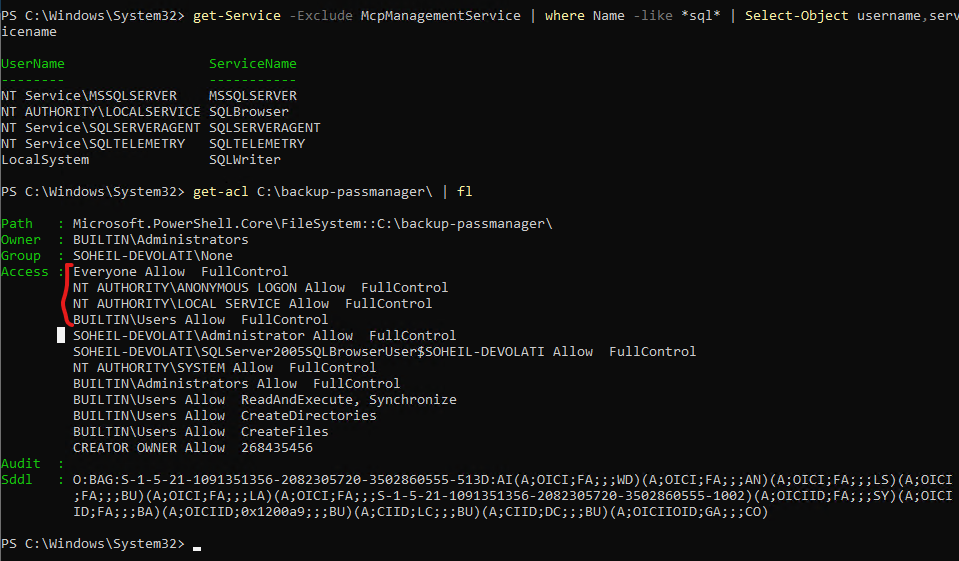
i try to grant full access to all of my user includes everyone and anonymous
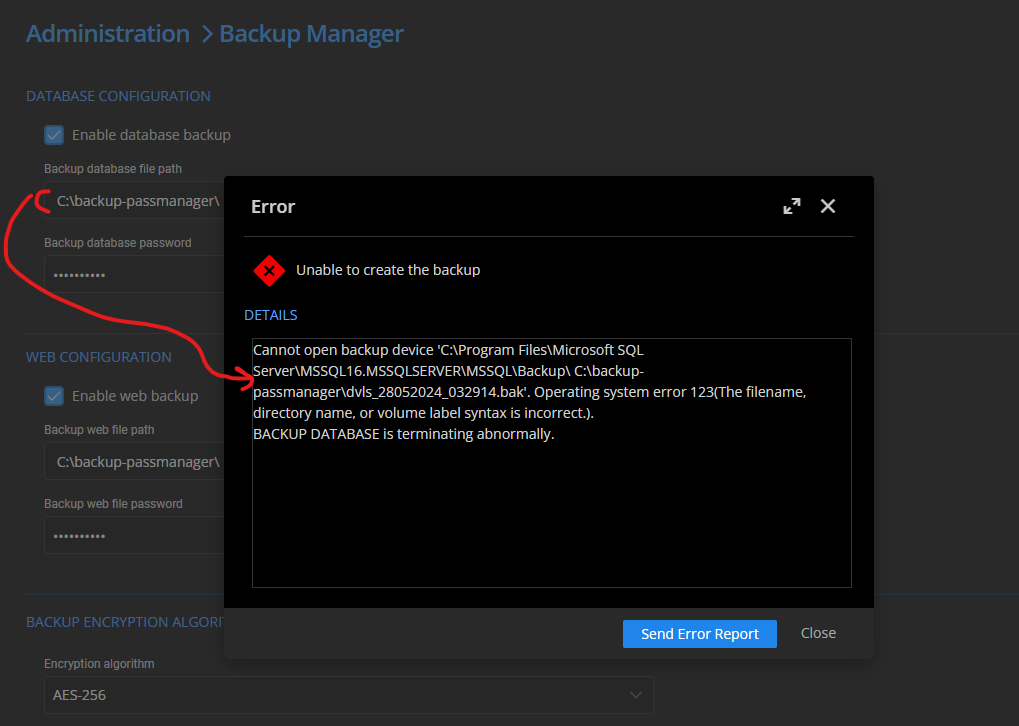
the path i define in backup path is not the same DVLS error show me, do i set it right !!!
Backup failed on Devolution server
Hi,
i try to use Backup manager on DVLS but i get confused:
1- in database configuration section, backup database file path i set " C:\backup-passmanager\"
but when trying to run backup i getting error :
Cannot open backup device 'C:\Program Files\Microsoft SQL Server\MSSQL16.MSSQLSERVER\MSSQL\Backup\ C:\backup-passmanager\dvls_26052024_084018.bak'. Operating system error 123(The filename, directory name, or volume label syntax is incorrect.).
BACKUP DATABASE is terminating abnormally.
i think my path is appending to mandatory file path that is not editable, by trying "test\" the back up file will be create on "C:\Program Files\Microsoft SQL Server\MSSQL16.MSSQLSERVER\MSSQL\Backup\ test\dvls_26052024_084018.bak".
i think it is not valid condition !!!!

2- i enbale web backup too with "C:\backup-passmanager\" path configuration, after running backup service it said web config successfully backed up but no file is created !!!!!

please guide me how to backup my server.
shortcut conflict
hi dear
for cleaning screen on Linux machine default shortcut is ctrl+l, this shortcut has conflict action with default Remote destop actoin that jumping to navigation section.
changing RDM default shortcut action to something else will be make RDM daily usage more enjoyable.
Allow SCP via RDM
hello
i am using free version of RDM. i could not find SFTP check box

Allow SCP via RDM
hello jeff,
thanks or your answer. i did not use SCP as a entry before. it is good feature, but it's better that SCP integrate with SSH entry so the user can simultaneously work with shell and file manager beside eath other.