Maran Michele - FactorySolver srl
RDM 2026.3.1.2 jump to company item from filter bar doesn't work
Hello
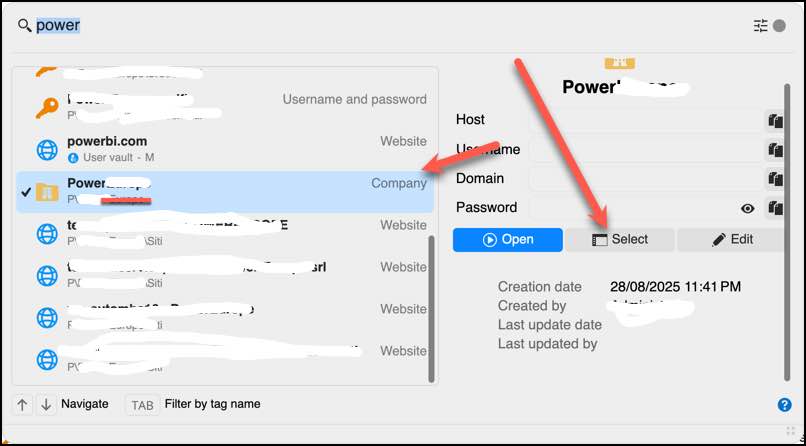
when i search with the new filter box in the status bar, then SELECT action for a Company item doesn't work, the treeview not expant to reach the item.
Same function work in windows version of RDM.
Thanks
RDM 2026.3.10 RDP ignored the screen resolution from template
Hello
problem solved!
Thank you!
RDM doesn't go anymore online on MAC OSX 26.7.1
Any news?
RDM doesn't go anymore online on MAC OSX 26.7.1
Hello
in this line of the log the browser must open to request login to DVLS but nothing appears.
[API-Wrapper] Open browser to login...
I try to change default browser (from EDGE to SAFARI) but nothing changes.
Could be a mac osx 26.7.1 realted problem?
Thanks
RDM doesn't go anymore online on MAC OSX 26.7.1
Devolution Server in 2026.3.7.0
Profiling log
~~CLEAR~~
*** WARNING [Load Connections Detailed] Enabled ***
[API-Wrapper] Beginning Login OAuth process
[DVLS] Save and sync refresh token for url: https://xxxxx key: xxxxx HasAccessToken: False, HasRefreshTokens: False
[API-Wrapper] No refresh token provided or provided one is invalid. Get verification uri...
[API-Wrapper] Open browser to login...
AuthBroker: GetSsoDataStoreMode - WebPrivateSessionMode: Enabled, resolved mode: private
AuthBroker: ConfigureSsoCookiePersistence - DataStoreMode is private, not Connection, skipping cookie persistence
AuthBroker: broker post-launch signature check: Valid
DVLSEmbedded: AuthBroker returned non-OK result: navigation-error
[DVLS] LoginOAuth - LoginInfo is null
DVLS - Api - .GetCacheValues : 2688 ms
Offline Security Info
>>>>>>>>>>>>>>>>>>>>>
CanAdd: {0}
CanDelete: {0}
CanEdit: {0}
OfflineHash:
OfflineUser:
> SecurityValues:
UserInfoID:
UserOverrideString:
>>>>>>>>>>>>>>>>>>>>>
Offline security has no user entity, falling back to an empty user. Administrative permissions will be denied.
Offline identity resolved: hasUserEntity=True userInfoID=853f1806-0b77-408b-8f2e-4d935596e702 isAdministrator=False roles=0 vaults=1 offlineEngine=MemoryOfflineEngine
*** WARNING [Load Connections Detailed] Enabled ***
[MDM] LoadPolicies complete — 154 properties scanned, 0 keys found in NSUserDefaults
RDM doesn't go anymore online on MAC OSX 26.7.1
Default Browser is EDGE version 154.0.4258.48
RDM doesn't go anymore online on MAC OSX 26.7.1
Latest DVLS _ 2026.3.7.0
RDM doesn't go anymore online on MAC OSX 26.7.1
Yes, devolution web work well.
It's only RDM mac with te problem.
The windows 11 virtual in parallels desktop with RDM windows version work well.
RDM doesn't go anymore online on MAC OSX 26.7.1
Hello
i recreated but unsuccessfully.
It seems a devolution server comunication problem.
RDM doesn't go anymore online on MAC OSX 26.7.1
Hello everyone
I find myself in a rather awkward situation.
RDM for Mac isn't working at all, while RDM for Windows is suffering from an issue where RDP sessions launch without respecting the video resolution specified in the template (Open with Template).
It’s not exactly pleasant: I update as soon as a notification arrives, but those bugs can give me a real headache.
It seems the updates aren't properly tested, and we end up acting as beta testers.
Thanks
RDM doesn't go anymore online on MAC OSX 26.7.1
Hello Maxim
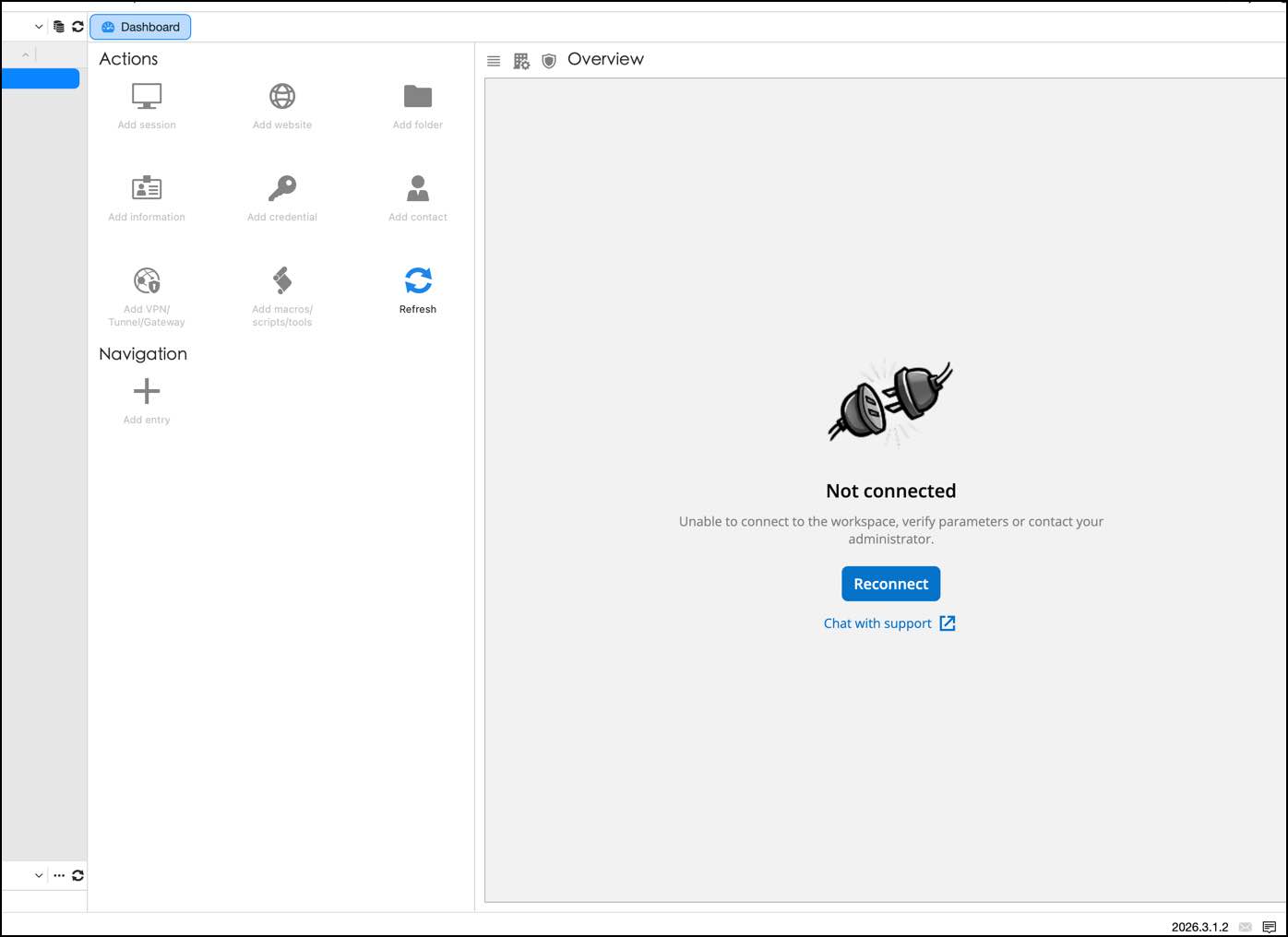
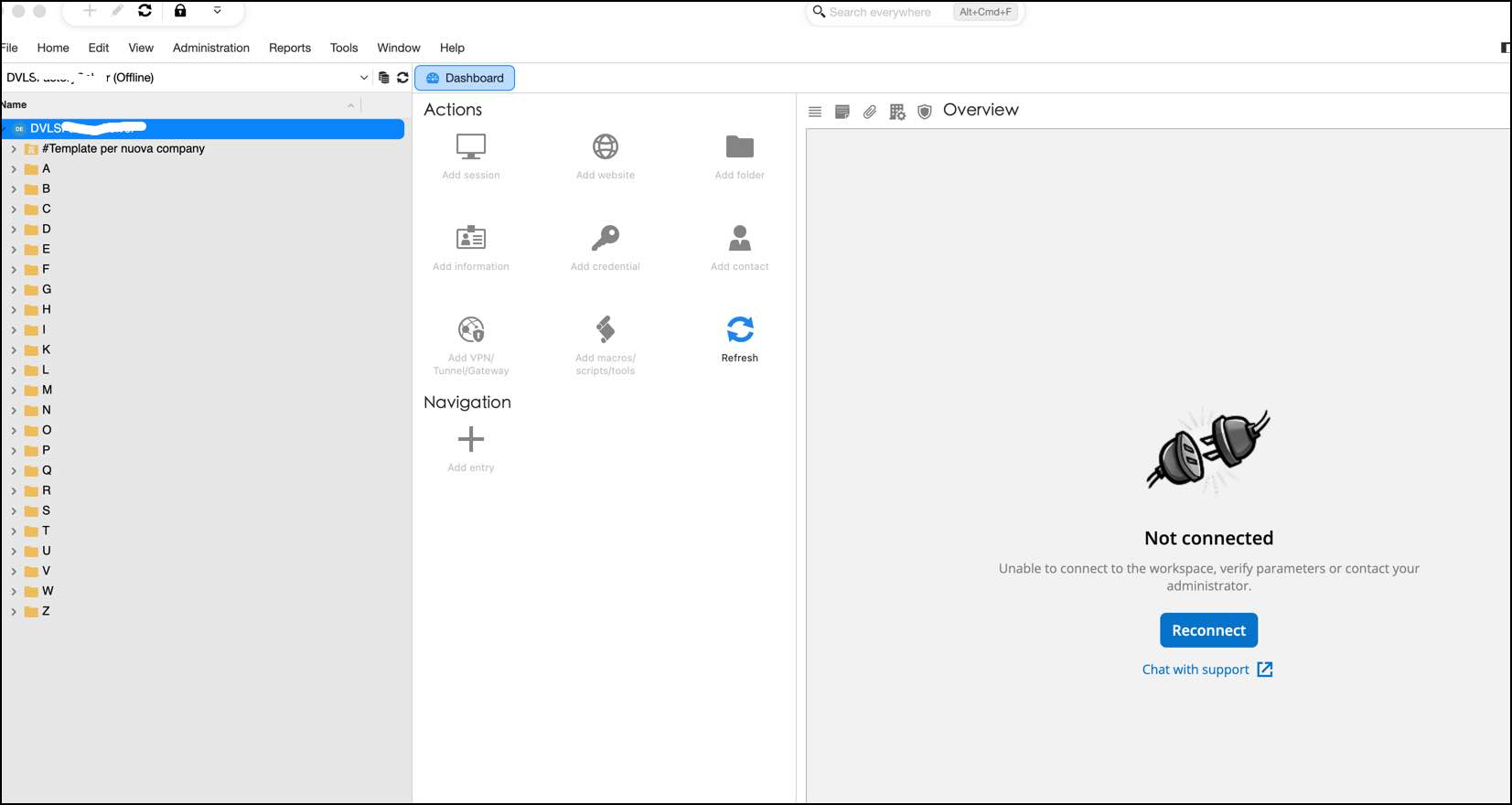
after opening RDM he pop up "autenticating" appears and close after some seconds, but the repository won't load.
The overview panel show the message "not connected":
The application log show
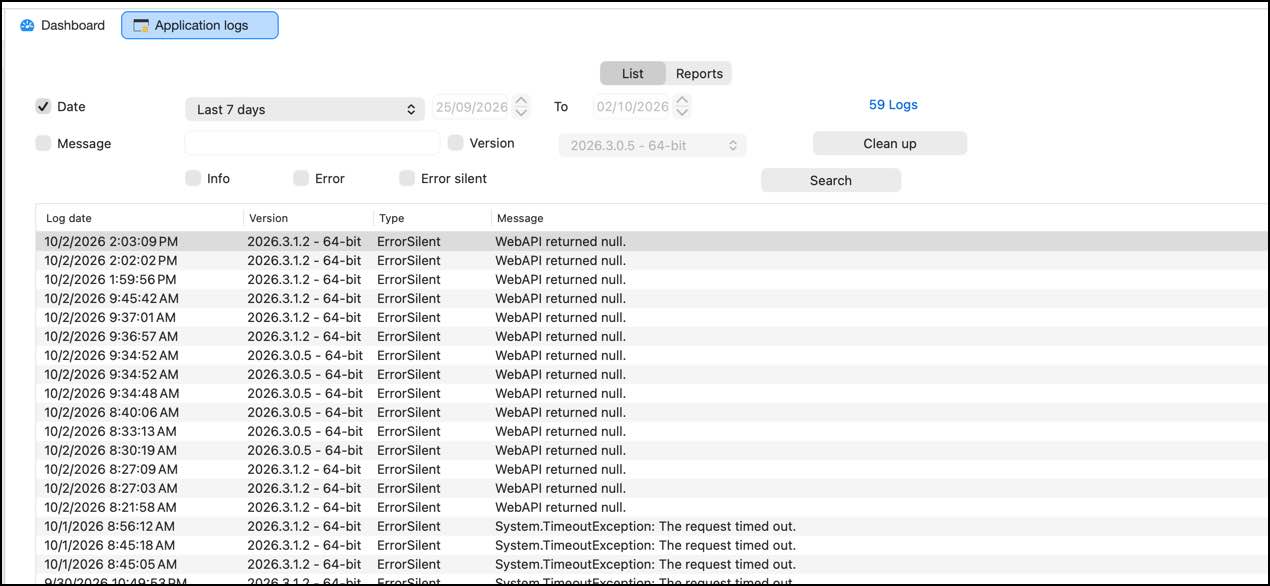
WEB API return NULL.
I think the problem appears after i update the DEVOLUTION SERVER To version 2026.3.7.0.
The LOG of server show
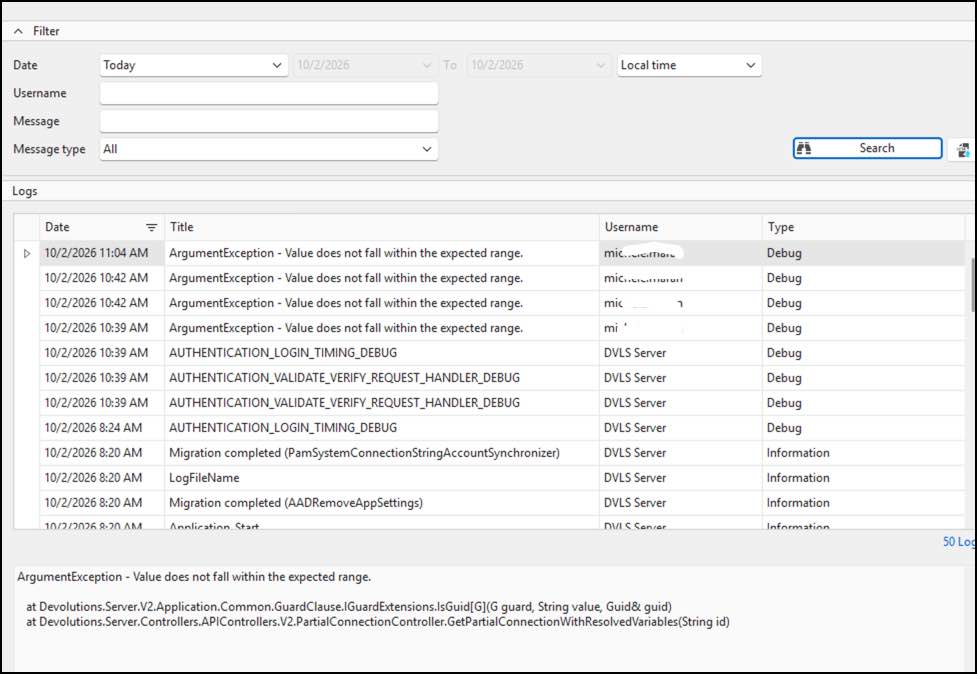
ArgumentException - Value does not fall within the expected range.
at Devolutions.Server.V2.Application.Common.GuardClause.IGuardExtensions.IsGuid[G](G guard, String value, Guid& guid)
at Devolutions.Server.Controllers.APIControllers.V2.PartialConnectionController.GetPartialConnectionWithResolvedVariables(String id)
Thanks
RDM doesn't go anymore online on MAC OSX 26.7.1
Hello
RDM for MAC osx tahoe 26.7.1 V2026.3.1.2 and V2026.3.0.5 (i make rollback) doesn't reconnect to workspaces.
It rest OFF line without the possibility to see any password of credential items.
Lates version in windows 11 work well with same Devolution server.
Can be a Mac OSX problem?
Thanks
RDM 2026.3.1.2 - search everywhere
Hello
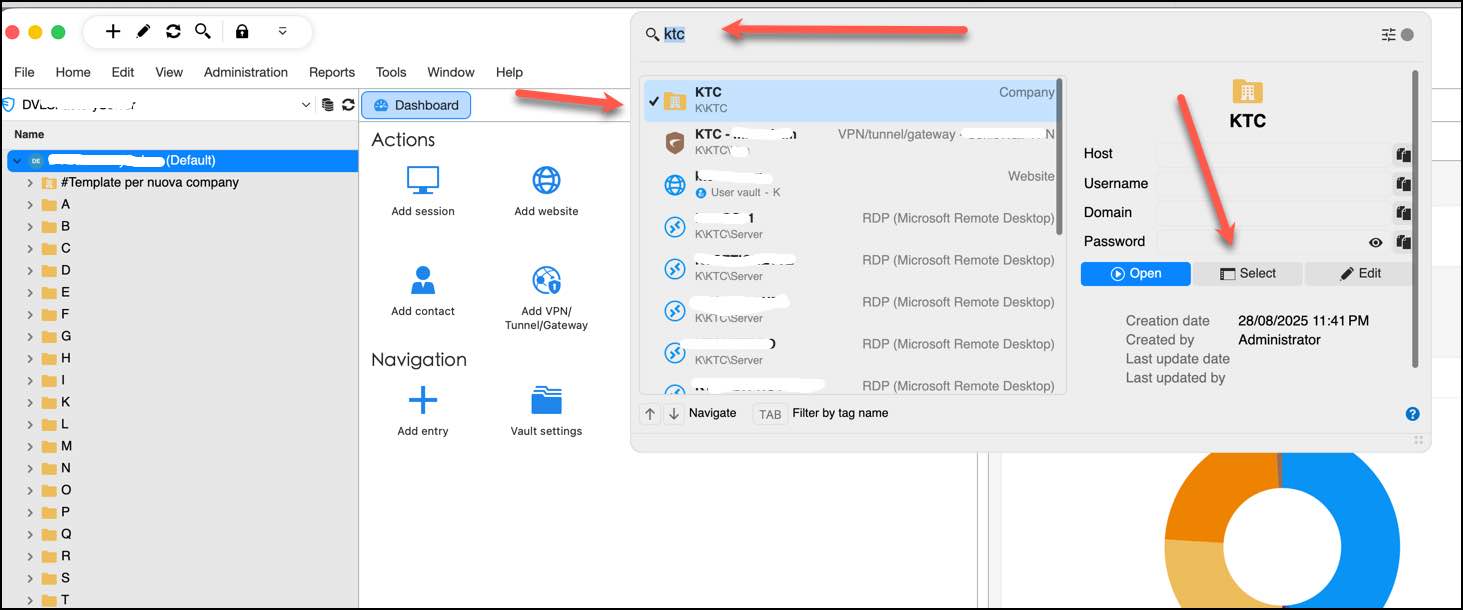
the search everywhere textbox can retrieve also folder items, but the SELECT command doesn't expand the treeview to reach and open the folder searched.
Windows version work well.
Thanks
RDM 2026.3.10 RDP ignored the screen resolution from template
Hello
the latest build 2026.3.10 introduced a bug when opening a RDP session through a template with different screen resolution. So a template with full screen will be opened in 1024x768 (i do not know the exact resolution)
PS lates MAC version isn't affected.
Thanks
OFFLINE EDITS item named MUR
Hello
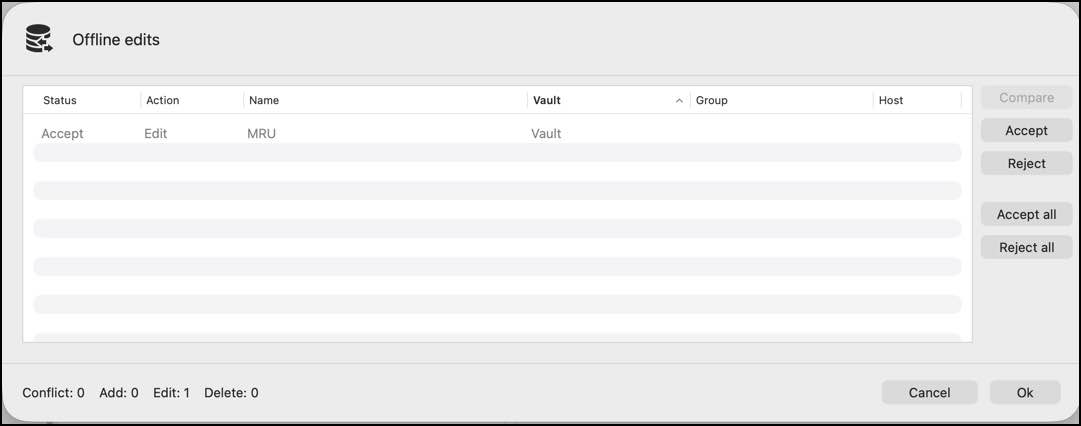
Whenever I go back online, I am always asked to synchronize this item, but I don't understand what it is.
Thanks
Dark mode and ribbon menù
Hello
i have "system" under Theme.
The issue start when Mac switch to dark mode automatically and in this case only a restart of RDM repaint correctly the menu consistent with the mac theme.
Thanks
Dark mode and ribbon menù
Hello
when MAC switch to dark mode, the ribbon become unusable, label of ribbon group are white.
Thanks
Autoupdate Server
The update notifications are greats but i like also an automatic process of upgrade to latest version of Devolution Server without manual maintenance
Thanks
Autoupdate Server
Hello
the update frequency of Devolution Server is obivous faster.
So an auto update function become interesting.
It is in your plans?
thanks
RDM 2026.2.1.2 freeze on loading connection after upgrade from 2026.1.12.6 on MacOsX Ventura 13.7.8
Hello,
Sorry for the late reply.
Which version of Devolutions Server are you running?
Do you get the same behavior using RDM Windows 2026.2.8.0?
Best regards,
@Jeff Dagenais
Hello Jeff
Were you able to identify the problem or we must remain on old version ?
Thanks
RDM 2026.2.1.2 freeze on loading connection after upgrade from 2026.1.12.6 on MacOsX Ventura 13.7.8
RDM not RDP!
RDM 2026.2.1.2 freeze on loading connection after upgrade from 2026.1.12.6 on MacOsX Ventura 13.7.8
Hello
after updating RDP latest build on a old macbook with Ventura 13.7.8, it freeze during loadin connection from devolution server.
Rollback to previous version work. Try the cfg rename but unsussesfully.
Any ideas?
Thanks
PROXMOX Console: keyboard language issue
YEs, you are right. UNDOCK work!.
Any workaround to type the key combination i need for type the correct password?
PROXMOX Console: keyboard language issue
Another question: then possibility to undock the console when opened.
thanks
PROXMOX Console: keyboard language issue
Hello
thanks for the fix.
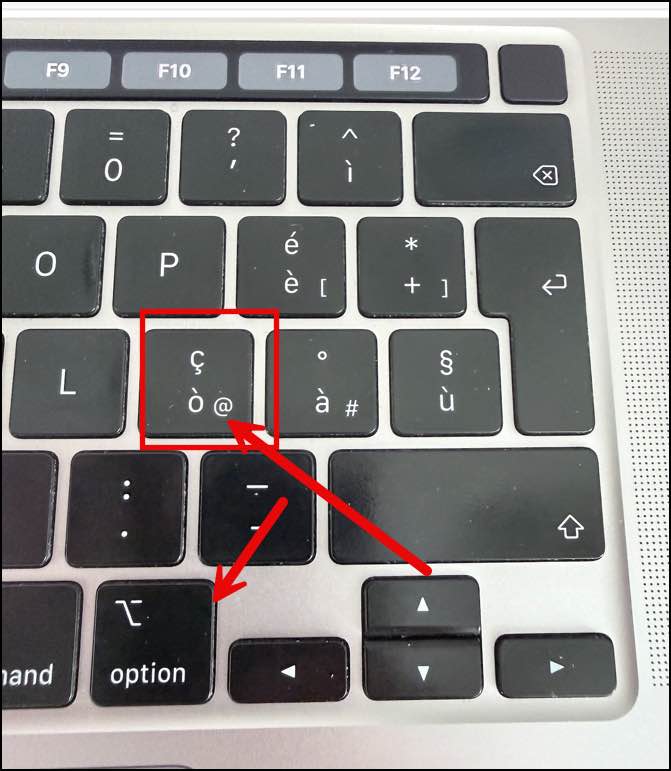
Unfortunately, remain a litte issue. I cannot type the key @ with OPTION + key (MacBook pro with Italian LAYOUT)
See printscreen
Any ideas?