PROXMOX Console: keyboard language issue

Hello
the console from proxmox dashboard (vnc?) doesn't map the keyboard language of my mac.
The same vnc session launched directly from web console work well.
Any ideas?
Thanks
All Comments (10)
Hi,
Thank you for the feedback on the interaction between our VNC console and keyboards on macOS.
I assume that when the mapping doesn't align, the keyboard is set to something other than US?
I don't have any ideas at the moment. I'll need to do some testing.
That being said, VNC as a protocol is extensible, and we don't use their VNC client, so it's possible that we are missing some edge cases specific to their implementation.
I'll report back once I've investigated further.
Regards
Jonathan Lafontaine
Hello Jonathan
mac keyboard layout is italian.
For example the @ digit become number 2 like a numeric pad.
Thanks
Hello,
Thank you for your follow-up.
Jonathan Lafontaine has opened an internal case to address this issue. We will keep you updated as soon as a fix, or a tentative solution, is deployed in a future version.
Thank you for your patience.
Best regards,
Jacob Lafrenière
Hello,
Thank you for being so patient!
I'm pleased to inform you that a new version of RDM Mac (2026.1.12.2) has been released, featuring the fix for your issue.
Latest Version: Download RDM
Please let us know if this works or if you encounter any issues.
Best regards,
Maxim Robert
Hello
thanks for the fix.
Unfortunately, remain a litte issue. I cannot type the key @ with OPTION + key (MacBook pro with Italian LAYOUT)
See printscreen
Any ideas?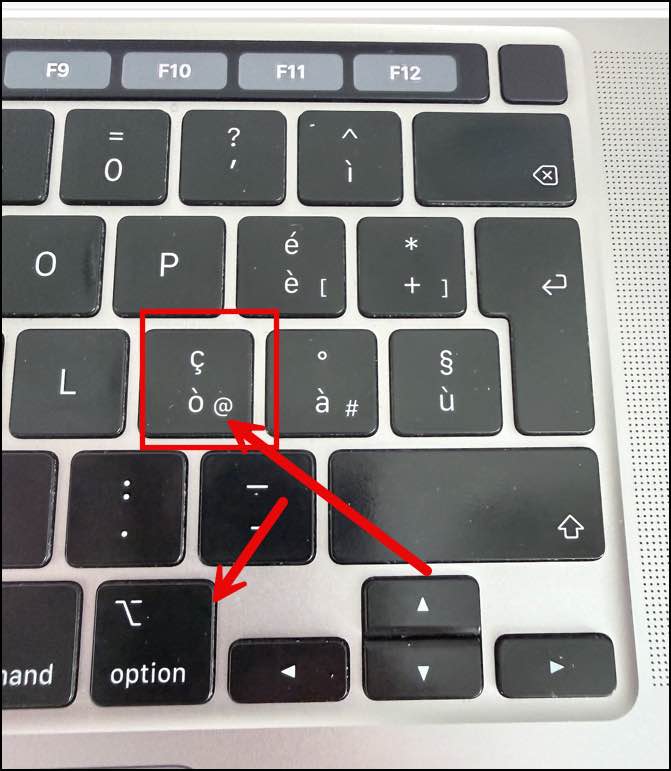
2026-05-20_17-13-14.jpg
Another question: then possibility to undock the console when opened.
thanks
Hi,
I've worked on the fix, and unfortunately, your issue might be an edge case we can't address right now.
The VNC server used by Proxmox doesn't handle key input in the standard way, it uses a custom message.
We haven't attempted to reverse the custom message yet and instead patched the standard keyboard message until we match the Proxmox viewer.
All that to say, some key combinations might not work correctly unless we use the custom message.
I'll create a ticket to see what we can do.
About undocking the console: unless I misunderstand what you are trying to do, you can simply right-click the tab and click 'Undock'.
Jonathan Lafontaine
YEs, you are right. UNDOCK work!.
Any workaround to type the key combination i need for type the correct password?
Maybe use a 'Typing macro' macro to type either the whole password or '@' character.
Supporting the custom message will probably be the only real solution though.
Jonathan Lafontaine
Hi @Maran Michele - FactorySolver srl
I've added the QEMU keyboard extensions for ProxMox in RDM Mac 2026.2 (that should be available in the first part of next month). I don't have a setup to fully test it, but I think it should make RDM behave more closely to the ProxMox client.
Once that's available, please try it and let me know if it's working better for you. We'll use your feedback to know if there are more issues to fix, or if this is working better and we can port the same feature to our Windows and Linux customers.
Thanks for your patience
Kind regards,
Richard Markievicz