
Ben05
Add credential support for CyberArk Workforce Password Manager (WPM)
Hi all,
CyberArk is providing a cloud based solution for Password manager. It is (also) called CyberArk Workforce Password manager (WPM)
Enterprise Workforce Password Management | CyberArk
It would be ideal if a Credential connection of type WPM (CyberArk WPM) can be added to use that as a credential source for personal passwords.
I have no idea if they have an open API or interface that you can connect to
Regards, Ben
Additional columns for AD Dashboard
Can I upvode this request?
And then make sure not a limited list of attributes, but potentially all. sometimes I'm looking for the last logon property of an account, sometimes on the last password change, sometimes on the msds-SupportedEncryptionTypes sometimes on.... even other attributes not on the default list above.
Thanks in advance! :-) Ben
Database Optimization dbo.UserInfoHistory
And a question from the community: I read above that after the upcoming fix with 2026.1, it may be needed 1x to clean the UserInfoHistory table.
Will such a command be included in the (auto-)upgrade db script, or will there be some guidelines to check and clean them ourselves?
Do you have the commands to check its current sizes ?
Regards, Ben
Show password feature on CyberArk credential or dashboard
Another option (or should I create a fresh feature request for this?) is that my company now provides a cloud based solution for personal passwords.
it is https://<ourtenant>.id.cyberark.cloud/ so it is a personal safe solution from CyberArk.
Would it be possible to create a credential (list) based upon these types of credentials ?
Show password feature on CyberArk credential or dashboard
Hi Hubert
That is a real drawback, it would help us soo much to resolve the issues.
There are many scenarios where we have to copy and use a password: specifically many websites require login where we have to type or copy/paste a password, we also have workflow applications where we need to type or paste passwords etc.
Until now we have username/password entries for this where we simply right-click and copy password, then paste that into the target. Due to that we've resorted to very long and complex passwords so typing them is not an option.
Would it be an option if we revert to scripting to retrieve it ?
Regards, Ben
Show password feature on CyberArk credential or dashboard
Hi all
Our company is planning to prevent us from storing passwords in RDM.
We have CyberArk vaults, and I'm testing with both credential entries of type CyberArk PVWA, but I also like the CyberArk dashboard.
However, if we start the CyberArk Dashboard we can select a vault and see our entries. On the entries we can right-connect but have only 'Connect' or 'Connect via PSM' etc type of entries.
We need the feature to have a 'copy password' feature on either or both account types above, just like we now have with username/password type of entries.
Of course there may be CyberArk policy to (pre-)request dual control access, and/or give a reason for retrieval.
Thanks in advance!
Ben van Zanten
Unable to add a YubiKey to RDM for MFA
Hi Hubert, Devolutiions team;
I can confirm now, the URL's above have been opened on our machines to the Internet, Yubikey configuration is now working.
so the cause of our problem was Internet access..
I DO have, however, another question now: what happens if we lose the yubikey? (lost, stolen, otherwise not available).
I'm afraid that will lock us out of the application, until... reinstall? or clear data ?
Several other applications have the possibility to add multiple Yubikeys, so if you lose your primary one, you can use a spare/backup one.
Regards, Ben van Zanten
Unable to add a YubiKey to RDM for MFA
Hi RDM team.
I think I may have found the problem.
Yubikey is not working from 1 machine (hardened), it is working when using RDM from another machine, (multiple versions).
Most likely this is a firewall problem. Assuming the Yubikey validation makes my RDM perform a call to the Yubikey backend... What URL would be needed to open in our firewalls ?
PS that probably solves it for me, don't know if it also solves for the original poster of this thread...
Regards, Ben
Unable to add a YubiKey to RDM for MFA
I have this error on RDM 2024.2.12.0 on datasource (internal) SQL Server
Regards, Ben
Unable to add a YubiKey to RDM for MFA
I have the same... on both of my YubiKeys
Macros/Scripts/Tools working on users in shared vault, not in private vault
I've written a powershell script to help reset passwords from the RDM vault.
we can right-click a username/password entry then select the macro and it will read the old password, generate a new one... then if accepted, change the password in AD.
This used to work in earlier versions , both in the shared vault and in the private vault, don't know in which version it ceased to stop, but not working in 2023.3.39.0 / 2024.1.x
If I right-click on a username/password entry in the shared vault:

however if I right-click on a username/password entry in my private vault I get:

so there is nothing below 'Who Is'
Regards, Ben van Zanten
Title of RSA SecurID dialog in 2024.1 beta
Thanks for your very quick response and actions.
I guess you'll check if this dialog is not the only one affected.. it may be on others as well.
But anyhow, impressive how quickly you've taken up and solved it... well done
Ben
Title of RSA SecurID dialog in 2024.1 beta
When we start CyberArk PSM sessions, we need to provide RSA credentials
so in our 'My Account settings' - RSA SecurID we've configured our creds.
When I start a PSM session in 2024.1.7.0, a popup appears asking the RSA id, but in the beta version, the title is wrong:

in 2023.3.39 it says:

Regards, Ben
Normal and Admin Account for one Person - 2 Licenses?
Thanks for your quick reply.
Then I have 1 additional question. Is the account linking only or specifically meant for License management, or would other things be linked/shared as well, like the users private vault, or other settings?
Regards, Ben
Normal and Admin Account for one Person - 2 Licenses?
Awesome!
however....
the article is describing Devolutions servers only it seems... Does it also apply to users in SQL Server datasource ?
Regards, Ben van Zanten
RDM Jump not working in 2024.1.7 Beta
Thanks Stefane for your reply.
So I was just ahead of you with finding this jump feature ;-)
Regarding testing with CyberArk datasource we're very interested in this feature. The KB is highly needed specifically in terms of requirements and how to have those met.
I already had the first requirement hurdle when 2024.1.x requires a newer version of .NET desktop or something.
but now it is complaining that I don't have a CyberArk license configured. and I have no idea how or where to configure the CyberArk license in the cyberark datasource. We HAVE a CA license...
Maybe it has to be configured within CyberArk (I guess) but that is another team. so I need to know what they need to configure within CyberArk, in order to make RDM 2024.1 work. I guess the license, but maybe a specific vault, or other objects as well?
Regards, Ben van Zanten
RDM Jump not working in 2024.1.7 Beta
Hi All,
I'm testing the beta version 2024.1.7 to see if the new cyberark datasource is a nice feature for us.
However, today I found out, that "Jump" is not working. I'm running the 2024.1.7.0 beta as a portable, separate instance from the ZIP file, alongside the installed version.
If I start a jump session, the initial jump is made, but further nothing happens
Even if I pre-login in the jump server, and start RDM, it won't work.
Tested on multiple connections.
Then start the 'installed' version of RDM on my workstation (2023.3.39.0) and it works flawlessly, same datasource, same connections.
Note that on the jumpservers, also 2023.3.29.0 is installed.
Regards, Ben van Zanten
Jump server settings gone from
I have the impression this is solved? in 2023.3.37.0 or so? ( Release notes on 3.37 say: Fixed an issue with Jump setting not visible )
We not only see the jump back again in 'website' entries, but SSH is also back again..
Thanks again! Ben van Zanten
CyberArk PSM sessions with user specific setting overrides to personal vault entries not working
Thanks already
We note that this behaviour is not always reproducible. We don't have that in our own datasource.
it may have to do with the datasource where the entries are located... or the datasource settings.
the message box popup however already helps a lot in troubleshooting.
we found that sometimes it worked if we enabled 'always ask for password' checkbox on the (fake) credential entry in the user vault... but not always
Regards, Ben
CyberArk PSM sessions with user specific setting overrides to personal vault entries not working
Sorry in advance, this is a little bit complicated to explain, so I HAVE to be thorough to get it completely explained.
our history with RDM:
We are running RDM for years, and below worked in the past. Due to the problems with subconnections -> subentries introduced with version 2022.3.4.0 in the tool, it took us a LONG time to upgrade all instances.
So now recently we've upgraded our clients to one of the latest version 2023.3.36.0 and some have issues described below.
Cyberark cannot find the requested account in vault and gives error : 1062E The requested account does not exist in the Vault....
this DID work before !
This is our requirement:
we store personal admin credentials in the CyberArk vault
we have shared PSM entries, the PSM should retrieve the personal admin account from the vault and start PSM with that account
This is high overview of our setup:
we store 'personal' admin accounts in CyberArk
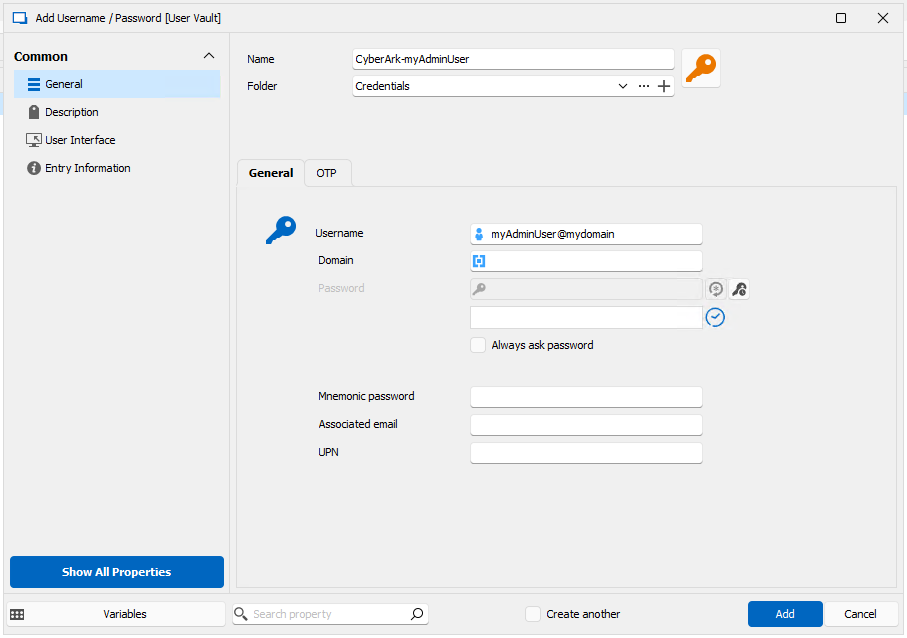
in RDM we configure 'placeholder' username/password entries in our user vault, the username is formatted in such a way that it uniquely finds the user account in the CyberArk vault, so the corresponding password can be retrieved.
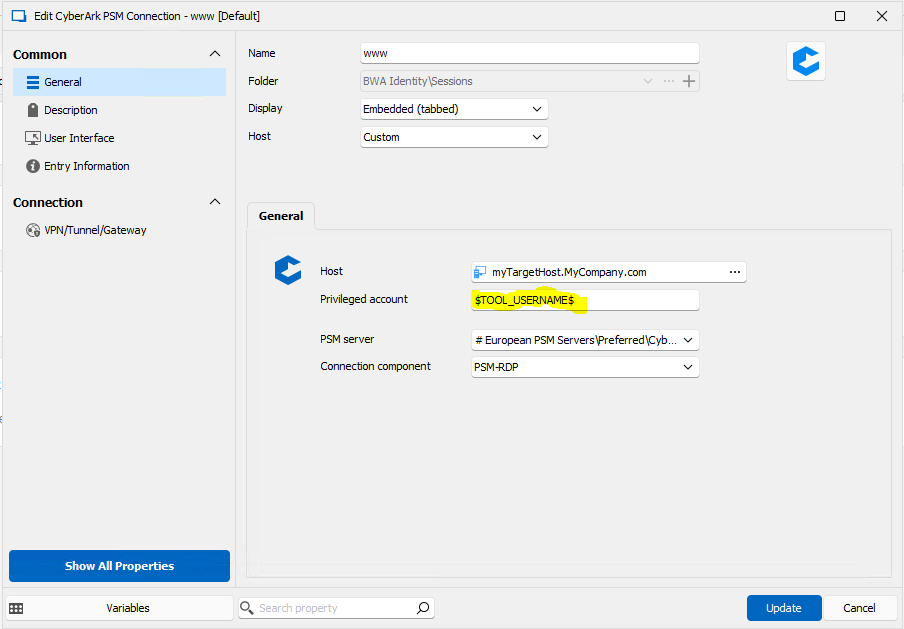
we configure CyberArk PSM entries in such a way that the 'privileged account' (= account to retrieve from cyberark to run the PSM entry) is retrieved from the entry in our personal vault.
Since our upgrade (from 2022.2.21.0 to 2023.3.36.0 ) this fails, CyberArk is giving error : 1062E The requested account does not exist in the Vault, or you do not have the appropriate....
How to debug this:
I found out... we can easily debug the setting.. don't even need a CyberArk PSM server or start a session.
in the session I configure an Event : Before Open - type: Message prompt - value: Retrieve account from CA: $TOOL_USERNAME$
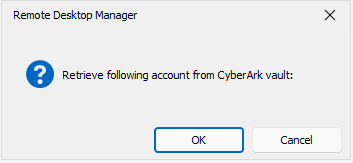
start the session, the $TOOL_USERNAME$ turns out to be empty!
Temporary workaround:
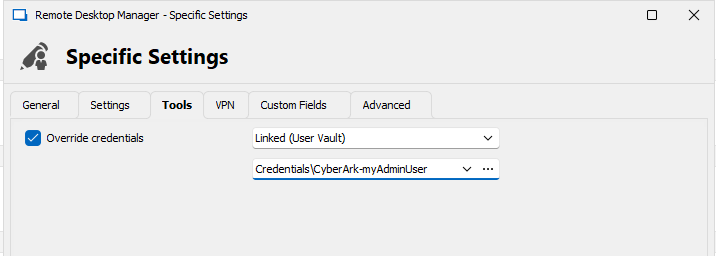
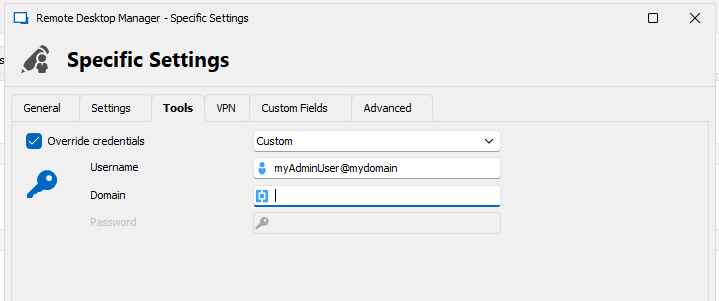
we configure the User specific setting - Tools - override credentials , replace the 'Linked (User Vault)' to 'Custom' and just type the requested username.. now it works.
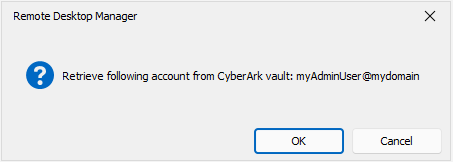
this also is shown by the popup message prompt. (pictures below)
Detailed configuration:
Account in personal vault in CyberArk
in RDM: Create a password entry in personal vault. configure username with name@address syntax so CyberArk can find the account in its vault
Create a PSM Connection entry. in 'Privileged Account' specify the variable $TOOL_USERNAME$
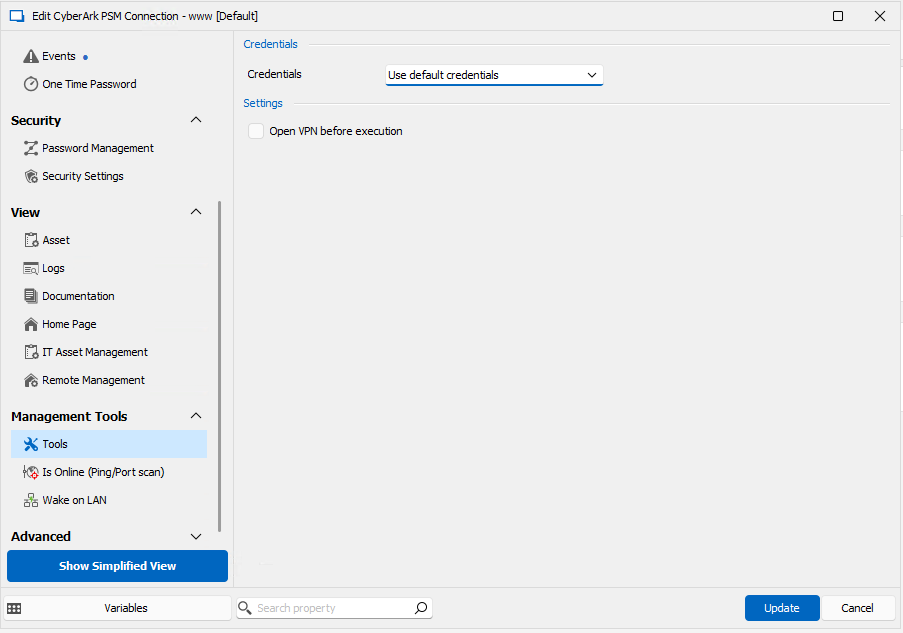
in Management Tools - Tools - Credentials.... specify 'use default credentials' (don't care here.. this is a shared-vault entry, every user will override this setting with his own personal settings)
each user: Edit - user specific settings for this entry... override the Tools username with a linked (User Vault) entry pointing to previously created account in personal vault.
debug: edit entry before open action with a prompt... include some text + $TOOL_USERNAME$ because sometimes $TOOL_USERNAME$ is sometimes empty.. and empty message prompt isn't shown.
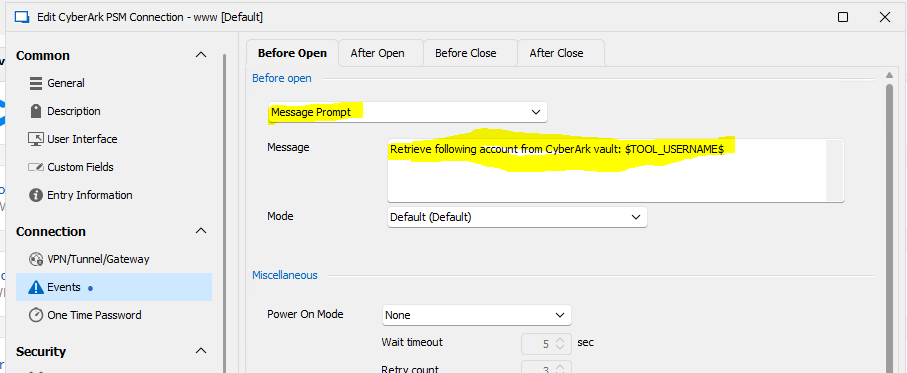
Error: username is empty
FIX (temporary) in user specific settings... do not overwrite with a link to personal vault entry, but a custom entry and type in username in correct format
Result: works. now the PSM entry also works, it can retrieve that account from the vault and start the PSM entry.
Jump server settings gone from
No problem! the entry is still using jump, we just can't configure the jump in the UI ;-)
And we'll wait for an update where it is solved.
thanks for the quick response.
Jump server settings gone from
We have been waiting for Upgrade RDM for a long time, because we had issues with the migration from subconnections to subentries in v 2022.3.4 (https://blog.devolutions.net/2023/01/goodbye-sub-connections-hello-much-better-sub-entries-in-rdm/) and had to combine our RDM upgrade with a DB migration/update.
So we waited a long time and now made a big jump from version 2022.2.21.0 to 2023.3.35.0
Somewhere in the versions in-between the gui configuration for configuring a jump server is moved from the 'General' setting to a 'Jump' setting..
for and RDP session that is...
Now for 'Website' session type there is NO JUMP..
Old UI:
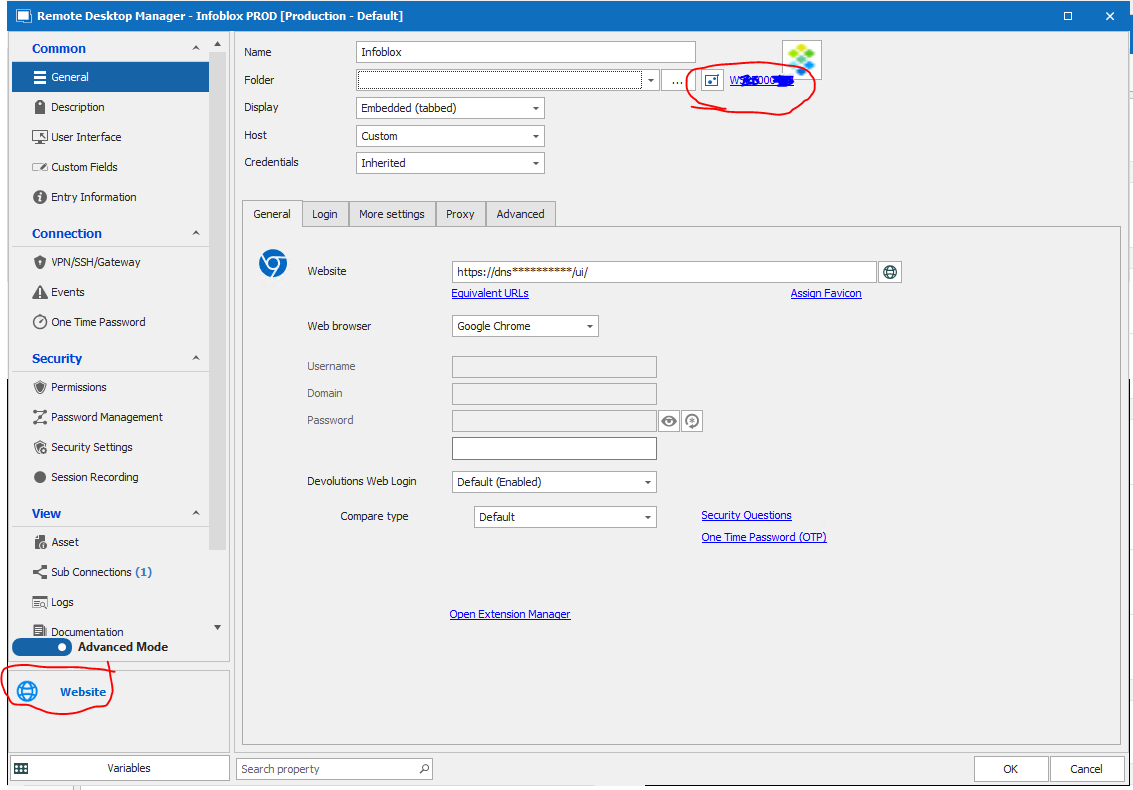
New UI:
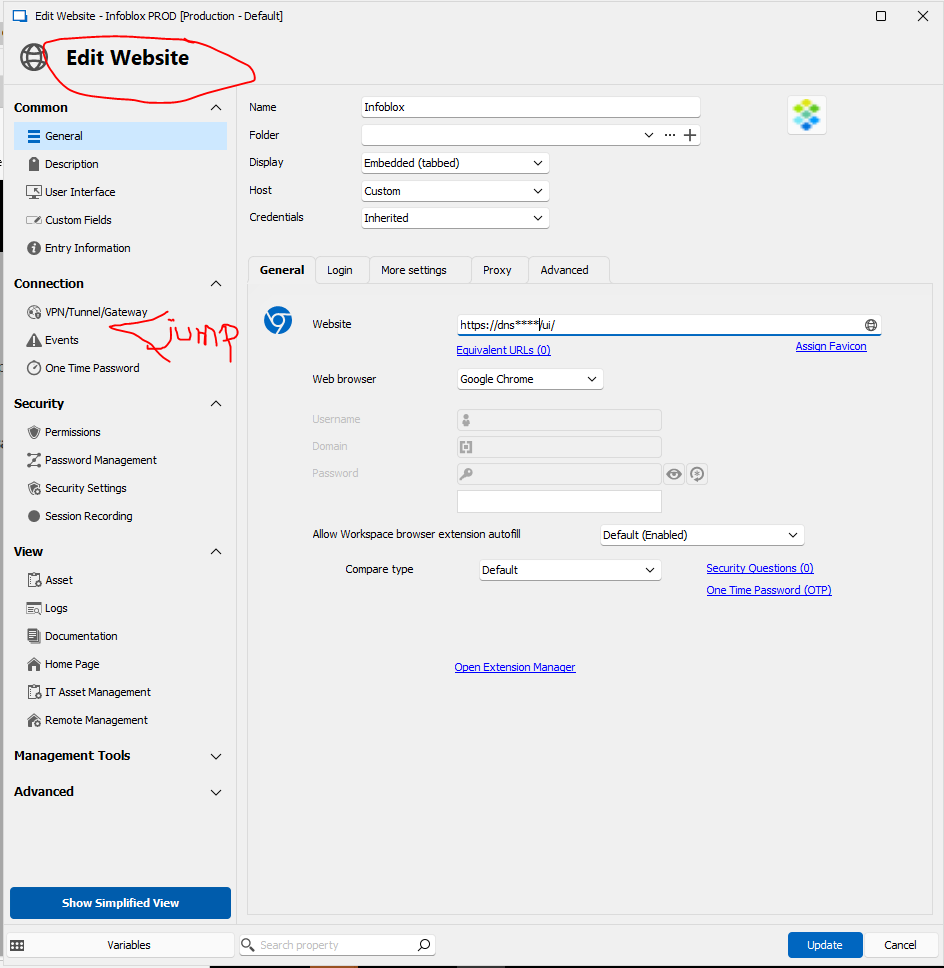
HOWEVER....
the Entry is STILL green in our OU, indicating it is going via a jump server
the entry is STILL using jump server if you use it
if you EXPORT the entry to JSON, the properties have still 'jump' configured
We need to use jump on some websites, since the website of some management interfaces (ILO and other network devices) are only reachable via a management jump server
Regards, Ben van Zanten
Upgrading from 2022.1.27 to current version
Hi generbillings
Problem we had that the RDM upgrade to version> 2023.2.x upgrades the database, and transforms subconnections to sub-entries. OLD RDM instance connecting to an upgraded DB will suddenly see all original subconnections as separate entries, as if they 'fell off' their parent.
https://blog.devolutions.net/2023/01/goodbye-sub-connections-hello-much-better-sub-entries-in-rdm/
it says:
Starting in RDM 2022.3, we have replaced sub connections with sub entries. Discover why we made this change, and why it’s a significant improvement. .....
(specifically: v2022.3.4.0)
This gave us so much problems (multiple times) that we decided to postpone the upgrade until we migrated to new SQL server.
We then backup/restored the RDM database to a new server, upgraded RDM on a few machines, connecting to the NEW instance.
during migration, the non-migrated RDM instances are connected to old SQL database, upgraded ones to new SQL Server.
We use version management in the datasource to make sure only older RDM instances could connect to old SQL, and newer RDM to new.
a.f.a.we know, if you're not using subconnections, there is no problem.
But DO NOT try to connect with a <2022.3.4 version of RDM to a migrated datasource, it will show as if all subconnections have become 'unparented'
Regards, Ben
Software Licencing Entry Enhancements
So you’re using a folder entry as a reference to a server asset
isn’t a Host entry better in this case ?
I have the impression the host type of entries was made for that
https://forum.devolutions.net/topics/36166/meaning-of-host-entry
regards, Ben
RDM Credentials
I believe it is at:
File
options
application
clipboard
advanced
Then default of 10 seconds I change into 300 or so
note when you now copy a password you get a clipboard clear timer on the right bottom of the application
;-)