Unable to add a YubiKey to RDM for MFA

I want to use my YubiKey as an added layer of security when launching RDM locally.
I followed the steps on https://docs.devolutions.net/rdm/kb/rdm-windows/how-to-articles/configure-yubikey-2fa/ but receive a "Yubikey is invalid" error.
For added context, this YubiKey was configured to use Yubico OTP via the YubiKey Manager app.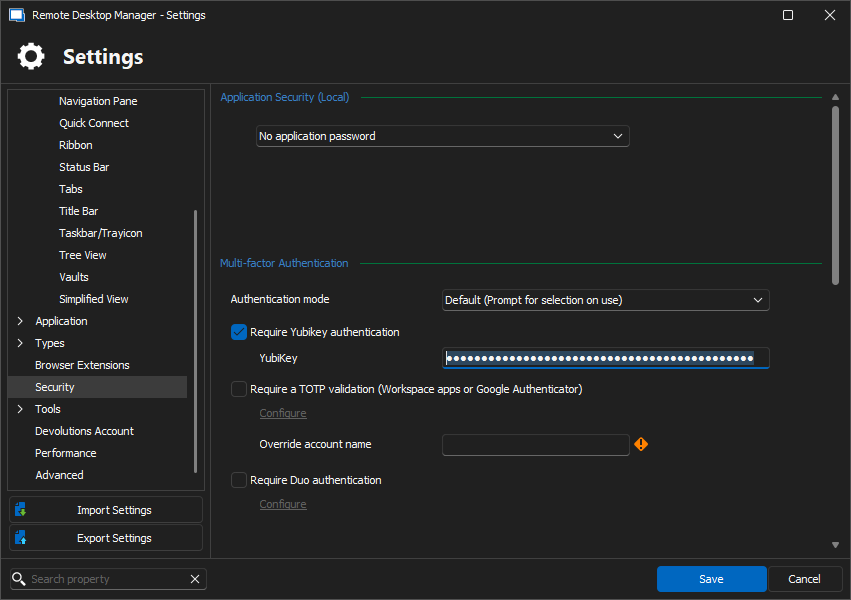

2.PNG
1.PNG
All Comments (10)
I have the same... on both of my YubiKeys
Hello,
What version of Remote Desktop Manager are you using?
Best regards,
Etienne Lord
2024.1.30.0 64-bit
Hello,
Thank you for your response.
Could you please update your RDM and let me know which data source you are using?
Best regards,
Tommy Sanders
I have this error on RDM 2024.2.12.0 on datasource (internal) SQL Server
Regards, Ben
Hello,
Thank you for your response.
Could you please update your RDM to the latest version and let me know if the issue still persists?
Best regards,
Tommy Sanders
Hi RDM team.
I think I may have found the problem.
Yubikey is not working from 1 machine (hardened), it is working when using RDM from another machine, (multiple versions).
Most likely this is a firewall problem. Assuming the Yubikey validation makes my RDM perform a call to the Yubikey backend... What URL would be needed to open in our firewalls ?
PS that probably solves it for me, don't know if it also solves for the original poster of this thread...
Regards, Ben
Hello Ben,
The exact URLs that RDM uses to validate the Yubico OTP are the following:
https://api.yubico.com/wsapi/2.0/verify
https://api2.yubico.com/wsapi/2.0/verify
https://api3.yubico.com/wsapi/2.0/verify
https://api4.yubico.com/wsapi/2.0/verify
https://api5.yubico.com/wsapi/2.0/verify
You can find this information on our documentation website here: https://docs.devolutions.net/rdm/mac/kb/rdm-windows/knowledge-base/internet-endpoints-access/
Regards,
Hubert Mireault
Hi Hubert, Devolutiions team;
I can confirm now, the URL's above have been opened on our machines to the Internet, Yubikey configuration is now working.
so the cause of our problem was Internet access..
I DO have, however, another question now: what happens if we lose the yubikey? (lost, stolen, otherwise not available).
I'm afraid that will lock us out of the application, until... reinstall? or clear data ?
Several other applications have the possibility to add multiple Yubikeys, so if you lose your primary one, you can use a spare/backup one.
Regards, Ben van Zanten
Hello Ben,
I'm glad this now works for you.
In case of a lost Yubikey used to configure the RDM application lock, RDM will not be able to load the sensitive data of your local configuration. In short, what this means is that it doesn't affect the data stored in your datasource, only the configuration in RDM to connect to that datasource.
You can forcefully remove this lock by deleting (or moving) your configuration files. The specific files you want to clear are the following:
- RemoteDesktopManager.cfg
- RemoteDesktopManager.bak
- RemoteDesktopManager.stv
- RemoteDesktopManager.stb
- RemoteDesktopManager.enc
- RemoteDesktopManager.enb
These files are located in %LOCALAPPDATA%\Devolutions\RemoteDesktopManager in the case of a standard installation, otherwise they are located in the same location as your portable installation.
The result of clearing these configuration files is that you will then have an RDM with its default configuration. You will need to configure your link to your datasource again (for example, Devolutions Server or Hub). Once you do, you should see all of the entries within, as those are stored in their database and not affected by the application lock configured in RDM.
For your request regarding having the option to configure a second Yubikey, we've received a few requests for this in the past and I've linked this topic to our internal ticket. I can't give you an estimate on when we will be able to work on this.
Regards,
Hubert Mireault