Database Optimization dbo.UserInfoHistory
0 vote

Hi,
Could it be possible to get a configurable parameter to limit the tab UserInfoHistory to keep growing ? In a year our database take 52G and after a clean up with a script and schrink, 1.5G
We have schedule a cleaning script to keep only the last 30 days. But we need to schrink the database to recover the space.
Could it be possible to program in the GUI a parameter to keep 1 to 1000 days for UserInfoHistory ?
Recommended Answer
The issue/solution is being discussed via direct message, here is a summary:
The issue here has been determined to be the "User specific settings," which, for the time being, are being stored in the dbo.UserAccount table and are creating data bloat in dbo.UserInfoHistory with every update of the user/user settings.
We have a task to fix this in the future, but until then, limiting the use of the user specific settings is your best bet.
Setting your credentials to "inherited" and overriding them at the folder level can help reduce the number of overrides needed. This approach can help but won’t fully solve the problem.
Stéfane Lavergne
All Comments (19)
Hi,
The first question I would ask is: why is your table growing so rapidly? In a typical installation, we wouldn't expect such a high number of dbo.UserInfoHistory rows to be created. Are there any PowerShell scripts running hourly or nightly that might be modifying the user table?
Second, shrinking a database without first addressing the root cause of the data bloating is not ideal. This approach will likely cause the database file to regrow, leading to potential disk fragmentation and other performance issues. While shrinking a 50+ GB database down to 1.5 GB once is likely acceptable in most scenarios, running monthly cleanups to shrink from 2.5 GB down to 1.5 GB is usually not recommended.
RDM provides several cleanup actions that users can run regularly based on their business needs. However, auto-cleanup functionality is not currently available, as this typically falls under the responsibilities of a database administrator (DBA). For more specialized cleanup requirements, involving a DBA would likely be advantageous. Scheduling tasks through SQL Server Management Studio (SSMS) can be an effective solution in such cases.
Best regards,
Stéfane Lavergne
We open a support case in 2023 and the problem was back in 2024. We have a typical instrallation, nothing special. We manage 700 SSH Cisco device with a team of 10 persons. We try every cleanup in RDM GUI and it doesn't change anything. There must be something not configure well. So I'm searching for an improment or a permanent solution. The support ask me to open this fequest request.
Very interesting, do you have by chance any/many user overrides?
Stéfane Lavergne
The only override by user are the personal credential contain in the private vault.
Would you mind if I sent you a few SQL statements to execute via SQL Server Management Studio (SSMS) so that I can gather statistics on what is causing this issue in your case?
Stéfane Lavergne
Go and I will see with our DB administrator to execute them to gather information
Sent via direct message.
The script will run 4 queries
- sp_spaceused
- stats per user
- stats per day
- stats per table
Thanks,
Stéfane Lavergne
The issue/solution is being discussed via direct message, here is a summary:
The issue here has been determined to be the "User specific settings," which, for the time being, are being stored in the dbo.UserAccount table and are creating data bloat in dbo.UserInfoHistory with every update of the user/user settings.
We have a task to fix this in the future, but until then, limiting the use of the user specific settings is your best bet.
Setting your credentials to "inherited" and overriding them at the folder level can help reduce the number of overrides needed. This approach can help but won’t fully solve the problem.
Stéfane Lavergne
Hi,
We are also getting this error once a year. I solved it deleting the table content with
DELETE FROM [RDM].[dbo].[UserInfoHistory] where ModifiedUserName like '%' 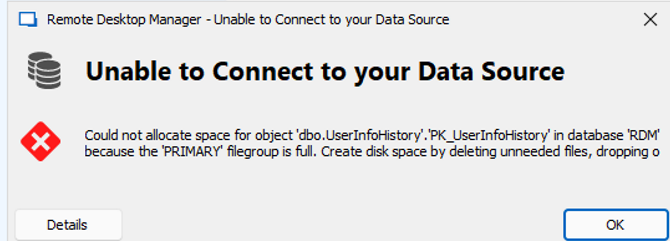 Is there maybe in the latest version we installed last week an option to limit the table size or another workaround to avoid this?
6e566bc8-58f4-4333-9d25-bd2414df3c35.png
@simten As with any app that uses a database, you will need to perform cleanup tasks to maintain its health. RDM has a Clean up manager screen where you can perform these tasks. I suggest running them regularly.
Before we start, make sure you have a proper backup of the database.
Once a filegroup is full, things can get tricky because SQL Server needs disk space to perform cleanup actions, putting you in a catch-22 situation. You can try the Clean up manager first—if it succeeds, great. If not, you might need to increase the filegroup size and retry the Clean up manager. In the worst case, you could truncate the entire UserInfoHistory table, but that would result in the a temporarily loss of traceability and auditing of users in RDM.
Let me know if Clean up manager worked or not. I can assist you further if need be via direct message as we don't want to post truncate SQL statements publicly so that people don't run them accidentally.
Best regards,
Stéfane Lavergne
Thanks Stefane, I already shrinked the db after troncating the history. But I have a reminder in some months and i will use the clean up manager the next time
Hi Stefane,
in the last 3 months i had to manually delete the [UserInfoHistory] and shrink the db cause the db growed over the 10gb limit. Clean up manager didn't work for us.
Hi @simten,
I hear you loud and clear. It’s a pretty annoying issue. The problem has been identified and resolved internally. The fix will be included in v2026.1, which is scheduled for release in early March.
I can send you the database upgrade script ahead of time if you’re brave enough. It’s compatible with 2025.3, but it hasn’t passed all testing stages yet. You will need to manually clean up the table one last time, but after that the growth will be controlled and a fraction of what it is now.
Sorry for the inconvenience,
Stéfane Lavergne
thank you Stefane for you support. I think I prefer to wait for the official release of the v2026.1 to solve this issue.Until then, I will continue to do the cleanup manually.
And a question from the community: I read above that after the upcoming fix with 2026.1, it may be needed 1x to clean the UserInfoHistory table.
Will such a command be included in the (auto-)upgrade db script, or will there be some guidelines to check and clean them ourselves?
Do you have the commands to check its current sizes ?
Regards, Ben
@Ben05
You can and should use the Cleanup Manager to perform periodic database cleanup (File > Administration > Clean up > Cleanup Manager). That said, because this table is growing so quickly, we have had issues with the Cleanup Manager failing to complete the cleanup for this table.
Will such a command be included in the (auto-)upgrade db script, or will there be some guidelines to check and clean them ourselves?
Do you have the commands to check its current sizes ?
We do not want to run automatic cleanup during the upgrade, as it could delete information you may need for audit purposes, for example. Every user’s requirements are different, so we leave it to your discretion how much data to keep, if any at all.
*** Before you delete any data, make sure you have proper backups ***
Yes, for example if you want to empty the entire table run the following : TRUNCATE TABLE dbo.UserInfoHistory
or
Delete all entries older than 30 days: DELETE FROM dbo.UserInfoHistory WHERE ModifiedDate <= GETUTCDATE() - 30
To find the table size run:
SELECT
    s.name + '.' + t.name AS TableName,
    p.Rows,
    SUM(a.total_pages) * 8 AS TotalSpaceKB,
    CAST(ROUND(((SUM(a.total_pages) * 8) / 1024.00), 2) AS NUMERIC(36, 2)) AS TotalSpaceMB,
    SUM(a.used_pages) * 8 AS UsedSpaceKB,
    CAST(ROUND(((SUM(a.used_pages) * 8) / 1024.00), 2) AS NUMERIC(36, 2)) AS UsedSpaceMB,
    (SUM(a.total_pages) - SUM(a.used_pages)) * 8 AS UnusedSpaceKB,
    CAST(ROUND(((SUM(a.total_pages) - SUM(a.used_pages)) * 8) / 1024.00, 2) AS NUMERIC(36, 2)) AS UnusedSpaceMB
FROM sys.tables t
    INNER JOIN sys.indexes i ON t.object_id = i.object_id
    INNER JOIN sys.partitions p ON i.object_id = p.object_id AND i.index_id = p.index_id
    INNER JOIN sys.allocation_units a ON p.partition_id = a.container_id
    LEFT OUTER JOIN sys.schemas s ON t.schema_id = s.schema_id
WHERE  t.name NOT LIKE 'dt%'
    AND t.is_ms_shipped = 0
    AND i.object_id > 255
GROUP BY
    t.name, s.name, p.rows
ORDER BY
    TotalSpaceMB DESC, t.name
Stéfane Lavergne
Hi @Stéfane Lavergne
I saw the Version 2026.1.10.0 is now available, can you confirm that this version fixes the db growing issue?
Yes, absolutely. The growth of the table should be contained to real changes now. You will still need to prune the table once after the upgrade and then on a scheduled occurrence, but at a much more reasonable interval compared to before the fix.
I would very much appreciate if, in say a few weeks, you could please let me know if this fix has improved things for you.
Best regards,,
Stéfane Lavergne
Hi Stefane,
i can confirm the fixed worked for us. I installed the fix 2 or 3 weeks ago and the db didn't grow as much as before
thanks
simon