
SelfMan
When I logoff a RDP session...
I can confirm that the issue still exists in 2026.3.13.0
When I logoff a RDP session...
I came here just to report this problem, when I saw this post.
I am on: Remote Desktop Manager 2026.3.12.0 64-bit (PreJIT), Runtime: .NET 10.0.12, Platform: Microsoft Windows 10.0.19045
and this "going to background" problem is pretty annoying while having multiple active RDP connections in tabs.
Here is the common config i am using:
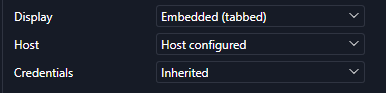
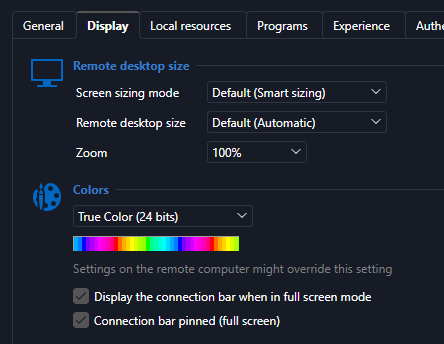
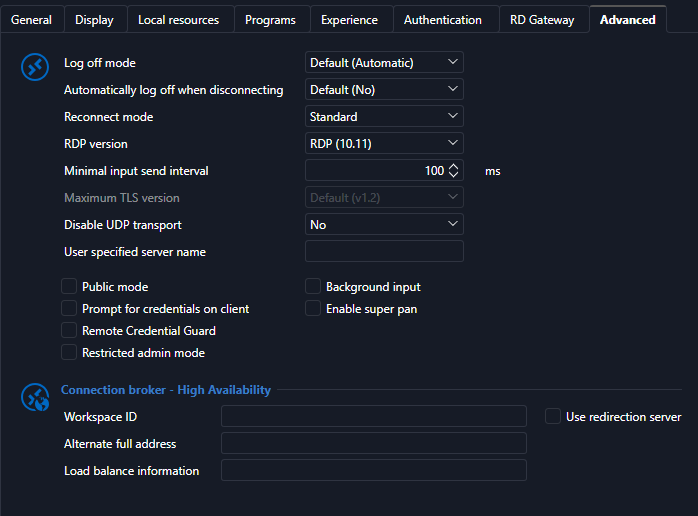
For clarification: If I just close the tab, all is ok, but when I log off on the remote system or the session disconnects for ever reason, then RDM goes into background.
If you need any more info, let me know please.
RDM [2026.3.4.0] - RDP Remote Desktop size set to auto open the RDP in a mini frame
Hello everyone,
For the issue where RDP opens in a small size, a new version containing a fix has been released. Please update to version 2026.3.8.0 or later.
@mvalpreda For the issue with the tabs and drag/undock, we will open a ticket so we can address this. It was also reported in this thread, so I would encourage you to follow that thread for future updates.
Regards,
@Hubert Mireault
I can confirm that the small window issue is gone. Thank you.
RDM [2026.3.4.0] - RDP Remote Desktop size set to auto open the RDP in a mini frame
One thing that is happening is that when I have multiple tabs open, and I click on a different one....it undocks.
@mvalpreda
This is unrelated to the original issue, but - I check the new 2026.3.8.0 and it only happens when you clit on the session tab and drag it. Only then it undocks. I am not able to reproduce it via a single click.
RDM [2026.3.4.0] - RDP Remote Desktop size set to auto open the RDP in a mini frame
One more thing I have noticed. This bug only happens on the double-click action. If you hit enter or use the context menu (Open session), all is ok. (plus the mentioned top menu and the "play" button.
RDM [2026.3.4.0] - RDP Remote Desktop size set to auto open the RDP in a mini frame
FYI the version 2026.3.5.0 still has the same issue.
RDM [2026.3.4.0] - RDP Remote Desktop size set to auto open the RDP in a mini frame
I ended up with 2026.2.19.0 (last official release) and it works fine.
RDM [2026.3.4.0] - RDP Remote Desktop size set to auto open the RDP in a mini frame
Hi,
I just want to ask if anyone noticed the RDM version 2026.3.4.0 opening a RDP session in a about 500x500px square instead of filling the Work area.
I've rolled back to 2026.2.18.0 and there the RDP connections work just fine.
I am running on Windows 10 22H2 x64 Fully up to date.
Display 1440p
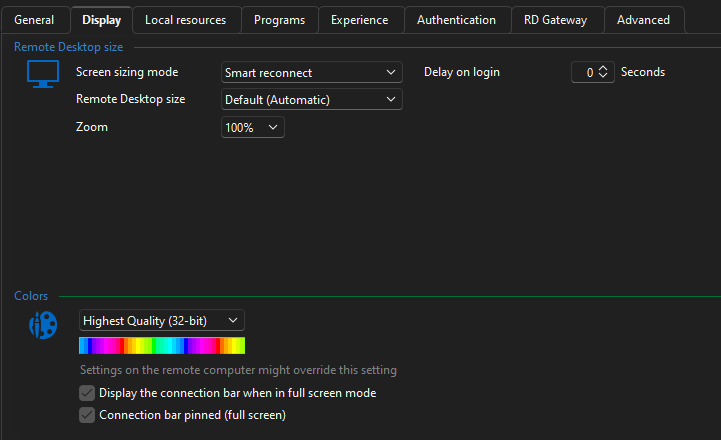
Actions Toolbar width issue
Hi,
in RDM 2026.3.3.0 running on Windows 10 Pro 22h2 (fully up to date), the action toolbar width on the dashboard can be dragged below a minimum viable width, almost to none. Shouldn't there be a minimum width? See screenshot.

RDM 2026.3.2.0 - Crash when starting RDP session
FYI - I've upgraded to 2026.3.3.0 and there are no crashing issues either.
RDM 2026.3.2.0 - Crash when starting RDP session
So, I've reinstalled the 2026.3.2 back and it's not crashing anymore. ( I used the integrated upgrade after closing function)
¯\_(ツ)_/¯
I believe that this was the 4th time that I installed it over the previous release.
Nothing major has changed in my system since, No additional Windows update, no drivers.¯\_(ツ)_/¯
I have no explanation.
The only thing that I did was to delete old *.dmp *.mdmp files and some old RDM logs, but I don't think that this would have any relationship with the previous crash problem.
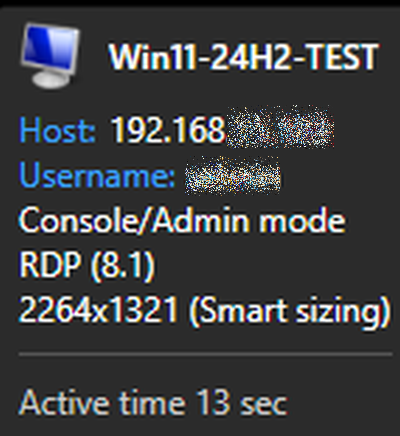
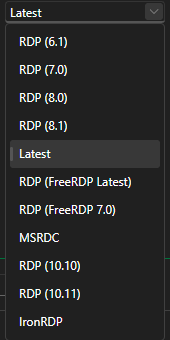
Also I can see that there are higher versions of RDP than 8.1 available, yet "Latest" chooses it.
The crash is gone now. So, ticket is resolved I guess. Yet I am really interested to know why this happened at all and even more so why it isn't happening anymore.
Did anything change in the 2026.3.2.0 installer it self?
as with previous crashes, the system was restarted multiple times since, so the "have you rebooted the computer" question is yes and had no influence on the crash.
Thanks for the support folks.
RDM 2026.3.2.0 - Crash when starting RDP session
My connections show 8.1
RDM 2026.3.2.0 - Crash when starting RDP session
Hi Paul,
I am on fully updated Windows 10 22H2 Pro with enabled ESU. RDM 2026.2.18.0 works just fine

All the RDP connections cause the application to crash. Here is a exported RDM file with removed private data.
<?xml version="1.0" encoding="utf-8"?>
<RDMExport>
  <Connections>
    <Connection>
      <Console>true</Console>
      <DesktopComposition>true</DesktopComposition>
      <DisableWallpaper>true</DisableWallpaper>
      <FontSmoothing>true</FontSmoothing>
      <SoundHook>DoNotPlay</SoundHook>
      <AppVersion>2025.3</AppVersion>
      <ConnectionType>RDPConfigured</ConnectionType>
      <Name>TEST</Name>
      <OpenEmbedded>true</OpenEmbedded>
      <PinEmbeddedMode>False</PinEmbeddedMode>
      <SortPriority>1</SortPriority>
      <RDP>
        <CustomHeight>768</CustomHeight>
        <CustomWidth>1280</CustomWidth>
        <GatewayProfileUsageMethod>Explicit</GatewayProfileUsageMethod>
        <GatewaySelection>None</GatewaySelection>
        <GatewayUsageMethod>NoneDetect</GatewayUsageMethod>
        <RedirectedDrives>
          <string>Somedrive (E:)</string>
        </RedirectedDrives>
      </RDP>
    </Connection>
  </Connections>
  <DatabaseID>XXXXXXXXXXXXXXXXXXXXXXXXXXXXX</DatabaseID>
  <Version>2</Version>
</RDMExport>
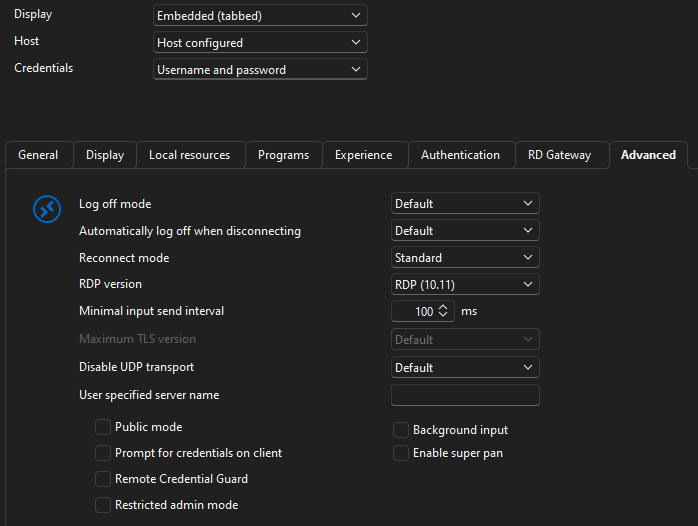
The RDP protocol is set to latest.
I don't have the MsRdpEx logging enabled and can't go back to 2026.3.2.0 because of the crashes. I need RDM to work.
I also don't think that this would help, because RDM crashes immediately after me trying to establish the RDP connection. Double click and instant crash. It does not get to the "connecting" point. Not even *.dmp/*.mdmp files are created.
RDM 2026.3.2.0 - Crash when starting RDP session
Thank you, much appreciated.
RDM 2026.3.2.0 - Crash when starting RDP session
RDM 2026.2.18.0 works fine
RDM 2026.3.2.0 crashes when trying to establish a RDP connection to a remote host.
Crash summary: RDM crashes with an unhandled exception while instantiating the RDP ActiveX COM control (RdpActiveXSession.CreateComInstance), triggered when the user double-clicks a connection entry to open an embedded RDP session. The exception happens during Avalonia's native control host attachment (layout/measure pass), not during actual RDP protocol negotiation - so this fails before any connection is even attempted.
Here is the record from the application event log - event 1026 .NET Runtime:
Application: RemoteDesktopManager.exe
CoreCLR Version: 10.0.1126.37416
.NET Version: 10.0.11
Description: The process was terminated due to an unhandled exception.
Stack:
at Devolutions.MsRdpEx.Avalonia.RdpActiveXSession.CreateComInstance(IntPtr, System.Guid)
at Devolutions.MsRdpEx.Avalonia.RdpActiveXSession+<>c__DisplayClass78_0.<Start>b__0()
at Devolutions.MsRdpEx.Avalonia.RdpActiveXSession.WithAxNameEnvironment[[System.IntPtr, System.Private.CoreLib, Version=10.0.0.0, Culture=neutral, PublicKeyToken=7cec85d7bea7798e]](System.String, System.Func`1<IntPtr>)
at Devolutions.MsRdpEx.Avalonia.RdpActiveXSession.Start(IntPtr, Int32, Int32, System.Guid, System.String, System.String)
at Devolutions.MsRdpEx.Avalonia.RdpClientView.StartSession(IntPtr)
at Devolutions.MsRdpEx.Avalonia.RdpClientView.CreateNativeControlCore(Avalonia.Platform.IPlatformHandle)
at Avalonia.Controls.NativeControlHost.<UpdateHost>b__18_0(Avalonia.Platform.IPlatformHandle)
at Avalonia.Win32.Win32NativeControlHost.CreateNewAttachment(System.Func`2<Avalonia.Platform.IPlatformHandle,Avalonia.Platform.IPlatformHandle>)
at Avalonia.Controls.NativeControlHost.UpdateHost()
at Devolutions.MsRdpEx.Avalonia.RdpClientView.OnAttachedToVisualTree(Avalonia.VisualTreeAttachmentEventArgs)
at Avalonia.Visual.OnAttachedToVisualTreeCore(Avalonia.VisualTreeAttachmentEventArgs)
at Avalonia.Controls.Control.OnAttachedToVisualTreeCore(Avalonia.VisualTreeAttachmentEventArgs)
at Avalonia.Visual.SetVisualParent(Avalonia.Visual)
at Avalonia.Visual.SetVisualParent(System.Collections.IList, Avalonia.Visual)
at Avalonia.Collections.AvaloniaList`1[[System.__Canon, System.Private.CoreLib, Version=10.0.0.0, Culture=neutral, PublicKeyToken=7cec85d7bea7798e]].Add(System.__Canon)
at Avalonia.Controls.Presenters.ContentPresenter.UpdateChild(System.Object)
at Avalonia.Controls.Presenters.ContentPresenter.ApplyTemplate()
at Avalonia.Layout.Layoutable.MeasureCore(Avalonia.Size)
at Avalonia.Layout.Layoutable.Measure(Avalonia.Size)
at Avalonia.Layout.Layoutable.MeasureOverride(Avalonia.Size)
at Avalonia.Layout.Layoutable.MeasureCore(Avalonia.Size)
at Avalonia.Layout.Layoutable.Measure(Avalonia.Size)
at Avalonia.Controls.Grid.MeasureCell(Int32, Boolean)
at Avalonia.Controls.Grid.MeasureCellsGroup(Int32, Boolean, Boolean, Boolean ByRef)
at Avalonia.Controls.Grid.MeasureOverride(Avalonia.Size)
at Avalonia.Layout.Layoutable.MeasureCore(Avalonia.Size)
at Avalonia.Layout.Layoutable.Measure(Avalonia.Size)
at Avalonia.Controls.Presenters.ContentPresenter.MeasureOverride(Avalonia.Size)
at Avalonia.Layout.Layoutable.MeasureCore(Avalonia.Size)
at Avalonia.Layout.Layoutable.Measure(Avalonia.Size)
at Avalonia.Layout.Layoutable.MeasureOverride(Avalonia.Size)
at Avalonia.Layout.Layoutable.MeasureCore(Avalonia.Size)
at Avalonia.Layout.Layoutable.Measure(Avalonia.Size)
at Avalonia.Controls.Border.MeasureOverride(Avalonia.Size)
at Avalonia.Layout.Layoutable.MeasureCore(Avalonia.Size)
at Avalonia.Layout.Layoutable.Measure(Avalonia.Size)
at Avalonia.Controls.Presenters.ContentPresenter.MeasureOverride(Avalonia.Size)
at Avalonia.Layout.Layoutable.MeasureCore(Avalonia.Size)
at Avalonia.Layout.Layoutable.Measure(Avalonia.Size)
at Avalonia.Controls.Border.MeasureOverride(Avalonia.Size)
at Avalonia.Layout.Layoutable.MeasureCore(Avalonia.Size)
at Avalonia.Layout.Layoutable.Measure(Avalonia.Size)
at Avalonia.Layout.Layoutable.MeasureOverride(Avalonia.Size)
at Avalonia.Layout.Layoutable.MeasureCore(Avalonia.Size)
at Avalonia.Layout.Layoutable.Measure(Avalonia.Size)
at Avalonia.Controls.Presenters.ContentPresenter.MeasureOverride(Avalonia.Size)
at Avalonia.Layout.Layoutable.MeasureCore(Avalonia.Size)
at Avalonia.Layout.Layoutable.Measure(Avalonia.Size)
at Avalonia.Layout.LayoutManager.Measure(Avalonia.Layout.Layoutable)
at Avalonia.Layout.LayoutManager.ExecuteMeasurePass()
at Avalonia.Layout.LayoutManager.InnerLayoutPass()
at Avalonia.Layout.LayoutManager.ExecuteLayoutPass()
at Devolutions.AvaloniaUI.Docking.DockingHostView.SynchronizeSelection()
at Devolutions.AvaloniaUI.Docking.DockingHostView.SynchronizeActiveDocument()
at Devolutions.RemoteDesktopManager.AvaloniaUI.ViewModels.Docking.DockingHostViewModel.Workspace_OnDocumentActivated(System.Object, Devolutions.RemoteDesktopManager.Forms.SessionDocumentEventArgs)
at Devolutions.RemoteDesktopManager.Forms.SessionDocumentWorkspace.Add(Devolutions.RemoteDesktopManager.Managers.IFormConnectionContainer, Int32)
at Devolutions.RemoteDesktopManager.Forms.FrmMainDocumentManager.AddDocument(Devolutions.RemoteDesktopManager.Managers.IFormConnectionContainer, System.String, Devolutions.RemoteDesktopManager.Business.OpenConnectionParameter)
at Devolutions.RemoteDesktopManager.Managers.EmbeddedViewManager.OpenEmbedded(Devolutions.RemoteDesktopManager.Managers.ConnectionEngine, Devolutions.RemoteDesktopManager.Frames.Embedded.IEmbeddedSession, Devolutions.RemoteDesktopManager.Business.Connection, Boolean, Devolutions.RemoteDesktopManager.Business.OpenConnectionParameter, System.Drawing.Image, System.Drawing.Image, System.String, System.Nullable`1<Devolutions.Images.ImagePaletteType>, System.String)
at Devolutions.RemoteDesktopManager.Managers.EmbeddedViewManager.Open(Devolutions.RemoteDesktopManager.Managers.ConnectionEngine, Devolutions.RemoteDesktopManager.Business.Connection, Devolutions.RemoteDesktopManager.Frames.Embedded.IEmbeddedSession, Boolean, Devolutions.RemoteDesktopManager.Business.OpenConnectionParameter, Boolean, System.Drawing.Image, System.Drawing.Image, System.String, System.Nullable`1<Devolutions.Images.ImagePaletteType>, System.String)
at Devolutions.RemoteDesktopManager.Business.Connectors.EmbeddedConnector.Connect(Devolutions.RemoteDesktopManager.Business.Connection, Devolutions.RemoteDesktopManager.Business.OpenConnectionParameter)
at Devolutions.RemoteDesktopManager.Managers.ConnectionManager.OpenConnection(Devolutions.RemoteDesktopManager.Managers.ConnectionEngine, Devolutions.RemoteDesktopManager.Business.Connection, Devolutions.RemoteDesktopManager.Business.OpenConnectionParameter)
at Devolutions.RemoteDesktopManager.Managers.ConnectionManager.OpenConnections(Devolutions.RemoteDesktopManager.Managers.ConnectionCollection, Devolutions.RemoteDesktopManager.Business.OpenConnectionParameter, Boolean)
at Devolutions.RemoteDesktopManager.Managers.ActionManager.DoOpenConnection(Devolutions.RemoteDesktopManager.Managers.ConnectionCollection, Devolutions.RemoteDesktopManager.Business.OpenConnectionParameter, Devolutions.RemoteDesktopManager.IConnectionSource)
at Devolutions.RemoteDesktopManager.Managers.ActionManager.OpenOrExecuteConnections(Devolutions.RemoteDesktopManager.Managers.ConnectionEngine, Devolutions.RemoteDesktopManager.Business.Connection[], Devolutions.RemoteDesktopManager.OpenConnectionMode, Devolutions.RemoteDesktopManager.IConnectionSource, Boolean)
at Devolutions.RemoteDesktopManager.Frames.NavigationPaneController.InvokeConnectionTreeEntryAction(Devolutions.RemoteDesktopManager.AvaloniaUI.ViewModels.ConnectionTreeViewNodeViewModel)
at Devolutions.AvaloniaUI.Controls.SelectableTreeView.OnTreeDoubleTapped(System.Object, Avalonia.Input.TappedEventArgs)
at Avalonia.Interactivity.EventRoute.RaiseEventImpl(Avalonia.Interactivity.RoutedEventArgs)
at Avalonia.Interactivity.EventRoute.RaiseEvent(Avalonia.Interactivity.Interactive, Avalonia.Interactivity.RoutedEventArgs)
at Avalonia.Interactivity.Interactive.RaiseEvent(Avalonia.Interactivity.RoutedEventArgs)
at Avalonia.Input.Gestures.PointerPressed(Avalonia.Interactivity.RoutedEventArgs)
at Avalonia.Reactive.LightweightObservableBase`1[[System.__Canon, System.Private.CoreLib, Version=10.0.0.0, Culture=neutral, PublicKeyToken=7cec85d7bea7798e]].PublishNext(System.__Canon)
at Avalonia.Interactivity.EventRoute.RaiseEvent(Avalonia.Interactivity.Interactive, Avalonia.Interactivity.RoutedEventArgs)
at Avalonia.Interactivity.Interactive.RaiseEvent(Avalonia.Interactivity.RoutedEventArgs)
at Avalonia.Input.MouseDevice.MouseDown(Avalonia.Input.IMouseDevice, UInt64, Avalonia.Input.IInputRoot, Avalonia.Point, Avalonia.Input.PointerPointProperties, Avalonia.Input.KeyModifiers, Avalonia.Input.IInputElement, System.Object)
at Avalonia.Input.MouseDevice.ProcessRawEvent(Avalonia.Input.Raw.RawPointerEventArgs)
at Avalonia.Threading.Dispatcher.Send(System.Threading.SendOrPostCallback, System.Object, System.Nullable`1<Avalonia.Threading.DispatcherPriority>)
at Avalonia.Controls.PresentationSource.HandleInput(Avalonia.Input.Raw.RawInputEventArgs)
at Avalonia.Win32.WindowImpl.AppWndProc(IntPtr, UInt32, IntPtr, IntPtr)
at Avalonia.Win32.WindowImpl.WndProcMessageHandler(IntPtr, UInt32, IntPtr, IntPtr)
at Windows.Win32.PInvokeCore.CallWindowProc(Windows.Win32.Foundation.LRESULT (Windows.Win32.Foundation.HWND, UInt32, Windows.Win32.Foundation.WPARAM, Windows.Win32.Foundation.LPARAM), Windows.Win32.Foundation.HWND, UInt32, Windows.Win32.Foundation.WPARAM, Windows.Win32.Foundation.LPARAM)
at Windows.Win32.PInvokeCore.CallWindowProc(Windows.Win32.Foundation.LRESULT (Windows.Win32.Foundation.HWND, UInt32, Windows.Win32.Foundation.WPARAM, Windows.Win32.Foundation.LPARAM), Windows.Win32.Foundation.HWND, UInt32, Windows.Win32.Foundation.WPARAM, Windows.Win32.Foundation.LPARAM)
at System.Windows.Forms.NativeWindow.DefWndProc(System.Windows.Forms.Message ByRef)
at System.Windows.Forms.NativeWindow.Callback(Windows.Win32.Foundation.HWND, UInt32, Windows.Win32.Foundation.WPARAM, Windows.Win32.Foundation.LPARAM)
at Windows.Win32.PInvoke.DispatchMessage(Windows.Win32.UI.WindowsAndMessaging.MSG*)
at System.Windows.Forms.Application+LightThreadContext.FPushMessageLoop(Microsoft.Office.msoloop)
at System.Windows.Forms.Application+LightThreadContext.RunMessageLoop(Microsoft.Office.msoloop, Boolean)
at System.Windows.Forms.Application+ThreadContext.RunMessageLoopInner(Microsoft.Office.msoloop, System.Windows.Forms.ApplicationContext)
at System.Windows.Forms.Application.Run(System.Windows.Forms.Form)
at Devolutions.RemoteDesktopManager.Program.RunApplication(System.String[])
at Devolutions.RemoteDesktopManager.Program.Main(System.String[])
RDM not passing password to TeamViewer
Yes, with the specific password it happened every time. TeamViewer is the latest 64bit 15.73.5
I even restarted both. RDM and TeamViewer and the result was the same. Other Sessions are opening just fine. it has to be an issue with the sanitization/parsing of the password.
RDM not passing password to TeamViewer
Hi there,
for couple versions now I am noticing a random situation where a TeamViewer session prompts me for a password while it is stored in RDM.
When I copy the password directly from RDM and paste it into the TeamViewer dialog, I can login just fine.
When I change the password, all starts working fine from RDM. Here is a sample password: D-9K&%6!++P?T8&Ys8a\
(don't worry I've changed it already)
OS: Win 10 22H2 on ESU
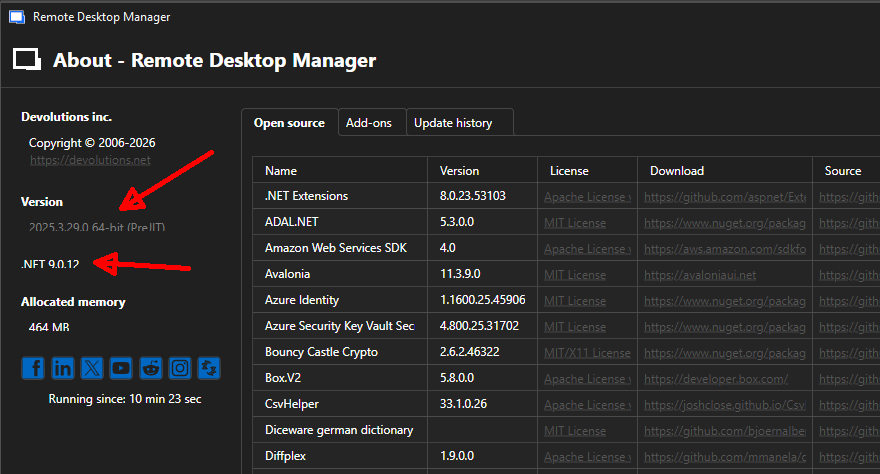
RDM: 2025.3.29.0 64bit
side note, the About dialog is wonky looking. The version info is cut of on the bottom.
Update notification vs dark mode
Hello,
Could you please try deleting the WebView2.Cache folder?
You can find it at the following path:
C:\Users\<username>\AppData\Local\Devolutions\RemoteDesktopManager\WebView2.Cache
Kindly let me know if this resolves the issue.
Best regards,
Oh yah, the magic words did it. Removing the cache content did the trick. Now it is fine.
Update notification vs dark mode
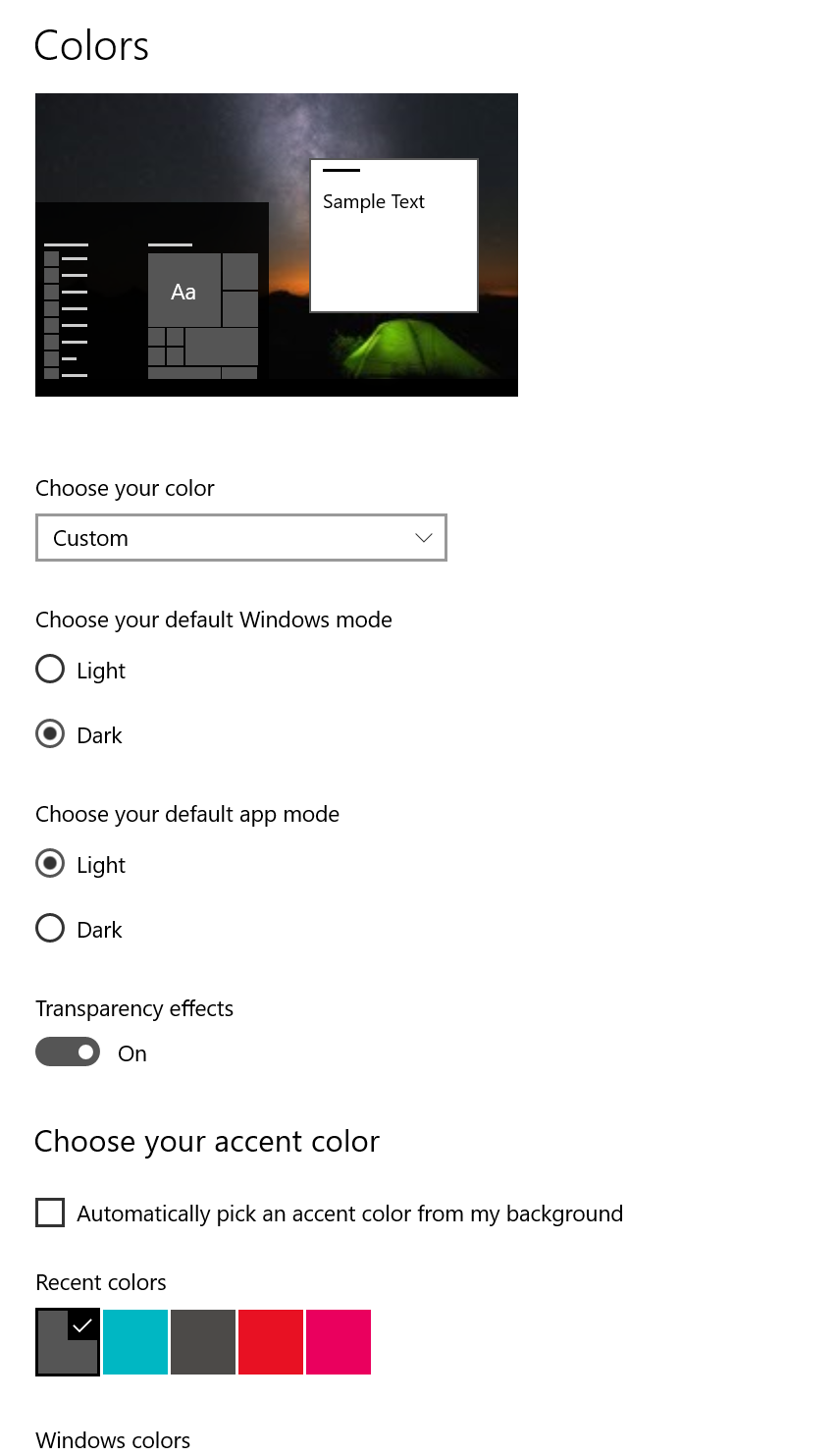
I switched windows to dark and it made no difference (and yet, I did restart RDM)
Update notification vs dark mode
Just some info here - if its related:
Update notification vs dark mode
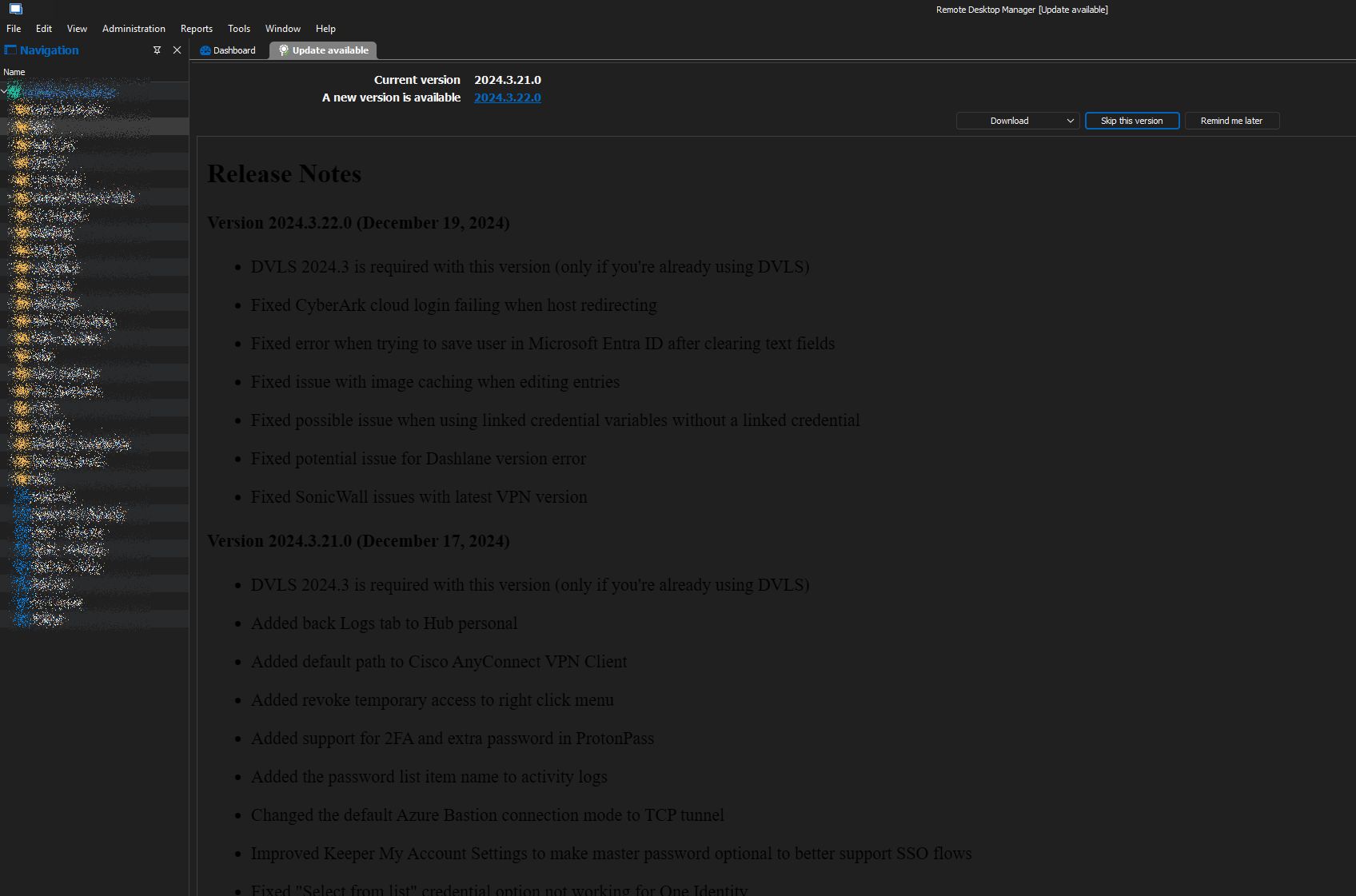
Hi guys,
when the application is in the dark mode, the "Update available" notification is unreadable.
It's black text on dark background. Theme > Dark
New version popup vs upgrade after exit
Hi David, thank you or the heads up!
New version popup vs upgrade after exit
Nice, thank you for the heads up.
New version popup vs upgrade after exit
I have managed to simulate the behavior and uploaded the capture in the FileDrop..
Technically it's easy to do with these steps:
open RDM
go to "Help" > "Check for updates..."
the new release tab opens
select "Download and install when application is closed"
go back to "Help" > "Check for updates..."
the new release tab re-opens
The behavior is identical to the situation where the update check is performed automatically by the application.
This should be not happening as RDM is already in the state of waiting for exit to install the new version.
New version popup vs upgrade after exit
As the check is performed automatically and depends on the release of a new version, it is hard to reproduce and capture on video as the conditions do change. I'll try it the next time an update is available, but no promises.
Marcel