RDM [2026.3.4.0] - RDP Remote Desktop size set to auto open the RDP in a mini frame
RDM [2026.3.4.0] - RDP Remote Desktop size set to auto open the RDP in a mini frame

Hi,
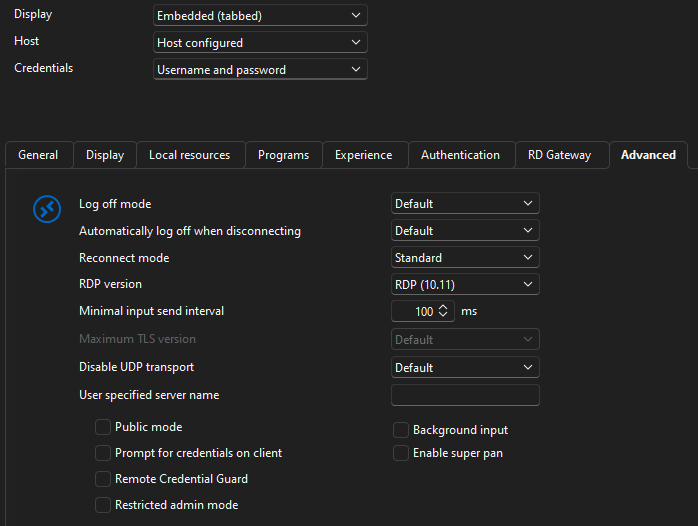
I just want to ask if anyone noticed the RDM version 2026.3.4.0 opening a RDP session in a about 500x500px square instead of filling the Work area.
I've rolled back to 2026.2.18.0 and there the RDP connections work just fine.
I am running on Windows 10 22H2 x64 Fully up to date.
Display 1440p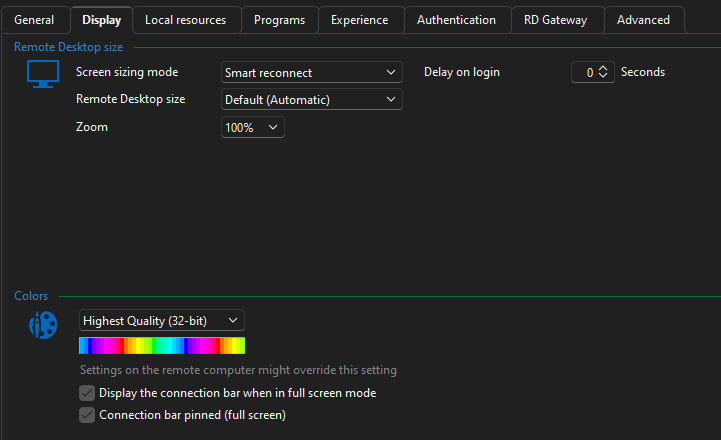
4ac62121-cddb-4e4d-bc9f-9e97403c85f9.png
bcc79d0f-85dc-47e0-b675-7aba24fd0274.png
All Comments (22)
Hello,
Can you confirm whether you're opening your RDP entry from the favorites? We were able to reproduce this issue but only that way. We're working to fix this as soon as we can.
Regards,
Hubert Mireault
Happening to me too. So annoying. I'm going to try downgrading
Same here. I can't figure out how to get it to work correctly without closing RDM and starting over every time I connect to a device.
Same here. I can't figure out how to get it to work correctly without closing RDM and starting over every time I connect to a device.
@malikh
Scratch that, closing RDM does nothing fix anything.
downgrading to 2026.2 fixed it for me
The update notes did say they completely redid the UI.
I ended up with 2026.2.19.0 (last official release) and it works fine.
Yeah same here on 2026.3.5.0 on Windows 11; anything opened from my vault seems to most-often open in a tiny window. Sometimes restarting the application corrects it, but not every time.
Manually entering an hostname seems to open normally.
downgrading to 2026.2 fixed it for me
The update notes did say they completely redid the UI.
@daveoneal
Thanks. That's what I just did and things are swimmingly good once again.
Hello,
I just wanted to let you know this is currently being handled in high priority by a developer.
Regards,
Hubert Mireault
As an interim solution, these settings help, as shown in the attached screenshot.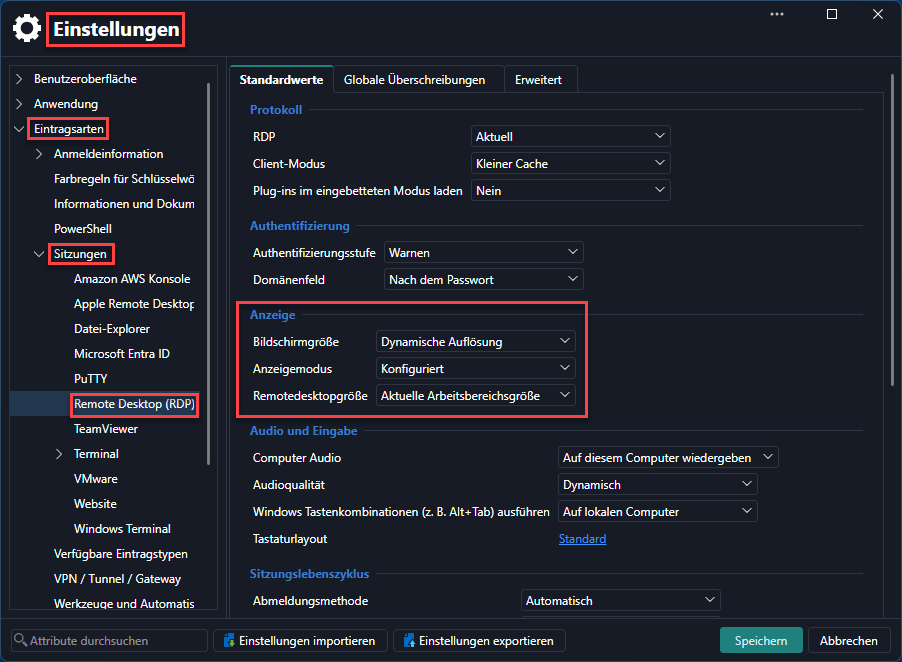
16-09-2026_14-24-13.png
Same issue here. in out case it looks that changing in advanced RDP version from "Latest" to "RDP (Free RDP Latest) solve the issue.
Hello,
The development team is currently working to resolve this issue. The issue will be resolved in the next release.
In the meantime, we found a workaround. Instead of double-clicking an RDP entry, select it and then click on "Open session" in the ribbon.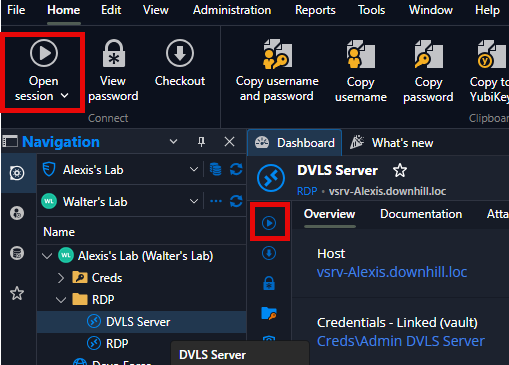
I’ll also make sure you’re notified by email when a new version with the fix is available.
If you have any other questions, please feel free to contact us.
Best regards,
Alexis Beauparlant
c7b811dd-eefe-45cd-9839-e07e24c3386d.png
As an interim solution, these settings help, as shown in the attached screenshot.
@akimu
Nice work!
And for those like me that don't speak German the English version is:
File > Setting > Entry types > Sessions > Remote Desktop > Display
Screen sizing mode: Dynamic resolution
Display mode: Configured
Remote desktop size: Current work area size
same problem here. But when choosing Remote desktop size: Current work area size, the RDP sesssion size is monitor size, not current window size.
After changing Screen sizing mode from Smart Reconnect to Dynamic resolution, now RDP session opens correctly.
FYI the version 2026.3.5.0 still has the same issue.
One more thing I have noticed. This bug only happens on the double-click action. If you hit enter or use the context menu (Open session), all is ok. (plus the mentioned top menu and the "play" button.
Glad I'm not alone! I double-click all the time to open. Using right-click open is fine. Opening RDM after closing with open sessions works when the prompt comes up and asks if I want to open existing sessions works as well.
One thing that is happening is that when I have multiple tabs open, and I click on a different one....it undocks.
Hello everyone,
For the issue where RDP opens in a small size, a new version containing a fix has been released. Please update to version 2026.3.8.0 or later.
@mvalpreda For the issue with the tabs and drag/undock, we will open a ticket so we can address this. It was also reported in this thread, so I would encourage you to follow that thread for future updates.
Regards,
Hubert Mireault
One thing that is happening is that when I have multiple tabs open, and I click on a different one....it undocks.
@mvalpreda
This is unrelated to the original issue, but - I check the new 2026.3.8.0 and it only happens when you clit on the session tab and drag it. Only then it undocks. I am not able to reproduce it via a single click.
Hello everyone,
For the issue where RDP opens in a small size, a new version containing a fix has been released. Please update to version 2026.3.8.0 or later.
@mvalpreda For the issue with the tabs and drag/undock, we will open a ticket so we can address this. It was also reported in this thread, so I would encourage you to follow that thread for future updates.
Regards,
@Hubert Mireault
I can confirm that the small window issue is gone. Thank you.
Hello @mvalpreda,
A fix is coming in the upcoming 2026.3.9.0 version of RDM for the undocking issue.
Best regards,
Antoine Mauger