RDM not passing password to TeamViewer

Hi there,
for couple versions now I am noticing a random situation where a TeamViewer session prompts me for a password while it is stored in RDM.
When I copy the password directly from RDM and paste it into the TeamViewer dialog, I can login just fine.
When I change the password, all starts working fine from RDM. Here is a sample password: D-9K&%6!++P?T8&Ys8a\
(don't worry I've changed it already)
OS: Win 10 22H2 on ESU
RDM: 2025.3.29.0 64bit
side note, the About dialog is wonky looking. The version info is cut of on the bottom.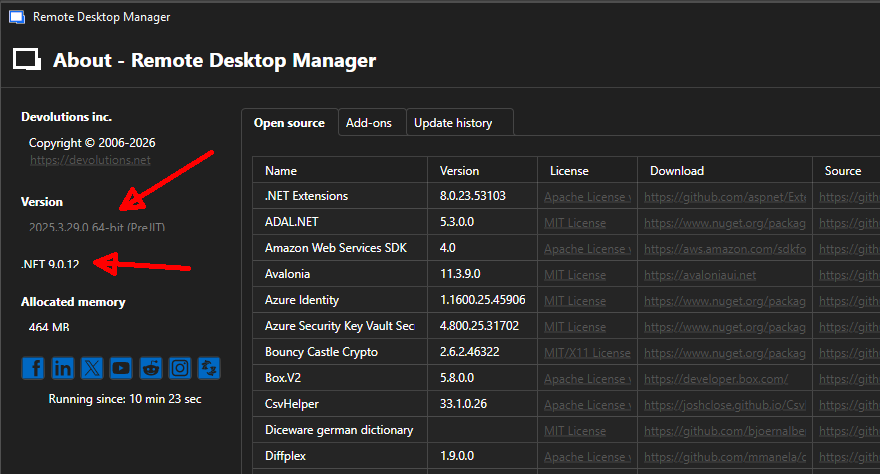
23743fbc-8798-4036-92b3-b7d56c418f7f.png
All Comments (3)
Hello,
Thank you for reaching out to us regarding this,
To clarify, is this occurring every time you are launching a TeamViewer session from RDM, or does it occur randomly?
Could you confirm which version of TeamViewer you are using?
Let me know,
Best regards,
Samuel Dery
Yes, with the specific password it happened every time. TeamViewer is the latest 64bit 15.73.5
I even restarted both. RDM and TeamViewer and the result was the same. Other Sessions are opening just fine. it has to be an issue with the sanitization/parsing of the password.
Hello,
Thank you for your reply,
I see, I have opened a case with our QA department to see if they can reproduce the issue,
I will keep you updated with any news I receive,
Best regards,
Samuel Dery