RDM 2026.3.2.0 - Crash when starting RDP session

RDM 2026.2.18.0 works fine
RDM 2026.3.2.0 crashes when trying to establish a RDP connection to a remote host.
Crash summary: RDM crashes with an unhandled exception while instantiating the RDP ActiveX COM control (RdpActiveXSession.CreateComInstance), triggered when the user double-clicks a connection entry to open an embedded RDP session. The exception happens during Avalonia's native control host attachment (layout/measure pass), not during actual RDP protocol negotiation - so this fails before any connection is even attempted.
Here is the record from the application event log - event 1026 .NET Runtime:
Application: RemoteDesktopManager.exe
CoreCLR Version: 10.0.1126.37416
.NET Version: 10.0.11
Description: The process was terminated due to an unhandled exception.
Stack:
at Devolutions.MsRdpEx.Avalonia.RdpActiveXSession.CreateComInstance(IntPtr, System.Guid)
at Devolutions.MsRdpEx.Avalonia.RdpActiveXSession+<>c__DisplayClass78_0.<Start>b__0()
at Devolutions.MsRdpEx.Avalonia.RdpActiveXSession.WithAxNameEnvironment[[System.IntPtr, System.Private.CoreLib, Version=10.0.0.0, Culture=neutral, PublicKeyToken=7cec85d7bea7798e]](System.String, System.Func`1<IntPtr>)
at Devolutions.MsRdpEx.Avalonia.RdpActiveXSession.Start(IntPtr, Int32, Int32, System.Guid, System.String, System.String)
at Devolutions.MsRdpEx.Avalonia.RdpClientView.StartSession(IntPtr)
at Devolutions.MsRdpEx.Avalonia.RdpClientView.CreateNativeControlCore(Avalonia.Platform.IPlatformHandle)
at Avalonia.Controls.NativeControlHost.<UpdateHost>b__18_0(Avalonia.Platform.IPlatformHandle)
at Avalonia.Win32.Win32NativeControlHost.CreateNewAttachment(System.Func`2<Avalonia.Platform.IPlatformHandle,Avalonia.Platform.IPlatformHandle>)
at Avalonia.Controls.NativeControlHost.UpdateHost()
at Devolutions.MsRdpEx.Avalonia.RdpClientView.OnAttachedToVisualTree(Avalonia.VisualTreeAttachmentEventArgs)
at Avalonia.Visual.OnAttachedToVisualTreeCore(Avalonia.VisualTreeAttachmentEventArgs)
at Avalonia.Controls.Control.OnAttachedToVisualTreeCore(Avalonia.VisualTreeAttachmentEventArgs)
at Avalonia.Visual.SetVisualParent(Avalonia.Visual)
at Avalonia.Visual.SetVisualParent(System.Collections.IList, Avalonia.Visual)
at Avalonia.Collections.AvaloniaList`1[[System.__Canon, System.Private.CoreLib, Version=10.0.0.0, Culture=neutral, PublicKeyToken=7cec85d7bea7798e]].Add(System.__Canon)
at Avalonia.Controls.Presenters.ContentPresenter.UpdateChild(System.Object)
at Avalonia.Controls.Presenters.ContentPresenter.ApplyTemplate()
at Avalonia.Layout.Layoutable.MeasureCore(Avalonia.Size)
at Avalonia.Layout.Layoutable.Measure(Avalonia.Size)
at Avalonia.Layout.Layoutable.MeasureOverride(Avalonia.Size)
at Avalonia.Layout.Layoutable.MeasureCore(Avalonia.Size)
at Avalonia.Layout.Layoutable.Measure(Avalonia.Size)
at Avalonia.Controls.Grid.MeasureCell(Int32, Boolean)
at Avalonia.Controls.Grid.MeasureCellsGroup(Int32, Boolean, Boolean, Boolean ByRef)
at Avalonia.Controls.Grid.MeasureOverride(Avalonia.Size)
at Avalonia.Layout.Layoutable.MeasureCore(Avalonia.Size)
at Avalonia.Layout.Layoutable.Measure(Avalonia.Size)
at Avalonia.Controls.Presenters.ContentPresenter.MeasureOverride(Avalonia.Size)
at Avalonia.Layout.Layoutable.MeasureCore(Avalonia.Size)
at Avalonia.Layout.Layoutable.Measure(Avalonia.Size)
at Avalonia.Layout.Layoutable.MeasureOverride(Avalonia.Size)
at Avalonia.Layout.Layoutable.MeasureCore(Avalonia.Size)
at Avalonia.Layout.Layoutable.Measure(Avalonia.Size)
at Avalonia.Controls.Border.MeasureOverride(Avalonia.Size)
at Avalonia.Layout.Layoutable.MeasureCore(Avalonia.Size)
at Avalonia.Layout.Layoutable.Measure(Avalonia.Size)
at Avalonia.Controls.Presenters.ContentPresenter.MeasureOverride(Avalonia.Size)
at Avalonia.Layout.Layoutable.MeasureCore(Avalonia.Size)
at Avalonia.Layout.Layoutable.Measure(Avalonia.Size)
at Avalonia.Controls.Border.MeasureOverride(Avalonia.Size)
at Avalonia.Layout.Layoutable.MeasureCore(Avalonia.Size)
at Avalonia.Layout.Layoutable.Measure(Avalonia.Size)
at Avalonia.Layout.Layoutable.MeasureOverride(Avalonia.Size)
at Avalonia.Layout.Layoutable.MeasureCore(Avalonia.Size)
at Avalonia.Layout.Layoutable.Measure(Avalonia.Size)
at Avalonia.Controls.Presenters.ContentPresenter.MeasureOverride(Avalonia.Size)
at Avalonia.Layout.Layoutable.MeasureCore(Avalonia.Size)
at Avalonia.Layout.Layoutable.Measure(Avalonia.Size)
at Avalonia.Layout.LayoutManager.Measure(Avalonia.Layout.Layoutable)
at Avalonia.Layout.LayoutManager.ExecuteMeasurePass()
at Avalonia.Layout.LayoutManager.InnerLayoutPass()
at Avalonia.Layout.LayoutManager.ExecuteLayoutPass()
at Devolutions.AvaloniaUI.Docking.DockingHostView.SynchronizeSelection()
at Devolutions.AvaloniaUI.Docking.DockingHostView.SynchronizeActiveDocument()
at Devolutions.RemoteDesktopManager.AvaloniaUI.ViewModels.Docking.DockingHostViewModel.Workspace_OnDocumentActivated(System.Object, Devolutions.RemoteDesktopManager.Forms.SessionDocumentEventArgs)
at Devolutions.RemoteDesktopManager.Forms.SessionDocumentWorkspace.Add(Devolutions.RemoteDesktopManager.Managers.IFormConnectionContainer, Int32)
at Devolutions.RemoteDesktopManager.Forms.FrmMainDocumentManager.AddDocument(Devolutions.RemoteDesktopManager.Managers.IFormConnectionContainer, System.String, Devolutions.RemoteDesktopManager.Business.OpenConnectionParameter)
at Devolutions.RemoteDesktopManager.Managers.EmbeddedViewManager.OpenEmbedded(Devolutions.RemoteDesktopManager.Managers.ConnectionEngine, Devolutions.RemoteDesktopManager.Frames.Embedded.IEmbeddedSession, Devolutions.RemoteDesktopManager.Business.Connection, Boolean, Devolutions.RemoteDesktopManager.Business.OpenConnectionParameter, System.Drawing.Image, System.Drawing.Image, System.String, System.Nullable`1<Devolutions.Images.ImagePaletteType>, System.String)
at Devolutions.RemoteDesktopManager.Managers.EmbeddedViewManager.Open(Devolutions.RemoteDesktopManager.Managers.ConnectionEngine, Devolutions.RemoteDesktopManager.Business.Connection, Devolutions.RemoteDesktopManager.Frames.Embedded.IEmbeddedSession, Boolean, Devolutions.RemoteDesktopManager.Business.OpenConnectionParameter, Boolean, System.Drawing.Image, System.Drawing.Image, System.String, System.Nullable`1<Devolutions.Images.ImagePaletteType>, System.String)
at Devolutions.RemoteDesktopManager.Business.Connectors.EmbeddedConnector.Connect(Devolutions.RemoteDesktopManager.Business.Connection, Devolutions.RemoteDesktopManager.Business.OpenConnectionParameter)
at Devolutions.RemoteDesktopManager.Managers.ConnectionManager.OpenConnection(Devolutions.RemoteDesktopManager.Managers.ConnectionEngine, Devolutions.RemoteDesktopManager.Business.Connection, Devolutions.RemoteDesktopManager.Business.OpenConnectionParameter)
at Devolutions.RemoteDesktopManager.Managers.ConnectionManager.OpenConnections(Devolutions.RemoteDesktopManager.Managers.ConnectionCollection, Devolutions.RemoteDesktopManager.Business.OpenConnectionParameter, Boolean)
at Devolutions.RemoteDesktopManager.Managers.ActionManager.DoOpenConnection(Devolutions.RemoteDesktopManager.Managers.ConnectionCollection, Devolutions.RemoteDesktopManager.Business.OpenConnectionParameter, Devolutions.RemoteDesktopManager.IConnectionSource)
at Devolutions.RemoteDesktopManager.Managers.ActionManager.OpenOrExecuteConnections(Devolutions.RemoteDesktopManager.Managers.ConnectionEngine, Devolutions.RemoteDesktopManager.Business.Connection[], Devolutions.RemoteDesktopManager.OpenConnectionMode, Devolutions.RemoteDesktopManager.IConnectionSource, Boolean)
at Devolutions.RemoteDesktopManager.Frames.NavigationPaneController.InvokeConnectionTreeEntryAction(Devolutions.RemoteDesktopManager.AvaloniaUI.ViewModels.ConnectionTreeViewNodeViewModel)
at Devolutions.AvaloniaUI.Controls.SelectableTreeView.OnTreeDoubleTapped(System.Object, Avalonia.Input.TappedEventArgs)
at Avalonia.Interactivity.EventRoute.RaiseEventImpl(Avalonia.Interactivity.RoutedEventArgs)
at Avalonia.Interactivity.EventRoute.RaiseEvent(Avalonia.Interactivity.Interactive, Avalonia.Interactivity.RoutedEventArgs)
at Avalonia.Interactivity.Interactive.RaiseEvent(Avalonia.Interactivity.RoutedEventArgs)
at Avalonia.Input.Gestures.PointerPressed(Avalonia.Interactivity.RoutedEventArgs)
at Avalonia.Reactive.LightweightObservableBase`1[[System.__Canon, System.Private.CoreLib, Version=10.0.0.0, Culture=neutral, PublicKeyToken=7cec85d7bea7798e]].PublishNext(System.__Canon)
at Avalonia.Interactivity.EventRoute.RaiseEvent(Avalonia.Interactivity.Interactive, Avalonia.Interactivity.RoutedEventArgs)
at Avalonia.Interactivity.Interactive.RaiseEvent(Avalonia.Interactivity.RoutedEventArgs)
at Avalonia.Input.MouseDevice.MouseDown(Avalonia.Input.IMouseDevice, UInt64, Avalonia.Input.IInputRoot, Avalonia.Point, Avalonia.Input.PointerPointProperties, Avalonia.Input.KeyModifiers, Avalonia.Input.IInputElement, System.Object)
at Avalonia.Input.MouseDevice.ProcessRawEvent(Avalonia.Input.Raw.RawPointerEventArgs)
at Avalonia.Threading.Dispatcher.Send(System.Threading.SendOrPostCallback, System.Object, System.Nullable`1<Avalonia.Threading.DispatcherPriority>)
at Avalonia.Controls.PresentationSource.HandleInput(Avalonia.Input.Raw.RawInputEventArgs)
at Avalonia.Win32.WindowImpl.AppWndProc(IntPtr, UInt32, IntPtr, IntPtr)
at Avalonia.Win32.WindowImpl.WndProcMessageHandler(IntPtr, UInt32, IntPtr, IntPtr)
at Windows.Win32.PInvokeCore.CallWindowProc(Windows.Win32.Foundation.LRESULT (Windows.Win32.Foundation.HWND, UInt32, Windows.Win32.Foundation.WPARAM, Windows.Win32.Foundation.LPARAM), Windows.Win32.Foundation.HWND, UInt32, Windows.Win32.Foundation.WPARAM, Windows.Win32.Foundation.LPARAM)
at Windows.Win32.PInvokeCore.CallWindowProc(Windows.Win32.Foundation.LRESULT (Windows.Win32.Foundation.HWND, UInt32, Windows.Win32.Foundation.WPARAM, Windows.Win32.Foundation.LPARAM), Windows.Win32.Foundation.HWND, UInt32, Windows.Win32.Foundation.WPARAM, Windows.Win32.Foundation.LPARAM)
at System.Windows.Forms.NativeWindow.DefWndProc(System.Windows.Forms.Message ByRef)
at System.Windows.Forms.NativeWindow.Callback(Windows.Win32.Foundation.HWND, UInt32, Windows.Win32.Foundation.WPARAM, Windows.Win32.Foundation.LPARAM)
at Windows.Win32.PInvoke.DispatchMessage(Windows.Win32.UI.WindowsAndMessaging.MSG*)
at System.Windows.Forms.Application+LightThreadContext.FPushMessageLoop(Microsoft.Office.msoloop)
at System.Windows.Forms.Application+LightThreadContext.RunMessageLoop(Microsoft.Office.msoloop, Boolean)
at System.Windows.Forms.Application+ThreadContext.RunMessageLoopInner(Microsoft.Office.msoloop, System.Windows.Forms.ApplicationContext)
at System.Windows.Forms.Application.Run(System.Windows.Forms.Form)
at Devolutions.RemoteDesktopManager.Program.RunApplication(System.String[])
at Devolutions.RemoteDesktopManager.Program.Main(System.String[])
All Comments (11)
Hello,
We created a ticket for this bug and will keep you updated on any progress.
Best Regards,
Michaël Beaudin
Thank you, much appreciated.
Hello,
Could you please share with me more details about your environment, for example what version of windows are you running RDM on? Can you export me the RDP connection in question and send me a direct message with the (.rdm) file so that I can inspect and try all the same settings (when you export please select to ignore credentials)? I will try to reproduce the issue and fix it asap.
Thanks,
Paul Dumais
Hello,
Could you also send us the MsRdpEx log files, this will help us debug and fix the problem, here is the way to get the logs:
RDP session troubleshooting | Devolutions RDM | Product guides & reference
Thanks,
Paul
Hi Paul,
I am on fully updated Windows 10 22H2 Pro with enabled ESU. RDM 2026.2.18.0 works just fine
All the RDP connections cause the application to crash. Here is a exported RDM file with removed private data.
<?xml version="1.0" encoding="utf-8"?>
<RDMExport>
  <Connections>
    <Connection>
      <Console>true</Console>
      <DesktopComposition>true</DesktopComposition>
      <DisableWallpaper>true</DisableWallpaper>
      <FontSmoothing>true</FontSmoothing>
      <SoundHook>DoNotPlay</SoundHook>
      <AppVersion>2025.3</AppVersion>
      <ConnectionType>RDPConfigured</ConnectionType>
      <Name>TEST</Name>
      <OpenEmbedded>true</OpenEmbedded>
      <PinEmbeddedMode>False</PinEmbeddedMode>
      <SortPriority>1</SortPriority>
      <RDP>
        <CustomHeight>768</CustomHeight>
        <CustomWidth>1280</CustomWidth>
        <GatewayProfileUsageMethod>Explicit</GatewayProfileUsageMethod>
        <GatewaySelection>None</GatewaySelection>
        <GatewayUsageMethod>NoneDetect</GatewayUsageMethod>
        <RedirectedDrives>
          <string>Somedrive (E:)</string>
        </RedirectedDrives>
      </RDP>
    </Connection>
  </Connections>
  <DatabaseID>XXXXXXXXXXXXXXXXXXXXXXXXXXXXX</DatabaseID>
  <Version>2</Version>
</RDMExport>
The RDP protocol is set to latest.
I don't have the MsRdpEx logging enabled and can't go back to 2026.3.2.0 because of the crashes. I need RDM to work.
I also don't think that this would help, because RDM crashes immediately after me trying to establish the RDP connection. Double click and instant crash. It does not get to the "connecting" point. Not even *.dmp/*.mdmp files are created.
bbde0829-76d1-470f-ad8d-0da5255a8ecf.png
Hello
If you don't mind a quick question, on your working 2026.2 environment if you connect to an RDP session and hover over the tab, what does the tooltip tell you for RDP version? I've attached a screenshot showing what I mean.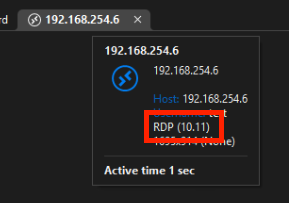
Thanks and kind regards,
Richard Markievicz
Screenshot 2026-09-03 at 09.08.30.png
My connections show 8.1
Hello
That's really interesting, because I think the version of the RDP DLLs on your machine is not what we expect. I build a VM based on the Windows 10 22H2 ISO and my RDP client version is 10.11.
In RDM, if you have "Latest" for the RDP version (which you do), it should be auto negotiated and I think this is the crash you've uncovered. I'll talk to my colleague about that.
In the meantime, if you have the opportunity to check 2026.3 again, it would confirm the bug if you change your RDP version to be explicitly 8.1 - does it resolve the crash? That would really help confirm things on our side.
Thanks and kind regards,
Richard Markievicz
Hello,
Also if you switch back to 2026.3 and get us the MsRdpEx log files that would be super helpful to find out why the app is crashing when selecting Latest RDP version.
Thanks,
Paul
So, I've reinstalled the 2026.3.2 back and it's not crashing anymore. ( I used the integrated upgrade after closing function)
¯\_(ツ)_/¯
I believe that this was the 4th time that I installed it over the previous release.
Nothing major has changed in my system since, No additional Windows update, no drivers.¯\_(ツ)_/¯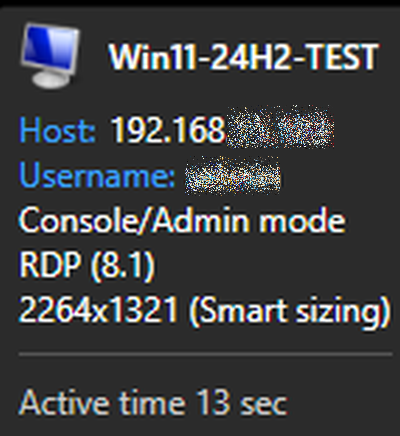
I have no explanation.
The only thing that I did was to delete old *.dmp *.mdmp files and some old RDM logs, but I don't think that this would have any relationship with the previous crash problem.
Also I can see that there are higher versions of RDP than 8.1 available, yet "Latest" chooses it.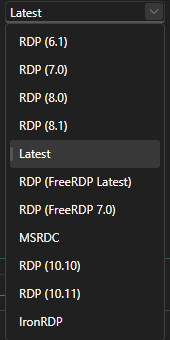
The crash is gone now. So, ticket is resolved I guess. Yet I am really interested to know why this happened at all and even more so why it isn't happening anymore.
Did anything change in the 2026.3.2.0 installer it self?
- as with previous crashes, the system was restarted multiple times since, so the "have you rebooted the computer" question is yes and had no influence on the crash.
Thanks for the support folks.
d36a44e6-043b-4098-80c2-bbbe05c027a1.png
b506fe20-efcc-4a6c-8cfb-09debdc2d0b2.png
FYI - I've upgraded to 2026.3.3.0 and there are no crashing issues either.