RDM v2026.3.5 - Open Tabs Moving and Undocking on single mouse click
RDM v2026.3.5 - Open Tabs Moving and Undocking on single mouse click

Updated to RDM 2026.3.5 and open several tabs and if i single click a tab it with either select like normal, select and become draggable, or undock from the main RDM window. Results seem to be random.
I am also seeing RDP instability. Screen writes are not stable, switching between tabs (open RDP sessions) I will get blank screens, half written screens, slow response screens in a session, or a normal screen. Results are random.
I am on RDP'd into Windows Server 2025 in an Enterprise environment, running RDM on my jump box.
All Comments (26)
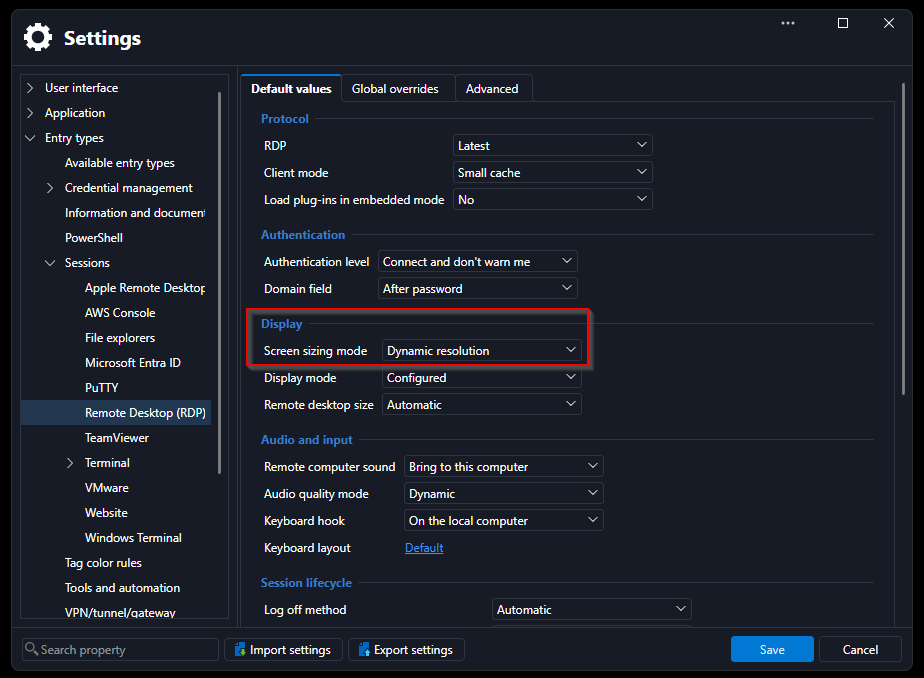
Yeah the thing with the tabs is incredibly annoying. Also all my RDP sessions default to very tiny remote windows and I had to set the properties for Remote Desktop size on all connections.
Yeah the thing with the tabs is incredibly annoying. Also all my RDP sessions default to very tiny remote windows and I had to set the properties for Remote Desktop size on all connections.
Yes, it's very annoying. That's exactly how it is for me. Set to "default" "auto" - but apart from the first connection, only a tiny remote session opens.
And tabs thing... detaching every second click. :(
EDIT:
Helps with RDP resolution
Updated to RDM 2026.3.5 and open several tabs and if i single click a tab it with either select like normal, select and become draggable, or undock from the main RDM window. Results seem to be random.
I am also seeing RDP instability. Screen writes are not stable, switching between tabs (open RDP sessions) I will get blank screens, half written screens, slow response screens in a session, or a normal screen. Results are random.
I am on RDP'd into Windows Server 2025 in an Enterprise environment, running RDM on my jump box.
I'm seeing the same with the new version and tabs undocking super (unintentionally) easily. I'm currently trying to click on the tab (or double-click) and keeping the mouse still, but even then sometimes it is undocking.
Updated to RDM 2026.3.5 and open several tabs and if i single click a tab it with either select like normal, select and become draggable, or undock from the main RDM window. Results seem to be random.
I am also seeing RDP instability. Screen writes are not stable, switching between tabs (open RDP sessions) I will get blank screens, half written screens, slow response screens in a session, or a normal screen. Results are random.
I am on RDP'd into Windows Server 2025 in an Enterprise environment, running RDM on my jump box.
I'm seeing the same with the new version and tabs undocking super (unintentionally) easily. I'm currently trying to click on the tab (or double-click) and keeping the mouse still, but even then sometimes it is undocking.
Most annoying... many bugs in 2026.3.5 which impact my daily work.
Hello everyone,
For the issue where RDP opens in a small size, a new version containing a fix has been released. Please update to version 2026.3.8.0 or later.
As a side note, there is also a workaround as it happened when double clicking specifically, so using the "Open session" context menu or action in the dashboard should work to bypass the issue as well.
For the issue with the tabs and drag/undock, we will open a ticket so we can address this.
Regards,
Hubert Mireault