New version popup vs upgrade after exit

FYI, there is a bug where RDM notifies you about a new version even though you already selected the install after exit option.
Please fix the behavior.
Thank you
All Comments (9)
Hello,
Could you post a print screen? I'm not sure to understand where you get the the notification.
Regards
David Hervieux
It is the same as when you do a manual check for updates via Help > Check for updates but the automated one.
It pops up a new Tab "Update availabe" even thou I've already seen it and clicked on the "Download and install when application is closed" menu item.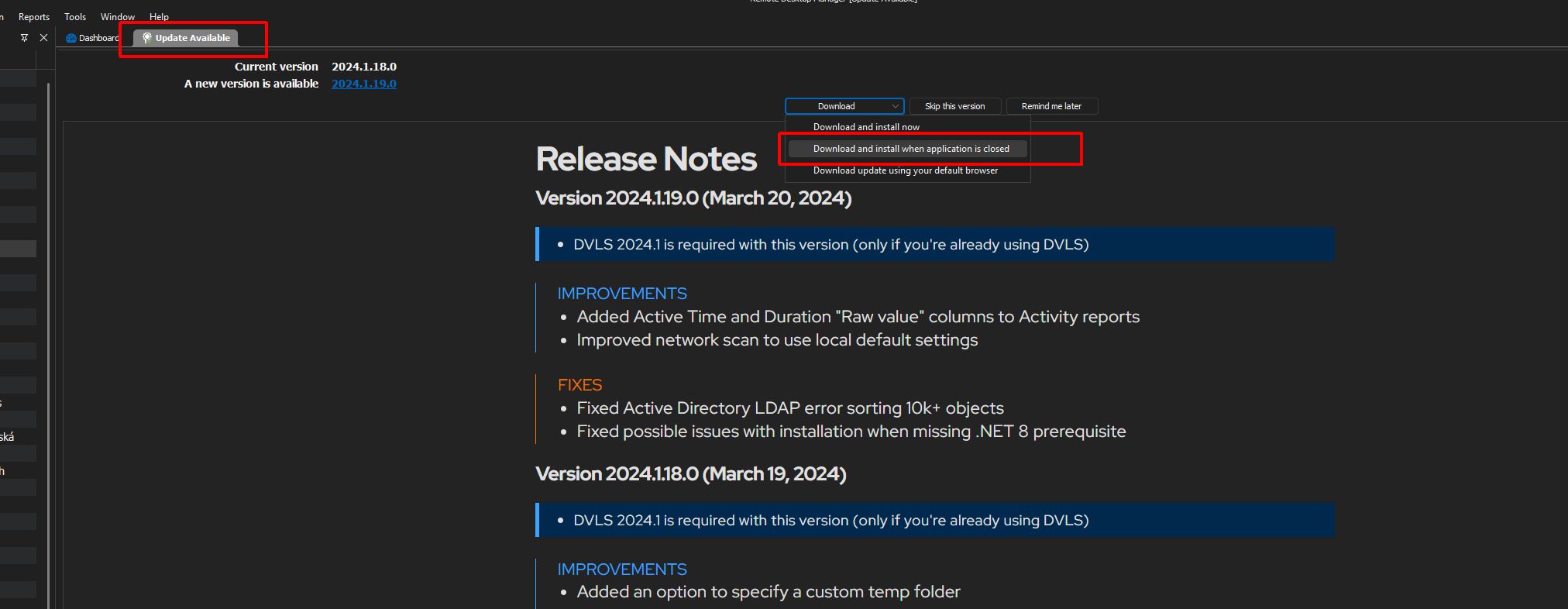
rdm-notification-bug.jpg
Hello SelfMan,
Thank you for your response!
I've created a ticket regarding your issue and would like a screen recording of the problem. I will send you the information through the ticket to provide us with the recording.
Thank you for your collaboration. If you have any other questions, feel free to let us know.
Best regards,
Maxim Robert
As the check is performed automatically and depends on the release of a new version, it is hard to reproduce and capture on video as the conditions do change. I'll try it the next time an update is available, but no promises.
Marcel
I have managed to simulate the behavior and uploaded the capture in the FileDrop..
Technically it's easy to do with these steps:
- open RDM
- go to "Help" > "Check for updates..."
- the new release tab opens
- select "Download and install when application is closed"
- go back to "Help" > "Check for updates..."
- the new release tab re-opens
The behavior is identical to the situation where the update check is performed automatically by the application.
This should be not happening as RDM is already in the state of waiting for exit to install the new version.
Hello SelfMan,
Thank you for the information!
I've reproduced the issue, and a ticket with our development team has been opened. I will let you know about any information as soon as possible.
Thank you for your collaboration. If you have any other questions, feel free to let us know.
Best regards,
Maxim Robert
Nice, thank you for the heads up.
Hello,
I have made the fix, and this will be resolved in RDM 2024.2 planned for this June.
Regards
David Hervieux
Hi David, thank you or the heads up!