
BJ11
No Connect Since Update to 3.0.5.0 RDM Mac Enterprise
Yes, it's working again.
Great app and even better support.
No Connect Since Update to 3.0.5.0 RDM Mac Enterprise
Super, thanks for the quick reply and have a nice day.
Alex
No Connect Since Update to 3.0.5.0 RDM Mac Enterprise
Hello,
since the update from 3.0.4.0 to 3.0.5.0 i've trouble to connect to our database.
The datasource config said connection to server is fine und to database is fine.
I become this error.
System.NullReferenceException: Object reference not set to an instance of an object
at System.Data.SqlClient.SqlDataReader.GetValues (System.Object[] values) <0x14f8a5d8 + 0x00051> in <filename unknown>:0
at System.Data.ProviderBase.DataReaderContainer+CommonLanguageSubsetDataReader.GetValues (System.Object[] values) <0x14f8a5b0 + 0x0001f> in <filename unknown>:0
at System.Data.ProviderBase.SchemaMapping.LoadDataRow () <0x14f8a410 + 0x00020> in <filename unknown>:0
at System.Data.Common.DataAdapter.FillLoadDataRow (System.Data.ProviderBase.SchemaMapping mapping) <0x14f89c88 + 0x00127> in <filename unknown>:0
at System.Data.Common.DataAdapter.FillFromReader (System.Data.DataSet dataset, System.Data.DataTable datatable, System.String srcTable, System.Data.ProviderBase.DataReaderContainer dataReader, Int32 startRecord, Int32 maxRecords, System.Data.DataColumn parentChapterColumn, System.Object parentChapterValue) <0x14f71428 + 0x000ef> in <filename unknown>:0
at System.Data.Common.DataAdapter.Fill (System.Data.DataSet dataSet, System.String srcTable, IDataReader dataReader, Int32 startRecord, Int32 maxRecords) <0x14f70f88 + 0x001f3> in <filename unknown>:0
at System.Data.Common.DbDataAdapter.FillInternal (System.Data.DataSet dataset, System.Data.DataTable[] datatables, Int32 startRecord, Int32 maxRecords, System.String srcTable, IDbCommand command, CommandBehavior behavior) <0x14f7fef8 + 0x00113> in <filename unknown>:0
at System.Data.Common.DbDataAdapter.Fill (System.Data.DataSet dataSet, Int32 startRecord, Int32 maxRecords, System.String srcTable, IDbCommand command, CommandBehavior behavior) <0x14f7fc38 + 0x0019f> in <filename unknown>:0
at System.Data.Common.DbDataAdapter.Fill (System.Data.DataSet dataSet) <0x14f7fa98 + 0x00093> in <filename unknown>:0
at A.c1b7e8caf3fa8e5fb77cc57c00e8d5e1c.cf7143f4d0ccb8590178f208ae12c1b10 (System.String c0543ca550f15febd1b069e16fd4b95e1, System.Data.IDbDataParameter[] c91084b2aae54f62d01e2a4664a847bd7) <0x14f5e848 + 0x000bd> in <filename unknown>:0
at Devolutions.RemoteDesktopManager.Business.DataSources.SQLServerConnectionDataSource.c1e3e098748c6efd7f005032d264f60b2 () <0x14f5e658 + 0x00167> in <filename unknown>:0
at A.cbbb560bfd0154564f3a0626f8038689f.cca44e7b409894de57ef01c51d223624f (A.c323b374042cd3040715f1835f9a00a5c c575f8eb13de2147c285404f8805d1720) <0x14f41880 + 0x00258> in <filename unknown>:0
Is there a known bug or should i downgrade to Version 3.0.4.0?
Regards,
Alex
Data Source Issue - No Offline / Passphrase not saved
Hi there,
please have attached my Application log.
Regards,
Alex
Data Source Issue - No Offline / Passphrase not saved
Hi Benoit,
thanks for the quick feedback.
Feel free to contact me if i can support you with information or logs.
Regards,
Alex
Data Source Issue - No Offline / Passphrase not saved
Hello,
i'm using RDP Manager Enterprise 2.5.6.0 under Mac OS 10.11 (GM Candidate). But the issue also was under 10.10.5. So it is not Mac OS Version related.
We have a Microsoft SQL Server, where our Windows Clients get the RDP Manager Enterprise Data for online and offline use.
The connection is secured to a passphrase, which is cached on the Windows client.
On the mac client i am asked 2 times every start to enter the passphrase.
After i entered it one time, the database is syncing and i can quit the second dialog and confirm that it is ok to not connect to the database.
But i am connected already...
Then the other problem is, that even a offline db file is created, i can't use it.
When i start RDP Manager - i have change the settings to ask me every start for offline mode - and i confirm to start in offline mode, the program tells me, that the database cannot be reached and i have no data.
In the log i can see, that the database file is malformed
15.09.2015 07:20:52]INFO Offline file - Database disk image is malformed, trying to delete the file
[15.09.2015 07:21:21]ERROR System.Exception: Unable to initialize the security provider
at A.cbbb560bfd0154564f3a0626f8038689f.cc215c098d9d30db01ad4833019a25cf4 (A.c323b374042cd3040715f1835f9a00a5c c6001ae751a83ae74954d848ad5dee7b4) [0x00000] in <filename unknown>:0
I'm working as a non admin on this workstation. Just in case if the user rights are important.
I like the use of RDP Manager on Mac, so i'm glad if there is anything to solve this issue.
Regards,
Alex
Beta 10.1.10 Issues (Security)
Thanks, this worked fine.
Security issue is solved and i can see my personal vault.
Have a nice day,
Alexander Flint
Beta 10.1.10 Issues (Security)
Hello,
i've installed the latest 10.1.10 Beat on my PC and have some issues.
We use a central database and my colleagues are using the release version 10.0.4 and 10.1.9
Since the Beta Update i get a message at the start and can't use my personal vault anymore.
I have to go offline and than go online to user our database.
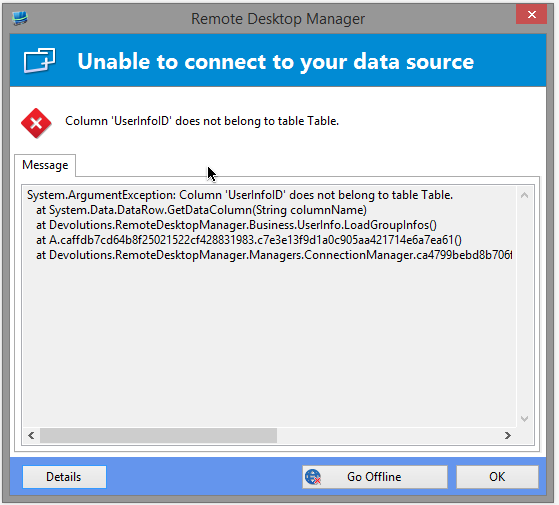
The other thing is, that i also can see every folder and connection in the navigation pane.
I'm not allowed to do that even so i can also use this and edit the settings of the connections.
Are you aware of this security issue?
Regards,
Alexander Flint
Missing Object in Navigation Pane since Update
Hi everyone,
David found the solution.
There was a line in the remotedesktopmanager.cfg which was causing the problem.
"TreeViewItemHeight>16</TreeViewItemHeight"
After deleting this line everything went well.
Call closed. :-)
Missing Object in Navigation Pane since Update
Hi David,
i send you a private message.
Regards,
Alex
Missing Object in Navigation Pane since Update
Hi David,
this is working.
I'Ve created some test folders and this is the first time i see the expand icon.
Hope this helps to find a solution.
Regards,
Alex
Missing Object in Navigation Pane since Update
Hi David,
as you expected, a local data source doesn't change the problem.
Is there another step i can try or another beta build?
Regards,
Alex
Missing Object in Navigation Pane since Update
Hi David,
i tried this today but with no Change in the Navigation ui.
The expand-Icon is still missing.
Could this be a Problem in the data-source?
Because we all have it after the upgrade and not only one Client.
Regards,
Alex
Missing Object in Navigation Pane since Update
Is there a way to get the beta client work with a 9.1 database?
Regards,
Alexander
Missing Object in Navigation Pane since Update
Hi David,
here you go.
Attached one Print-Screen of our navigation and one screenshot of the actual UI-Settings.
We use the application on our PCs and notebooks.
We already have a terminal-server but we've not updatet the client on that machine.
Regards,
Alexander
Missing Object in Navigation Pane since Update
Hi David,
thanks for the quick answer.
That was the first thing we tried.
We've changed the ui back to 7.x and tried "Use modern ui" and without it.
No change at all.
Also we tried the Application in x64 and x86 but no difference.
Regards,
Alexander
Missing Object in Navigation Pane since Update
Hello,
we've updated our RDPManager Enterprise from 7.6 to 9.2.10 and are very pleased with the new featuers and ui.
Only on all our client PCs (Windows 7, Windows 8, x86, x64) we miss the little symbol near to the folders to fold or unfold them.
The functionality is working, but there is no symbol.
Is this a bug or a setting to be set?
See attached screenshot.
Regards,
Alexander
New beta for Remote Desktop Manager 6.2
I have got the problem, that closed treeitems become open, every database refresh (Hit F5 or edit a setting,..).
I could not determine, when this happens. Sometimes, when I leave the RDM opened with collapsed view then change an item (with DB Refresh) treeitems became expanded I used hours before....??
New beta for Remote Desktop Manager 6.2
Hi,
an Option to always open RDM in collapsed tree view would be very nice.
Like:
Sessions
+Customer1
+Customer2
+.....
Credentials
Session Script Tools
Thanks
New beta for Remote Desktop Manager 6.2
Hi David,
first of all: many many many thanks for this very cool Programm RDM. Our Support is very happy to work with such a great tool.
pls. can you explain how the new feature "Added the possibility to package an installer without a subscription" is used. What can one do with the resulting .rdi file?
Whish list:
- pls. add a link "Edit Session" to the Dashboard. So that you do not have to right click on a session to edit.
- is there a possibliity to not reload the whole Session Data from SQL when one edited a session (in SQL Mode)?
- a feature to automatically reconnect a RDP Session would be nice (in a case of Serverreboot for example)
- pls make the colums in "openned Session" smaller and safe the width in the config file.
Thanks for your great work.
Björn