New beta for Remote Desktop Manager 6.2
Hi,
We are happy to announce a new beta for Remote Desktop Manager. This version contains many small enhancements and bug fixes. For the Enterprise user, it also include a whole new product name Password Vault Manager. You can now share or protect your sensitive data (Credit card, bank account, credentials...) within your business. http://passwordvaultmanager.com
http://remotedesktopmanager.com/download/Setup.RemoteDesktopManager.6.1.7.0.exe
Here is the complete change history
- Added embedded web browser auto login with frames
- Added a new data entry sub types
- Added the possibility to use Firefox portable
- Added the escape key shortcut in the filter to clear it
- Added batch edit support for the RDP gateway
- Added the possibility to hide the top panel
- Added the delete shortcut for User / Security Group and Data Source
- Added the smart size support with the embedded RDP and fullscreen
- Added a master key for the Dropbox data source encryption
- Added attachments and information support for groups
- Added copy to clipboard for Credentials
- Added the possibility to expose the session password in a database (SQL Server only)
- Added automatic Windows Credentials clean up
- Added Data Entry add-on support
- Added S3 file explorer
- Added DropBox file explorer
- Added suppress script error for LogMeIn
- Added a new data entry type for sensitive data
- Added the posibility to change the username in the SQL Server login prompt
- Added a manual button for the typing macro in embedded web browser
- Added a move group / folder menu
- Added a tree view item height property TreeViewItemHeight and TreeViewItemIndent in the option (xml only)
- Added a master key for the xml data source encryption
- Added a Putty option for ipv4 and ipv6
- Added a small delay to optimize the refresh of connection logs and attachments
- Added Basic authentication auto login for web connection
- Added an option to change the embedded IE browser mode (IE7, IE8, IE9)
- Exposed the command timeout property for the SQL Server data source
- Changed the way RDM save the Windows position, breaking change
- Fixed a bug with the import in RDMO
- Fixed a scrolling bug when clicking the tree view arrow and a session is already opened
- Fixed a bug with the batch edit and the save description
- Fixed a refresh bug in the favorite view when a session is opened
- Fixed a bug with web template (host variable) and session tool
- Fixed a bug with the local log no longer working
- Fixed a bug credential root and the Collapse All menu
- Fixed a bug with KeePass and LogMeIn
- Fixed a possible bug with Century Gothic font
- Fixed a refresh bug with the add attachment
- Fixed a bug with the import of an RDP file and the administrative mode
- Fixed some large font problems
- Fixed a bug with the VPN group and the ping
- Fixed a bug with a linked Microsoft Phonebook VPN and an old RDM version
- Fixed a bug when opening multi session with the shortcut
- Fixed a port problem with the alternate host and a web connection
- Fixed with https and the alternate host for a web connection
- Minor UI improvements
David Hervieux
All Comments (69)
Hi David, do you also have the binaries?
Regards, Paul
Regards, Paul Molensky
Tested embedded web browser auto login within frames (IE): This works - mostly. Fields are filled in. Can't get login/submit button pressed. Tried typing macro {ENTER} and that doesnt work. Fields on only filled in when embeded, if you select External, no fields are filled in
Tested against Sonicwall login. Previous versions, even if I filled in the field name (No control ID's are there) the fields never got filled in.
David Hervieux
@pgordemer I haven't been able to make it work with IE external and frames unfortunately. For the submit, I will verify but I have an idea if it does not work.
David Hervieux
Hi David, I get an 404 Resource not found error
Regards, Paul Molensky
David Hervieux
Thanks
Regards, Paul Molensky
Hi,
Here is the new beta version:
http://remotedesktopmanager.com/download/Setup.RemoteDesktopManager.6.1.8.0.exe
http://remotedesktopmanager.com/download/Devolutions.RemoteDesktopManager.Bin.6.1.8.0.zip
Change history:
- Added an expiration for the offline mode
- Added the possibility to disable the user and local specific settings feature
- Fixed a problem with the embedded Putty 0.61
- Integrated TheGreenBow VPN by default
David Hervieux
Hi David,
thanks, no problem with 6.1.8.0 and vpn ;)
For Dropbox integration. it's possible to upload and download with drag and drop, and create folder.
Hi,
Do you mean for the new drop box content browser?
David Hervieux
yes
André, my colleague, is already aware of these two missing features. I hope he will finish them soon.
David Hervieux
Hi,
Here is the new beta. I haven't got the time to add everything I had promised. I have many new feature in progress.
http://remotedesktopmanager.com/download/Setup.RemoteDesktopManager.6.1.9.0.exe
http://remotedesktopmanager.com/download/Devolutions.RemoteDesktopManager.Bin.6.1.9.0.zip
- Added the possiblity to create a password custom field and use it as a variable
- Added Send Ctrl+Alt+Delete to the embedded RDP
- Added Create folder in DropBox
- Added the Offline mode expiration settings in the database configuration
- Fixed a bug with the cancel of a new data source
- Fixed a bug with a name containing only a space and the browse file
- Fixed an issue with an RDP session an the auto type macro (enter, tab, ...)
- Enhanced the Password Vault Manager integrated
- The application now check in the current data source if PVM is not installed
David Hervieux

thank you very much for "send ctrl-alt-delete to embedded rdp", great!
can you give me an update about the timeframe for "remember teamviewer sessions" and remember session-connect comments (http://forum.devolutions.net/forum/topic1212-teamviewer-addon--connection-notecomment.aspx)
Hi.
I can't connect to my Dropbox database with newest beta. I've got "The current datasource is unavailable" error. Works when i downgrade to 6.1.8.0
Regards
Mariusz
@marlonqpa
I have updated the binaries. Can you retry to download it?
http://remotedesktopmanager.com/download/Setup.RemoteDesktopManager.6.1.9.0.exe
http://remotedesktopmanager.com/download/Devolutions.RemoteDesktopManager.Bin.6.1.9.0.zip
@Xanacas : If finally found a solution to send key stroke to an RDP session, this has allowed me to add the Ctrl+Alt+Delete feature. For your tow requests, it's in progress but I decided to release the beta sooner.
edited by dhervieux on 8/12/2011
David Hervieux
Hello David
why has new beta (6.1.9.0) installer restriction on minimal 1000MB physical memory?
because of some restrictive vpn i use RDM on virtual XP mode ... there is no need to add this more than 512 MB ram.
if i unzip bin.zip everythig works without problems ...
Petr Valouch
Help wanted: Telepath.
You know where to apply.
Hi Petr,
The next beta will required only 512 Mo, sorry about that.
David Hervieux
Hi,
Here is the next beta version:
http://remotedesktopmanager.com/download/Setup.RemoteDesktopManager.6.1.10.0.exe
http://remotedesktopmanager.com/download/Devolutions.RemoteDesktopManager.Bin.6.1.10.0.zip
There is small database upgrade required with the SQL Server. It's backward compatible but you can create a backup to be sure.
What's changed:
- Added a status management of session with lock and disable
- Added an help for the auto typing macro
- Added a search filter field by "Group" in the Shared Connection Log
- Added the possibility to reuse the last entered comment
- Added the possibility to reuse the last entered Team Viewer ID
- Added the Execute Auto Typing Macro menu in the session context menu and embedded menu
- Added more setting for the Auto Typing Macro (initial delay, disabled and delay command duration)
- Added the possibility to add notes to a log entry
- Added an option to only show the password to an administrator for a data entry
- Added an option prompt for a comment on disconnect (SQL Server and RDMO only)
- Added an option to go offline on VPN connection
- Fixed a minor scrollbar issue with the dashboard
edited by dhervieux on 8/15/2011
edited by dhervieux on 8/15/2011
David Hervieux
Hi
I try 6.1.10.0 and there is no problem with Dropbox anymore.
Thank you.
That's a good news, we had a conflict with the Amazon S3 library but we finally found a solution.
David Hervieux
thank you very much!
but.... :P sorry =)
would it be possible to add a "password" field to the promt for ID field and add the remember function to this too?
one more: thank you!
Hi,
I'm not sure I understand, you want me to hide the ID with a password field? What is the remember function for you?
David Hervieux

could you here add a password field too and remember it?
and one mor think to last comment and last id would be great if they would be safed per sessionid/ for every session
edit: and the order in the connection comment windows isn't perfect, now i have to double tab until I'm on the OK button...
edited by Xanacas on 8/16/2011
Hi,
I'm sorry again, I really don't understand the password field. What should I do with the password, you just want the application to reload it? Why not save it in the session directly?
David Hervieux
we are a software and hardware reseller, so we have daily many contacts to our customers, to the big and important customers we have vpn/rdp connection, or some times teamviewer connections. this connections are configured as normal sessions. but there are many customers, where we have to connect temporary through teamviewer. so the customer downloads the teamviewer quicksupport and tells us the id and the password. but we want to monitor the connections, thats why we start these temporary connections out of RDM from a default teamviewer session without a configured ID. so we enter the ID on opening the connection.
some times we have to reopen these seetings after a few minutes again, and then it would be great if we could reconnect using the last id and password field.
hope you understand what i mean, if not probably we should choose an other way to comunicate - sorry for my english.. :P
Hi,
I think I understand now, so I have to save the password and id as a group. I will try to add this
David Hervieux
Ok, this is a long shot, but....
In Server 2003 Terminal Services, you could use Terminal Services Manager to see all the Terminal Server "hosts" that were running in the Domain. Now, in Server 2008 and R2, Terminal Services has been renamed as Remote Desktop Services. The new RDS services include a more robust Session Broker and the new RD Gateway to handle remote/outside connectivity more securely.
Here's the issue for us...
With a Session Broker, all RDS Hosts (terminal servers) "check-in" with the Session Broker to handle load balancing and reconnections. The Remote Desktop Services Manager can gather a list of all the farms registered with it. The problem is, it is REALLY cumbersome to use when you have 300+ servers to operate. The old way TS Manager worked was to connect to a given server to see their sessions, it was as simple as arrowing down to it and hitting Enter. Even if there were a lot, it was still fairly quick, although it would have been nice to have a "Connect All" option when right-clicking the Domain in the TS Manager. Now, in RDS Manager, they've made things a LOT harder. Not only do you have to select each server, but you also have to right-click and choose connect, you can't just hit Enter. To further the problem, even if you arrow down and "select" the server you want to view sessions on, you get no "Connect" option on the menu until you either click that server with the mouse, or first hit Enter. And the best part, every time we add a new RDS Farm, we have to refresh the RDS Manager and, guess what, ALL of the connections have to be reconnected. This means that before I can see a full list of who's connected I have to select and right-click, "connect", each and every server. And guess what, it crashes...ALL...THE...TIME...GRRRRRRR!!! So each and every crash, guess what...reconnect.
Now that may all sound really confusing if you've never used it before, and that may be where the ability to support this stops. If ANYONE else beta testing uses this functionality outside of Remote Desktop Manager and finds it equally annoying, please help me explain this better. Typically this is going to be an issue for Data Center setups like we have where we have literally hundreds of server farms to connect to.
So...is there ANYTHING that can be programmed into RDM to allow a connection to an RD Session Broker to get the farm list? I am MORE than willing to get a guest session connected directly to our infrastructure to show you exactly what happens. This is nothing that screen shots will show you. You have to see the workflow to understand the problem. This may or may not be something RDM can do, or that you even want to try, but nobody else is doing anything that I'm aware of to get a better solution than what Microsoft puked out.
Thanks for any help!
Using 6.1.10.0
Events, After Connect, Typing Macro - It seems to only execute sporatically. It works the first time I open the program and go to the website (Its just sends {TAB}{TAB}{ENTER}.)
On the times it doesnt work if I click the Run Macro (Control-ALT-A) It works. Sometimes toggling the Execute Automatically check box gets it to work once.
For consistency, I suggest changing {Delay} to {DELAY} to be consistent with all the other ones.
@zim2323
Ouff, I'm not sure what I can do. I will see if I can find anything in the documentation but if you have a solution for me, let me know
@pgordemer
What I suspect is that the macro is executed too quickly, I will add a notification in the trayicon when it's executed we will see it. For the delay, I will support both for backward compatibility, but you are right.
David Hervieux
I don't have one. I was kinda of hoping together we could work together on creating one. Honestly, you could create a tool completely seperate from Remote Desktop Manager for the Enterprise market specifically geared to creating a tool for managing the new RDS infrastructure and I would bet more than one person would go for it. There are a lot of people dissapointed in how Microsoft implemented the new RDS Manager.
Like I said, let me get you connected through LogMe.In or something similar and show you.
It's interesting, but It will have to wait until this release is completed. Right after, you could come to me with this and I will take a look at it.
David Hervieux
i get the followig exeption with the acutal beta when im trying to open the global shared connection log:
SqlNullValueException - Data is Null. This method or property cannot be called on Null values.
at System.Data.SqlClient.SqlBuffer.get_String()
at System.Data.SqlClient.SqlDataReader.GetString(Int32 i)
at Devolutions.RemoteDesktopManager.Business.DataSources.DatabaseConnectionDataSource.GetDataStrings(String sql, IDbDataParameter[] parameters)
at Devolutions.RemoteDesktopManager.Business.DataSources.SqlServerLogSubDataSource.GetGroupNames()
at Devolutions.RemoteDesktopManager.Frames.FreConnectionGlobalLogList.DoInitializeComponent()
at Devolutions.RemoteDesktopManager.Frames.FreBase..ctor()
at Devolutions.RemoteDesktopManager.Frames.Embedded.FreEmbeddedView..ctor()
at Devolutions.RemoteDesktopManager.Frames.FreConnectionGlobalLogList..ctor()
at Devolutions.RemoteDesktopManager.Managers.ActionManager.ViewConnectionLogGlobal()
at Devolutions.RemoteDesktopManager.Managers.MainMenuManager.mnuViewConnectionLogGlobal_Click(Object sender, EventArgs e)
at System.Windows.Forms.ToolStripItem.RaiseEvent(Object key, EventArgs e)
at System.Windows.Forms.ToolStripMenuItem.OnClick(EventArgs e)
at System.Windows.Forms.ToolStripItem.HandleClick(EventArgs e)
at System.Windows.Forms.ToolStripItem.HandleMouseUp(MouseEventArgs e)
at System.Windows.Forms.ToolStripItem.FireEventInteractive(EventArgs e, ToolStripItemEventType met)
at System.Windows.Forms.ToolStripItem.FireEvent(EventArgs e, ToolStripItemEventType met)
at System.Windows.Forms.ToolStrip.OnMouseUp(MouseEventArgs mea)
at System.Windows.Forms.ToolStripDropDown.OnMouseUp(MouseEventArgs mea)
at System.Windows.Forms.Control.WmMouseUp(Message& m, MouseButtons button, Int32 clicks)
at System.Windows.Forms.Control.WndProc(Message& m)
at System.Windows.Forms.ScrollableControl.WndProc(Message& m)
at System.Windows.Forms.ToolStrip.WndProc(Message& m)
at System.Windows.Forms.ToolStripDropDown.WndProc(Message& m)
at System.Windows.Forms.Control.ControlNativeWindow.OnMessage(Message& m)
at System.Windows.Forms.Control.ControlNativeWindow.WndProc(Message& m)
at System.Windows.Forms.NativeWindow.Callback(IntPtr hWnd, Int32 msg, IntPtr wparam, IntPtr lparam)
Hi,
I added a fix and this will be in the next beta release. Sorry about that.
David Hervieux
Hi,
A new beta version is now available:
http://remotedesktopmanager.com/download/Setup.RemoteDesktopManager.6.1.11.0.exe
http://remotedesktopmanager.com/download/Devolutions.RemoteDesktopManager.Bin.6.1.11.0.zip
- Added drag and drop support for the cloud explorer
- Added the possibility to package an installer without a subscription
- Added the possibility to use a linked credential or embedded credential with the local and user override
- Added password support for the Team Viewer prompt with the remember last input feature
- Added a trayicon message when execution the auto typing macro
- Added the possibility to change the display mode with the local and user overrides
- Added the {WINDOW:???} command to focus a window with the auto type macro
- Enhanced the status feature (warning, custom message and lock by information)
- Fixed a crash with the Move to Another Group and the root selected
- Fixed a but with the Go Offline on VPN connection
- The delay command is not longer case sensitive in the auto typing macro
David Hervieux
thanks for drag and drop,
but :
- in cloud explorer is it possible to delete something by pressing del.
- when i drag and drop to local (download large file), if i cancel, remote destop freeze.
- when i drag and drop to cloud (upload large file), no progress bar are visible.
In another subject is it possible to have an integration of this product (M-file) http://www.m-files.com. I see api for client developement.
thanks again
Hi David,
first of all: many many many thanks for this very cool Programm RDM. Our Support is very happy to work with such a great tool.
pls. can you explain how the new feature "Added the possibility to package an installer without a subscription" is used. What can one do with the resulting .rdi file?
Whish list:
- pls. add a link "Edit Session" to the Dashboard. So that you do not have to right click on a session to edit.
- is there a possibliity to not reload the whole Session Data from SQL when one edited a session (in SQL Mode)?
- a feature to automatically reconnect a RDP Session would be nice (in a case of Serverreboot for example)
- pls make the colums in "openned Session" smaller and safe the width in the config file.
Thanks for your great work.
Björn
Hi BJ11
For the new feature about the installer package, it's used to to create a package on a computer without a subscription. A subscription is still required to process the package but this allow you to create a specific package on different machine.
For the edit, you can double click on the header (name or icon) to edit the session, but I will try to add edit in the available button.
For the full reload, there is an Advanced option to "Force refresh before session edit"
The automatic reconnect is on my todo list for the next version
I added the feature request for the opened session grid. I might be able to squeeze it for the final beta.
David Hervieux
I'm just playing with the latest beta 6.1.11.0 and I cant type a Polish character outside of RDM! The problem is with Ctrl-Alt-A shortcut which we use to enter a special national character (actually we use the right Alt key, the AltGR, but it's actually Ctrl-Alt). You've made it global, so the keys are inactive even outside of RDM. The regular (non-beta) ver. works fine. So I can't have my letter typed in a word processor as long as RDM is launched in background!
And a small complain: the treeview items are spaced not so tight as they were in v.5.8. There is too much vertical space among items so less items are visible on screen. I see no reason for it.
Hi,
The shortcut is not confgurable yet but in the xml configuration (remotedesktopmanager.cfg) you can change DisableExecuteTypingMacroHotKey to true. I will add it in the UI for the next beta
Also for the vertical spacing, we changed it to the default in Windows Explorer. You can change it back in the application option by checking Disable Tree View themes.
David Hervieux
Hi,
We are now pleased to release another beta. Please take note that the next version will be 6.5 and not 6.2 as mentioned before.
If you don't already own an Enterprise license, you should consider buying it before our price rise (September 9th).
Download:
http://remotedesktopmanager.com/download/Setup.RemoteDesktopManager.6.1.12.0.exe
http://remotedesktopmanager.com/download/Devolutions.RemoteDesktopManager.Bin.6.1.12.0.zip
Change history:
- Added -nocertpwd option for the Cisco VPN
- Added auto open alternate host with tcp port scan
- Added an export menu for the application grids (Csv, Xml and Html)
- Added an Edit action link in the dashboard
- Added a data result session type to execute a query / report on a database
- Compressed the xml data for the Add-on Manager and Session Script Tool Manager
- Fixed an error message when the application is unable to ping the alternate host
- Fixed a UI bug with the Offline mode and the Administration menu
edited by dhervieux on 8/29/2011
David Hervieux
I seem to be getting this error upon startup. Windows 7 - 64bit
Enterprise Edition 6.1.12.0
InvalidOperationException - Unable to generate a temporary class (result=1).
error CS0119: 'bool' is a 'type', which is not valid in the given context
at System.Xml.Serialization.Compiler.Compile(Assembly parent, String ns, XmlSerializerCompilerParameters xmlParameters, Evidence evidence)
at System.Xml.Serialization.TempAssembly.GenerateAssembly(XmlMapping[] xmlMappings, Type[] types, String defaultNamespace, Evidence evidence, XmlSerializerCompilerParameters parameters, Assembly assembly, Hashtable assemblies)
at System.Xml.Serialization.TempAssembly..ctor(XmlMapping[] xmlMappings, Type[] types, String defaultNamespace, String location, Evidence evidence)
at System.Xml.Serialization.XmlSerializer.GenerateTempAssembly(XmlMapping xmlMapping, Type type, String defaultNamespace)
at System.Xml.Serialization.XmlSerializer..ctor(Type type, String defaultNamespace)
at System.Xml.Serialization.XmlSerializer..ctor(Type type)
at Devolutions.RemoteDesktopManager.Managers.SerializationManager.GetSerializer(Type type)
at Devolutions.RemoteDesktopManager.Managers.SerializationManager.LoadObjectFromString(String str, Type type, Boolean createAnInstanceIfNotExists)
at Devolutions.RemoteDesktopManager.Business.ConnectionOverrideSaver.OverrideData.ToConnectionOverride()
at Devolutions.RemoteDesktopManager.Business.ConnectionOverrideSaver.Fill(List`1 connectionOverrideList)
at Devolutions.RemoteDesktopManager.Managers.ConnectionOverrideManager.set_ConnectionLocalOverridesSaverString(String value)
at Devolutions.RemoteDesktopManager.Managers.OptionManager.DoLoadOptionExtension()
at Devolutions.RemoteDesktopManager.Managers.OptionManager.LoadOptions()
at Devolutions.RemoteDesktopManager.Managers.ApplicationManager.InitializePhaseOne(String[] args, ApplicationDescriptor applicationDescriptor)
at Devolutions.RemoteDesktopManager.Program.Main(String[] args)
Glad to hear your business is growing and that RDM is getting a well needed price increase, have you decided on any price changes for renewalls? Also, I asked this in a previous post that you must have not noticed but please give us some info on what RDM Server is going to be. As we are already using RDM on a server with SQL I can only imagine what your intentions are.
Daniel
FYI... TheGreenBow VPN Add-on keeps showing that an update is needed, even though I updated it. I deleted and redownloaded new. Still shows that it needs updated.
Any ideas?
Hi,
@Ohip
Can you send me in a private email the file in %LocalAppData%\Devolutions\RemoteDEsktopManager\remotedesktopmanager.ext?
@Daniel
Yes we will have a small increase and some renewal prices changes but not for the single user. We set all the renewal price at 40% of the regular price.
For the server, we will release more details soon but it the same thing than Remote Desktop Manager Online but hosted or deployed by you. You will be able to deploy it on your own machine.
@
For the TheGreeBow VPN it's now integrated and we don't need the add-on anymore. I will fix this for the next beta release and it will no longer appears. Sorry about that.
David Hervieux
During install, Get a prompt to include the program in Startup and also under Custom install get an option to make the program AutoStart. Need to remove one of the two options. I'd prefer to see the item removed from Custom install.
Hi,
Port Scan Check is working perfectly!
Thanks David
remotedesktopmanager.log:
[9/3/2011 1:55:22 PM]DEBUG Form load was not called
[9/3/2011 1:55:22 PM]DEBUG Starting main form Load
[9/3/2011 1:55:22 PM]DEBUG Main form Loaded = true
[9/3/2011 1:55:22 PM]DEBUG Ending main form Load
[9/3/2011 1:55:22 PM]DEBUG Showing main form...
[9/3/2011 1:55:23 PM]DEBUG Loading user info VETZ\Christian Goebel
[9/3/2011 1:55:23 PM]DEBUG userInfo.IsAdministrator: True
[9/3/2011 1:55 PM]ERROR System.InvalidOperationException: Unable to generate a temporary class (result=1).
error CS0119: bool ist ein Typ, das im gegebenen Kontext jedoch ungültig ist.
at System.Xml.Serialization.Compiler.Compile(Assembly parent, String ns, XmlSerializerCompilerParameters xmlParameters, Evidence evidence)
at System.Xml.Serialization.TempAssembly.GenerateAssembly(XmlMapping[] xmlMappings, Type[] types, String defaultNamespace, Evidence evidence, XmlSerializerCompilerParameters parameters, Assembly assembly, Hashtable assemblies)
at System.Xml.Serialization.TempAssembly..ctor(XmlMapping[] xmlMappings, Type[] types, String defaultNamespace, String location, Evidence evidence)
at System.Xml.Serialization.XmlSerializer.GenerateTempAssembly(XmlMapping xmlMapping, Type type, String defaultNamespace)
at System.Xml.Serialization.XmlSerializer..ctor(Type type, String defaultNamespace)
at System.Xml.Serialization.XmlSerializer..ctor(Type type)
at Devolutions.RemoteDesktopManager.Managers.SerializationManager.GetSerializer(Type type)
at Devolutions.RemoteDesktopManager.Managers.SerializationManager.LoadObjectFromString(String str, Type type, Boolean createAnInstanceIfNotExists)
at Devolutions.RemoteDesktopManager.Business.ConnectionOverrideSaver.OverrideData.ToConnectionOverride()
at Devolutions.RemoteDesktopManager.Business.ConnectionOverrideSaver.Fill(List`1 connectionOverrideList)
at Devolutions.RemoteDesktopManager.Managers.ConnectionOverrideManager.set_ConnectionUserOverridesSaverString(Object value)
at Devolutions.RemoteDesktopManager.Managers.SecurityManager.LoadSecurity()
at Devolutions.RemoteDesktopManager.Managers.ConnectionManager.LoadConnectionsFromDataSource(BaseConnectionDataSource connectionDataSource)
a clear/new/empty MSSQL Database is working, the original one brings up this error on opening RDM/ changing the Datasource.
the remotedesktopmanager.ext does not exist.
edited by Xanacas on 9/3/2011
Hi,
I still have issues with the Tree View spacing. The optionn to Disable Tree View themes doesn't work at all, i.e. nothing changes, even after restart. Here's how it looks now and looked before:
I was, ehm, happier before...
Regards,
qqrq
edited by qqrq on 9/4/2011
edited by qqrq on 9/4/2011
edited by qqrq on 9/4/2011
edited by qqrq on 9/4/2011
edited by qqrq on 9/4/2011
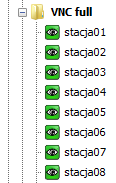
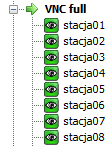
SpacingOld.png
SpacingNew.png
@qqrq You can edit the remotedesktopmanager.cfg file and change TreeViewItemHeight to 16. I will add this value in the UI soon.
@Xanacas I'm unable to explain this .NET error but I think I have found a workaround can you try this version:
http://remotedesktopmanager.com/download/Setup.RemoteDesktopManager.6.1.13.0.exe
David Hervieux
no, still an error...
RemoteDesktopManager.log
Hi,
Thank you for the log. It has helped me to find the error. Can you try this version?
http://remotedesktopmanager.com/download/Setup.RemoteDesktopManager.6.1.13.0a.exe
Let me know if this help
David Hervieux
Hi,
Attention, update isn't backwards compatible in using with a SQL server
FormatException - Guid should contain 32 digits with 4 dashes (xxxxxxxx-xxxx-xxxx-xxxx-xxxxxxxxxxxx).
at System.Guid..ctor(String g)
at Devolutions.RemoteDesktopManager.Managers.ConnectionManager.VerifyMissingAddons(IEnumerable`1 connectionList)
at Devolutions.RemoteDesktopManager.Managers.ConnectionManager.LoadConnectionsFromDataSource(BaseConnectionDataSource connectionDataSource)
at Devolutions.RemoteDesktopManager.Managers.ConnectionManager.LoadConnections(BaseConnectionDataSource connectionDataSource)
at Devolutions.RemoteDesktopManager.Managers.ConnectionManager.RefreshConnections()
at Devolutions.RemoteDesktopManager.Forms.FrmMainBase.RefreshAllConnectionView(Boolean saveState, Boolean checkOnline)
at Devolutions.RemoteDesktopManager.Forms.FrmMainDockable.DoFirstLoad()
at Devolutions.RemoteDesktopManager.Forms.FrmMainDockable.tmFirstLoad_Tick(Object sender, EventArgs e)
at System.Windows.Forms.Timer.OnTick(EventArgs e)
at System.Windows.Forms.Timer.TimerNativeWindow.WndProc(Message& m)
at System.Windows.Forms.NativeWindow.Callback(IntPtr hWnd, Int32 msg, IntPtr wparam, IntPtr lparam)
Hi,
Is it possible that you have TheGreenBow add-on installed? I'm asking that because from the error I see, it's related to the missing add-on verification and we have integrated this add-on
David Hervieux

Hi,
I think it's because I haven't changed the version in the installer and it does not recognize the update. You can unzip it:
http://remotedesktopmanager.com/download/Devolutions.RemoteDesktopManager.Bin.6.1.13.0a.zip
David Hervieux
thanks, works great!
Hi,
an Option to always open RDM in collapsed tree view would be very nice.
Like:
Sessions
+Customer1
+Customer2
+.....
Credentials
Session Script Tools
Thanks
Do you mean Open Always Collapsed everytime the application start?
David Hervieux
I have got the problem, that closed treeitems become open, every database refresh (Hit F5 or edit a setting,..).
I could not determine, when this happens. Sometimes, when I leave the RDM opened with collapsed view then change an item (with DB Refresh) treeitems became expanded I used hours before....??
Hi,
We are proud to release the Release Candidate for Remote Desktop Manager 6.5
Download:
http://remotedesktopmanager.com/download/Setup.RemoteDesktopManager.6.4.8.0.exe
http://remotedesktopmanager.com/download/Devolutions.RemoteDesktopManager.Bin.6.4.8.0.zip
Change history:
- Added batch import for rdp and rdm files
- Added KeePass import
- Added more details in the Export to csv (group, display name, security group...)
- Added the environment variables in the variables dialog
- Added a trial reminder with a tray notifier
- Integrated PasswordSafe
- Changed the Dropbox implementation to comply to their guideline
- Exposed the Tree view item height property in the options
edited by dhervieux on 9/9/2011
David Hervieux
Hello,
The links points to version 6.1.12.0 files :(
Is it normal?
No. Links wrong, but hyperlink is true.
Fixed links below:
Download:
http://remotedesktopmanager.com/download/Setup.RemoteDesktopManager.6.4.8.0.exe
http://remotedesktopmanager.com/download/Devolutions.RemoteDesktopManager.Bin.6.4.8.0.zip
Thank you, I hate when the cut and paste does not change the link
Sorry about that
edited by dhervieux on 9/9/2011
David Hervieux
Hi guys,
We have released the final version 6.5 of Remote Desktop Manager.
http://remotedesktopmanager.com/remotedesktopmanager/Home/Download
As usual, we will do a small update in the next few days to fix some small issues we could find.
Thank you for you help.
David Hervieux
Thanks!
Downloading right now!
Is there a complete changelog anywhere? (I'd like to see all the changes from 6.1 to 6.5)
Hi,
It's in the readme in the zip file.
David Hervieux
Thanks! Got it.
Hi guys,
If some of you are using an Xml data source, you might be interested in our new backup service. By the way it works for the Standard and the Enterprise edition. You can request a trial here
http://remotedesktopmanager.com/remotedesktopmanager/Home/TrialOnlineBackup
And get more information here:
http://remotedesktopmanager.com/remotedesktopmanager/Home/Services#OnlineBackup
edited by dhervieux on 10/10/2011
David Hervieux