
Cri25
RDM SQL Client inutilisable pour des tables de taille conséquente
Bonjour,
Le client SQL (pour MSSQL) disponible dans RDM et dans le launcher est inutilisable pour visualiser des tables dont le nombre de lignes est supérieurs à 100'000 lignes (ordre de grandeur)
Le comportement est le meme avec le client SQL de RDM et du launcher.
Cas de figure: select d'une table de 500'000 lignes
avec SSMS au travers d'un tunnel DVLS, 500'000 lignes récupérer en 14sec, pas de problème
avec le client SQL (RDM ou Launcher), l'utilisation RAM de l'application augmente jusqu'à 1.2GB, puis après plusieurs minutes, RDM (ou le launcher) freeze et il faut killer l'application via le task manager.
Test réalisé sur la même machine avec la même table MSSQL source.
Meilleures Salutations
/Christian
MS SQL Server Remote Management Session Type not working as expected
Hi,
Any news regarding this issue ?
I have the same requirement: be able to authenticate with a windows user (not the user running the launcher) to a MSSQL instance.
Rgds
/Christian
Copy Paste in RDP web brower (rdp web client) does not work anymore
Hello,
Thank you for your feedback.
This issue has already been reported, and a ticket has been opened internally.
We will post it here once a fix is available.
Thank you for being so patient.
Best regards,
@Erica Poirier
Hallo,
It seems to be even worse with the web SSH client:
copy/does not work at all, even in the same shell, the text appear but it not interpreted
some time opening the session fails
some times disconnected and relogin mandatory
huge number ot http 400 unauthorized when login out after having tried a SSH connection
Rgds
Copy Paste in RDP web brower (rdp web client) does not work anymore
Hi,
after patching dvls serveur to v2025.2, copy/paste from rdp windows session to localhost using any kind of browser does not work anymore.
Any known issue ?
Rgds
/Christian
Web client - resolution change
Hallo,
any news regarding this issue?
RDP resolution is extremly bad and configuration is ignored.
Thx
/Christian
Hello Christian,
We are still working on fixing the "Default" resolution bug, but there is a temporary workaround, if you set the resolution to an explicit resolution it should work fine.
We are re-working how sessions are opened (embedded versus in external tabs) so we are changing the logic of what the default resolution will be. I will make sure the bug gets fixed in our next release.
Paul
Thanks Paul for this feedback.
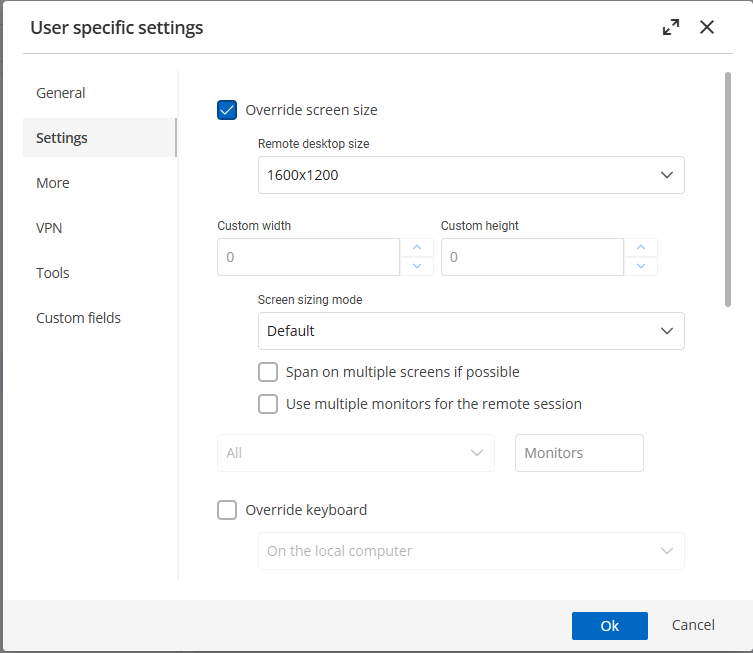
Just to be sure we are talking about the same issue, I would like that the RDP resolution that the user can set in "User specifics Setting" really override the default resolution.
Our user do not have permission to see the "properties => general => Display => Remote Desktop size" menu and cannot change it..
He can see only "User specifics Setting"..
Each user should be able to configure different resolution setting..
Capture attached.
Overriding screen size from this configuration is ignored and does not work.
Thanks!£
Rgds
Web client - resolution change
Hallo,
any news regarding this issue?
RDP resolution is extremly bad and configuration is ignored.
Thx
/Christian
RDM disconnected several time per hours from dvls server
DPS_Main.log uploaded.
Rgds
RDM disconnected several time per hours from dvls server
Reconnect is asked typically when:
PC screen was locked for 20 minutes
sometimes in RDM when switching from "user vault" to "vault"
randomly for no apparent reason..
DPS_Main.log show some errors:


Rgds
RDM disconnected several time per hours from dvls server
Hello,
It's configured with a lifetime of 5 days!
Any possibility to increate verbose log of RDM in order to analyze whats wrong ?
Rgds
/Christian
RDM disconnected several time per hours from dvls server
RDM: 2022.1.12.0 64-bit
DVLS: 2022.1.9.0
RDM disconnected several time per hours from dvls server
Hi,
Our RDM get disconnect from the dvsl server several time per hours.
When it happens, we have then to reconnect from the web browser.
Typically it happens when switching from "user vault" to "vault".
Any idea what could be missconfigured ?
Is there some timeout to tune ?
Rgds
/Christian Renevey
Securecrt embeded option does not work anymore with v2019.1.38.0
Hi,
I just installed this morning the last patch of RDM and now all my securecrt sessions do not start embeded but external.
If I try to create a new session, the Display option dont show anymore "embeded" but only external.
If I click on ... in the session dialog, I get an empty list of securecrt session available !!
I upgraded version of securecrt to 8.5.4 but it does not help.
Any idea whats wrong ?
Rgds
/Christian
Mouse disappear in text box when rdp is embedded in RDM
hi
The only workaround I found is to change the mouse Scheme to "Windows Black (system scheme)" in Mouse properties on the target host.
Seems it does not work anymore with default scheme ..
is it the same for you ?
Rgds
Mouse disappear in text box when rdp is embedded in RDM
Hello,
Could you go in File -> Options -> Types -> RDP and change the RDP engine from Default to RDP 8.1 or 8.0 to see if that help.
If not, you can maybe try FreeRDP 7.0 as the RDP engine to see if the mouse is available or not.
Best regards,
RDP 8.1,8.0,7.0 does not help, mouse still not visible in all text boxes (notepad, word, SSMS, etc)
FreeRDP helps: I can see a small mouse (vertical bar) with a very bad definition!
Mouse disappear in text box when rdp is embedded in RDM
Hello,
What version of RDM are you running?
Are you the only one experimenting this issue in your organization?
Best regards,
Running last version of RDM: 13.0.6.0.
I did not have this problem with my previous laptop.
I got a new one: an hp Elitebook x360 (huge resolution 4k).
Problem is there only when I plug external displays, no problem when using the laptop display.
Currently I have 3 screens connected via a USB-C docking.
I have no problem when using the OS "remote desktop connection" (Desktop APP) but only problem when RDP is embedded in RDM.
Very strange and very annoying..
Rgds
/Christian
Mouse disappear in text box when rdp is embedded in RDM
Hi,
Mouse is not anymore visible in text boxes when running a RPD session inbedded(tabbed) in RDM.
External or using "remote Desktop Connection" do not have this problem!
I try to reinstall, does not help..
Any clue whats wrong ?
Rgds
/Christian
Securecrt session not embeded
Thats right, window title is sessionname.
For example, suppose you have a session test.
When the CRT session "test" is located at the root, no problem, RDM is able to tab/embed the session.
When the CRT session "test" is located in a subfolder, example TT\test, RDM cannot tab the session.
In both case the window title is correct, ie test, but for me, tabbing does not work if the crt session is in a subfolder.
Rgds
Securecrt session not embeded
Hi,
Im using the last version of RDM, 9.2.2.
Now the issue is clear.
It works fine if the crt session is at the root level. But in securecrt, you can organize session in folders.
When I choose the crt session, the syntax for the session is: [foldername][sessionname].
If the crt session in a crt folder, RDM is unable to tab it.
Could you confirm the issue ?
Rgds
Securecrt session not embeded
The content of the title bar can change dynamically...
Once im connected, when I change the directory, the title is updated and show the full path..
What is the restriction ? The title have to be fixed?
Securecrt session not embeded
I mean, when I open the session using the button "Open(Embedded,Tabbed)", I get the same result as if use "Open(external)", ie the securecrt session is not tabbed and into RDM, as it is for example with Firefox..
Change path setting for securecrt addon
Thanks a lot!
I didnt think to try this big button "Configure Installation Path"..
Yes it will complain, but if you have two different versions installed and want to switch to the other one...
Rgds
Securecrt session not embeded
Hi,
Im using RDM with securecrt addon.
When I start the session, securecrt is not embedded in rdm, even if the "embedded" option is checked.
Is there a requirement about the securecrt vesion to have it embedded ?
My current version of securecrt is 7.0.3..
Rgds
Change path setting for securecrt addon
Hi,
How can I change after installation the location of the binary corresponding to anaddon (in my case, securecrt).
The first time, it ask for the path, but then no chance to modify this path.
I try to deinstall/re-install the addon but, but no way to change the path.
Any idea ?
Rgds