
David Hervieux
2026.3.8.0 Sucks
Hello everyone,
A few last words from me on this topic.
First, the rule I mentioned applies to everyone. @RDMTinkerer, the comment about doctors and pills was out of line. Disagree with anyone as much as you like, but keep it about the software.
To give some context on 2026.3: it wasn’t a regular update. We rebuilt the entire Windows interface of Remote Desktop Manager, more than 1,500 screens, dialogs and controls, on a new cross-platform UI framework, and shipped it in a single release. That was the ambition I mentioned. Changing that much at once disrupted habits many of you rely on every day, like the tabs and the navigation pane. I’m sorry for that.
That work wasn’t change for the sake of change. It’s the foundation for something many of you have asked us for over the years: the same Remote Desktop Manager on Windows, macOS and Linux, with the same features and the same behavior everywhere. Every fix and improvement we make now lands on all platforms at once.
It also had a cost on our side. Stabilizing the new interface came first, so the Nutanix and ScreenConnect integrations we had planned for the next major release will have to wait for a later one.
Here’s what we’re doing so this doesn’t happen again:
More automated end-to-end testing. We keep adding tests that run the real application through the workflows you use every day, so regressions are caught before a release instead of after.
A larger beta program. The best way to catch issues like the ones in this thread is to have more of you try new versions before they ship. If you’d like to be part of it, especially if your setup or workflow is unusual, [link or instructions to join the beta]. Your feedback there goes straight to the team.
2026.3.17.0 is the current version, and it includes the fixes from the reports in this thread. If something still doesn’t work the way you expect, please open a new topic with the details, one issue per topic, so we can follow up on each one properly.
Thank you to everyone who took the time to write here, including the harshest posts. Precise reports are what get things fixed fastest.
Regards,
2026.3.8.0 Sucks
@rdearman , you’re right that we owe you more than an explanation. 2026.3 should not have shipped in that state, and I apologize to you and to everyone it disrupted. Your criticism of the product and of us is welcome here, as harsh as you want it to be.
What isn’t welcome is going after other members. RDMTinkerer shared their own experience, and they have the same right to it as you do to yours. Please keep the discussion about the software, not about the people in this thread. If personal attacks continue, I’ll have to suspend the account, in line with the forum rules that apply to everyone.
If you still have issues on 2026.3.17.0 or later, post them here and we’ll look at each one.
Open link in new Tab
Hello,
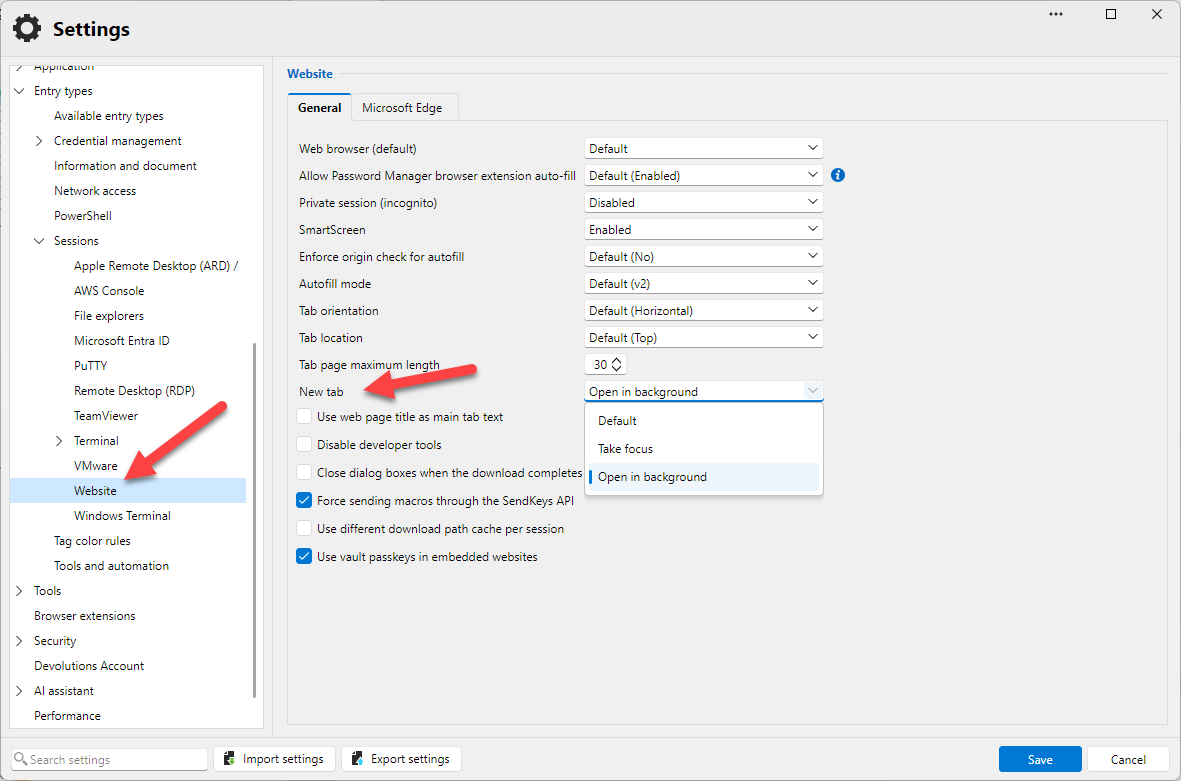
It's in File-Settings | Entry types - Sessions - Web sites
Regards
Enhance the "Connect when Available" button
Hello,
The 2027.1 version is expected in mid-December, and a beta is expected in a month.
Regards
Taskbar conext menu overlaps
Hi Daniel, hi Rob,
Thanks for the reports, and for the screenshot.
This is fixed. The tray menu’s submenus didn’t have room to open on the right near the edge of the screen, so they were pushed left on top of their parent menu. Now a submenu that doesn’t fit on the right opens on the left side of its parent, like a native Windows menu, and deeper levels keep opening to the left. You’ll be able to move the mouse down the parent folder without a submenu getting in the way.
The fix will be in the next 2026.3 update, 2026.3.16.0.
Regards,
RDM notifications badge
Hello,
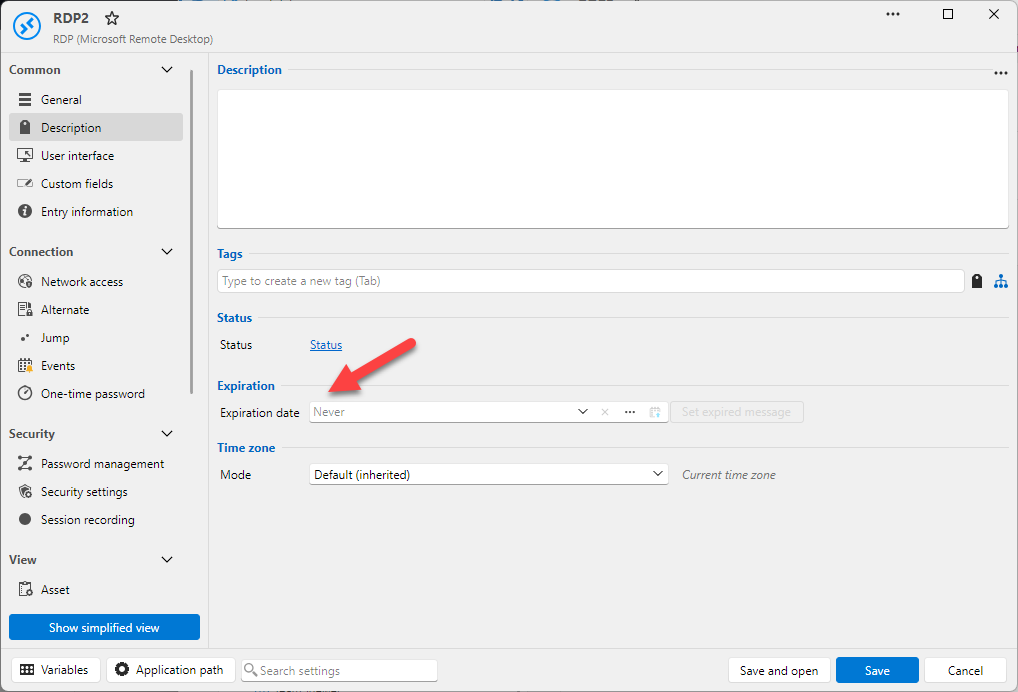
Could you check if you set an expiration there?
Regards,
Template Does Not Inherit Tab Group From Host
Hi David,
I’m following up on Carl’s reply: there’s no need to submit a feature request for this one.
After reviewing your report, we agree with you. When a template is set to Inherited for its tab group and is opened from a Host entry, the session should use the Host’s tab group. Today, the session opened from the template is placed beside the Host in the tree, so the inheritance skips the Host entry and only looks at the folders above it. We’ve corrected that, and it will be included in an upcoming release:
If the template’s tab group is Inherited, the Host’s tab group now applies, including user-specific settings and any variables in its name.
If the Host itself is set to Inherited, the usual folder inheritance continues as before.
A template with its own tab group (Custom or None) keeps it.
In the meantime, there’s a workaround: set the tab group on the folder that contains the Host entry instead of on the Host itself. Templates opened from that Host already inherit it.
Thanks for the detailed report and the screenshots; they made this easy to pin down.
Best regards,
RDM notifications badge
Hi cavaliersa,
You’re not being dim at all. My first answer described a layout you don’t have, sorry about that. Here’s the full picture.
Where the number comes from
The badge counts everything waiting for you in the current workspace:
Notifications sent by your server
Action Center items (empty for you, as your screenshot shows)
Access requests waiting for your answer
Unread secure Messages
Finding them in your current version
You’re using the compact layout (the ☰ menu), and your status bar is turned off. You don’t need it, though: each source has its own pane under ☰ > Window > Communication: Access requests, Action center, Notifications and Messages. Since your Action Center is empty, the count is in one of the other three. Read or handle those items and the badge goes away.
If you’d still like the status bar back, it’s under ☰ > Window > Layout options > Status bar.
Coming in the next version
You’re right that this is too scattered today, and we’ve already changed it. The navigation rail on the left gets an Activity button that brings notifications, Action Center items and requests waiting for your action into one list. It shows the same number as the taskbar badge, so clicking the badge’s source is one step. When your workspace supports secure messages, they get their own Messages button beside it. Both are on the rail by default, and the status bar icons go away.
A couple of other notes
Data sources are now called Workspaces: ☰ > File > Workspaces…. Workspace information… right below it shows the type you’re connected to.
To hide the badge, go to ☰ > File > Settings > Application > Notifications and clear Show notification badge in the taskbar. My earlier answer pointed you to the wrong page.
If all four panes are empty and the badge is still there, please send us your RDM version (☰ > Help > About) and your workspace type, and we’ll look into it.
Best regards,
RDM notifications badge
Hi cavaliersa,
Thanks for the screenshot. It’s a fair question, since the badge doesn’t say where the number comes from.
The number on the taskbar icon is the total of two counts that RDM also shows in the status bar, at the bottom right of the main window:
Action Center items: things RDM wants you to look at, such as an available update, a license or subscription that is about to expire, or a pending action from your data source. Click the Action Center icon in the status bar to open the list.
Unread notifications from your data source. These only appear on data sources that support them, such as Devolutions Server or Devolutions Hub. Click the Notifications (bell) icon next to it to read them.
When either icon has something pending, it shows a small badge, and hovering over it shows how many items it has. Once you clear or read those items, the taskbar badge goes away.
The badge has been in RDM for a while, but it only appears when one of those counts is above zero. That’s why it can show up without an update: something new probably arrived, for example a notification published on the server or an update that became available.
If you’d rather not have the badge at all, version 2026.3 lets you turn it off under File > Settings > User interface > Taskbar: clear Show notification badge in the taskbar.
If neither status bar icon shows anything pending and the badge is still there, please tell us your RDM version and data source type, and we’ll look into it.
Best regards,
Installer does not close RDM
Hi Daniel,
Thanks for the report, and you’re right about the setting. Since 2026.3.5.0, when “Reduce to tray icon/taskbar on close” is on, RDM treats the installer’s close request like a click on the X button, so it goes to the tray instead of closing. We’ve found the cause and will fix it in an upcoming version.
Until then, you can exit RDM from the tray icon (right-click > Exit) before you start the installer, or turn the option off while you update.
Sorry for the inconvenience, and thanks again for pointing us to the setting.
Best regards,
Devolutions RDM
Hello,
Thanks for explaining. Your goal is clear now: send commands to PowerShell or cmd on many Windows machines, the way “Broadcast all” works for SSH, without deploying anything extra. Here is why that doesn’t work over RDP alone.
RDP can’t carry commands
SSH is a remote shell protocol. The server runs whatever text you send and returns the output, so broadcasting a command to several SSH sessions is easy.
RDP is a remote display protocol. It sends screen updates to the client and keyboard and mouse input to the server. It also carries a few “virtual channels” for redirection: clipboard, drives, printers, audio and smart cards. None of these tells Windows to run a program or a script. Nothing on the server side is listening for that kind of request. Port 3389 isn’t the limit here; the protocol itself has no such message.
The only other option would be to fake typing: RDM types the command as keystrokes into whatever window has focus in the session. We avoid this for script execution because it’s unreliable:
RDM can’t confirm that the right window has focus, or that a console is open at all.
If the session is locked, minimized or showing a UAC prompt, the keys go somewhere else.
A different keyboard layout or input language on the server changes the characters that get typed.
RDM gets no output, no exit code and no way to know when the command has finished.
The agent uses the RDP port too
This is the part we should have explained better. Over RDP, the Devolutions Agent doesn’t open a port or need a firewall rule. RDP lets an application on the server open its own private channel, called a dynamic virtual channel, inside the existing RDP connection. The agent is that application. It receives the command through the RDP connection on 3389, runs it in the user’s session, and sends back the output and exit code.
So the agent is what makes “use the RDP connection to run commands” possible. Without something running inside the remote session, nothing can receive the command. The protocol requires a small piece of software on the remote machine; the network doesn’t. If your firewalls already let RDP through, the agent works through them too.
I understand that installing anything on a large fleet is still a cost. The agent ships as a standard MSI, so most teams push it with the same tools they already use (GPO, Intune, SCCM) rather than machine by machine.
Your idea of broadcasting a command to PowerShell in several RDP sessions, like we do for SSH, is a good one. With the agent we could do it reliably and show each machine’s result. Without the agent we would have to fall back on keystroke injection. I’ll pass it on to the team as a feature request.
Regards,
Open link in new Tab
Hello,
I could try to add the global setting in a minor and the per session in the next major update.
Regards
Open link in new Tab
Hello,
I will add a setting to change the default behavior; this could be per entry or global in the app.
Regards
Open link in new Tab
Hello,
Could you give me more details about this. Is it when you open a web site entry type?
Regards
2026.3.8.0 Sucks
Hello everyone,
Following up on my previous message, looking back at 2026.3, the root cause is clear to us: we were too ambitious. We changed too many things in a single release, and we missed a lot of use cases we took for granted, like how people rely on tabs and the navigation pane every day. Your feedback in this thread helped us see exactly where we got it wrong.
The team has kept working on it, and 2026.3.15.0 is now available with many performance improvements and bug fixes. I’d like to invite you to give it a try. If you’d rather not touch your current installation, the portable version lets you test it on the side without any risk.
If something still doesn’t behave the way you expect, please post the details here. Precise reports like the ones in this thread are what help us fix things the fastest.
Regards,
Inconsistent Support for the DYNAMIC_PORT Variable
Hello,
This will be fixed in the next minor update, RDM 2026.3.16.0
Regards,
Task tray context menu over-lapping sub-menu's
Hello,
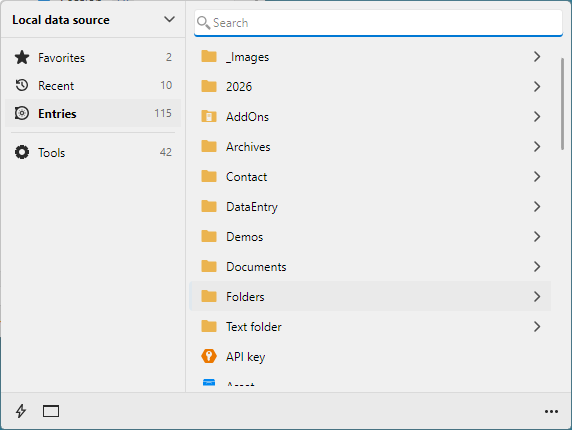
I think that I have a fix. This will not be in the next minor update, as it's already been sent to QA, but it will be in the following one. By the way, in RDM 2027.1, we have a modern tray icon view coming soon.
Regards,
The tab bar is in one line like the browser (shortening the length of the tab name, rather than scrolling to the right)
Hello,
Could you check the next minor update for the fix? I have managed to include it, but it might not be listed in the release notes.
Regards
Small UI change for API key entry
Hello Daniel,
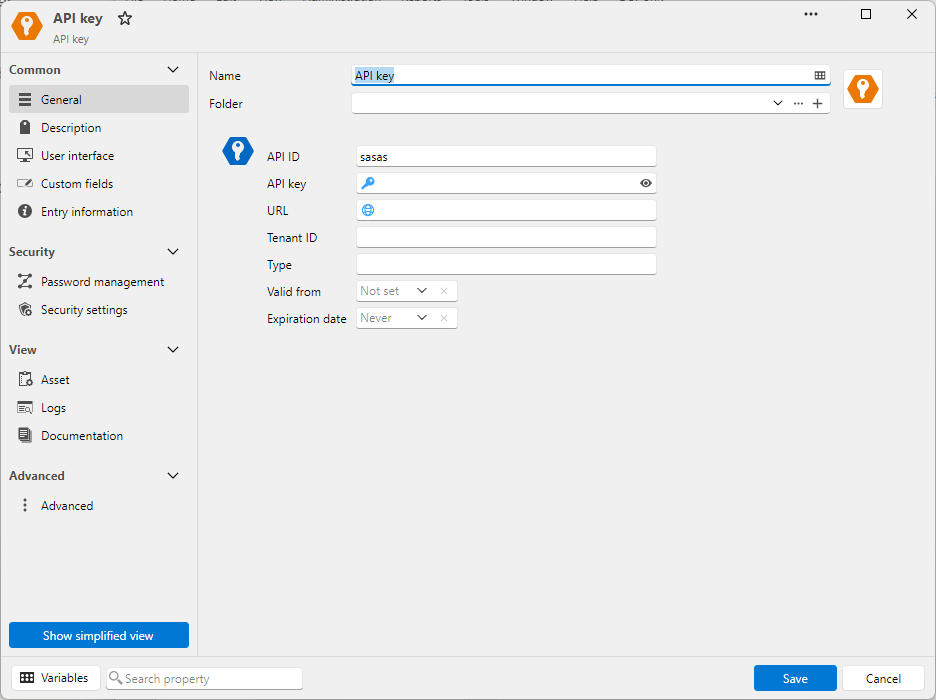
Here is what you can expect in RDM 2027.1 (coming in December):
Regards
Small UI change for API key entry
Hello Daniel,
I will verify what we can do, but it does not seem like a problem. I am pretty confident we can improve this and all the other date pickers.
Regards
Rename Integrate Application "Configure installation path"
Hello,
I have improved the UI. This is no longer in Path and is no longer a modal dialog. You can also see what is configured.
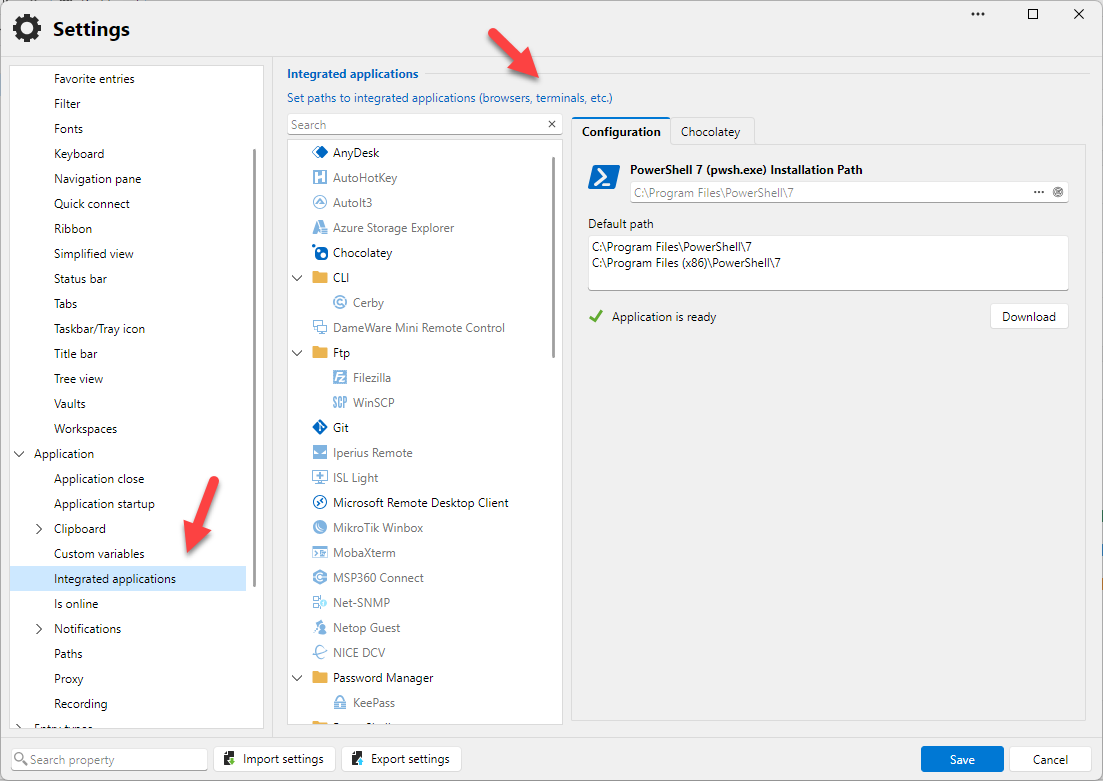
This will be in RDM 2027.1 coming in December.
Regards
Properties > User Interface
Hello,
Let us know when you have updated the app. Version 2026.2 was in WinForms, and the new version is in Avalonia, so it's completely different. I can't fix 2026.2, but if you still have the issue, you can reply in a month to let me know.
Regards
Properties > User Interface
Hello,
This is a strange issue. What RDM version are you using? Could you also let me know if you are using HiDPI with scaling? This will help me reproduce the issue.
Regards
'show password window' issues
Hi Clemens,
Thank you for the report. You were right on both points, and both are fixed. The fix will be in the next minor update, 2026.3.
Minimize button
The View password window lost its minimize button when we redesigned it. That was not intended. The button is back in the fix.
“Show password” state
This comes from the Remember ‘Mask the password’ state setting. It is on by default, so the choice made in one View password window applies to every later window, even after restarting RDM. Older versions behaved the same way. We agree that showing passwords should not be the lasting default, so the setting will now be off by default:
Every View password window will open with the password masked.
Showing the password will only affect the window you are in.
If you have never changed this setting, you don’t need to do anything. You will get the new behavior automatically after updating.
If you prefer the old behavior, you can turn the setting back on.
Until the update is out
You can get the new behavior today in File – Settings – User interface. Under Security, uncheck Remember ‘Mask the password’ state.
Administrators who want to always mask passwords in this window can also use the DisableMaskPasswordInViewPassword policy.
Thanks again for taking the time to report this.
Best regards,
Website subentry from template doesn't inherit the tab full name (folders path + entry name)
Hello,
This should be fixed in the next minor release. It might not appear in the release notes since it was fixed along with another issue.
Regards,