RDM notifications badge

I've been using RDM for a few years now and have never seen a notification badge count against the application taskbar icon until the last day or so, with no update having been done, i.e., same version etc.
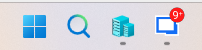
I'm sure it is ignorance on my part, but I have looked around and simply cannot see where to "see" these notifications.
All Comments (6)
Hi cavaliersa,
Thanks for the screenshot. It’s a fair question, since the badge doesn’t say where the number comes from.
The number on the taskbar icon is the total of two counts that RDM also shows in the status bar, at the bottom right of the main window:
Action Center items: things RDM wants you to look at, such as an available update, a license or subscription that is about to expire, or a pending action from your data source. Click the Action Center icon in the status bar to open the list.
Unread notifications from your data source. These only appear on data sources that support them, such as Devolutions Server or Devolutions Hub. Click the Notifications (bell) icon next to it to read them.
When either icon has something pending, it shows a small badge, and hovering over it shows how many items it has. Once you clear or read those items, the taskbar badge goes away.
The badge has been in RDM for a while, but it only appears when one of those counts is above zero. That’s why it can show up without an update: something new probably arrived, for example a notification published on the server or an update that became available.
If you’d rather not have the badge at all, version 2026.3 lets you turn it off under File > Settings > User interface > Taskbar: clear Show notification badge in the taskbar.
If neither status bar icon shows anything pending and the badge is still there, please tell us your RDM version and data source type, and we’ll look into it.
Best regards,
David Hervieux