Customize "Open with parameters"

Hello,
I sometimes use the ":open with parameters" function and I'm always looking for a function where I can enter credentials. Even when I customize and add the "pin" function, it's not in the menu. Is this supposed to be the case or is it a bug?
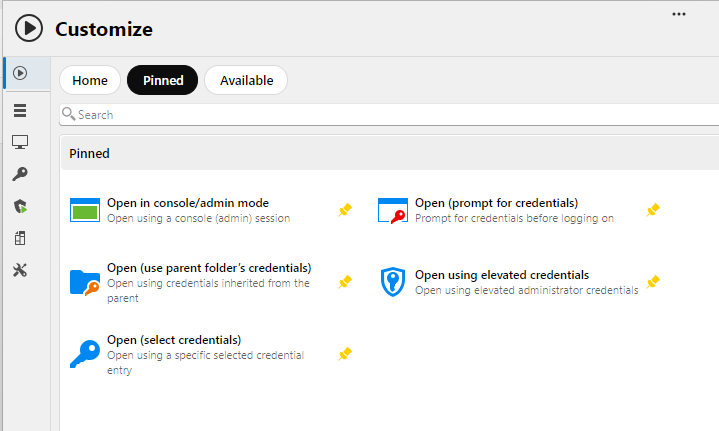
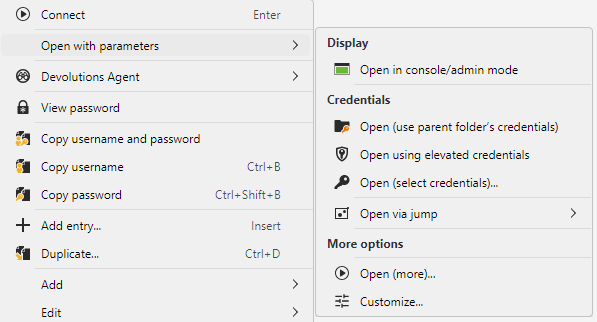
I forgot ... windows 11 26H2, RDM 2026.3.18
Recommended Answer
Hello martin25,
Thanks for raising this. As our support team explained, the action is hidden behind the "Allow Open (prompt for credentials)" setting. Your question showed us that this setting causes more confusion than it prevents: pinning an action in Customize should make it appear, and today it doesn't.
So we're going to remove that setting. Once the change is out, "Open (prompt for credentials)" will always be available for entry types that support it (RDP, SSH (PuTTY), Telnet…):
- in Open with parameters, under Credentials
- in the context menu, when you pin it through Customize
- in Quick Connect
Until then, the workaround stays the same: File > Settings > User interface > Context menu, then check "Allow Open (prompt for credentials)" in the Advanced section.
We'll post here when it's released.
Best regards,
David Hervieux
All Comments (3)
Hello martin25,
Thanks for the screenshots, they made this easy to follow.
This is expected. "Open (prompt for credentials)" is hidden by a setting that is off by default. Pinning it in Customize only changes where it appears, so it won't show until the setting is on. That's also why it appears in the Pinned tab but not in the Available tab.
To turn it on:
Go to File > Settings > User interface > Context menu.
In the Advanced section, check Allow Open (prompt for credentials).
Click OK.
After that, the option should appear under Open with parameters in the Credentials group.
A couple of things to keep in mind:
It only appears for entry types that can prompt for credentials at logon, such as RDP, SSH (PuTTY) and Telnet.
It only appears when one entry is selected. If several entries are selected, it's hidden.
Let us know how it goes.
Best regards,
Eduard Sepulveda Lopez
Hello martin25,
Thanks for raising this. As our support team explained, the action is hidden behind the "Allow Open (prompt for credentials)" setting. Your question showed us that this setting causes more confusion than it prevents: pinning an action in Customize should make it appear, and today it doesn't.
So we're going to remove that setting. Once the change is out, "Open (prompt for credentials)" will always be available for entry types that support it (RDP, SSH (PuTTY), Telnet…):
- in Open with parameters, under Credentials
- in the context menu, when you pin it through Customize
- in Quick Connect
Until then, the workaround stays the same: File > Settings > User interface > Context menu, then check "Allow Open (prompt for credentials)" in the Advanced section.
We'll post here when it's released.
Best regards,
David Hervieux