Auto-type typing the wrong credentials when using the "Home" tab button
Auto-type typing the wrong credentials when using the "Home" tab button

May be related to https://forum.devolutions.net/topics/56972/rdm-type-functions-type-password-type-clipboard-not-working?message=246918#246918
Since the update to 2026.3.15 (running 2026.3.16 now) the auto-type function on the Home ribbon chooses the wrong credentials for the session in focus:

If I right-click on the session's tab and use the auto-typing function there, it uses the correct credentials.
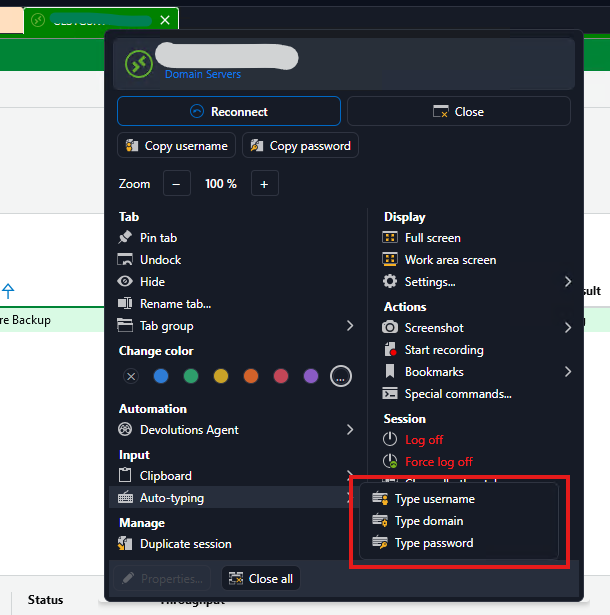
As a note, I keep my credentials as entries on the Navigation tree and the session has the credentials either linked or inherited. The "wrong credentials" RDM types is another of those saved.
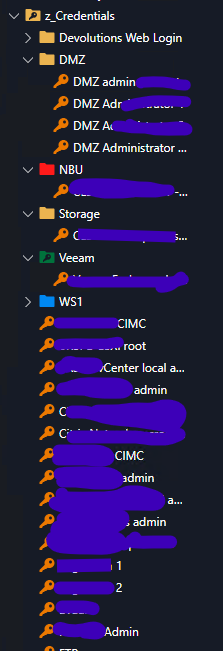
This used to work flawlessly up until around the 2026.3.1x update.
All Comments (4)
I didn't even know this was a thing. But I can confirm the same behavior. RIbbon doesn't use the right password but right-click does.
Hello,
Thank you for the detailed report and the screenshots.
We were able to reproduce this on Remote Desktop Manager 2026.3.16.
When you use Auto-Typing from the Home ribbon, it uses the entry selected in the Navigation pane instead of the session in the active tab.
If a credential entry or another session is selected there, its credentials are typed.
We have reported this to our development team so it can be fixed.
Until then, either of these will type the correct credentials:
Right-click the session tab and select Auto-Typing, as you noticed.
Click the session’s own entry in the Navigation pane before you use Auto-Typing from the ribbon.
Best regards,
Carl Marien
Hello,
This will be fixed in RDM 2026.3.18 coming soon.
Regards
David Hervieux
I've just installed RDM 2026.3.18, it seems to have been fixed.