Taskbar conext menu overlaps

Hey everyone,
since around 2026.3.5.0 the taskbar context menu does not work as intended.
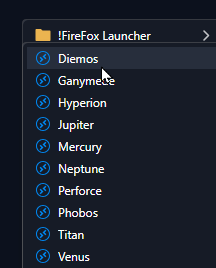
Every subfolder window should be presented next to the existing window, not above it.
Because of this behaviour, every subfolder is opening in an instand when you hover the main folder with the mouse cursor. You cannot select the entry that you want to access.
Regards,
Daniel.
All Comments (3)
Same here, have to move quickly and no pauses. Should open to the left in this case since it's up against the right side of the desktop.
Cheers,
Rob
Hi Daniel, hi Rob,
Thanks for the reports, and for the screenshot.
This is fixed. The tray menu’s submenus didn’t have room to open on the right near the edge of the screen, so they were pushed left on top of their parent menu. Now a submenu that doesn’t fit on the right opens on the left side of its parent, like a native Windows menu, and deeper levels keep opening to the left. You’ll be able to move the mouse down the parent folder without a submenu getting in the way.
The fix will be in the next 2026.3 update, 2026.3.16.0.
Regards,
David Hervieux
Hi David,
Fantastic, thanks for the update. Pun intended. 😁
Rob