
elaineberenguer
"Double authentication" when selecting DVLS Privileged Accounts using Launcher
Hi Simon!
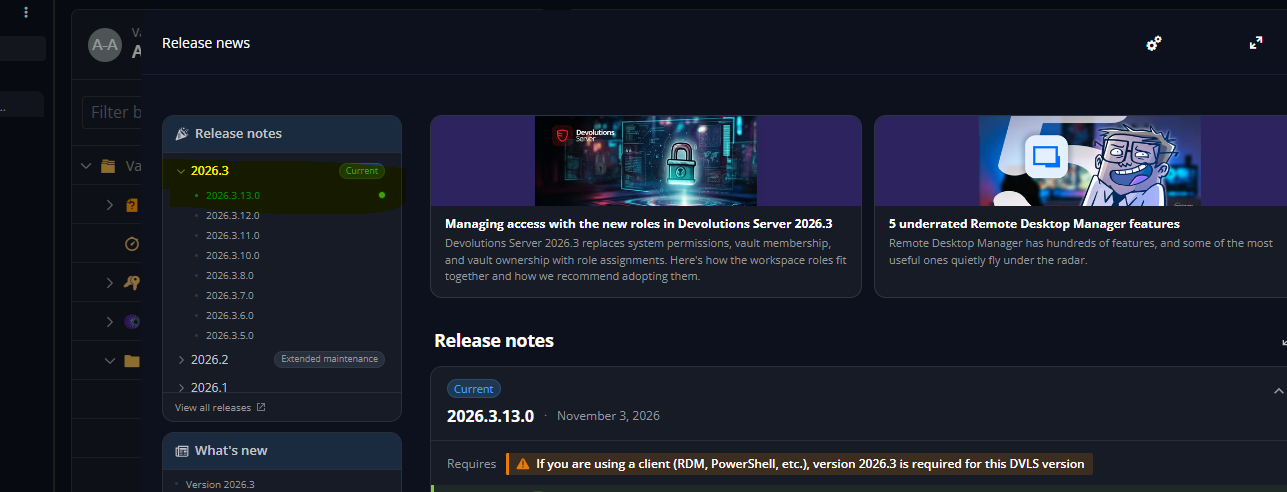
Thanks for your update! I updated DVLS Server, but the problem persists... The error logged on DVLS is the following:
ODataError - Resource 'facbaaf8-557c-4fd4-98af-9d3e6ae92b04' does not exist or one of its queried reference-property objects are not present.
at Microsoft.Kiota.Http.HttpClientLibrary.HttpClientRequestAdapter.ThrowIfFailedResponseAsync(HttpResponseMessage response, Dictionary`2 errorMapping, Activity activityForAttributes, CancellationToken cancellationToken)
at Microsoft.Kiota.Http.HttpClientLibrary.HttpClientRequestAdapter.SendAsync[ModelType](RequestInformation requestInfo, ParsableFactory`1 factory, Dictionary`2 errorMapping, CancellationToken cancellationToken)
at Microsoft.Kiota.Http.HttpClientLibrary.HttpClientRequestAdapter.SendAsync[ModelType](RequestInformation requestInfo, ParsableFactory`1 factory, Dictionary`2 errorMapping, CancellationToken cancellationToken)
at Microsoft.Graph.Users.Item.TransitiveMemberOf.TransitiveMemberOfRequestBuilder.GetAsync(Action`1 requestConfiguration, CancellationToken cancellationToken)
at Devolutions.Server.Managers.ADSync.AzureGroupMembershipExtractor.GetTransitiveMemberOfAsync(String userId)
---
Azure sync failed while building group membership for all users. Running: 0.4529973 secondsuser name: facbaaf8-557c-4fd4-98af-9d3e6ae92b04
I tried to change the folder's credentials configuration to see if it changed something, but nothing worked...
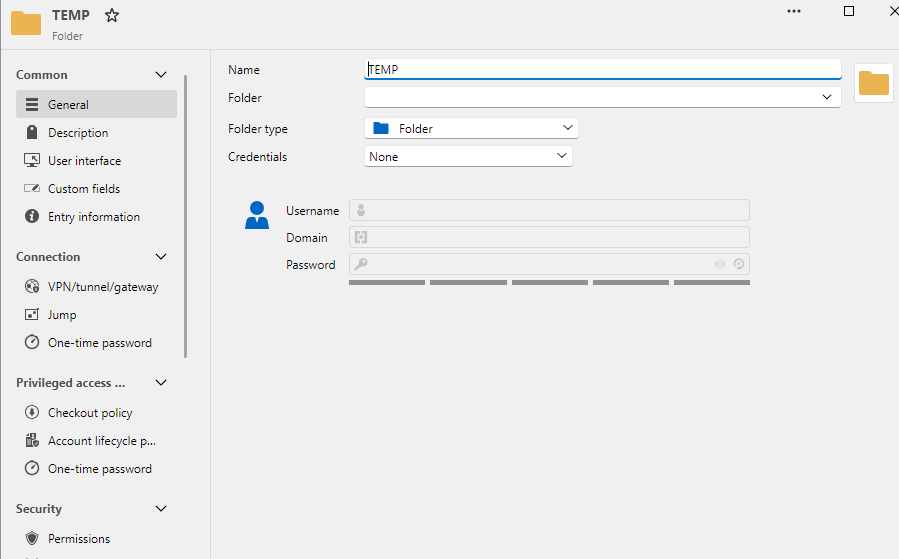
Do I have to do something else?
Regards.
Elaine
"Grant Checkout" option do DVLS Privileged Account Entry
Hi @Luc Fauvel !
That will be great! \o/
As, in our case scenario, we'll be the ones to grant permissions (and we do that a LOOOOOT in a daily basis!), we've decided to use only PAM Account. Doing this way, the administrative effort to grant and revoke permissions will not be so messy.
Thanks!
Elaine Berenguer
JIT Accounts being created without appending the DOMAIN
Hello Michel!
The configuration made in RDS entry worked! I'll keep this way for now... but I'll keep the other option (enable x disable) in mind when presenting the solution to my manager. ;)
Once again... thank you very much!
Regards,
Elaine
JIT Accounts being created without appending the DOMAIN
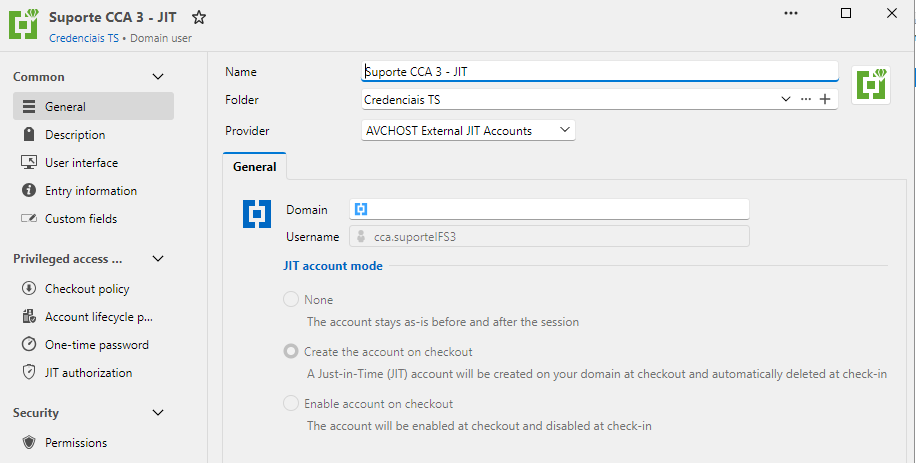
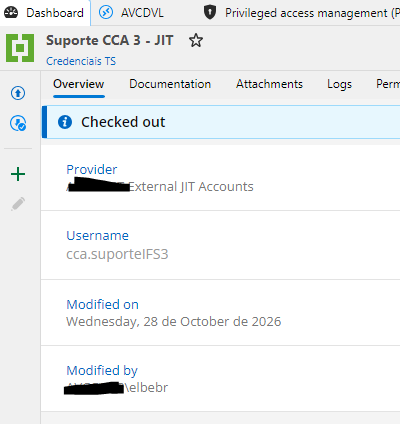
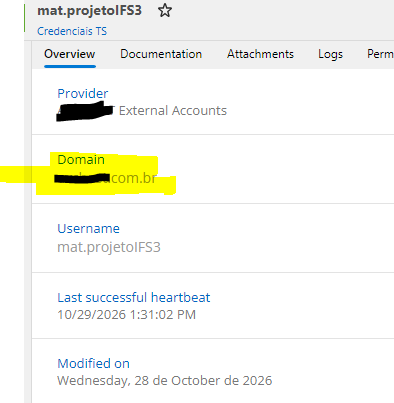
Hi! I'm trying out the JIT PAM Accounts, and it's not working because, as far as I can see, it's not appending the domain in the entry, like it does with 'normal' PAM Accounts.
JIT Account:
NORMAL:
When checking this JIT Account out, it's created successfully in the domain:
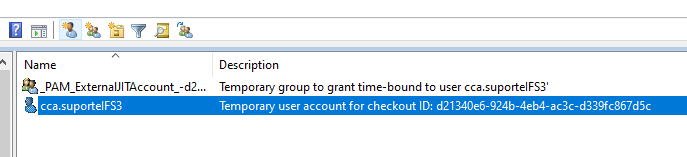
But when we try to use it to log in our RDS Server, the missing domain information results in credential error:
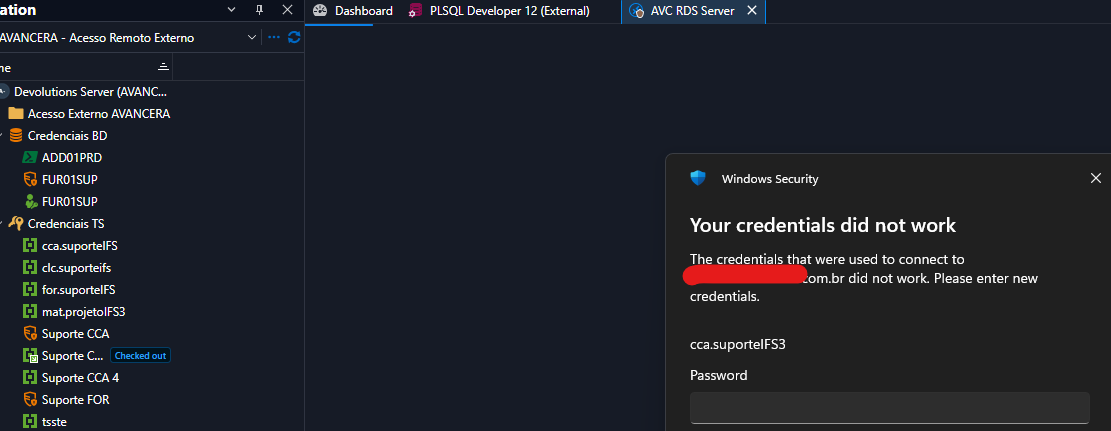
I've been trying to check if there is some configuration I've missed, but I couldn't find any so far... Is it a bug or am I missing something?
Thanks!
Att.,
Elaine
"Double authentication" when selecting DVLS Privileged Accounts using Launcher
Hi Simon! There's no need to apologize! I'm glad I could help you out finding an issue that needs to be worked on. :)
I'll wait for the fix!
Thanks again!
Regards,
Elaine Berenguer
"The workspace does not support the use of privileged accounts"
Thanks Michel!
I've just posted the request! Thank you very much!
Regards,
Elainie Berenguer
Connect button for PAM Accounts in Web Interface
Currently, in DVLS version 2026.3.12 there is no support for using PAM Accounts to open, for example, RDP sessions. It would be nice to give the ability to have the 'connect' button available to them, discard the need to maintain two entries (PAM Account and DVLS Privileged Account) for a single access.
In our case scenario, we have set up multiple 'generic' PAM domain accounts, which will be used by several contractors (one at a time, of course), therefore the need to setup the permissions of these entries.
NOTE: We can use Launcher and RDM successfully, but we're trying to make the most of the web interface so some contractors with restricted internal policies may not be able to install neither of them (RDM or Launcher).
Thank you!
Regards,
Elaine Berenguer
"Double authentication" when selecting DVLS Privileged Accounts using Launcher
Hi @Simon Leroux !
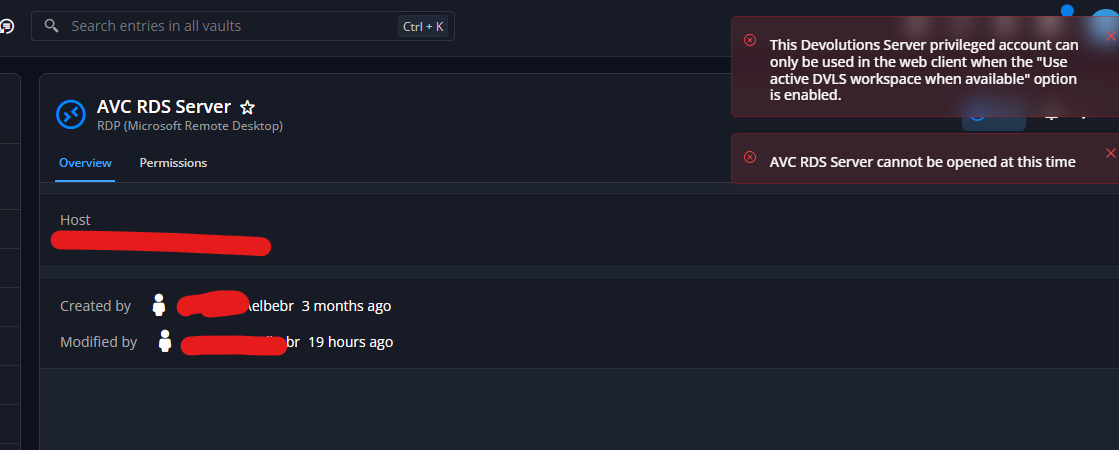
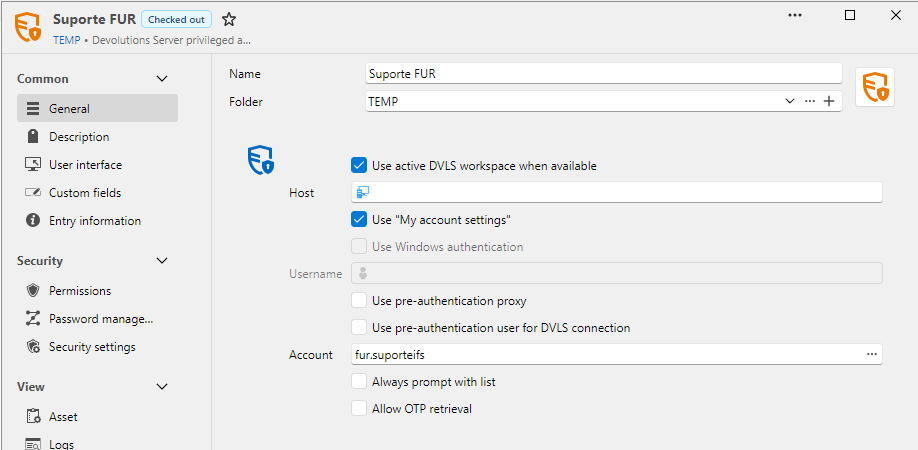
All accounts under "Credenciais TS" have both "Use active DVLS workspace when available" and “My account settings” options enabled and the problem still happens, no matter which one I choose:
Configuration:
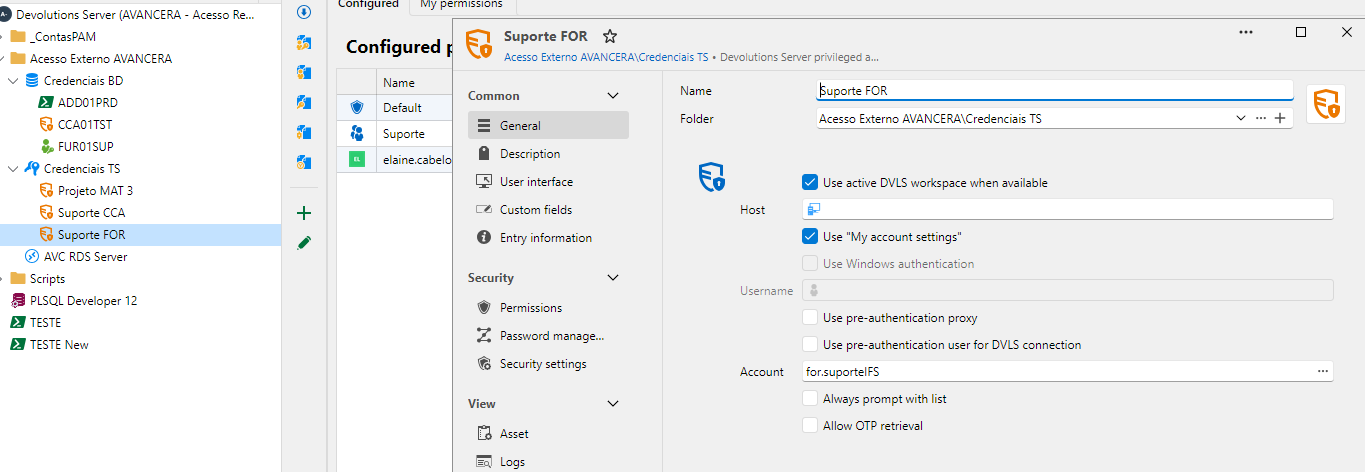
Suprote FOR permission s: only view and connect to contractor's account.
I've granted checkout for the PAM account to the contractor's account using my Admin rights (therefore the user is current able to do so via web interface - problem already reported)
Opened Devolutions Serve Web interace with contractor's account, checkout the account (another problem in this process that I've reported as well) and tried to connect:
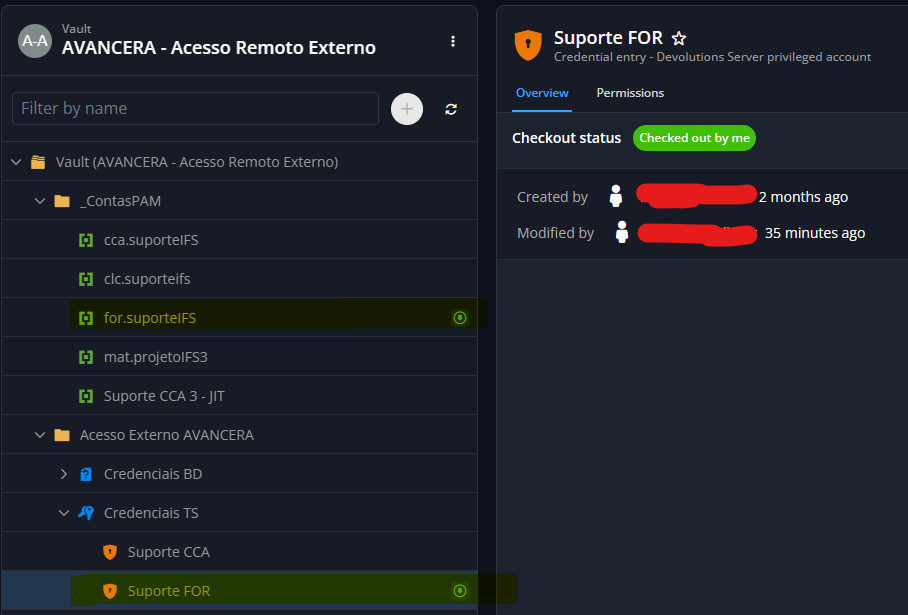
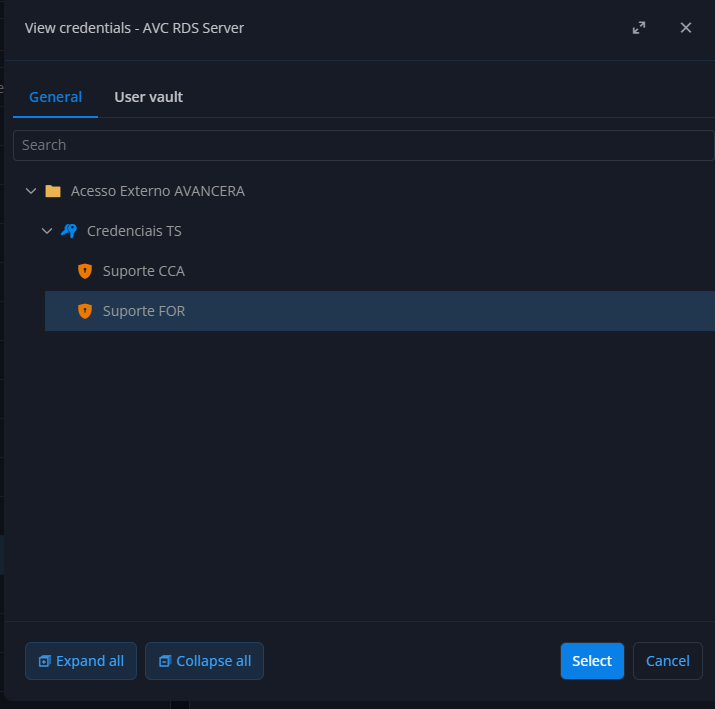
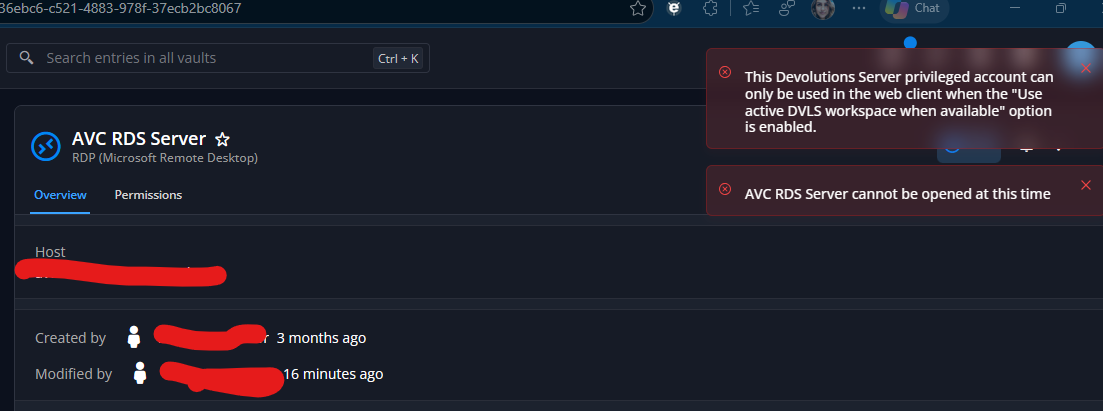
AVC RDS Server configuration:
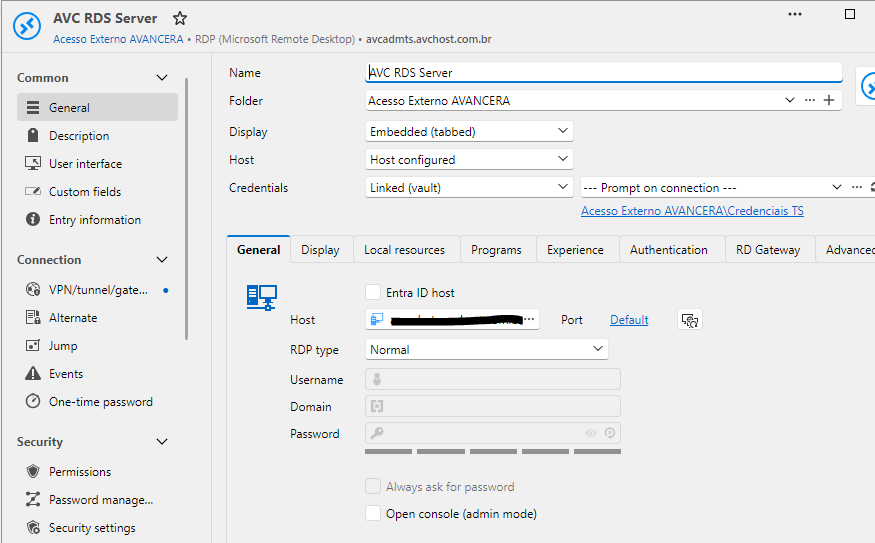
Thank you again for your attention.
Regards,
Elaine Berenguer
"The workspace does not support the use of privileged accounts"
Hi @Luc Fauvel Luc! :)
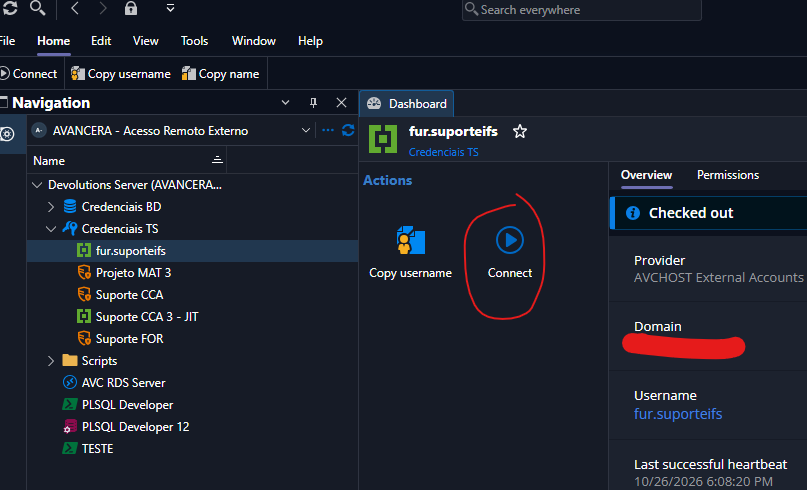
I had resumed my POC last week and... uow... there are a lot of news in PAM solution... :) I realized that now we don't need to have a 'PAM Vault' for the privileged accounts, which made our job much easier! Also, I confirmed that I can start RDP session using DVLS Privileged Accounts in web interface... That's great! My question now is: will it be available for PAM account as well?
Currently, the 'connect' option for PAM accounts is available only in Launcher:
WEB:
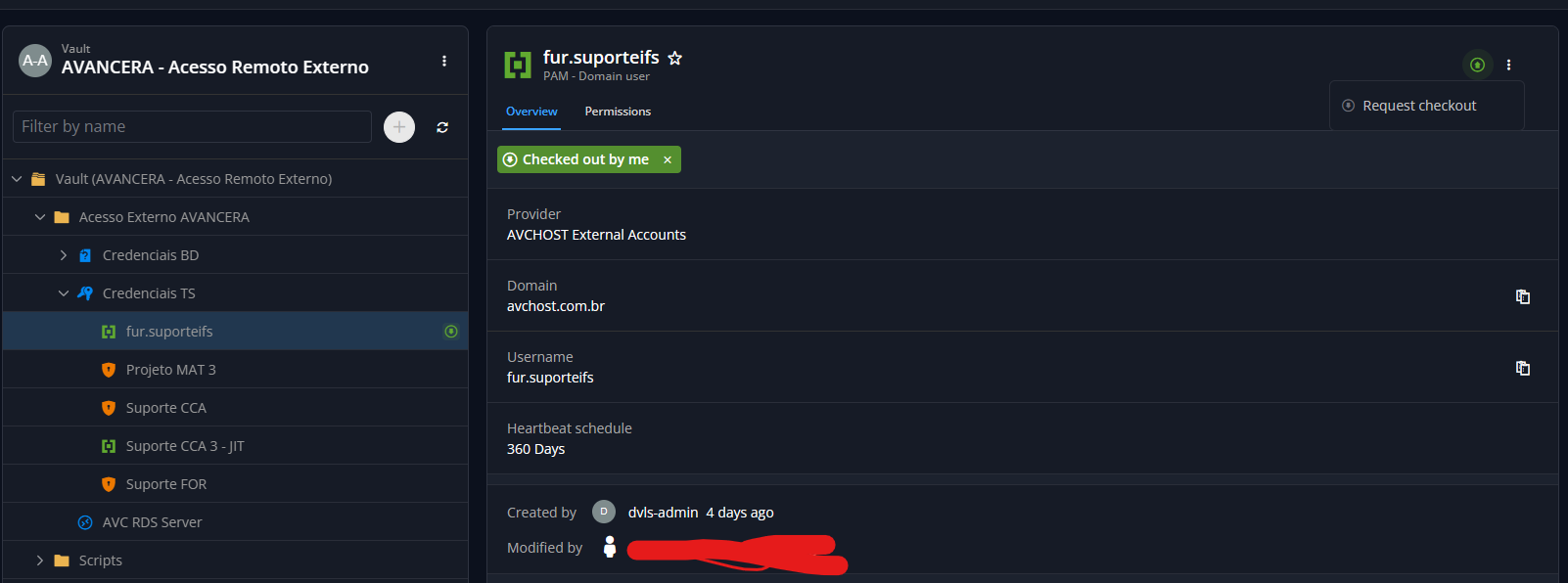
LAUNCHER:
Regards,
Elaine Berenguer
"Grant Checkout" option do DVLS Privileged Account Entry
Currently, grant check-out is available only to PAM accounts. It would be nice if we have the ability to grant checkout DVLS Privileged Accounts as well. In the RDM UI, this entry shows a more friendly check-out status and we're missing this 'feature' because we only use grant checkout in this vault:
DVLS Privileged Accounts:
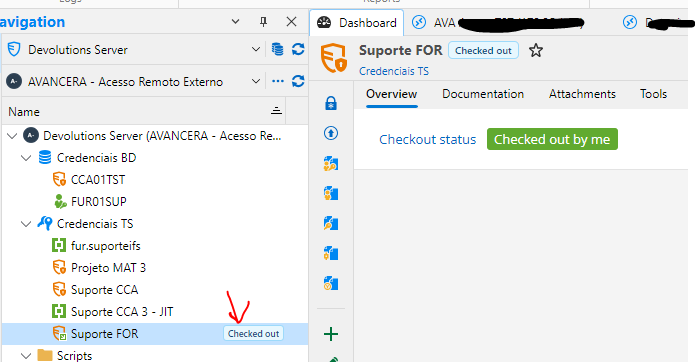
PAM Accounts:
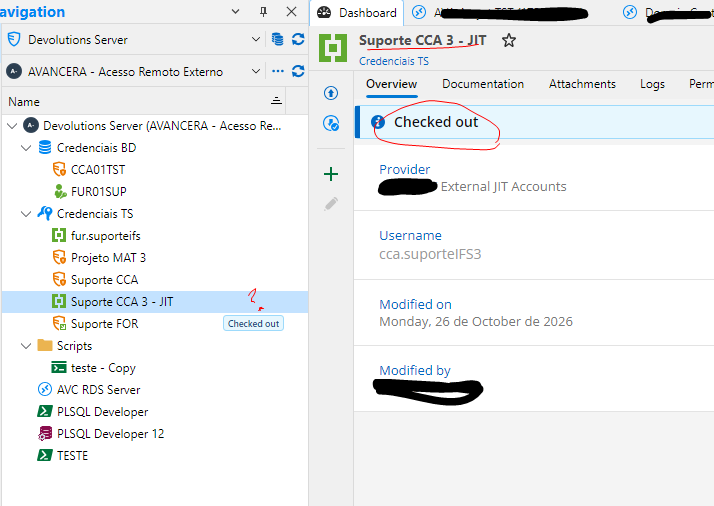
Regards,
Elaine Berenguer
"Double authentication" when selecting DVLS Privileged Accounts using Launcher
Thanks Simon!
Regarding "Launcher: Devolutions Server login prompt", I left only and today it worked... I believe it had something to do with working offline, because today I connected to RDS without prompting for credentials again. Thank you very much.
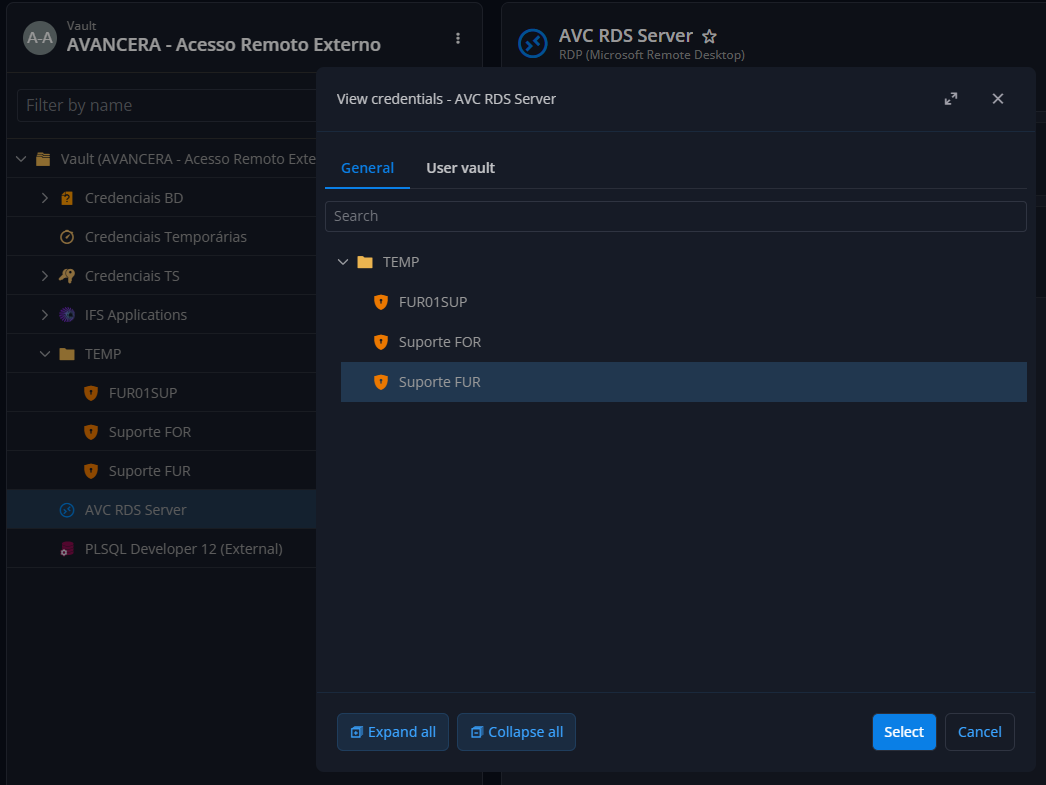
About "Web interface: “Use active DVLS workspace” error", the entry in PAM Vault is configured to View, Connect and Checkout for the contractor account. The DVLS Privileged Account entry is configured with View and Connect... The RDS entry is configured to prompt the accounts available on " Credenciais TS" folder:
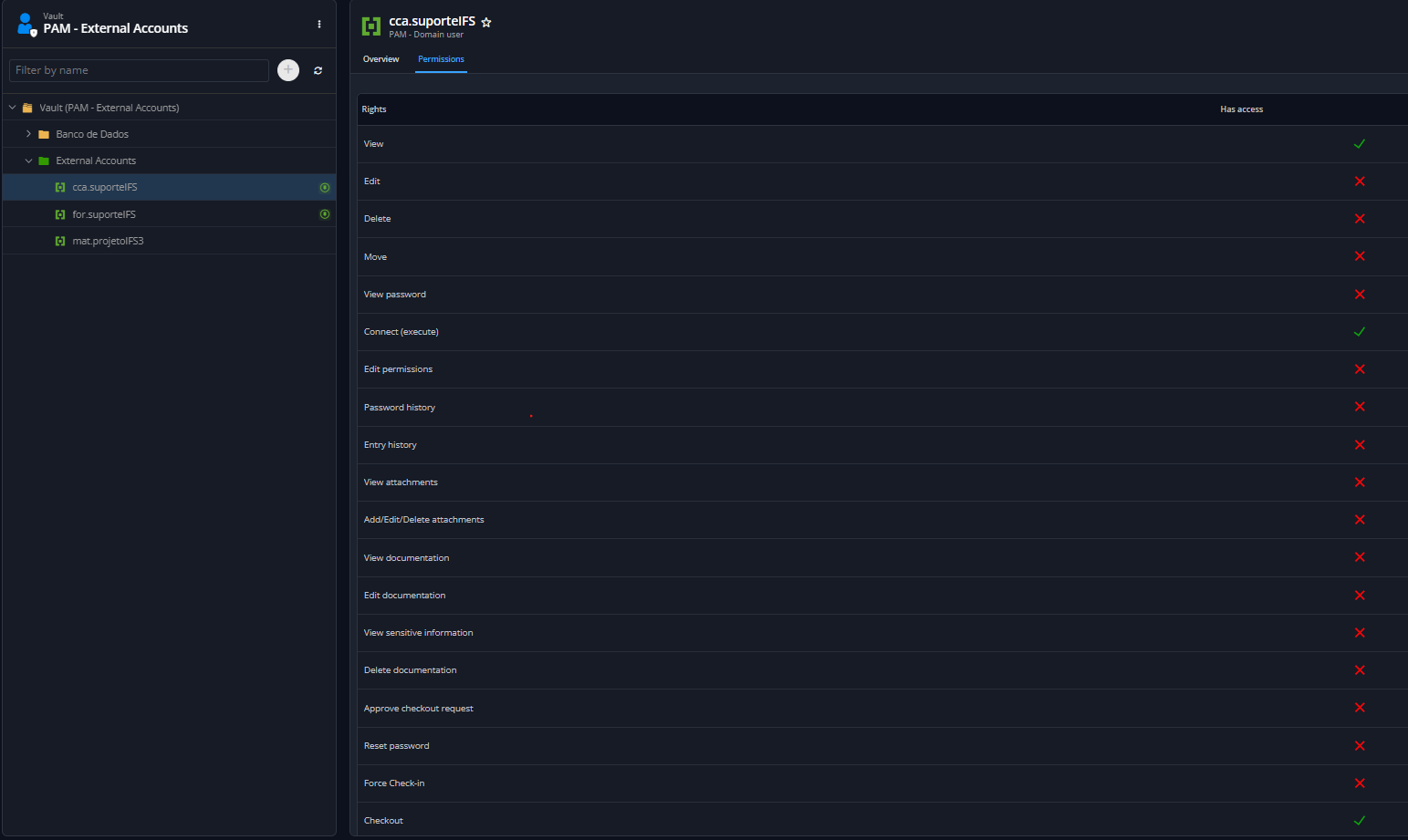
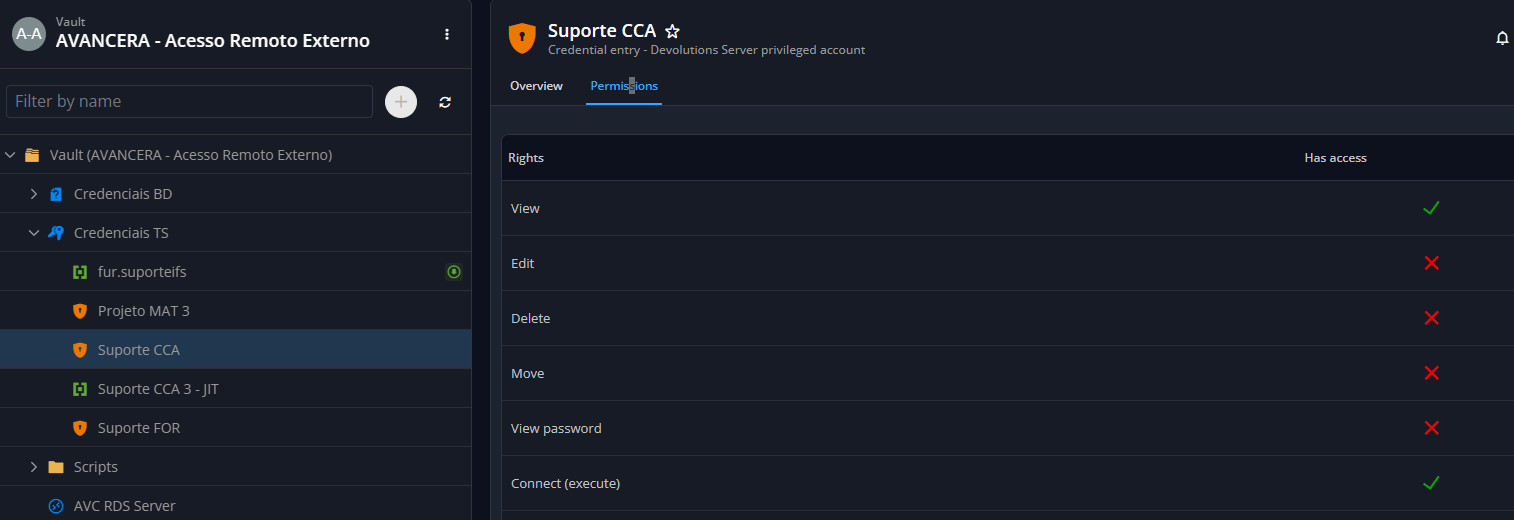
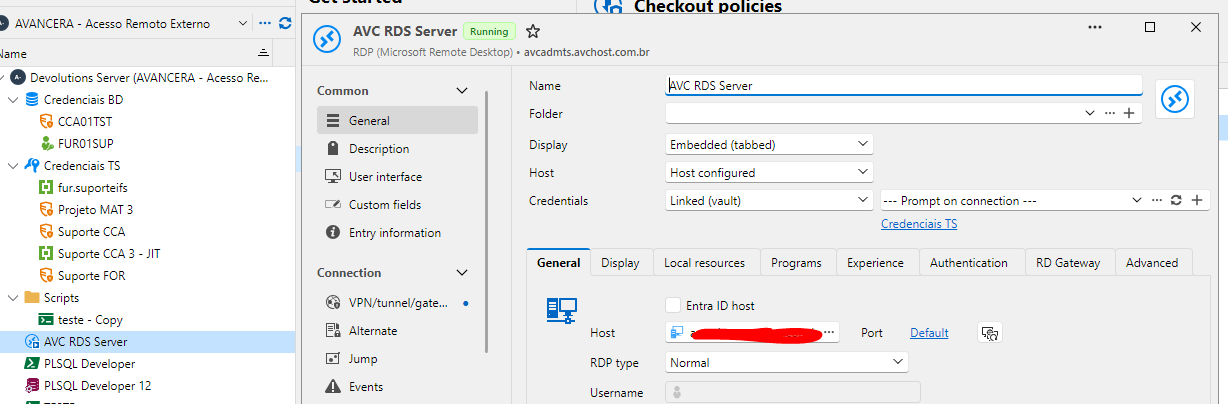
With this very same configuration, the connection is established using Launcher.
Regards,
Elaine Berenguer
"Double authentication" when selecting DVLS Privileged Accounts using Launcher
Hi! I'm setting up a contractor access to our environment using PAM. I've set up a specific vault to this contractor with Devolution Server privileged account entries, as you can see below.
It's working, but it keeps asking for DVLS credentials when selecting any of them at RDP session:
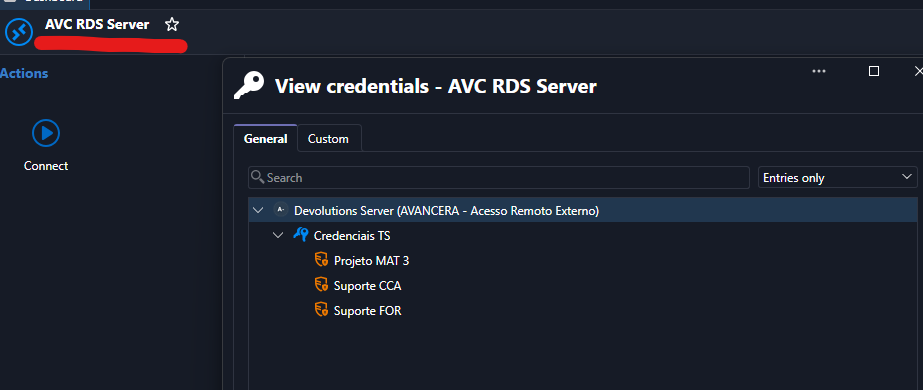
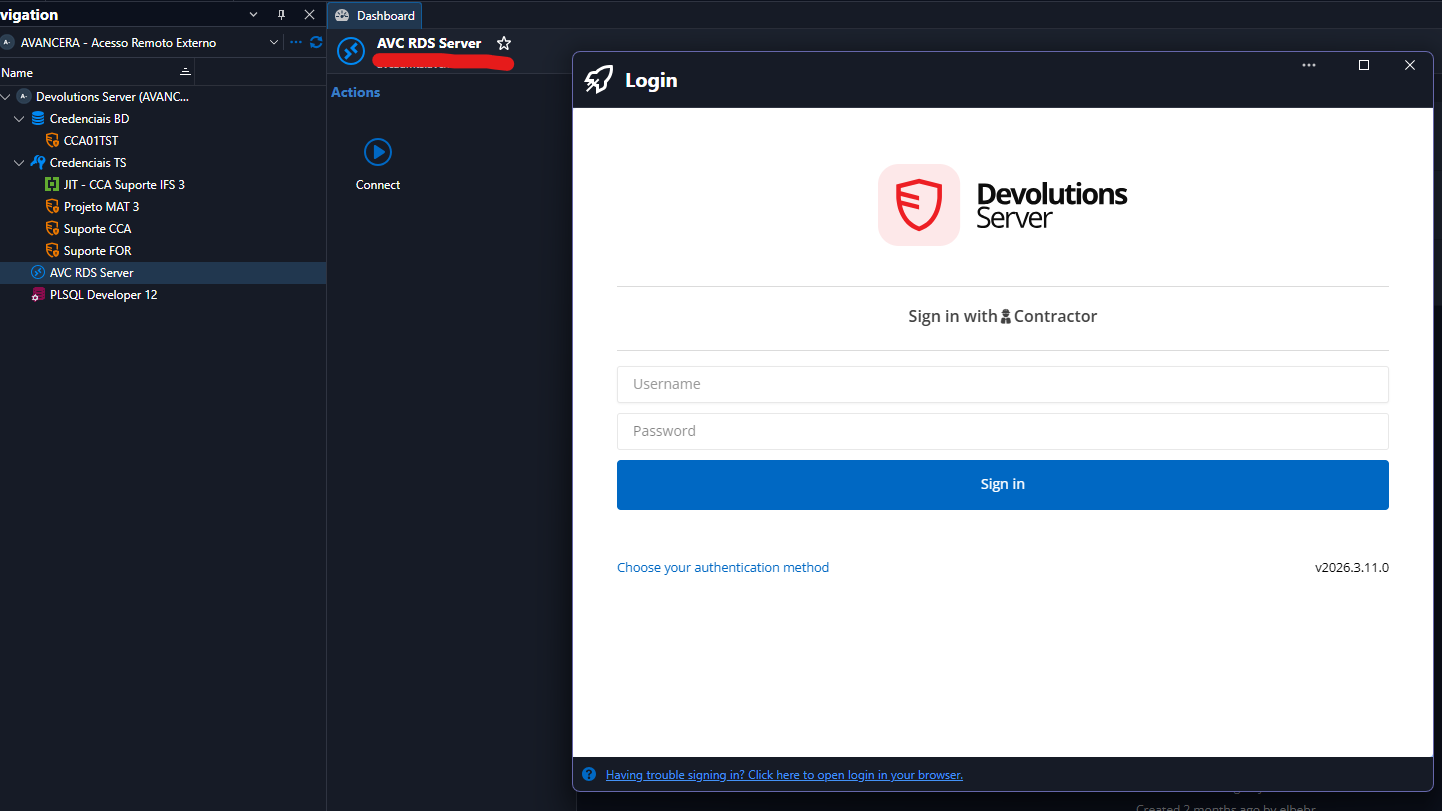
I've already tried every combination in this entry configuration section, but nothing worked...
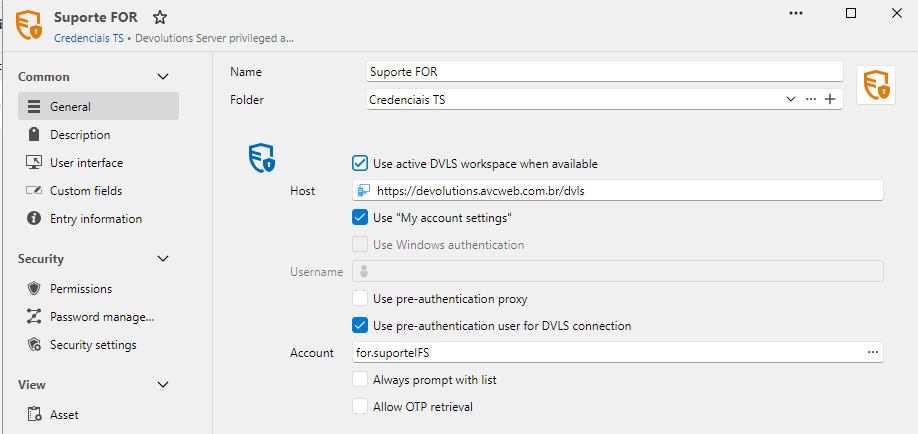
Is there a way to avoid that once the user is already logged in Launcher, using the same DVLS?
Meanwhile, using the web interface, it asks for this specific setting that I've already have enabled... Am I missing something here too? :P
I don't know if the use of privileged accounting in web session is already available... I have just resumed our POC after one month and a lot of changes took place since I last used DVLS PAM, but I remember that the error was different, so, that's why I'm asking... ;)
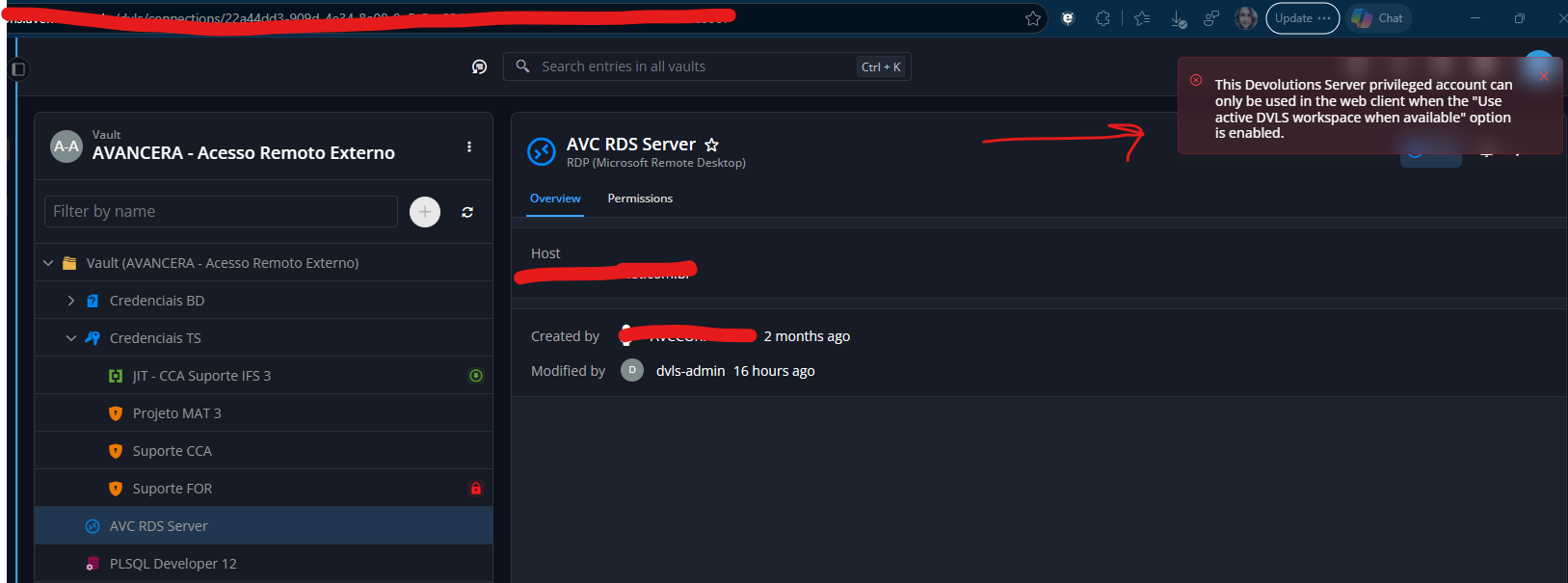
Regards!
Elaine Berenguer
New DVLS Server
Hi @Alexandre Bélisle, everything worked just fine following the steps you've asked me to follow! Thank you very very much! :)
New DVLS Server
Hi Elaine,
Yes, that will work, and you will keep everything (providers, policies, permissions, entries, etc.) since it all lives in the database. You don't need a fresh database; just point the new instance to your existing POC database.
The staging article you read is actually the same procedure we use to move DVLS to another server. In short:
On the POC server, export the encryption keys (Devolutions Server Console > your instance > Encryption Keys > Export). This step is critical: without these keys, the data in the database cannot be decrypted.
Take a full backup of the POC database (just in case).
On the new server, install the Devolutions Server Console and create a new instance, ideally with the same DVLS version as your POC.
At the database step, enter your existing POC database information.
When prompted, provide the encryption keys file exported in step 1.
Reinstall the companion components on the new server (Scheduler service for PAM, Devolutions Gateway, etc.) and apply your new trial license.
Stop or decommission the POC instance so that only one instance uses the database.
If the new machine keeps the same name as the POC server, you won't need to update the access URL in Remote Desktop Manager; otherwise, simply update the workspace URL.
Reference: Migrating Devolutions Server to another server
Let us know if you have any questions.
Best regards,
@Alexandre Bélisle
Hi! Thank you very much for your explanation... I was unsure if just pointing to the 'POC db' would work... :) I will follow your instructions and will let you know! :)
Regards!
Elaine Berenguer
New DVLS Server
Hi!
We did a Devolution Server + PAM POC and now, after receiving a new trial license for a few more days to present the solution, we're going to install the DVLS in a new server (so we it can be in the definitive server if we do adquire your solution). The question here is... I would like to use the existing database (from our POC) in this new installation. I've already read about DVLS staging, but it's not the case, since we're not to use the current server.
Must I install it using a fresh database and create a new instance pointing to that existing database? Will it work? I want to keep all providers, policies, permissions and everything else I've set up...
Thanks!
Regards,
Elaine Berenguer
Green Mark on "Disallowed (inherited)"?
Hi Eduard!
Sorry for the delay in getting back to you... Between your post and me accessing RDM again to get the informations you've asked, I updated RDM to 2026.2.18 (we're running it in Windows Server 2025) and now the informations available in Permissions tab are accurate again:
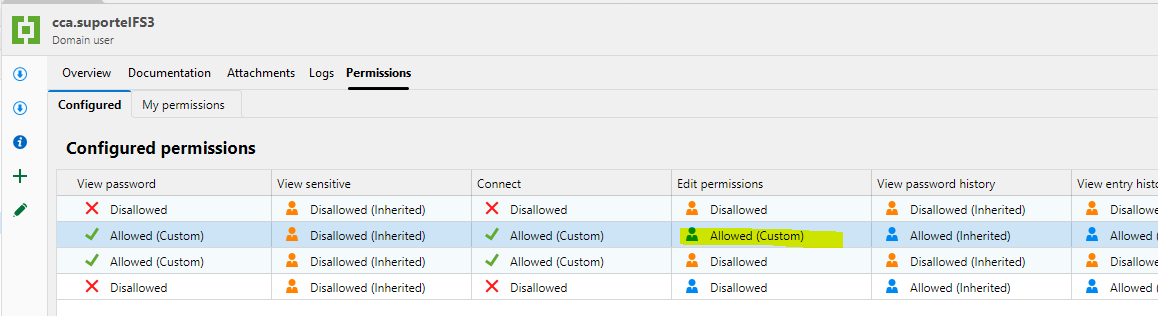
Anyways, Support Team is still unable to edit the entry... Am I missing something?
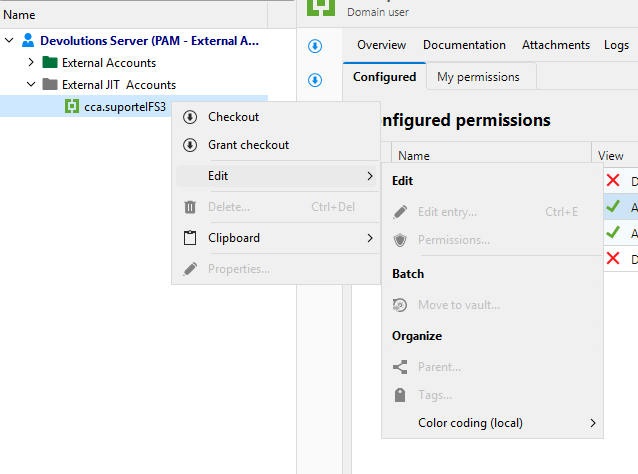
The permission summary for Support Team to this entry is:
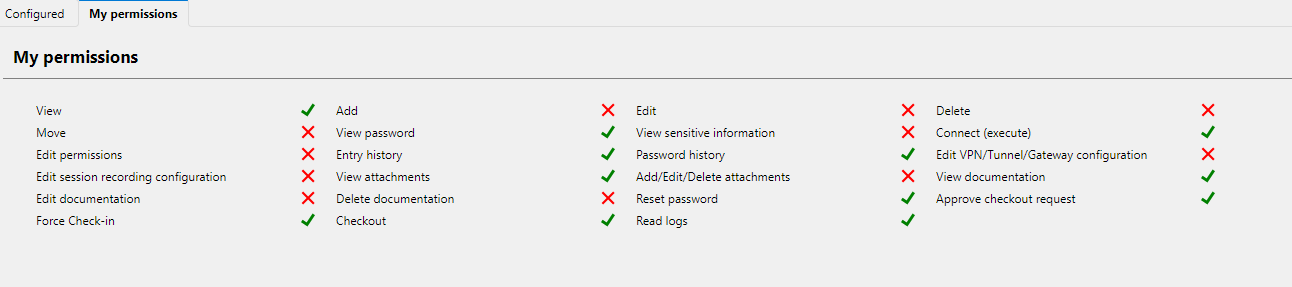
But Edit permission is granted by inheritance:
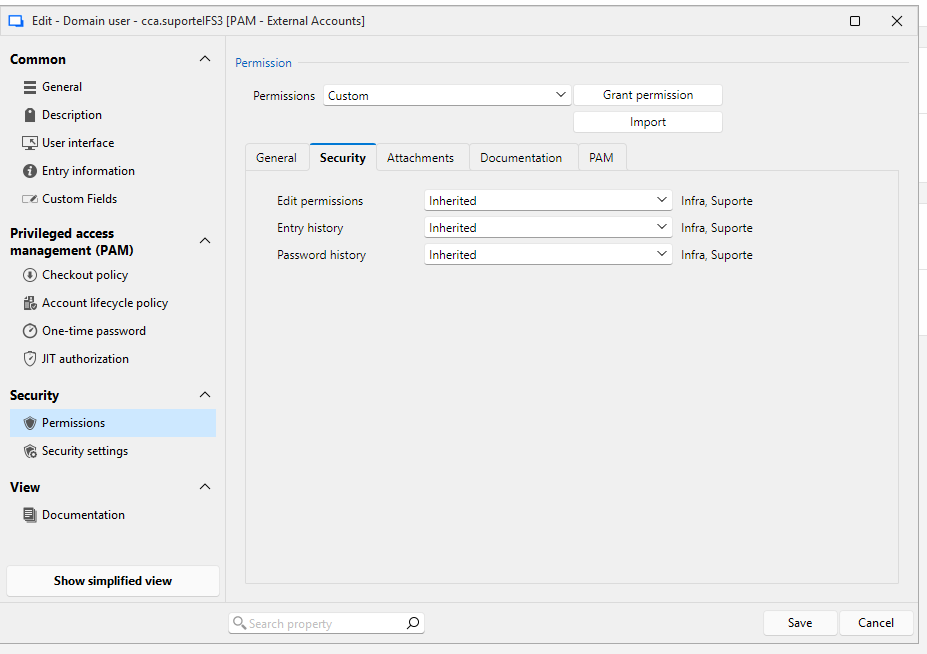
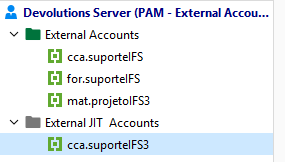
Regarding your other questions: It's a DVLS workspace. 'External JIT accounts' folder sits under Vault Root, yes. And the Edit Permission is configured correctly at the folder level, as you can see below:
Thanks in advance... :)
Regards,
Elaine Berenguer
Password Variable
Hi Sam! As I told you over DM, this problem was solved after update RMD to 2026.2.18 version!
Thank you very much for your attention!
Regards,
Elaine
Question - Checked out PAM Account password
Yes Luc! It would definitely work!
Question - Checked out PAM Account password
Hi everyone... As a hosting provider, we provide all the infrastructure our customers need to host their applications. These customers have several contractors who support the applications running on our infrastructure. That's why, at my company, check out processes is never performed by the contractors: after our customer provides us the proper authorization, we proceed granting check out for the contractors...
Given this scenario, we have two different types of account:
the fixed ones: each customer have, by right, 3 domain accounts to be used by these contractors.
the temp ones: there are special occasions when same customers need more than 3 accounts, so, we create 'temp' ones.
NOTE: All these contractors access our environment through a Windows TS Server.
So, I'm trying to setup Devolutions PAM solution to help us automate and audit all the external access from those two scenarios.
The first one is already mapped out and working like a charm: we've set up a provider and saved the accounts to a PAM Vault. Once in this case the check-in process do NOT terminate the account, we can access the TS by checking out the privilege account to ourselves, log in the TS using the privilege credentials, set some things up in the session according to the customer we're dealing with, and check in the privilege account when done. After that, we grant checkout to the contractor and the process is finished.
The second one is giving me headache. We reaaaaaly could use the benefits of JIT Accounts, because the account is created using RDM directly and is terminated automatically. The problem in this process is that I (as administrator) cannot view the password created for these types of users (when checked out) so I could log in the TS to setup it's session (only if I check out, but when I check in, the account is terminated and all I did in this session will be lost).
If I could only view the password, all my problems would be solved (at least as far as I got so far... lol):
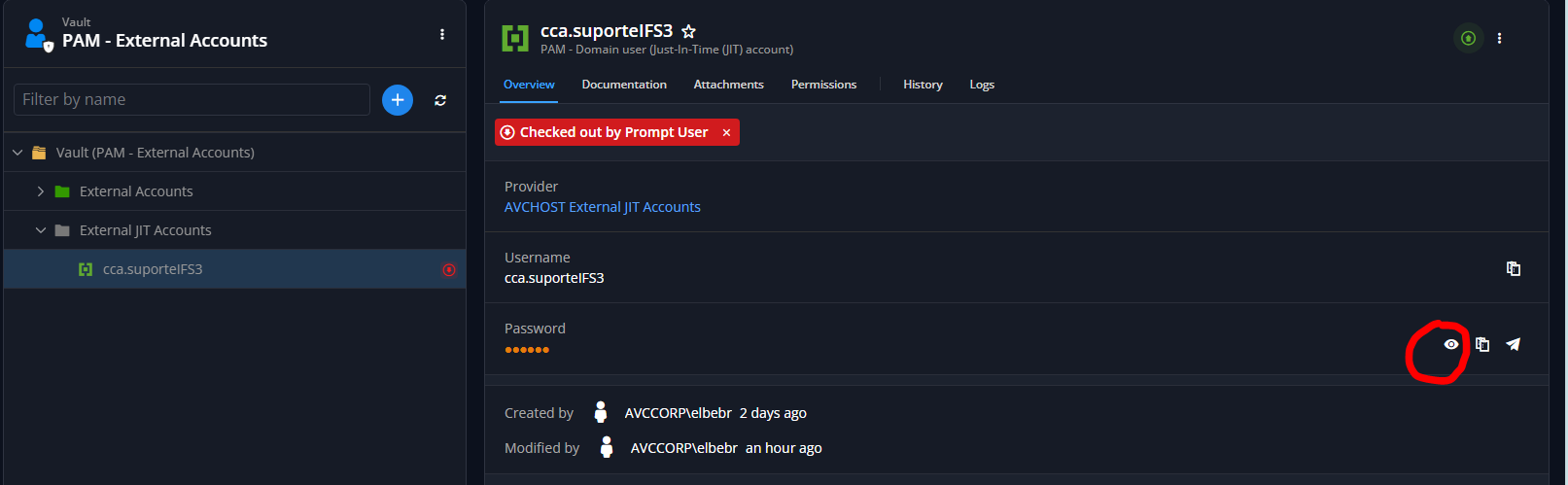
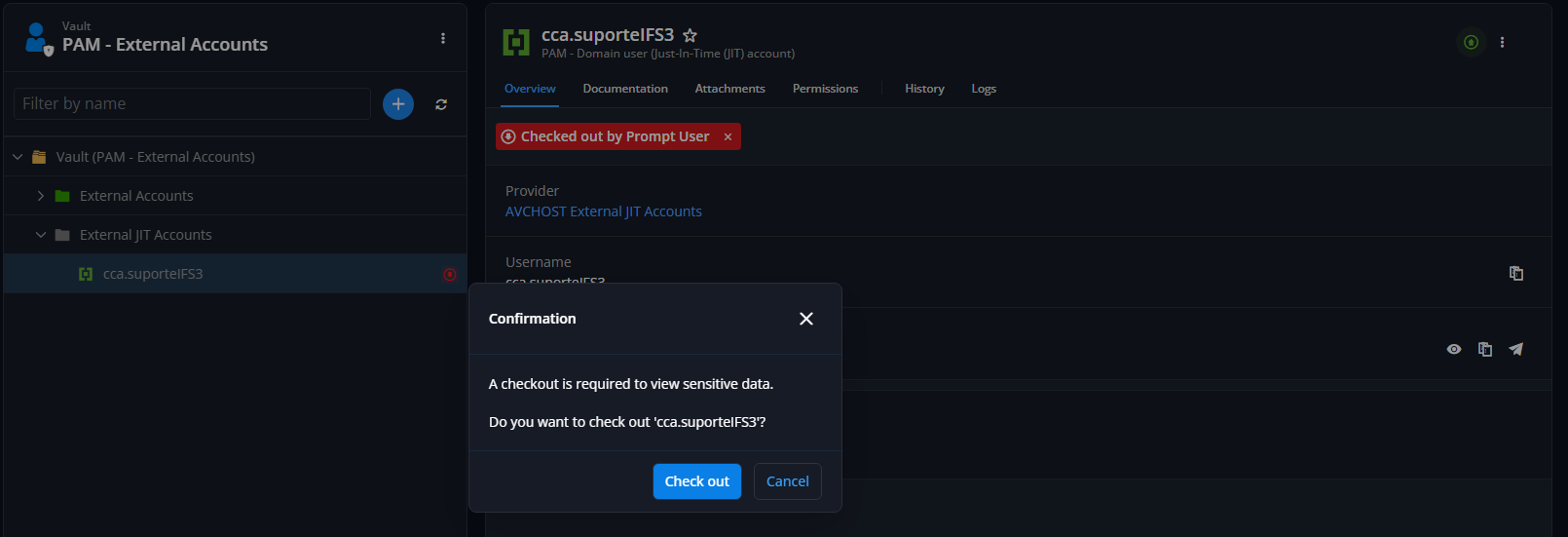
If, by design, this possibility violates some major PAM principle and will not be considered at all... can you tell me if there's a way to accomplish our needs regarding the second scenario (without considering the possibility of creating these accounts manually in the DC, as we do nowadays)?
Sorry about the gigantic post... :)
Looking forward to hearing from you soon.
Regards,
Elaine Berenguer
Privilege Set and Individual Privilege
Oh... I got it!
In our case scenario the checkout will never be triggered by the contractors (they technically could do it, but we will not approve it). We have to give them access only after receiving the formal authorization from our customer and after finishing setting up his session.
Anyways... just explaining why we need this...
Thank you very much, Luc!
Privilege Set and Individual Privilege
Hi!
I have a situation here at my company that all JIT accounts must always have a default set of privileges and a special individual one, which will determine which customer of ours they will access (we have a bunch of specific configurations that depends on which customer he will support).
However, when I'll set the privileges when granting checkout, as you can see bellow, only the permission sets are available to select, but the other ones aren't (CCA, FOR or MAT)...
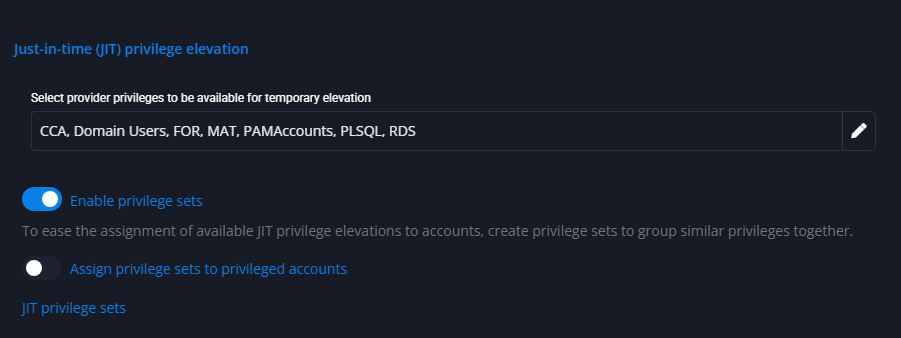
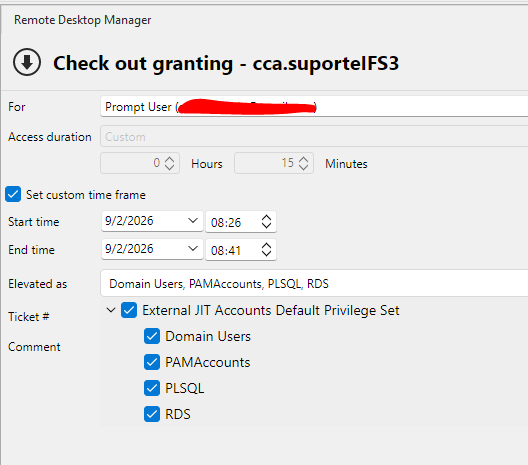
Can you please tell me if there is some configuration I'm missing to make them both available (the privilege set and the individual provider privileges) to be selected? If there's not, I believe it would be a great feature...
PS.: While I was writing here for you guys, I did another test creating another Privilege Set using one of the others provider privilege we have and now it's available... That means that when you enable privilege set, only them will be available, right?I believe it's too much work, since we have more than 85 different customers and we already have to pinpoint each group in provider... :P
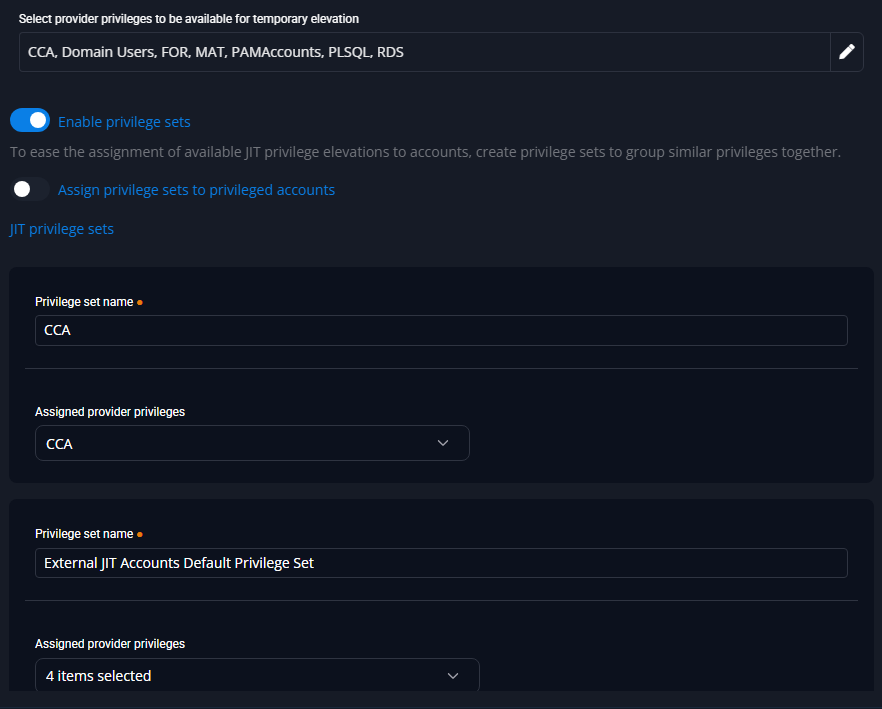
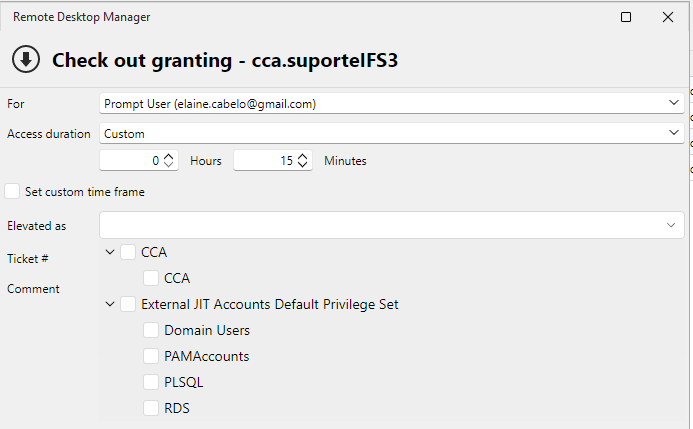
Thank you!
Regards,
Elaine Berenguer
Green Mark on "Disallowed (inherited)"?
Hi everyone... the whole permissions settings in RDM is driving me crazy... lol
I have a folder in which I added some credential entries and gave "Edit Permissions" access to a specific group:
FOLDER PERMISSION:
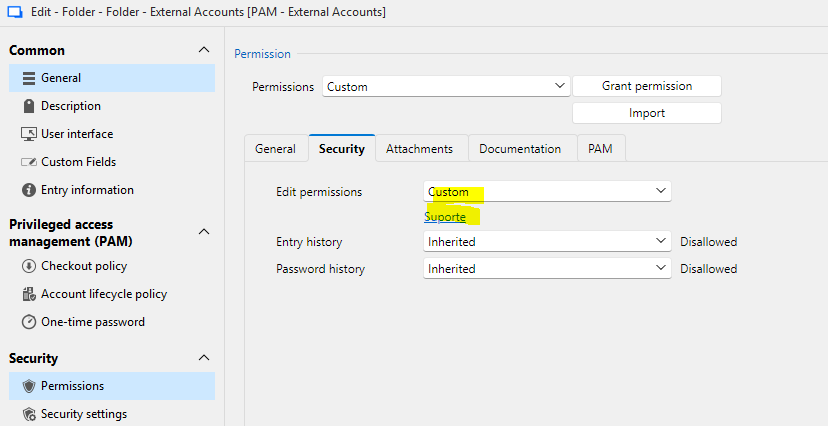
ENTRY PERMISSION:
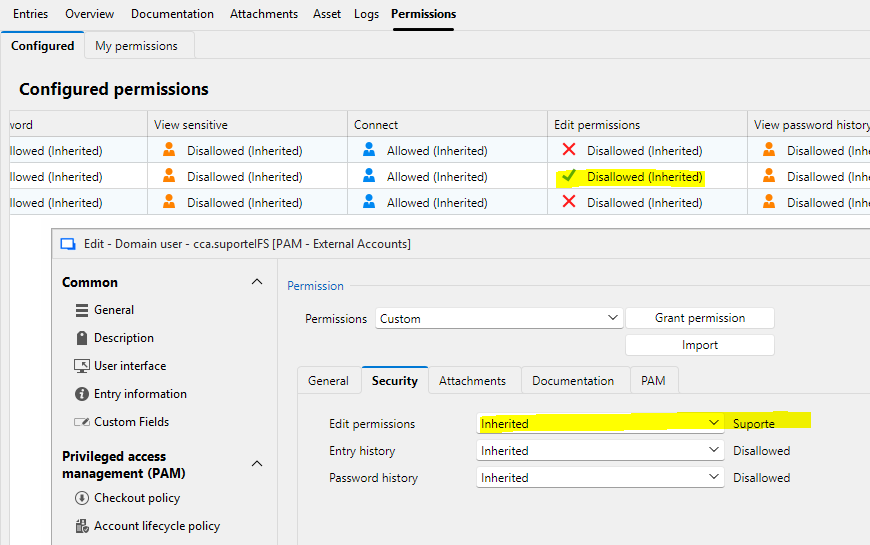
NOTE: Those prints are from RDM logged with an Administrator user.
Why is it "Disallowed (Inherited)" when I view the entry's permissions panel (in the back in the previous image)?
When logged with an account member of 'Suporte' group, the entry permissions are:
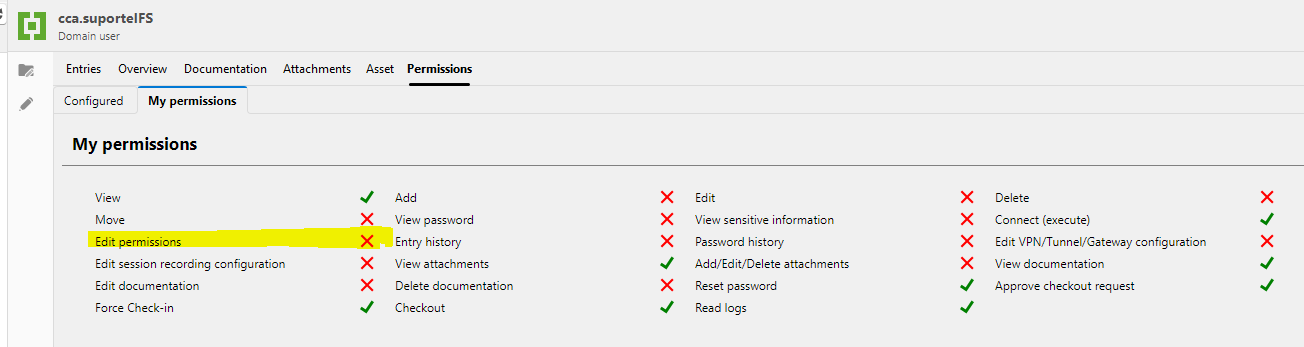
Can anyone pleeeeeeease HELP ME? :P
Regards,
Elaine Berenguer
Password Variable
Screenshots sent through DM! :)
Password Variable
Hi there Sam!
Screenshot:
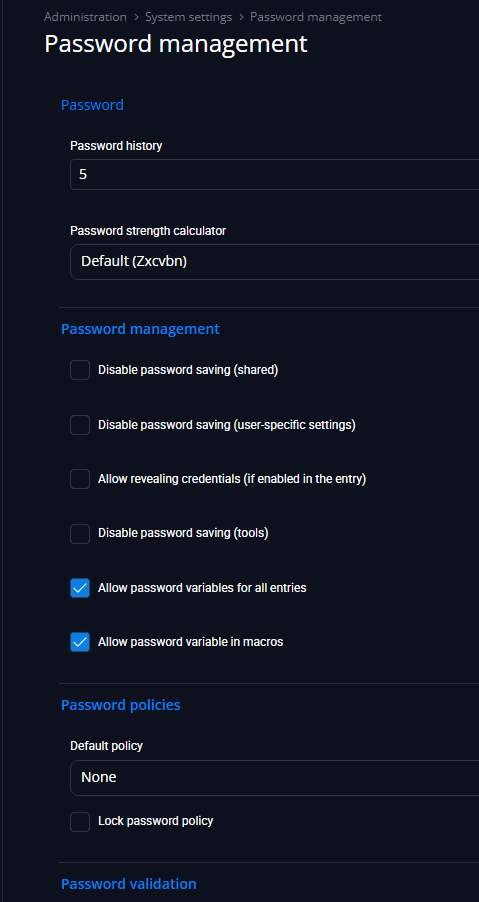
Even after enabling "Allow password in macros", the problem persists:

Thank you for your attention in this matter. :)
Regards,
Elaine Berenguer
Password Variable
Hi Sam!
The password setting was already enabled:
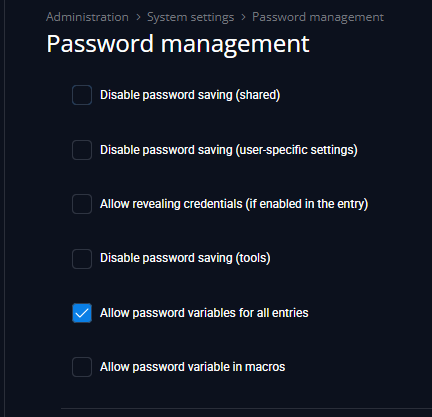
Credential entry:
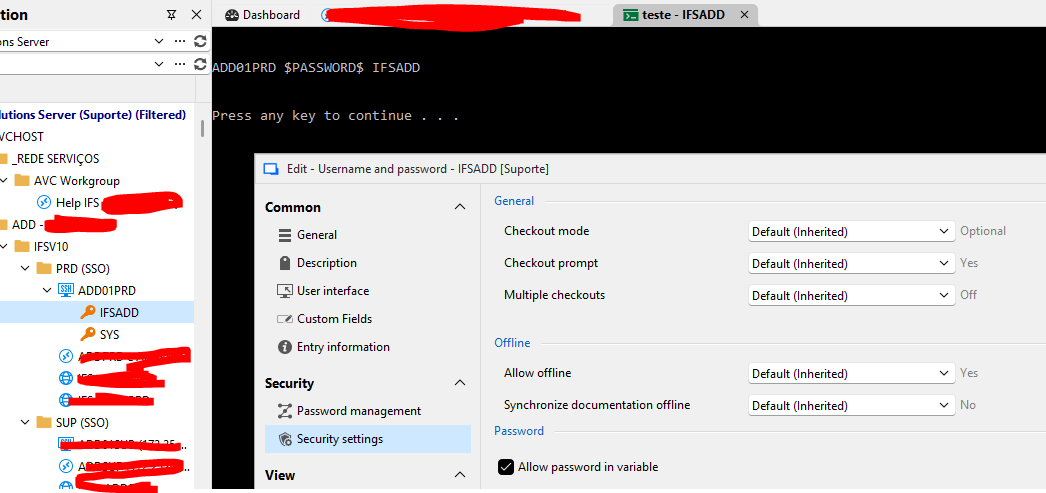
Any ideas?
Regards,
Elaine