Password Variable

I have a SSH entry and a credential one linked to it. I've enabled "Allow password on a variable" on both of them and 'm trying to open PLSQL Developer using a command-line I've setup with the following arguments:
userid=$USERNAME$/$PASSWORD$@$PARENT_NAME$
The tool opens, but the authentication fails.
To debug what was going on, I created a bat file to echo the variables and, as you can see, the only one that is not working is the $PASSWORD$...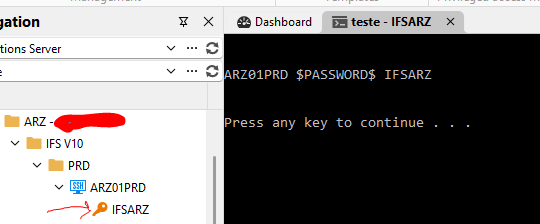
Do I have to enable something else?
OBS.: My user is Administrator.
9afd969c-8b85-446d-b8be-f2a2d81694de.png
Recommended Answer
Hi Sam! As I told you over DM, this problem was solved after update RMD to 2026.2.18 version!
Thank you very much for your attention!
Regards,
Elaine
All Comments (9)
Hello Elaine,
Thanks for reaching out!
PASSWORD in a Command Line tool depends on two settings, not just one. You've already enabled "Allow password in variable" on both the SSH entry and its linked credential, which covers the per-entry side. On an advanced workspace, it also requires the system-level toggles under Administration → System Settings → Password Settings: "Allow password variables for all entries" and "Allow password variable in macros" both need to be on. The walkthrough is here: Allow password in variable. Please confirm these are enabled and rerun the batch test.
If both toggles are already on and PASSWORDPASSWORD PASSWORD still comes through as the literal string, then please let us know.
Thank you in advance!
Best regards,
Hi Sam!
The password setting was already enabled: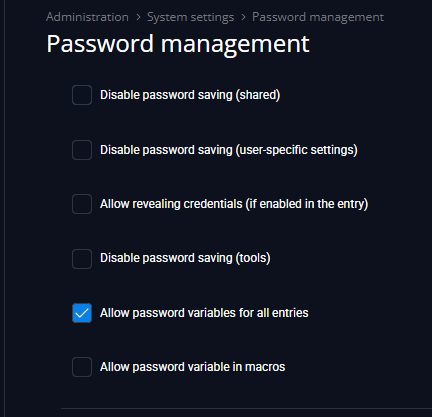
Credential entry: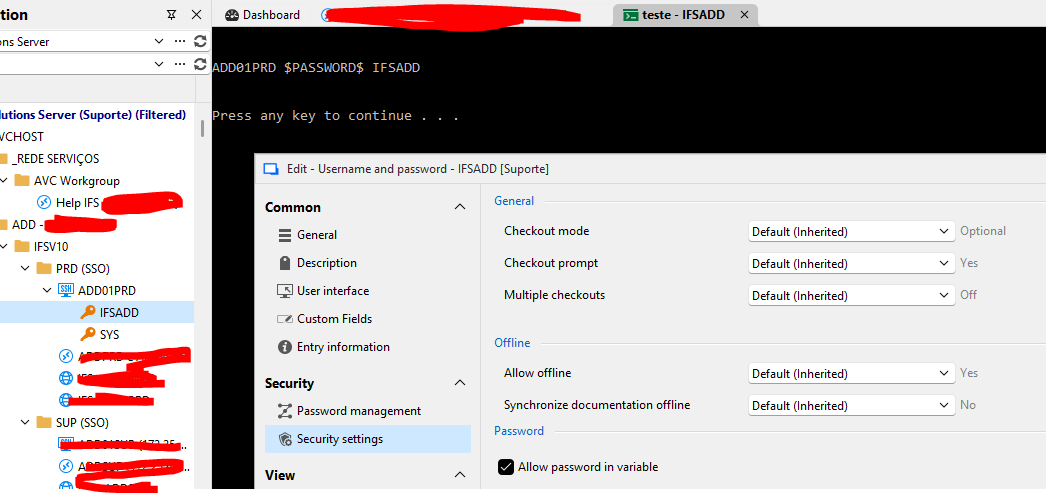
Any ideas?
Regards,
Elaine
50aa2ad7-2781-4db6-b36a-aa34671d88da.png
a6d41c29-331c-4fd3-bf54-40feb8055177.png
Hello Elaine,
Thank you for the feedback.
In RDM, if you navigate to Administration → System Settings → Password Settings. Could you please send us a screenshot of the settings you have configured?
There should be an option to enable the "Allow password variable in macros" setting there.
If this is also enabled and the issue persists, please let us know.
Thank you in advance!
Best regards,
Hi there Sam!
Screenshot: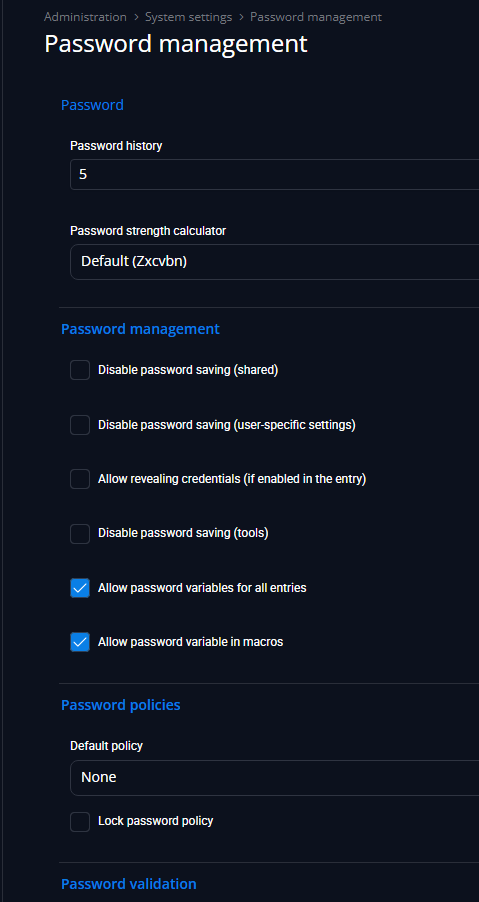
Even after enabling "Allow password in macros", the problem persists:
Thank you for your attention in this matter. :)
Regards,
Elaine Berenguer
8ced7bbe-2105-4282-a2e5-651b059c8603.png
328f52a5-24f6-4e69-bba4-425457b1c6e6.png
Hello Elaine,
Thank you for the feedback.
Could you please let us know what version of RDM you are using as well as what workspace (formally known as datasource) you have configured?
Could you also please send us a screenshot of the SSH entry configurations and the credential configurations, and we will try to reproduce the issue on our side.
If necessary, you can send us the screenshots via DM.
Thank you in advance!
Best regards,
Screenshots sent through DM! :)
Hello Elaine,
Thank you for letting us know!
We will investigate and get back to you.
Best regards,
Hi Sam! As I told you over DM, this problem was solved after update RMD to 2026.2.18 version!
Thank you very much for your attention!
Regards,
Elaine
Hello Elaine,
Thanks for confirming!
You are very welcome.
Best regards,