
krisr
Inconsistent property behaviour in Apps
sorry for long delay (i forgot). here are my function with function calls:
function Get-FastADObject {
[CmdletBinding()]
param(
[Parameter(Mandatory = $true, Position = 0)]
[string]$SearchBase,
[Parameter(Mandatory = $false)]
[ValidateSet('User', 'Group', 'Computer', 'Any')]
[string]$Category = 'User',
[Parameter(Mandatory = $false)]
[string]$Server,
[Parameter(Mandatory = $false)]
[string[]]$Attributes = @('Name', 'SamAccountName', 'DistinguishedName', 'Enabled')
)
process {
# 1. Virtual Attribute Mapping (RSAT Names -> LDAP Names)
$virtualMap = @{
'Enabled' = 'userAccountControl'
'AccountExpirationDate' = 'accountExpires'
'PasswordLastSet' = 'pwdLastSet'
'LastLogon' = 'lastLogonTimestamp'
'LastLogonDate' = 'lastLogonTimestamp'
'Created' = 'whenCreated'
'Modified' = 'whenChanged'
'Members' = 'member'
'EmailAddress' = 'mail'
'Surname' = 'sn'
'LockedOut' = 'msDS-User-Account-Control-Computed'
'lockoutTime' = 'lockoutTime'
'PasswordExpired' = 'pwdLastSet'
'PasswordNeverExpires' = 'userAccountControl'
'SID' = 'objectSid'
}
# 2. Build the list of real LDAP attributes to load
$ldapAttributes = New-Object System.Collections.Generic.HashSet[string]
foreach ($attr in $Attributes) {
$mapped = $false
foreach ($vKey in $virtualMap.Keys) {
if ($attr -ieq $vKey) {
$null = $ldapAttributes.Add($virtualMap[$vKey].ToLower())
$mapped = $true
break
}
}
if (-not $mapped) {
$null = $ldapAttributes.Add($attr.ToLower())
}
}
# 3. Setup DSSearcher
$prefix = if ($Server) { "LDAP://$Server/" } else { "LDAP://" }
try {
$root = [ADSI]($prefix + $SearchBase)
# Trigger a bind to verify path
$null = $root.NativeGuid
}
catch {
Write-Error "Failed to connect to SearchBase '$SearchBase'. Check path and Server. Error: $_"
return
}
$searcher = [ADSISearcher]$root
$searcher.PageSize = 1000
# Category Filters
$searcher.Filter = switch ($Category) {
'User' { "(&(objectClass=user)(objectCategory=person))" }
'Group' { "(objectClass=group)" }
'Computer' { "(objectClass=computer)" }
'Any' { "(|(sAMAccountName=*)(objectClass=group))" } # Broad filter for principal objects
}
# Add attributes to searcher
foreach ($lAttr in $ldapAttributes) {
$null = $searcher.PropertiesToLoad.Add($lAttr)
}
# 4. Execute Search
$results = $searcher.FindAll()
# 5. Process Results
foreach ($r in $results) {
$propHash = [ordered]@{ }
foreach ($attr in $Attributes) {
# Find corresponding LDAP attribute name
$mappedLDAP = $null
foreach ($vKey in $virtualMap.Keys) {
if ($attr -ieq $vKey) { $mappedLDAP = $virtualMap[$vKey].ToLower(); break }
}
$currentLdapAttr = if ($mappedLDAP) { $mappedLDAP } else { $attr.ToLower() }
$val = $r.Properties[$currentLdapAttr]
# Special Case: 'Enabled' (calculated from userAccountControl bit 2)
if ($attr -ieq 'Enabled') {
if ($null -ne $val -and $val.Count -gt 0) {
$propHash['Enabled'] = (-not ($val[0] -band 2))
}
else {
$propHash['Enabled'] = $null
}
continue
}
if ($attr -ieq 'SID') {
if ($null -ne $val -and $val.Count -gt 0) {
$propHash['SID'] = (New-Object System.Security.Principal.SecurityIdentifier($val[0], 0)).Value
}
else {
$propHash['SID'] = $null
}
continue
}
# Special Case: 'LockedOut'
if ($attr -ieq 'LockedOut') {
if ($null -ne $val -and $val.Count -gt 0) {
try {
$propHash['LockedOut'] = (([long]$val[0] -band 0x10) -ne 0)
}
catch {
$propHash['LockedOut'] = $false
}
}
else {
$propHash['LockedOut'] = $false
}
continue
}
# Special Case: 'lockoutTime' (return the actual datetime)
if ($attr -ieq 'lockoutTime') {
if ($null -ne $val -and $val.Count -gt 0) {
try {
$longVal = [long]$val[0]
if ($longVal -eq 0) {
$propHash['lockoutTime'] = $null
}
else {
$propHash['lockoutTime'] = [datetime]::FromFileTime($longVal)
}
}
catch {
$propHash['lockoutTime'] = $val[0]
}
}
else {
$propHash['lockoutTime'] = $null
}
continue
}
# Special Case: 'PasswordExpired'
if ($attr -ieq 'PasswordExpired') {
# Simple check: if pwdLastSet is 0, password must be changed
if ($null -ne $val -and $val.Count -gt 0 -and $val[0] -eq 0) {
$propHash['PasswordExpired'] = $true
}
else {
$propHash['PasswordExpired'] = $false
}
continue
}
# Special Case: 'PasswordNeverExpires'
if ($attr -ieq 'PasswordNeverExpires') {
if ($null -ne $val -and $val.Count -gt 0) {
$propHash['PasswordNeverExpires'] = (($val[0] -band 65536) -eq 65536)
}
else {
$propHash['PasswordNeverExpires'] = $null
}
continue
}
# Handle Null/Empty
if ($null -eq $val -or $val.Count -eq 0) {
$propHash[$attr] = $null
continue
}
# Handle Multi-valued attributes (Join with semicolon)
# Specifically handle 'member', 'memberof', 'proxyaddresses' or any multi-count val
if ($val.Count -gt 1 -or $currentLdapAttr -match 'member|proxyaddresses') {
$propHash[$attr] = $val -join '; '
}
# Handle 64-bit Dates (FileTime)
elseif ($currentLdapAttr -match 'expires|pwdlastset|lastlogon|timestamp|lockouttime') {
try {
$longVal = [long]$val[0]
if ($longVal -eq 0 -or $longVal -eq 9223372036854775807) {
$propHash[$attr] = $null # or "Never"
}
else {
$propHash[$attr] = [datetime]::FromFileTime($longVal)
}
}
catch {
$propHash[$attr] = $val[0]
}
}
# Handle GeneralizedTime (whenCreated / whenChanged)
elseif ($currentLdapAttr -match 'when') {
try {
# Format is typically "20230101120000.0Z"
$strDate = [string]$val[0]
if ($strDate -match '^(\d{4})(\d{2})(\d{2})(\d{2})(\d{2})(\d{2})') {
$propHash[$attr] = Get-Date -Year $Matches[1] -Month $Matches[2] -Day $Matches[3] -Hour $Matches[4] -Minute $Matches[5] -Second $Matches[6]
}
else {
$propHash[$attr] = $strDate
}
}
catch {
$propHash[$attr] = $val[0]
}
}
# Standard Text/String
else {
$propHash[$attr] = [string]$val[0]
}
}
[PSCustomObject]$propHash
}
}
}
function Get-FastADUniversal {
[CmdletBinding(DefaultParameterSetName = 'ByLogins')]
param(
[Parameter(Mandatory = $true, ParameterSetName = 'ByLogins')]
[string]$Server,
[Parameter(Mandatory = $true, ParameterSetName = 'ByLogins')]
[string[]]$LoginArray,
[Parameter(Mandatory = $false, ParameterSetName = 'BySearchBase')]
[string]$SearchBase,
[Parameter(Mandatory = $false, ParameterSetName = 'BySearchBase')]
[ValidateSet('User', 'Group', 'Computer', 'Any')]
[string]$Category = 'User',
[Parameter(Mandatory = $false, ParameterSetName = 'BySearchBase')]
[string]$DomainController,
[Parameter(Mandatory = $true)]
[string[]]$Properties,
[Parameter(Mandatory = $false)]
[switch]$AsHashtable = $false
)
$virtualMap = @{
'Enabled' = 'userAccountControl'
'AccountExpirationDate' = 'accountExpires'
'PasswordLastSet' = 'pwdLastSet'
'LastLogon' = 'lastLogonTimestamp'
'LastLogonDate' = 'lastLogonTimestamp'
'Created' = 'whenCreated'
'Modified' = 'whenChanged'
'Members' = 'member'
'EmailAddress' = 'mail'
'Surname' = 'sn'
'LockedOut' = 'msDS-User-Account-Control-Computed'
'lockoutTime' = 'lockoutTime'
'PasswordExpired' = 'pwdLastSet'
'PasswordNeverExpires' = 'userAccountControl'
'SID' = 'objectSid'
'LastBadPasswordAttempt' = 'badpasswordtime'
}
$ldapProperties = @()
foreach ($prop in $Properties) {
if ($virtualMap.ContainsKey($prop)) {
$ldapProperties += $virtualMap[$prop].ToLower()
}
else {
$ldapProperties += $prop.ToLower()
}
}
if ($PSCmdlet.ParameterSetName -eq 'ByLogins' -and "samaccountname" -notin $ldapProperties) {
$ldapProperties += "samaccountname"
}
$searcher = if ($PSCmdlet.ParameterSetName -eq 'ByLogins') {
$filterParts = foreach ($adlogin in $LoginArray) { "(sAMAccountName=$adlogin)" }
$finalFilter = "(|$( -join $filterParts ))"
$root = [ADSI]"LDAP://$Server"
$s = [adsisearcher]$root
$s.Filter = $finalFilter
$s
}
else {
$prefix = if ($DomainController) { "LDAP://$DomainController/" } else { "LDAP://" }
try {
$root = [ADSI]($prefix + $SearchBase)
$null = $root.NativeGuid
}
catch {
Write-Error "Failed to connect to SearchBase '$SearchBase'. Check path and Server. Error: $_"
return
}
$s = [ADSISearcher]$root
$s.PageSize = 1000
$s.Filter = switch ($Category) {
'User' { "(&(objectClass=user)(objectCategory=person))" }
'Group' { "(objectClass=group)" }
'Computer' { "(objectClass=computer)" }
'Any' { "(|(sAMAccountName=*)(objectClass=group))" }
}
$s
}
$searcher.PageSize = 100
$searcher.ReferralChasing = [System.DirectoryServices.ReferralChasingOption]::None
$searcher.SearchScope = "Subtree"
$searcher.PropertiesToLoad.AddRange(@($ldapProperties))
$results = $searcher.FindAll()
if ($PSCmdlet.ParameterSetName -eq 'ByLogins' -or $AsHashtable) {
$adLookup = @{}
foreach ($r in $results) {
$property = $r.Properties
if ($null -eq $property) {
continue
}
$loginKey = if ($property.samaccountname -and $property.samaccountname.Count -gt 0) {
$property.samaccountname[0].ToString().ToLower()
}
else {
$null
}
$userObject = @{}
foreach ($prop in $Properties) {
$ldapAttr = if ($virtualMap.ContainsKey($prop)) {
$virtualMap[$prop].ToLower()
}
else {
$prop.ToLower()
}
$allValues = $property[$ldapAttr]
$userObject[$prop] = Get-ProcessedValue -PropertyCollection $property -PropertyName $prop -VirtualMap $virtualMap -AllValues $allValues
}
if ($loginKey) {
$adLookup[$loginKey] = $userObject
}
}
return $adLookup
}
else {
$outputArray = @()
foreach ($r in $results) {
$property = $r.Properties
if ($null -eq $property) {
continue
}
$propHash = [ordered]@{}
foreach ($prop in $Properties) {
$ldapAttr = if ($virtualMap.ContainsKey($prop)) {
$virtualMap[$prop].ToLower()
}
else {
$prop.ToLower()
}
$allValues = $property[$ldapAttr]
$propHash[$prop] = Get-ProcessedValue -PropertyCollection $property -PropertyName $prop -VirtualMap $virtualMap -AllValues $allValues
}
$outputArray += [PSCustomObject]$propHash
}
return $outputArray
}
}
function Get-ProcessedValue {
param(
$PropertyCollection,
[string]$PropertyName,
[hashtable]$VirtualMap,
$AllValues
)
$ldapAttr = if ($VirtualMap.ContainsKey($PropertyName)) {
$VirtualMap[$PropertyName].ToLower()
}
else {
$PropertyName.ToLower()
}
$val = $PropertyCollection[$ldapAttr]
if ($null -eq $val -or $val.Count -eq 0) {
return $null
}
$rawValue = $val[0]
switch -Wildcard ($PropertyName) {
'Enabled' {
return -not [bool]($rawValue -band 2)
}
'SID' {
if ($rawValue -is [byte[]]) {
return (New-Object System.Security.Principal.SecurityIdentifier($rawValue, 0)).Value
}
return $rawValue
}
'LockedOut' {
try {
return (([long]$rawValue -band 0x10) -ne 0)
}
catch {
return $false
}
}
'lockoutTime' {
try {
$longVal = [long]$rawValue
if ($longVal -eq 0) { return $null }
return [DateTime]::FromFileTime($longVal)
}
catch {
return $rawValue
}
}
'PasswordExpired' {
return $rawValue -eq 0
}
'PasswordNeverExpires' {
return [bool]($rawValue -band 65536)
}
'LastLogon*' {
try {
if ([long]$rawValue -gt 0) {
return [DateTime]::FromFileTime($rawValue)
}
return $null
}
catch {
return $null
}
}
'PasswordLastSet' {
try {
if ([long]$rawValue -gt 0) {
return [DateTime]::FromFileTime($rawValue)
}
return $null
}
catch {
return $null
}
}
'AccountExpirationDate' {
try {
$longVal = [long]$rawValue
if ($longVal -gt 0 -and $longVal -ne 9223372036854775807) {
return [DateTime]::FromFileTime($longVal)
}
return $null
}
catch {
return $null
}
}
'LastBadPasswordAttempt' {
try {
if ([long]$rawValue -gt 0) {
return [DateTime]::FromFileTime($rawValue)
}
return $null
}
catch {
return $null
}
}
'Created' {
try {
$strDate = [string]$rawValue
if ($strDate -match '^(\d{4})(\d{2})(\d{2})(\d{2})(\d{2})(\d{2})') {
return Get-Date -Year $Matches[1] -Month $Matches[2] -Day $Matches[3] -Hour $Matches[4] -Minute $Matches[5] -Second $Matches[6]
}
return $strDate
}
catch {
return $rawValue
}
}
'Modified' {
try {
$strDate = [string]$rawValue
if ($strDate -match '^(\d{4})(\d{2})(\d{2})(\d{2})(\d{2})(\d{2})') {
return Get-Date -Year $Matches[1] -Month $Matches[2] -Day $Matches[3] -Hour $Matches[4] -Minute $Matches[5] -Second $Matches[6]
}
return $strDate
}
catch {
return $rawValue
}
}
'Members' {
if ($AllValues.Count -gt 1) {
return , @($AllValues)
}
elseif ($AllValues.Count -eq 1) {
return $rawValue
}
return $null
}
default {
if ($val.Count -gt 1 -or $ldapAttr -match 'member|proxyaddresses') {
return $val -join '; '
}
elseif ($ldapAttr -match 'expires|pwdlastset|lastlogon|timestamp|lockouttime') {
try {
$longVal = [long]$rawValue
if ($longVal -eq 0 -or $longVal -eq 9223372036854775807) {
return $null
}
return [DateTime]::FromFileTime($longVal)
}
catch {
return $rawValue
}
}
elseif ($ldapAttr -match 'when') {
try {
$strDate = [string]$rawValue
if ($strDate -match '^(\d{4})(\d{2})(\d{2})(\d{2})(\d{2})(\d{2})') {
return Get-Date -Year $Matches[1] -Month $Matches[2] -Day $Matches[3] -Hour $Matches[4] -Minute $Matches[5] -Second $Matches[6]
}
return $strDate
}
catch {
return $rawValue
}
}
else {
return [string]$rawValue
}
}
}
}and how i call them :
$myAttributes = @('SamAccountName', 'displayname', 'LockedOut', 'lockoutTime', 'PasswordExpired', 'PasswordLastSet', 'Enabled', 'PasswordNeverExpires', 'Name', 'Description', 'DistinguishedName')
$cache:adm_users_object = Get-FastADUniversal -SearchBase $adm_ou -Category User -Properties $myAttributes -DomainController dc002

$cache:pc_ous = Get-ADObject -LDAPFilter "(objectClass=organizationalUnit)" -SearchBase $pc_ou -Properties distinguishedName, Name

$myAttributes = @('name', 'SamAccountName', 'info', 'Members', 'Description', 'DistinguishedName')
$cache:all_security_groups_object = Get-FastADUniversal -SearchBase $OU_Security -Category Group -Properties $myAttributes -DomainController dc002

$myAttributes = @('name', 'LastLogonDate', 'OperatingSystem', 'whenChanged', 'Description', 'Enabled', 'DistinguishedName')
$cache:ad_computers = Get-FastADUniversal -SearchBase $pc_ou -Category Computer -Properties $myAttributes -DomainController dc002
I hope it will help
Inconsistent property behaviour in Apps
I've been dealing with this issue since back when v4 was the thing (there are probably still posts about it on the old forum).
I ended up creating a custom function to fetch AD objects non-default properties into a PSCustomObject.
So for almost every array that I want to have cached, I have two instances:
$cache:ad_users — proper AD objects that I can use in scenarios where I need to deal with AD objects (only default properties)
$cache:ad_users_object — a standard PSCustomObject that has all the properties I want to read from
It's been working flawlessly since then (and fetching is extremely fast thanks to a custom function made by Claude).
@krisr
Thanks for sharing this - Maybe this will be my workaround. Would you mind sharing the function in question?
@lloydmitchell
got the code at work, i will probably be able to get it tomorrow
Inconsistent property behaviour in Apps
I've been dealing with this issue since back when v4 was the thing (there are probably still posts about it on the old forum).
I ended up creating a custom function to fetch AD objects non-default properties into a PSCustomObject.
So for almost every array that I want to have cached, I have two instances:
$cache:ad_users — proper AD objects that I can use in scenarios where I need to deal with AD objects (only default properties)
$cache:ad_users_object — a standard PSCustomObject that has all the properties I want to read from
It's been working flawlessly since then (and fetching is extremely fast thanks to a custom function made by Claude).
Does anyone know what "-PaperStyle" can be used for in Show-UDModal?
is a style applied to whole modal:
Show-UDModal -Content {
  New-UDTypography "test"
} -PaperStyle @{'height' = '420px'} -ContentStyle @{'color' = 'blue'}VSCode extension for PowerShell Universal, anybody using it?
While the Devolutions PowerShell Universal 2026.2.3 extension seems to work fine in VS Code (a little slow, but it works okay), I'm wondering if it's possible to make its file access provider available to other VS Code extensions, such as Cline.
Right now, although I can edit and save files directly to PSU using the extension, other extensions don't have access to those files.
As development shifts more toward AI-driven "vibe coding," an extension that lacks AI agent file access becomes far less useful for complex tasks. I’m not sure if this is technically feasible given VS Code's architecture, but without this feature, the PSU extension's usability might be limited to acting as a simple editor—something that risks becoming obsolete in the near future.
Native AI Chat Component
Hi everyone,
With AI assistants becoming a standard UI/UX pattern in modern web applications, I think it’s time to talk about bringing this capability natively into PowerShell Universal.
Lately, I’ve been working on a custom module called AiChatFloatingButton for PSU. To be honest, most of it was "vibe coding" with AI assistance, but it still took a ton of work to get the styling, animations, state handling, and theme-aware CSS working correctly without breaking PSU's re-rendering logic.
The good news is that it actually works and looks pretty decent! It supports any OpenAI-compatible API (Ollama, Open WebUI, Azure, etc.), handles dark/light modes via CSS variables, and uses standard New-UDelements.
However, as much as I enjoy tweaking custom components and hacking overlays, a native solution would be a massive game-changer for the PSU community for several reasons:
Seamless Integration: No need to manually manage $page: scope variables or complex Set-UDElement / Sync-UDElement logic just to keep the chat history and animations smooth. It would just work out of the box with standard New-UD... syntax.
Unified UI & Theme Engine: A native component would automatically respect the active PSU dashboard theme without custom CSS injection hacks.
Enterprise Ready: Having a built-in, standard way to connect dashboards to LLM endpoints (like Azure OpenAI, Ollama, or OpenAI API) would make PSU an even more powerful framework for internal enterprise tools.
Since Universal Dashboard is built on React, implementing this natively wouldn't require building everything from scratch. There are fantastic, production-grade open-source libraries available that could be wrapped into a New-UD component:
assistant-ui (@assistant-ui/react) – A highly popular, production-ready React library specifically designed for AI chat experiences. It handles streaming lifecycles, markdown parsing, and has excellent shadcn/ui inspired primitives that match modern web aesthetics perfectly.
deep-chat (deep-chat-react) – A fully customizable, framework-agnostic AI chat component. It connects directly to popular APIs (OpenAI, Claude, custom endpoints) out of the box with minimal configuration.
react-chatbotify – Another very flexible option with built-in LLM connectors, response streaming, and custom theme support.
Alternatively, a native combination of Material UI's Fab (Floating Action Button) combined with a properly anchored Floating UI popover drawer enclosing a standard message list would be incredibly powerful.
For anyone interested, or if the dev team wants to look at my implementation details i can share my module code.
Built-in AI Code Assistant in PSU Editor (like Claude/Copilot)
Hi,
I'm not sure if this has been requested yet, but I think it would be helpful to have a built-in AI code assistant (similar to Claude Code or GitHub Copilot) directly inside the PowerShell Universal code editor.
Let’s be honest—most of us are writing a significant portion of our code using LLMs these days. VS Code extension for PSU can sometimes be a bit clunky, and switching back and forth isn't seamless.
Having an integrated AI assistant in the web editor would significantly streamline the workflow (at least for me). It should support:
1) Cloud-based models (via API keys for OpenAI, Anthropic, etc.)
2) Local models (via Ollama/LM Studio) for environments with strict data privacy.
What do you think? Would anyone else find this useful, or is there already something in the pipeline?
@krisr
Just to expand on my original thought:
The real superpower of having a built-in assistant wouldn't just be writing generic PowerShell code. It should be context-aware of the entire PSU environment.
Imagine an assistant that actually understands PSU-specific architecture, native cmdlets, and boundaries. It would know exactly what's possible within PowerShell Universal and what isn't - not just for the specific script or dashboard you are writing, but for the platform itself.
For example, it could:
1) Help configure Triggers, Schedules, or Endpoints using the correct PSU context.
2) Understand how variables and secrets are handled inside the PSU environment.
3) Guide you on best practices for PSU-specific features without hallucinating standard PowerShell solutions that don't fit the platform.
Basically, an AI that "knows" PowerShell Universal inside out, making the development experience much tighter and faster.
Built-in AI Code Assistant in PSU Editor (like Claude/Copilot)
Hi,
I'm not sure if this has been requested yet, but I think it would be helpful to have a built-in AI code assistant (similar to Claude Code or GitHub Copilot) directly inside the PowerShell Universal code editor.
Let’s be honest—most of us are writing a significant portion of our code using LLMs these days. VS Code extension for PSU can sometimes be a bit clunky, and switching back and forth isn't seamless.
Having an integrated AI assistant in the web editor would significantly streamline the workflow (at least for me). It should support:
1) Cloud-based models (via API keys for OpenAI, Anthropic, etc.)
2) Local models (via Ollama/LM Studio) for environments with strict data privacy.
What do you think? Would anyone else find this useful, or is there already something in the pipeline?
Send-MailMessage
this is my function
function Send-Mail {
    param($subject, $body, $to_mail, $bcc_mail, $cc_mail, $from_mail, $from_mail_name, $files, $smtpServer, $SmtpClientObject)
    if (! $smtpServer) {
        $smtpServer = "redacted"
    }
    $Message = New-Object System.Net.Mail.MailMessage
    $Message.Subject = "$subject"
    if ($from_mail_name) {
        $Message.From = New-Object System.Net.Mail.MailAddress ("$from_mail", "$from_mail_name")
    }
    else {
        $Message.From = New-Object System.Net.Mail.MailAddress "$from_mail"
    }
    if ($to_mail) {
        $Message.To.Add("$to_mail")
    }
    if ($bcc_mail) {
        $Message.Bcc.Add("$bcc_mail")
    }
    if ($cc_mail) {
        $Message.CC.Add("$cc_mail")
    }
    if ($files) {
        foreach ($file in $files) {
            $attachment = New-Object System.Net.Mail.Attachment($file)
            $Message.Attachments.Add($attachment)
        }
    }
    $Message.Body = "$body"
    $Message.IsBodyHtml = $true
    if (! $SmtpClientObject) {
        $SmtpClient = New-Object System.Net.Mail.SmtpClient $smtpServer
    }
    else {
        $SmtpClient = $SmtpClientObject
    }
    $SmtpClient.Send($Message)
    $Message.Dispose()
}making New-UDTextbox required
I am not a big fan of UD Form, so I wrote my own highly customizable validation module. It works like a charm across all of my applications
Send-MailMessage
I will verify this tomorrow. However, I have used New-Object System.Net.Mail.Attachment for a long time without any issues. Please note that I haven't tested it with the latest release yet.
PowerShell Universal - 2026.1.7
I don't know whether it was intentional or not, but it solved my problem with an app called SelfPortal (I couldn't use this name anymore).
Now when I tried to change the name, a small hint appeared explaining why it wasn't valid. From what I understand, I had a separate name with the URL /selfportal/active_directory, and this "selfportal" part was causing the conflict.
I changed it to /active_directory and SelfPortal is working now.
It kind of makes sense, but the previous configuration had been working for over two years…
Is PSU being abandoned ?
Is it just me, or is this project actually dying?
Ever since PSU merged with Devolutions (actually, starting a few months before that), development has seriously slowed down. Adam stopped being as involved, releases got rare, and they had fewer new features and way more bugs.
Now that the whole community got moved to Devolutions, even that's looks dead. There are barely any new posts on the forum, and the issue tracker was shut down without being migrated.
I hope it’s just a temporary, but it doesn't look good...
Git commits PUSH ONLY behavior
. I use manual git pushes from outside PSU
i was referring to this part:
. I use manual git pushes from outside PSU
how to set it up ?
Git commits PUSH ONLY behavior
maybe some additional info ? it might be useful…
Git commits PUSH ONLY behavior
yep i know manual mode - but it turns the whole admin portal read only and i dont want that also
Git commits PUSH ONLY behavior
Product: PowerShell Universal
Version: 5.6.13
I am encountering an issue with the built-in Git integration in PowerShell Universal. Please note that I am likely not using the feature in the most optimal way, and I would appreciate any guidance or suggestions you may have.
I have configured the integration in Push-Only mode, with synchronization to a GitLab repository. This serves as an archive for all apps and helps track progress on my applications. As the sole user making changes, there are no concurrent edits from others.
The behavior I observe is as follows: despite setting the sync interval to 6 hours, every save action in the Admin Console (e.g., saving a dashboard or page) immediately triggers a local commit. These commits are then pushed to the remote repository.
Additionally, a system commit occurs every 6 hours.
This has resulted in approximately 6,000 commits in the repository, with about 70% consisting of single-line or minor changes (rarely exceeding a dozen lines).
Until recently, this was manageable. However, I have now integrated the Gitlab repository with Jira using a local LLM for analysis. The high volume of granular, low-impact commits makes it difficult for the LLM to accurately assess the actual scope and progress of work.
Interestingly, automatic commits appear to occur primarily for dashboards and pages, while modules, scripts, and APIs are only included in the periodic system commits.
In summary, a single daily aggregated commit would suffice for my needs, as the LLM can handle that level of granularity effectively.
Do you see any built-in solution or recommended workaround for this issue? For example:
An option to batch commits or delay them until the sync interval.
A toggle to disable automatic commit-on-save in Push-Only mode.
Any configuration adjustments to reduce commit frequency.
PowerShell Universal - 2026.1.0
yep - the same - docker image is broken
Form Layout Help
...that’s very individual approach to create an PSU APP
very innovative but also very not easy to debug
And i have no idea why its not working
Form Layout Help
it should, sometimes its tricky to know which size to use (maybe -smallsize ?)
a small portion of app code would be helpful
Form Layout Help
is it not what -Largesize and -Smallsize parameters are for in UDColumn command ?
Upgrading from v4 to v5 issues
been there before:
wmic product get name, IdentifyingNumber
copy GUID (IdentifyingNumber) of PSU app
msiexec /x {GUID}
New-UDAutocomplete Broken in New Update
I’ve had similar thoughts. Back in v4, PSU was missing some features but was fairly stable. Now, each update breaks more than it fixes—often the same things that were previously fixed, or things that shouldn’t break at all because they haven’t been changed recently. With every update, I hope it will finally be ready, but after a while I start seeing a lot of issues again, and the cycle repeats every time.
New-UDTable -OnRowStyle not working - row coloring not applied (even with documentation example)
strange:
im on 5.6.11 on my home instance but:
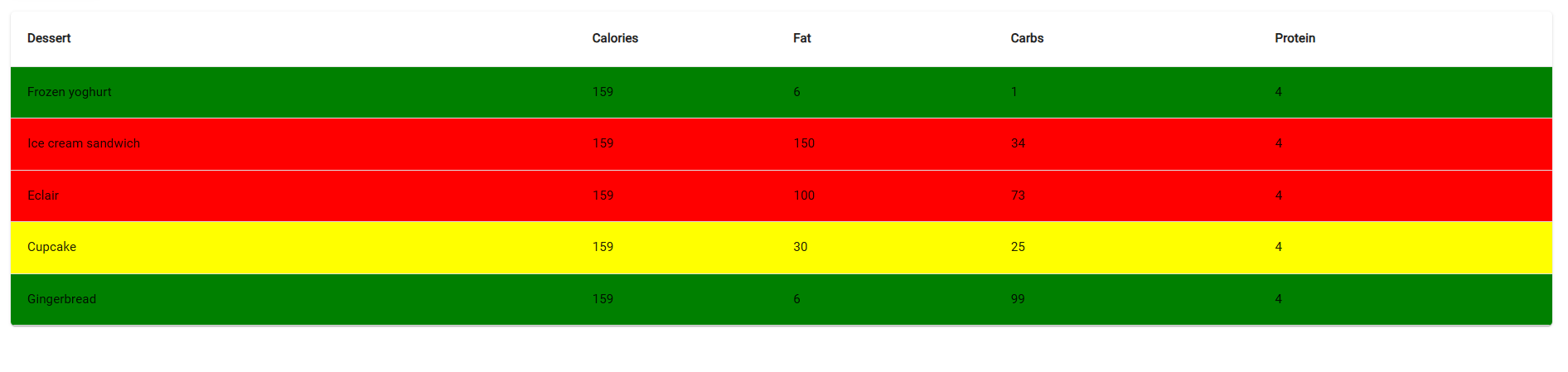
PowerShell Universal - 5.6.11
editing pages in App (by Web) in docker container finally works) !!!
thx @Adam Driscoll