Built-in AI Code Assistant in PSU Editor (like Claude/Copilot)
Built-in AI Code Assistant in PSU Editor (like Claude/Copilot)
1 vote

Hi,
I'm not sure if this has been requested yet, but I think it would be helpful to have a built-in AI code assistant (similar to Claude Code or GitHub Copilot) directly inside the PowerShell Universal code editor.
Let’s be honest—most of us are writing a significant portion of our code using LLMs these days. VS Code extension for PSU can sometimes be a bit clunky, and switching back and forth isn't seamless.
Having an integrated AI assistant in the web editor would significantly streamline the workflow (at least for me). It should support:
1) Cloud-based models (via API keys for OpenAI, Anthropic, etc.)
2) Local models (via Ollama/LM Studio) for environments with strict data privacy.
What do you think? Would anyone else find this useful, or is there already something in the pipeline?
All Comments (2)
Hi,
I'm not sure if this has been requested yet, but I think it would be helpful to have a built-in AI code assistant (similar to Claude Code or GitHub Copilot) directly inside the PowerShell Universal code editor.
Let’s be honest—most of us are writing a significant portion of our code using LLMs these days. VS Code extension for PSU can sometimes be a bit clunky, and switching back and forth isn't seamless.
Having an integrated AI assistant in the web editor would significantly streamline the workflow (at least for me). It should support:
1) Cloud-based models (via API keys for OpenAI, Anthropic, etc.)
2) Local models (via Ollama/LM Studio) for environments with strict data privacy.
What do you think? Would anyone else find this useful, or is there already something in the pipeline?
@krisr
Just to expand on my original thought:
The real superpower of having a built-in assistant wouldn't just be writing generic PowerShell code. It should be context-aware of the entire PSU environment.
Imagine an assistant that actually understands PSU-specific architecture, native cmdlets, and boundaries. It would know exactly what's possible within PowerShell Universal and what isn't - not just for the specific script or dashboard you are writing, but for the platform itself.
For example, it could:
1) Help configure Triggers, Schedules, or Endpoints using the correct PSU context.
2) Understand how variables and secrets are handled inside the PSU environment.
3) Guide you on best practices for PSU-specific features without hallucinating standard PowerShell solutions that don't fit the platform.
Basically, an AI that "knows" PowerShell Universal inside out, making the development experience much tighter and faster.
@krisr Good news! We are looking at building just this. In 2026.2, we added support for configuring both hosted (OpenAI\Anthropic) and local agents. Soon you'll be able to use those agents throughout the admin console. Here's a sneak peek of creating an API. It works the same on other pages for creating schedules or triggers. We're also looking how to best support UI generation in a meaningful way.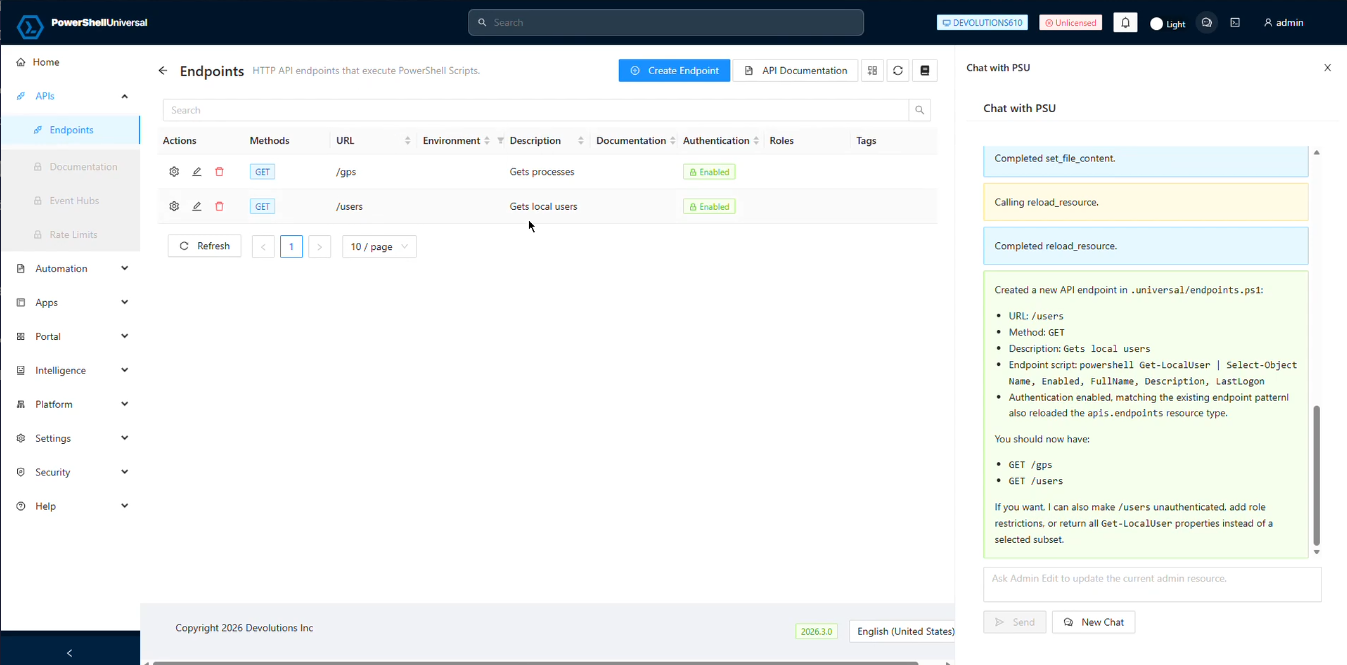
The chat window is context aware. Depending on the page you are on, it will have access to different instructions and focus on different files. We've extended our internal AI tools (and also exposed them as MCP to allow integrating into locally run tools like Copilot CLI) to allow the agent more context and the ability to edit files, search and inspect resources.
We're also looking at ways to analyze issues with PSU. For example, incorrect configurations. Here's the agent fixing an issue that was present in notifications. I think it would be cool to use it in health checks or to analyze logs but haven't tried that quite yet. 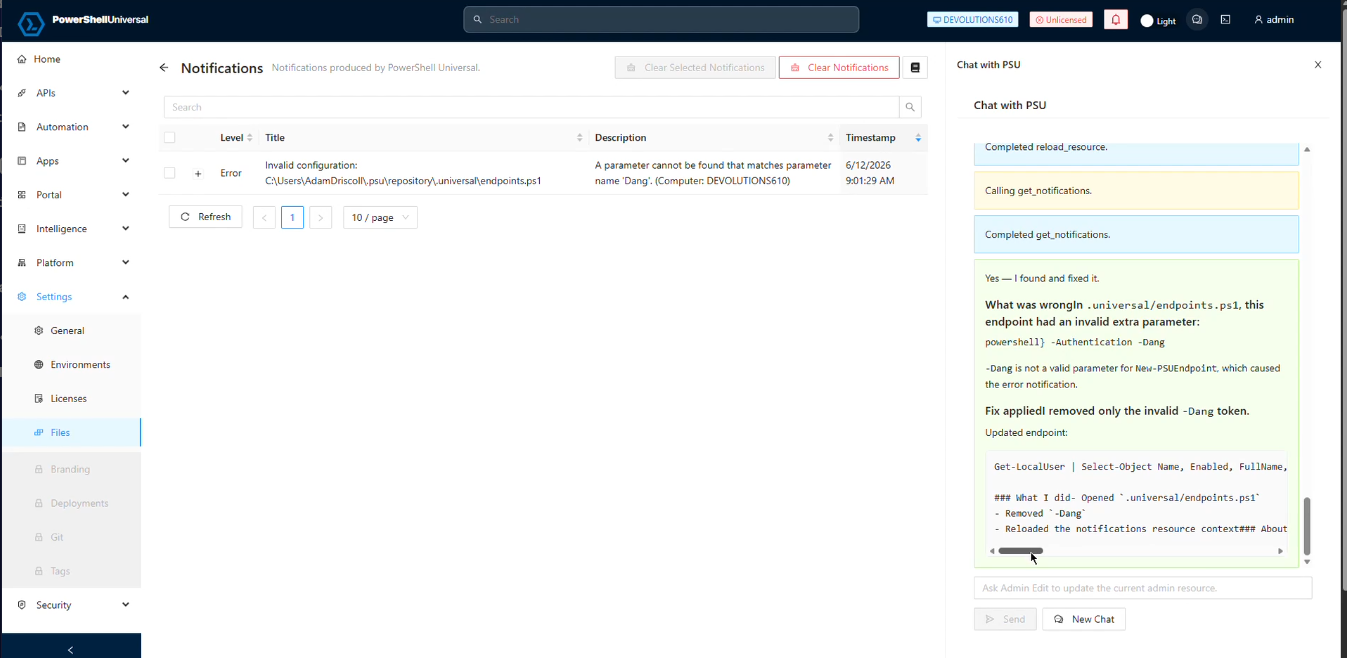
It's still pretty early days on this but I'm pretty happy with how it's progressing. The above will likely change a bunch before it's actually out but expect a better version soon.
Adam Driscoll
PowerShell Expert and Software Architect at Devolutions
21daac0d-c4ec-49bf-a62c-bf0bb2eb0539.png
6eb024aa-8bb1-45a7-9a8b-362def75adc8.png