New-UDTable -OnRowStyle not working - row coloring not applied (even with documentation example)
New-UDTable -OnRowStyle not working - row coloring not applied (even with documentation example)

Product: PowerShell Universal
Version: 5.6.8
Hello,
I’m experiencing an issue with the -OnRowStyle parameter in New-UDTable. The row coloring functionality is not working, even when using the exact code from the documentation.
Problem
The -OnRowStyle parameter doesn’t apply background colors to table rows, even though the script block executes and returns the correct style hashtable.
Steps to Reproduce
Create a new page in PowerShell Universal with the following code:
New-UDPage -Url "/TestTable" -Name "TestTable" -Role @('Administrator', 'Tester') -Content {
    $Data = @(
        @{Dessert = 'Frozen yoghurt'; Calories = 159; Fat = 6.0; Carbs = 1; Protein = 4.0 }
        @{Dessert = 'Ice cream sandwich'; Calories = 159; Fat = 150.0; Carbs = 34; Protein = 4.0 }
        @{Dessert = 'Eclair'; Calories = 159; Fat = 100.0; Carbs = 73; Protein = 4.0 }
        @{Dessert = 'Cupcake'; Calories = 159; Fat = 30.0; Carbs = 25; Protein = 4.0 }
        @{Dessert = 'Gingerbread'; Calories = 159; Fat = 6.0; Carbs = 99; Protein = 4.0 }
    )

    $Columns = @(
        New-UDTableColumn -Property Dessert -Title "Dessert"
        New-UDTableColumn -Property Calories -Title "Calories"
        New-UDTableColumn -Property Fat -Title "Fat"
        New-UDTableColumn -Property Carbs -Title "Carbs" -DefaultSortColumn
        New-UDTableColumn -Property Protein -Title "Protein"
    )

    New-UDTable -Data $Data -Id 'table14' -Columns $Columns -OnRowStyle {
        if ($EventData.Fat -lt 10) { $Color = 'green' }
        elseif ($EventData.Fat -ge 10 -and $EventData.Fat -lt 50) { $Color = 'Yellow' }
        else { $Color = 'Red' }
        @{ backgroundColor = $Color }
    }
}
Load the page in the browser.
Expected Behavior
Rows with Fat < 10 should have green background
Rows with 10 ≤ Fat < 50 should have yellow background
Rows with Fat ≥ 50 should have red background
Actual Behavior
Table displays correctly with all data
No row coloring is applied (all rows have default background)
No errors in console or logs
The script block appears to execute (tested with
Write-Hostdebugging), but styles are not applied to the UI
Additional Notes
This is the exact code from the documentation example for
-OnRowStyleI’ve tested with different color formats (named colors, hex codes) - none work
Tried removing other parameters (
-Dense,-MaxHeight,-DefaultSortDirection) - still doesn’t workThe feature appears to be documented but may not be functional in the current version
Question
Is -OnRowStyle supported in the current version of PowerShell Universal? If yes, what could be causing this issue? If not, is there an alternative way to style table rows based on data values?
Thank you for your help!
All Comments (2)
strange:
im on 5.6.11 on my home instance but:
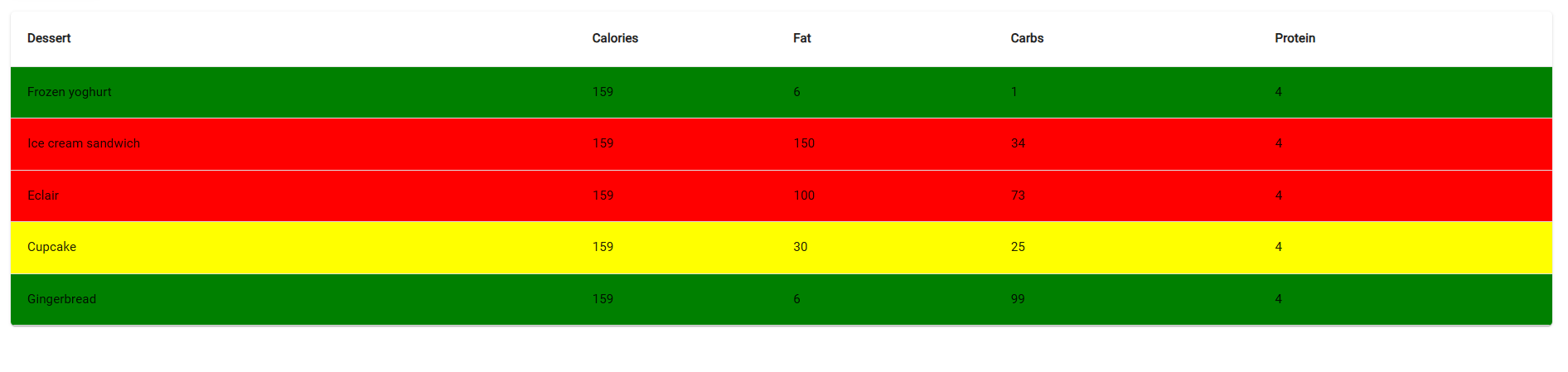
Thanks.
I will update the PSU to version 5.6.12 as soon as it becomes available and test again.