
baehrm
Heartbeat/ Password rotation fails
Hi @Sayed channoufi ,
thanks for the info. It was already set for our domain.
Best wishes
Heartbeat/ Password rotation fails
Hi Devolutions-Forum,
I encountered the following problem:
The accounts are all stored in the same OU in AD
All accounts have "admin count" set to 1 (The object belongs (or belonged) to the protected objects; permission inheritance is disabled.)
The Accounts are all members of the protected users group
The Accounts are member of Domain Admins
The PAM provider account has delegated rights (Least privileges for Active Directory providers | Devolutions PAM | Product guides & reference)
I managed to set up one account to work by adding the rights of the PAM provider account directly to it.
Then I tried to do the same on the next account, but it fails to rotate the password or heartbeat. -> Error LDAP 49.
Additionally, the values in domain, UPN, SAM account name and NetBIOS name are not populated in the not working PAM account.
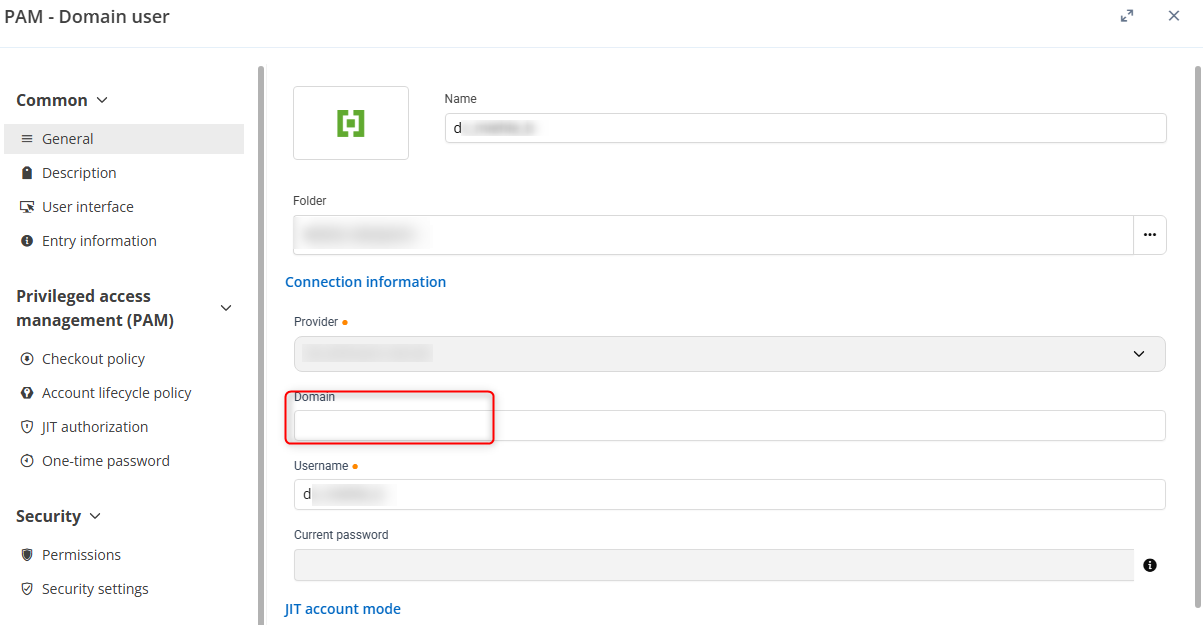
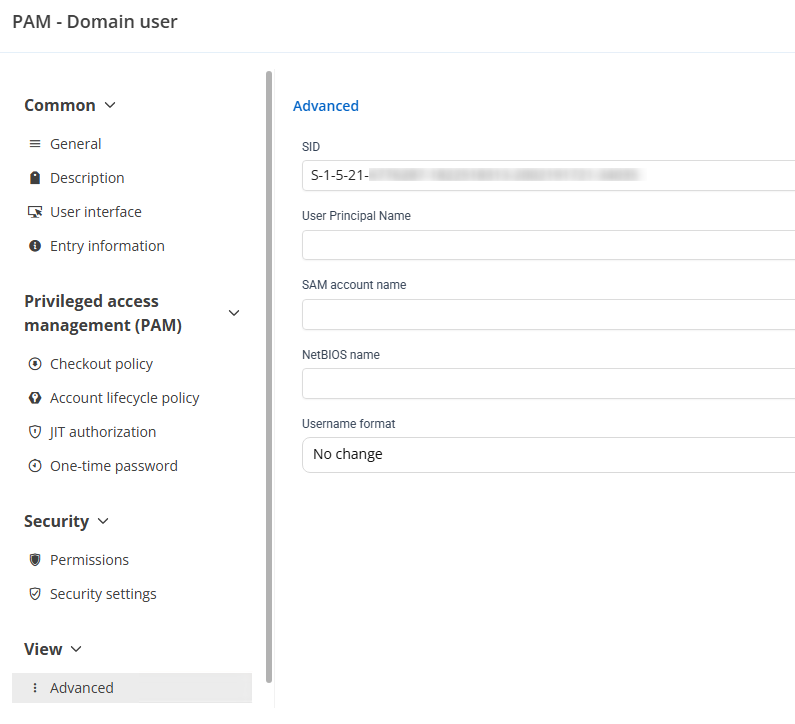
Is there anything missing? Is it the right way to assign the rights directly on the user?
Best wishes
Auto fill in username and password not working
Hi Oliver,
Interestingly enough clearing HTML Control ID's from the entry so that both the username and password fields are blank fixes the issue.
These fields were not manually entered they were automatically generated when adding the site to the vault and worked prior to the update that broke the functionality on Firefox as these issues to not appear on either Edge or Chrome browsers.
@GioGG
Same for me. Clearing it resolved the issue.
DVLS Import KeePass/ Pleasant Password Server XML with TOTP Secret
Hi Michel,
perfect! That's what I'm looking for.
Thank you!
Best wishes,
DVLS Import KeePass/ Pleasant Password Server XML with TOTP Secret
Hi Forum,
I'm currently creating guides for my users for Importing passwords from KeePass and I wanted to give them a easy way to import the TOTP-values stored in the entry object:
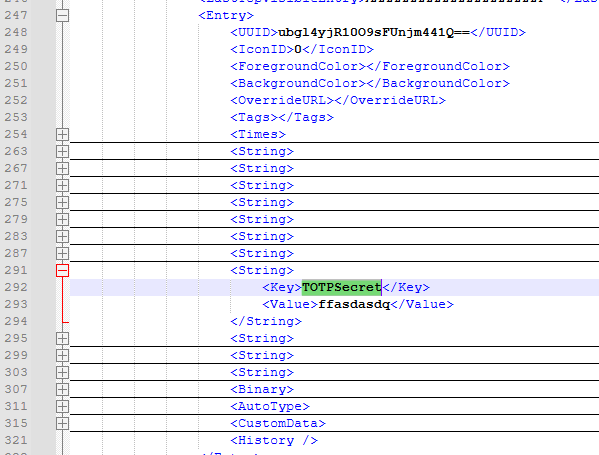
CSV import is not possible because of attachments in the XML.
Do I need to rename the Key "TOTPSecret" to import it properly or is it not possible?
I created a small PowerShell script to list the TOTP in the whole XML but I can't tell my not IT colleagues to use it :)
$xmlPath = "C:\Path\to\your\file.xml"
[xml]$xml = Get-Content $xmlPath

# Look for entries in the XML file with String "TOTPSecret" and list Title, UserName, and Totp Secret

$entries = $xml.SelectNodes("//Entry")

# Output the found TOTP secrets
$entries | ForEach-Object {
    $titleNode = $_.SelectSingleNode("./String[Key='Title']/Value")
    $username = $_.SelectSingleNode("./String[Key='UserName']/Value")
    $secretNode = $_.SelectSingleNode("./String[Key='TOTPSecret']/Value")

    if ($titleNode -and $secretNode) {
        [PSCustomObject]@{
            Title = $titleNode.InnerText
            UserName = $username.InnerText
            TotpSecret = $secretNode.InnerText

        }
    }
}
Best wishes,
DVLS: Import/ Export rights
Hi Jacob,
I looked here but I can't find it:
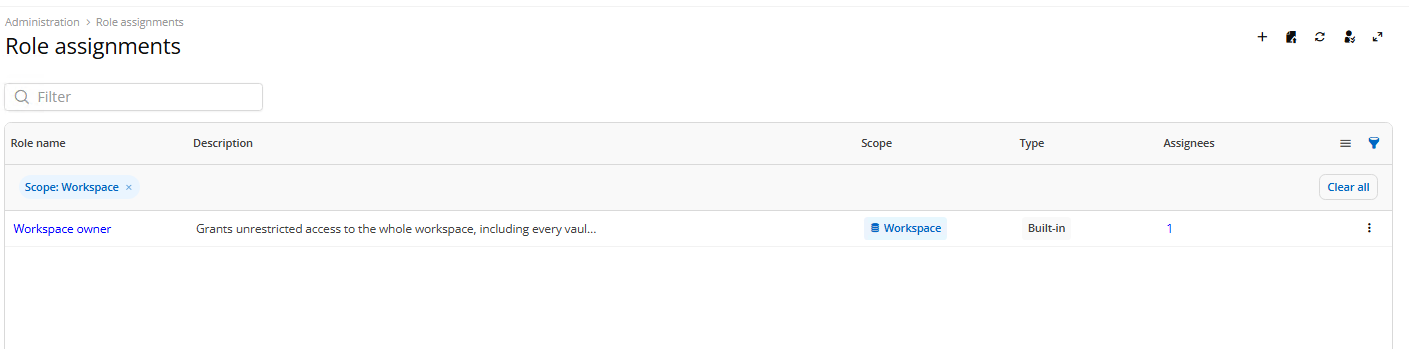
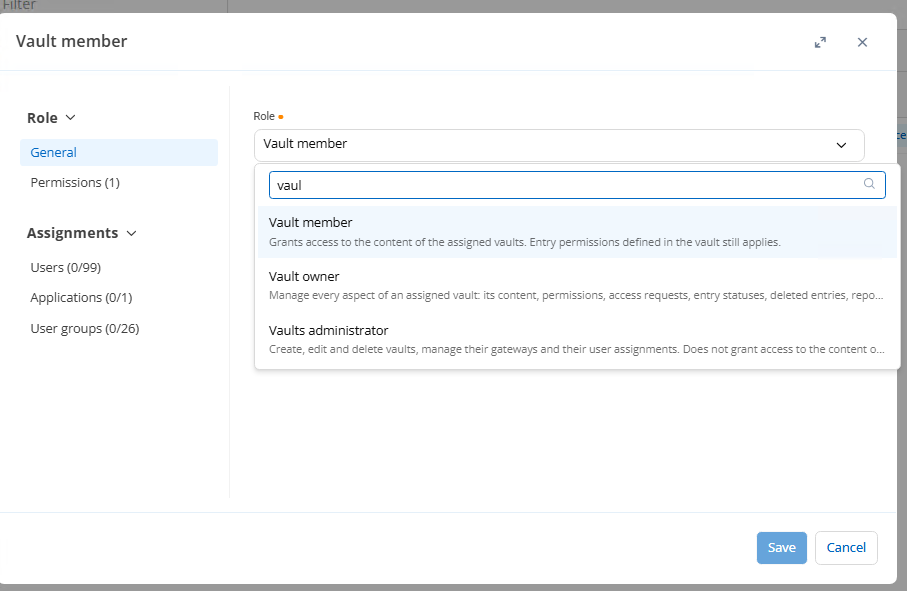
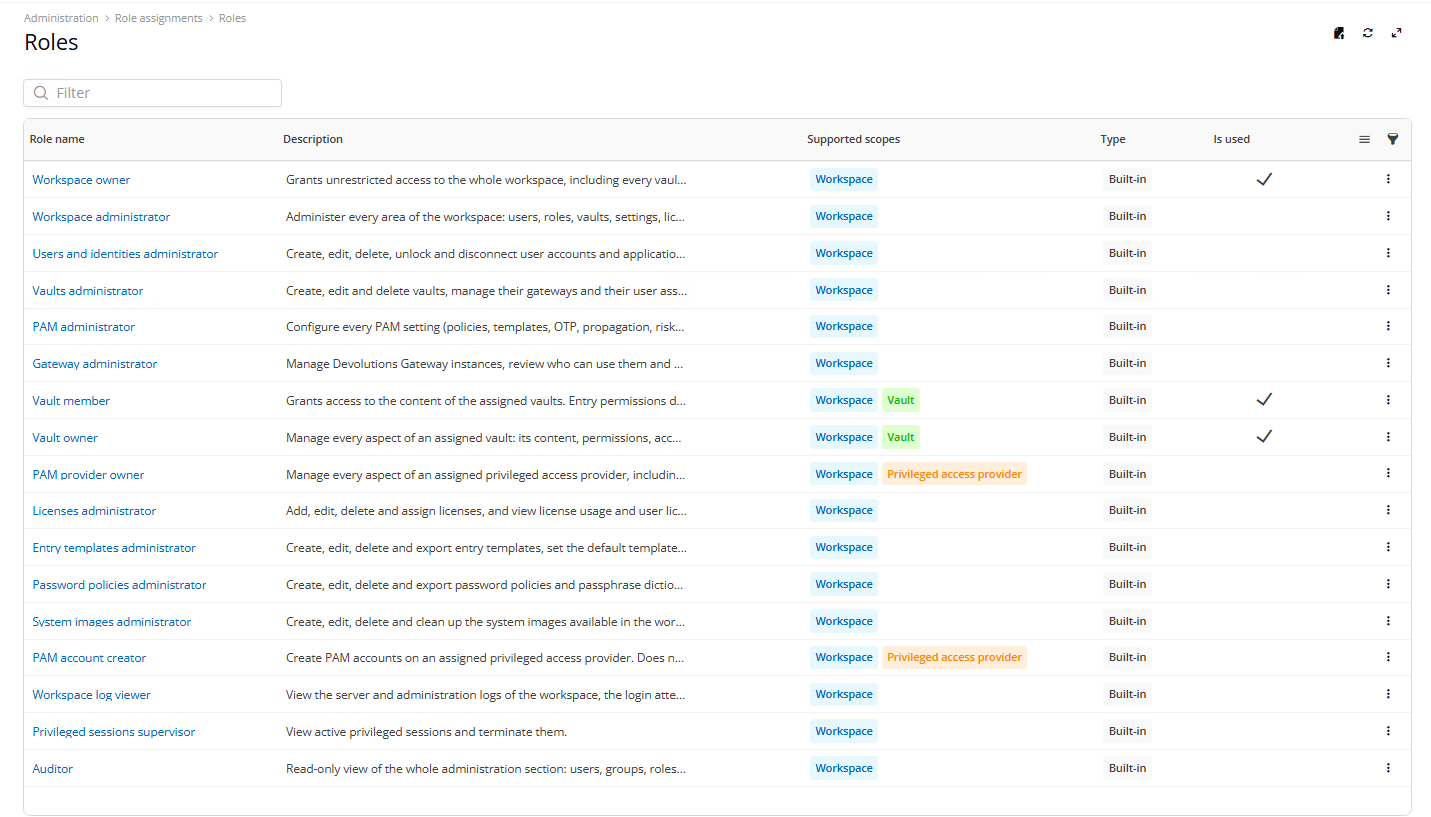
The Legacy Roles are not available.
Best wishes
DVLS: Import/ Export rights
Hi Devoltutions-Forum,
I created another Ticket for the Copy/ Move Feature and as a solution until this feature is available, I tried the suggested Import/ Export workaround.
RDM with DVLS: Copy Folders/ Entries to another vault - Devolutions Forum
Now I noticed the Import/ Export is disabled for vault members and I tried to find the "System Permissions" page in DVLS to assign the right for it.
Unfortunately: I can't find it.
System permissions | Devolutions RDM | Product guides & reference or Import and export | Devolutions Server | Product guides & reference or Configuring system permissions : Devolutions
I guess it is somewhere else since the GUI change?
Best wishes,
RDM with DVLS: Copy Folders/ Entries to another vault
Hello Michael,
thank you for the info and the bump for the feature :)
Best wishes
RDM with DVLS: Copy Folders/ Entries to another vault
Hi Forum,
I've found multiple ways to copy or move Folders/ Entries from one vault to another, but many ways are contradictory.
At one point it even says moving entries to other vaults is only allowed by admins.
But: When I'm the owner of the two vaults, I want interchange entries with, I'm allowed to move or copy entries to it.
My problem: My users want to copy/ move entries from one vault to another without being an owner of the vault.
Is there a convenient way to copy or move the entries? I don't want to tell my users they have to export it as a .rdm file and import it again.
Best wishes,
DPM: Multiple GUI bugs
Hi Dany,
the issues with umlauts and loss of focus looks fixed. Thank you.
Unfortunately it looks like "tab" and cursor keys are not working anymore.
It is not possible to control which action to use or to select the entry. in 2026.2.2 it was possible.
Best wishes
Administrator without PAM license
Hi Luc,
thanks for the clarification!
Best wishes,
Heartbeat and Password Rotation Failures on Accounts in Protected Users Group
Hi Erica,
thank you for the guide.
The problem was with the (7) - the Domain "testdomain.local" has 3 domain controllers (dc1.testdomain.local, dc2...) and I used "testdomain.local" as DC. The domain itself is not part of the SPNs for the DCs which caused the problem.
After switching to a single DC the rotation and the heartbeat worked.
Is it possible to configure multiple DCs for the heartbeat/ rotation?
Best wishes,
Administrator without PAM license
Hi Devolutions-Forum,
is it possible to change the PAM settings without assigning a license to the administrator account?
It is a bit inkonvenient to assign the license to the admin account for just setting up/ changing the PAM settings.
Or is it by design?
Best wishes,
Heartbeat and Password Rotation Failures on Accounts in Protected Users Group
Hi Devolutions-Forum,
we still get the heartbeat / out of sync error message with LDAP or LDAPS. It is possible to check out the credentials but the message won't go away.
The DVLS Version is 2026.2.7.0
Best wishes,
DPM: Multiple GUI bugs
Hi Dany,
thank you for the implementation! But not all Bugs are fixed:
Loss of focus is still a problem:
Use Quick Access
select entry
select global autotype
let DPM enter the credentials
focus to window jumps away (to not visible DPM Quick Access)
push enter on keyboard
global autotype is launched again
Umlauts:
Umlauts in username and password are visible but when entering it with global auto type this happens:

In the video you can see both bugs.
Best wishes
DPM: Multiple GUI bugs
Hi Dany,
I've found another GUI bug: Umlauts :)
In DPM:

In Quick Access:

The username itself ist copied with the wrong charset (�SERNAME)
Best wishes
PAM checked out user password not visible in quick access
Hi Devolutions Forum,
I have found a bug in DPM quick access:
Check out Credential in PAM Vault
Verify visibility in DVLS and DPM while checked out
Try entering password via quick access (CTRL + SHIFT + Space)
Password is not visible
Can't view in quick access
when selecting "type password" the username (???) is pasted.
Feel free to contact me if you need an example.
Best wishes
Grant permissions on sub-entries without requiring read access on parent folders
Hi all,
I guess it would be sufficient if the parent folders are visible but nothing else.
That is the same logic as we are used to in Pleasant Password Server.
Best wishes
DVLS/DPM/RDM toggle inconsistency edit/ new entry window
Hi Devolutions-Forum,
while rolling out DVLS/ DPM/ DRM I came across this GUI inconsistency in the edit/ new entry window
DPM:

DVLS:

RDM:

In RDM it is okay but in DVLS and DPM it is a bit confusing.
Best wishes
DPM: Multiple GUI bugs
Hi Devolutions-Forum,
I came across multiple little bugs in DPM:
Loss of focus to window when entering credentials using hotkey:
Using quick access using the standard hotkey (control + shift + space)
enter name of credential
select credential
global autotype (ctrl + T) or any other action
credentials are entered
focus jumps back to DPM (or search)
now you need to jump back to previous window or else you are still entering key strokes to the DPM search
last search is not emptied but the last credential is not visible either.
like 1.
use quick access again
last entered search is visible but no credentials are shown
either add/delete a character to the search and search starts again
Selection of credentials/actions are not highlightend correctly
like 1. a-b
select credential using keyboard cursors
selection/ highlighting is on multiple areas

We are rolling out DVLS/ DPM right now (coming from Pleasant Password Server with KeePass) for our users and these bugs are a bit irritating for the users.
Best wishes
Application Error when setting Hotkey to CTRL + SHIFT + <> (German keyboard)
Hi again,
thanks for the info. The file can be found here:
C:\Users\USER\AppData\Roaming\net.devolutions\Devolutions Password Manager\shared_preferences.json
The problematic key is 458852

When putting it in there DPM crashes at start.
Best wishes
Application Error when setting Hotkey to CTRL + SHIFT + <> (German keyboard)
Hi Devolutions Community,
I came across a reproduceable error:
When editting the Hot Key in DPM to CTRL + SHIFT + <> (German keyboard) the <>-key is labeled as unknown and the application crashes. After that it is not possible to start the application
Version: 2026.2.0.0
Where can I delete the settings of DPM? Appdata? Registry?
Best wishes
Pooled Contractor Subscription/License
+1 vote
We could really use this feature right now!
OTP missing in DVLS
Hi Devolutions-Community,
we recently updated to DVLS v2026.1.11.0 and now we can't add OTPs to username/password entries.

When I try to create one in the Workspace app I can't save the entry anymore.

Is this normal or do I need to set it somewhere?
Best wishes,
MB
Version 2026.1.11.0 (March 19, 2026)
Hi Devolutions-Team,
I updated from 2025.3.15.0 to 2026.1.11.0.
On first try the Scheduler Service would not start but the install process finished as successful.
.....
Upgrading database for data source 'DVLS' with version 1160
EXECUTED

Done!
Restoring the custom folders...
Done!
Restoring appsettings.json file...
Done!
Merging configuration on upgraded install...
Done!
Restoring the EncryptionConfig file...
Done!
Updating encryption file...
Done!
Setting rights on appsettings.json file...
Done!
Register Devolutions Server Event Source...
Allowing Anonymous Authentication Feature Delegation...
Starting scheduler service...
Failed to start service
Starting IIS Application Pool...
Done!
Checking for WebApp ID...
Done!
Ensure decryption test is in place...
Done!
Starting the server may take longer than usual if a data migration is required. This means that you may have to wait before the web page is available.
After some search in the Event Viewer I stumbled over missing dependencies to .net Core 10.0.5 and .NET Runtime 10.0.5.
I reverted the installation using a snapshot, installed the .Net components and tried again. -> Works.
What I want to say: Would it be possible to integrate some checks for the required software BEFORE the installation starts?
Best wishes