
Phil
2026.3.8 - RDP sessions randomly going blank when switching tabs.
Right now, that's the only bug that's still bothering me. :D -> 2026.3.9
Switching tabs and going blank or white for under 1 second (:
RDM v2026.3.5 - Open Tabs Moving and Undocking on single mouse click
Hello,
Thank you for your patience. A fix for the Undocking issue will be included in the upcoming release, version 2026.3.9.0.
Best regards,
@Antoine Mauger
Don't get us wrong. It's a great feature. But it sticks to the mouse pointer so much when you're switching through tabs. Then undocks a tab, even though I don't want to. xD
dev' could also simply define the undocking behavior in the settings with an “On” “Off”. I couldn't find anything.
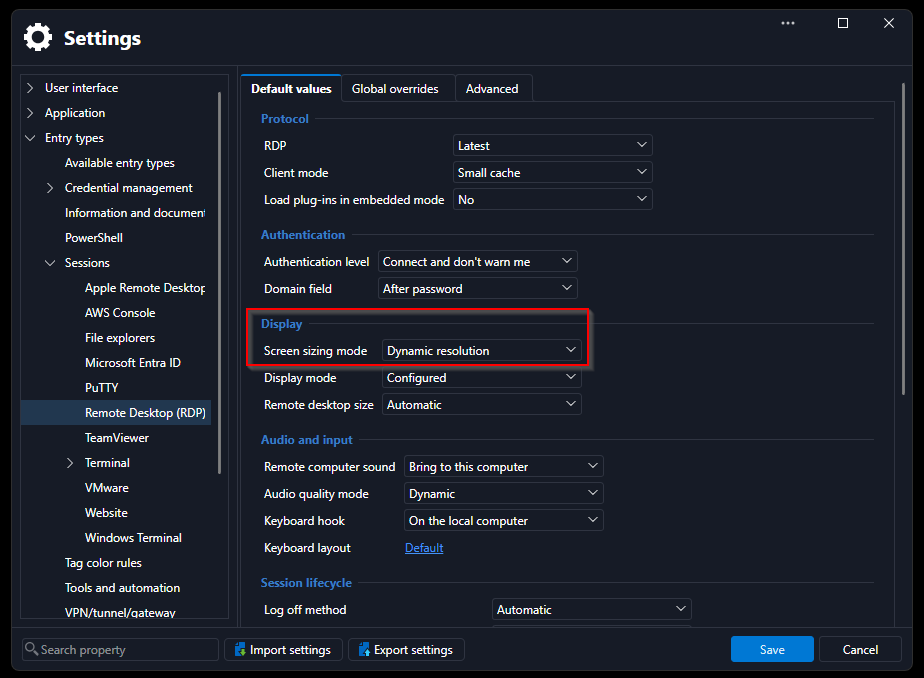
RDP coonections are by default opened in very low resolution - v2026.3.5
This Setting also helps:
RDM v2026.3.5 - Open Tabs Moving and Undocking on single mouse click
Yeah the thing with the tabs is incredibly annoying. Also all my RDP sessions default to very tiny remote windows and I had to set the properties for Remote Desktop size on all connections.
@holgerwachter
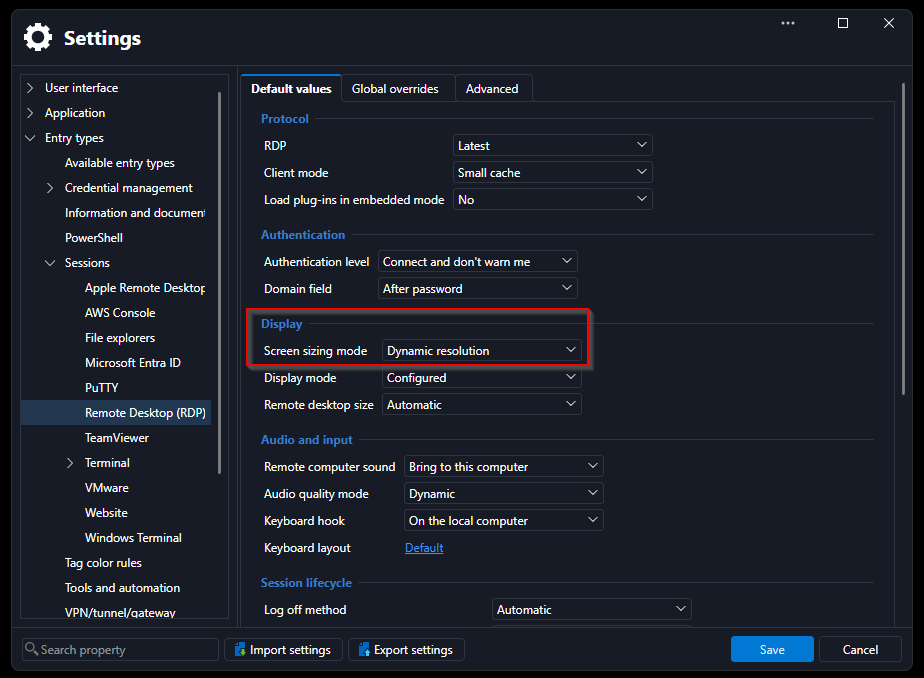
Yes, it's very annoying. That's exactly how it is for me. Set to "default" "auto" - but apart from the first connection, only a tiny remote session opens.
And tabs thing... detaching every second click. :(
EDIT:
Helps with RDP resolution
Network scan failure
Thank you Carl.
Tricks from your side? How can I cleverly outsmart the problem? ;) ;)
I know that it must have worked in the past. My colleague scanned certain customer networks a year or two ago. It doesn't work with the current version in the same infrastructure.
BR
Philipp
Network scan failure
:) :) Hi Carl,
I'm using the latest release - 2025.3. Try with local data source and business hub. Initiated via Tools > Network Scan or Import > Network Scan.
Scan my own subnet without a problem actually. My client(s) subnet over IPsec ends with behavior above.
Test with subnet 192.168.xx.15 - 50 scans 192.168.xx.16 (ping, https, rdp) and stops... :D (no new sessions on fortigate)
VPN on fortigate, so I checked for security scans and any restrictions on firewall policies, not really discover something.
If I use a different IP scanner, works normal, complete subnet scan with most common ports.
How RDM scanner works?
Network scan failure
After eleven years, I have managed to achieve the same effect. hahaha (:
I can see the sessions on the firewall - the first IP gets scanned, certain standard ports, ICMP... After that, nothing else happens (no other IP from subnet is being checked).
Am I overlooking something?
list and vaults in RDM
Thanks Hubert, and thanks all for your support.
We will implement everything using the available tools. I'm also consuming all the training materials so that my team can make the best use of the RDM. (:
Best regards,
Philipp
list and vaults in RDM
Yes, that's exactly what I meant. :) Thank you Tommy.
Would it be worth requesting this as a feature, instead/additionally of switching between vaults, to be able to select a range of vaults? Or to display all favorites at once? (:
Best regards,
Philipp
list and vaults in RDM
Cannot change the title. I meant list and view vaults in the title.
list and vaults in RDM
I've been using RDM for several months now. But with a local data source. Now I connected the hub business to RDM. Before transferring everything, I wanted to better understand the Vault view.
Hence my question: Can I display all or specific vaults in RDM without changing it in the navigation? With favorites? As listed in hub business "web"?
So it's a beginner's question. But so far I haven't found any reference to it in the Academy and so on - or screenshot. (:
Thanks and regards
Philipp