
adillinger
Multi Faktor TOTP
mhh the link dosent work for me:

We have the latest version of DVLS 2024.3.4.0

Multi Faktor TOTP
We have local users on the Devolutions server. If I go to MultiFactor for the user and enter TOTP there and check the box “Configure later by user”, the user has no possibility to set his 2Factor himself.
Where is it possible for the user to do this himself?

PAM work with variables
that’s exactly what we are looking for. Is there release date available?
Gateway dosent work
yes we are usung the Devolutions Server. After install the msi the Gateway works :)
thanks
Gateway dosent work
ok i will try, but where i get the MSI Files.
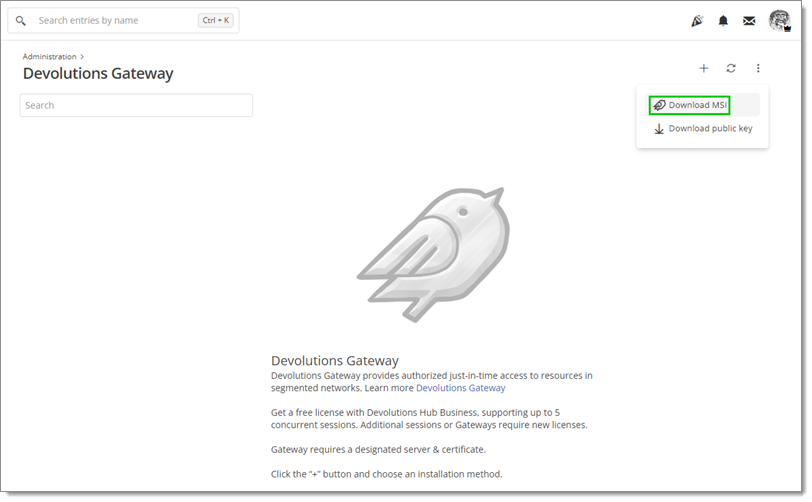
i cant see the "Download MSI" Button.
Gateway dosent work
i habe received a error message mail:
Error:
GatewayUnreachableException - Devolutions Gateway ist
nicht erreichbar. Bitte stellen Sie sicher, dass es läuft. at
Devolutions.Server.Managers.Gateway.GatewayManager.GetGatewayClock(Gateway
gateway) at Devolutions.Server.Managers.Gateway.GatewayManager.GetGatewayClock(Guid
id) at
Devolutions.Server.Managers.Gateway.GatewayManager.GetGatewayClockDrift(Guid
id) at
Devolutions.Server.Managers.Gateway.GatewayManager.GetGatewayDiagnostic(Gateway
gateway) at Devolutions.Server.Managers.Gateway.DefaultGatewayManager.GetGatewayDiagnostic(Gateway
gateway) at
Devolutions.Server.Controllers.APIControllers.Gateway.GatewayApiController.GetGatewayDiagnostic(Guid
id) ------------------------------------------ ApiException - Error calling
GetClockDiagnostic: The SSL connection could not be established, see inner
exception. at
Devolutions.Gateway.Client.Api.DiagnosticsApi.GetClockDiagnosticWithHttpInfo(Int32
operationIndex) at
Devolutions.Gateway.Client.Api.DiagnosticsApi.GetClockDiagnostic(Int32
operationIndex) at Devolutions.Server.Managers.Gateway.GatewayManager.GetGatewayClock(Gateway
gateway) --- DevolutionsGateway
Gateway dosent work
Hello,
I have installed the gateway on the same server as the Business Hub.
We have used the following instructions:
https://docs.devolutions.net/dgw/server/server-configuration/
The instructions differ under point 6. We do not have the option to store a certificate file, password and private key.
But this shouldn't be a problem as the gateway runs on the same server as the Business Hub.
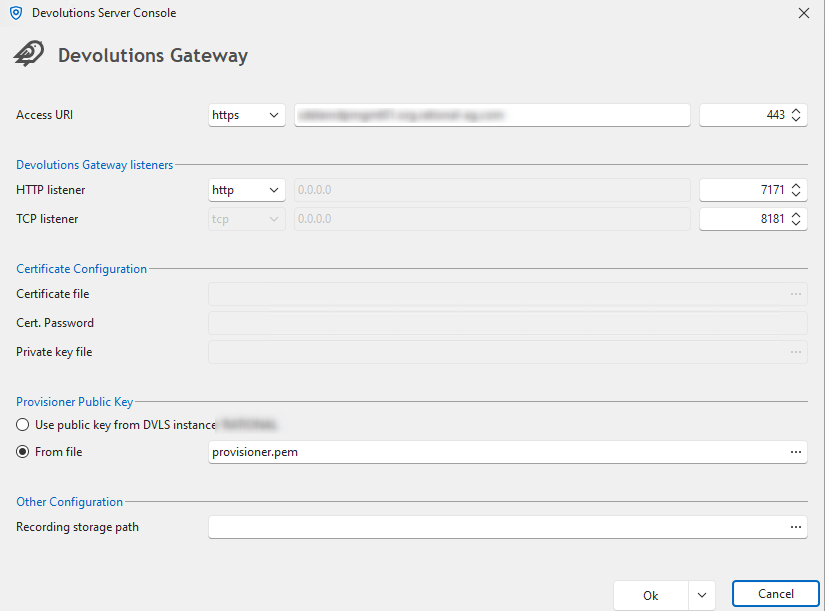
An entry was also created automatically, but it is not accessible.
The message says: “Devolutions Gateway ‘Devolutions Gateway’ could not be pinged.”

Unfortunately, I can't find any logs that say anything and would help.
Problem with RDM and PAM or Plugins
Hi,
maybe it helps you, the plugin itself opens without any problems. As soon as you use the search bar, an error message appears as shown above. Maybe this will help you.

can you say when the update 2024.3.17.0. will be available?
More than one linked account
Hi, is the solution deployed?
Problem with RDM and PAM or Plugins
i have updated the RDM Manager to the latest version.
Now we got not error with Devolutions PAM.
But with the Keeper Plugin we got this error message:
NullReferenceException - Object reference not set to an instance of an object.
at Devolutions.RemoteDesktopManager.Forms.FrmSelectKeeperEntry.<>c__DisplayClass47_0.<UpdateRecordsCache>b__0(IKeeperRecord r)
at System.Linq.Enumerable.WhereArrayIterator`1.ToArray()
at System.Linq.Buffer`1..ctor(IEnumerable`1 source)
at System.Linq.OrderedEnumerable`1.ToList()
at Devolutions.RemoteDesktopManager.Forms.FrmSelectKeeperEntry.UpdateRecordsCache()
at Devolutions.RemoteDesktopManager.Forms.FrmSelectKeeperEntry.LoadRecordsInListView()
at Devolutions.RemoteDesktopManager.Forms.FrmSelectKeeperEntry.TxtSearchRecord_TextChangedDelayed(Object sender, EventArgs e)
at Devolutions.RemoteDesktopManager.Controls.DelayedTextBox.OnTextChangedDelayed()
at Devolutions.RemoteDesktopManager.Controls.DelayedTextBox.Timer_Tick(Object sender, EventArgs e)
at System.Windows.Forms.Timer.TimerNativeWindow.WndProc(Message& m)
at System.Windows.Forms.NativeWindow.Callback(HWND hWnd, MessageId msg, WPARAM wparam, LPARAM lparam)
------------------------ extended stack ------------------------
at Devolutions.RemoteDesktopManager.Forms.FrmErrorMessage.ShowErrorMessage(Exception exception, String message, String title)
at Devolutions.RemoteDesktopManager.Forms.FrmErrorMessage.ShowErrorMessage(Exception exception, String title)
at Devolutions.RemoteDesktopManager.Managers.LogManager.OnThreadException(Object sender, ThreadExceptionEventArgs t)
at System.Windows.Forms.Application.ThreadContext.OnThreadException(Exception ex)
at System.Windows.Forms.NativeWindow.Callback(HWND hWnd, MessageId msg, WPARAM wparam, LPARAM lparam)
at Windows.Win32.PInvoke.DispatchMessage(MSG* lpMsg)
at Windows.Win32.PInvoke.DispatchMessage(MSG* lpMsg)
at System.Windows.Forms.Application.ComponentManager.Microsoft.Office.IMsoComponentManager.FPushMessageLoop(UIntPtr dwComponentID, msoloop uReason, Void* pvLoopData)
at System.Windows.Forms.Application.ThreadContext.RunMessageLoopInner(msoloop reason, ApplicationContext context)
at System.Windows.Forms.Application.ThreadContext.RunMessageLoop(msoloop reason, ApplicationContext context)
at System.Windows.Forms.Form.ShowDialog(IWin32Window owner)
at DevExpress.XtraEditors.XtraForm.ShowDialog(IWin32Window owner)
at Devolutions.RemoteDesktopManager.Business.KeeperCredentialResolverConnectionTypeDescriptor.GetCredentialDynamicParameterBrowseResult(VaultOnline vault, IKeeperRecord[] records, String username, String password, Connection credentials)
at Devolutions.RemoteDesktopManager.Business.KeeperCredentialResolverConnectionTypeDescriptor.BrowseDynamicValue(Connection connection, Connection credentials, String credentialDynamicValue, String credentialDynamicDescription)
at Devolutions.RemoteDesktopManager.Managers.CredentialTypeManager.BrowseDynamicValue(Connection connection, Connection credential, String credentialDynamicValue, String credentialDynamicDescription, ConnectionEngine engine)
at Devolutions.RemoteDesktopManager.Forms.FrmConnectionBase.BrowseCredentialDynamicParameter()
at Devolutions.RemoteDesktopManager.Forms.FrmConnection.ButCredentialDynamicParameter_LinkClicked(Object sender, LinkLabelLinkClickedEventArgs e)
at Devolutions.RemoteDesktopManager.Controls.EnhancedLinkLabel.TryClickHyperlink(MouseEventArgs e)
at DevExpress.XtraEditors.LabelControl.OnMouseClick(MouseEventArgs e)
at System.Windows.Forms.Control.WmMouseUp(Message& m, MouseButtons button, Int32 clicks)
at System.Windows.Forms.Control.WndProc(Message& m)
at DevExpress.Utils.Controls.ControlBase.BaseWndProc(Message& m)
at DevExpress.XtraEditors.BaseControl.WndProc(Message& msg)
at System.Windows.Forms.NativeWindow.Callback(HWND hWnd, MessageId msg, WPARAM wparam, LPARAM lparam)
at Windows.Win32.PInvoke.DispatchMessage(MSG* lpMsg)
at Windows.Win32.PInvoke.DispatchMessage(MSG* lpMsg)
at System.Windows.Forms.Application.ComponentManager.Microsoft.Office.IMsoComponentManager.FPushMessageLoop(UIntPtr dwComponentID, msoloop uReason, Void* pvLoopData)
at System.Windows.Forms.Application.ThreadContext.RunMessageLoopInner(msoloop reason, ApplicationContext context)
at System.Windows.Forms.Application.ThreadContext.RunMessageLoop(msoloop reason, ApplicationContext context)
at System.Windows.Forms.Form.ShowDialog(IWin32Window owner)
at DevExpress.XtraEditors.XtraForm.ShowDialog(IWin32Window owner)
at Devolutions.RemoteDesktopManager.Managers.ActionManager.EditConnection(IConnectionSource source, ConnectionEngine currentConnectionEngine, ConnectionEngine currentUIEngine)
at Devolutions.RemoteDesktopManager.Managers.SessionMenuManager.MnuEditConnection_Click(Object sender, EventArgs e)
at Devolutions.RemoteDesktopManager.Controls.EnhancedBarButtonItem.OnClick(BarItemLink link)
at DevExpress.XtraBars.BarItemLink.OnLinkClick()
at DevExpress.XtraBars.BarButtonItemLink.OnLinkClick()
at DevExpress.XtraBars.BarButtonItemLink.OnLinkAction(BarLinkAction action, Object actionArgs)
at DevExpress.XtraBars.ViewInfo.BarSelectionInfo.ClickLink(BarItemLink link)
at DevExpress.XtraBars.ViewInfo.BarSelectionInfo.UnPressLink(BarItemLink link)
at DevExpress.XtraBars.Controls.CustomLinksControl.OnMouseUp(MouseEventArgs e)
at DevExpress.XtraBars.Controls.CustomPopupBarControl.OnMouseUp(MouseEventArgs e)
at System.Windows.Forms.Control.WmMouseUp(Message& m, MouseButtons button, Int32 clicks)
at System.Windows.Forms.Control.WndProc(Message& m)
at DevExpress.XtraBars.Controls.CustomControl.WndProc(Message& msg)
at System.Windows.Forms.NativeWindow.Callback(HWND hWnd, MessageId msg, WPARAM wparam, LPARAM lparam)
at Windows.Win32.PInvoke.DispatchMessage(MSG* lpMsg)
at System.Windows.Forms.Application.ComponentManager.Microsoft.Office.IMsoComponentManager.FPushMessageLoop(UIntPtr dwComponentID, msoloop uReason, Void* pvLoopData)
at System.Windows.Forms.Application.ThreadContext.RunMessageLoopInner(msoloop reason, ApplicationContext context)
at System.Windows.Forms.Application.ThreadContext.RunMessageLoop(msoloop reason, ApplicationContext context)
at Devolutions.RemoteDesktopManager.Program.Main(String[] args)
Problem with RDM and PAM or Plugins
yes sure, let me check this.
Problem with RDM and PAM or Plugins
Hello,
When we link Devolutions PAM accounts to an entry and then try to open it, we always get the following message:
No Connection zur Database, switch to offline mode?

if i use "no" i got this message:

Details:
NullReferenceException - Object reference not set to an instance of an object.
at Devolutions.RemoteDesktopManager.Business.CredentialPAMCredentialResolver.Execute(Connection credConnection, Connection owner, CredentialRepositoryDestination destination, ConnectionEngine engine, CredentialResolveParameters resolveParameters, OpenConnectionParameter openConnectionParameters)
at Devolutions.RemoteDesktopManager.Managers.CredentialTypeManager.GetCredentialResolved(Connection connection, String credentialConnectionID, CredentialRepositoryDestination destination, CredentialResolveMode credentialResolveMode, CredentialResolveParameters resolveParameters, OpenConnectionParameter openConnectionParameters, CredentialsResult credentialsResult)
at Devolutions.RemoteDesktopManager.Managers.CredentialTypeManager.PrepareCredentials(Connection connection, String credentialConnectionID, CredentialRepositoryDestination destination, String privateVaultSearchString, CredentialResolveMode credentialResolveMode, CredentialResolveParameters resolveParameters, OpenConnectionParameter openConnectionParameters, CredentialsResult credentialsResult)
at Devolutions.RemoteDesktopManager.Managers.ConnectionManager.Prepare(Connection connection, Boolean applyCredentials, Boolean applyAlternate, Boolean applyVPN, Boolean copy, Boolean applyOverrideCredentials, Boolean isOverrideCredentials, CredentialResolveMode credentialResolveMode, CredentialResolveParameters resolveParameters, OpenConnectionParameter openConnectionParameters, CredentialsResult credentialsResult, Boolean isClosing)
at Devolutions.RemoteDesktopManager.Managers.ConnectionManager.OpenConnection(Connection connection, OpenConnectionParameter parameter)
at Devolutions.RemoteDesktopManager.Managers.ConnectionManager.OpenConnections(Connection[] connectionList, OpenConnectionParameter parameter, Boolean isPlaylist)
at Devolutions.RemoteDesktopManager.Managers.ActionManager.DoOpenConnection(Connection[] currentConnections, OpenConnectionParameter openConnectionParameter, IConnectionSource source)
at Devolutions.RemoteDesktopManager.Managers.ActionManager.OpenConnections(Connection[] currentConnections, OpenConnectionMode openConnectionMode, IConnectionSource source, Boolean checkOpenedConnection, ConnectionEngine engine)
at Devolutions.RemoteDesktopManager.Frames.ConnectionViews.FreBaseConnectionView.OpenConnection(Connection[] currentConnections, OpenConnectionMode openConnectionMode)
at Devolutions.RemoteDesktopManager.Frames.ConnectionViews.FreConnectionTreeListView.OpenOnDoubleClick(Boolean isEmbedded)
at Devolutions.RemoteDesktopManager.Frames.ConnectionViews.FreConnectionTreeListView.<>c__DisplayClass241_0.<OnDoubleClick>b__0()
at Devolutions.RemoteDesktopManager.Managers.ThreadManager.PushTimer_Tick(Object sender, EventArgs e)
at System.Windows.Forms.Timer.TimerNativeWindow.WndProc(Message& m)
at System.Windows.Forms.NativeWindow.Callback(HWND hWnd, MessageId msg, WPARAM wparam, LPARAM lparam)
------------------------ extended stack ------------------------
at Devolutions.RemoteDesktopManager.Forms.FrmErrorMessage.ShowErrorMessage(Exception exception, String message, String title)
at Devolutions.RemoteDesktopManager.Forms.FrmErrorMessage.ShowErrorMessage(Exception exception, String title)
at Devolutions.RemoteDesktopManager.Managers.LogManager.OnThreadException(Object sender, ThreadExceptionEventArgs t)
at System.Windows.Forms.Application.ThreadContext.OnThreadException(Exception ex)
at System.Windows.Forms.NativeWindow.Callback(HWND hWnd, MessageId msg, WPARAM wparam, LPARAM lparam)
at Windows.Win32.PInvoke.DispatchMessage(MSG* lpMsg)
at System.Windows.Forms.Application.ComponentManager.Microsoft.Office.IMsoComponentManager.FPushMessageLoop(UIntPtr dwComponentID, msoloop uReason, Void* pvLoopData)
at System.Windows.Forms.Application.ThreadContext.RunMessageLoopInner(msoloop reason, ApplicationContext context)
at System.Windows.Forms.Application.ThreadContext.RunMessageLoop(msoloop reason, ApplicationContext context)
at Devolutions.RemoteDesktopManager.Program.Main(String[] args)
We got this message also with Keeper Plugin or BeyonTrust Plugin.
PAM Database encryption
perfect thank you for the information
PAM Database encryption
We are currently looking at the PAM solution. What I didn't find in the documentation is how the data is encrypted on the database? AES256 or how is it done?
JumpHost dosent work
it was a timeout problem. The login took so long that the RDM Jump was not yet loaded. I increased the timeout a little and it worked
JumpHost dosent work
Hi,
Status look good RDM and RDM Jump are Green.
when i open the jump session in RDP and open in RDM the Jump Session, he will connect to the JumpHost 😂
JumpHost dosent work
RDM is not installed on the JumpHost.
On my other JumpHost the RDM is installed. But it dosent work on both server.
is the rdm neassesary?
JumpHost dosent work
i see the message in the log: the rdmj is not configured or registrated.
JumpHost dosent work
The notepad work, but the JumpHost doesn’t work :(
JumpHost dosent work
Yes it works as described
JumpHost dosent work
Hi,
on the TS the latest version run: 2024.3.14.0
RDM Manager on my Client ist also one of the latest: 2024.3.13.0
Troubleshooting Guide dosent help :(
JumpHost dosent work
The JumpHost
does not work for us.
If we want to
establish a connection via the JumpHost (Windows Terminal Server 2022), e.g. to
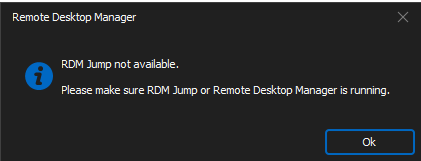
a website or SSH session, we receive the following message:
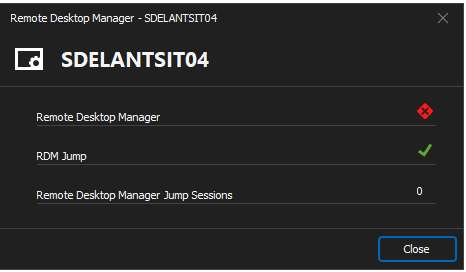
If we go directly to the jumpHost via RDP, the agent status for RDM Jump is green.
The log of
the RDM Jump follows:
[10.17.2024
9:27:07 ] RDP session started
[10.17.2024
9:27:07 ] RDMJump: 2732200524656
[10.17.2024
9:27:07 ] Buffer (Header) : 0x4700410045004100410041003d003d00
[10.17.2024
9:27:07 ] Buffer (Header) (raw): 18010000
[10.17.2024
9:27:07 ] Buffer (Header) (value): 560
[10.17.2024
9:27:07 ] RDMJump: Received Acknowledge [95b0afb1-9236-4e23-8e6a-31919d9bc8e9]
[10.17.2024
9:27:07 ] BeginRead(1600)
[10.17.2024
10:02:16 ] RDMJump: 2225963248464
[10.17.2024
10:02:16 ] Buffer (Header) : 0x4700410045004100410041003d003d00
[10.17.2024
10:02:16 ] Buffer (Header) (raw): 18010000
[10.17.2024
10:02:16 ] Buffer (Header) (value): 560
[10.17.2024
10:02:16 ] RDMJump: Received Acknowledge [0dd2e3c4-4735-4757-86a3-5fde252f1ffe]
[10.17.2024
10:02:16 ] BeginRead(1600)
[10.17.2024
10:02:16 ] Started
[10.17.2024
10:03:25 ] No process is on the other end of the pipe.
[10.17.2024
10:03:25 ] at System.IO.__Error.WinIOError(Int32 errorCode,
String maybeFullPath)
at System.IO.FileStream.EndRead(IAsyncResult asyncResult)
at
Devolutions.RemoteDesktopManager.Managers.VirtualChannelManager.CallBack(IAsyncResult
asyncResult)
[10.17.2024
10:03:25 ] RDP session closing
[10.17.2024
10:03:29 ] No process is on the other end of the pipe.
[10.17.2024
10:03:29 ] at System.IO.__Error.WinIOError(Int32 errorCode,
String maybeFullPath)
at System.IO.FileStream.EndRead(IAsyncResult asyncResult)
at
Devolutions.RemoteDesktopManager.Managers.VirtualChannelManager.CallBack(IAsyncResult
asyncResult)
[10.17.2024
10:03:29 ] RDP session closing
[10.17.2024
10:24:07 ] RDP session started
[10.17.2024
10:24:08 ] RDMJump: 2225975771840
[10.17.2024
10:24:08 ] Buffer (Header) : 0x4700410045004100410041003d003d00
[10.17.2024
10:24:08 ] Buffer (Header) (raw): 18010000
[10.17.2024
10:24:08 ] Buffer (Header) (value): 560
[10.17.2024
10:24:08 ] RDMJump: Received Acknowledge [8c0db387-73f8-4db9-86cb-b9248381366f]
[10.17.2024
10:24:08 ] BeginRead(1600)