Gateway dosent work

Hello,
I have installed the gateway on the same server as the Business Hub.
We have used the following instructions:
https://docs.devolutions.net/dgw/server/server-configuration/
The instructions differ under point 6. We do not have the option to store a certificate file, password and private key.
But this shouldn't be a problem as the gateway runs on the same server as the Business Hub.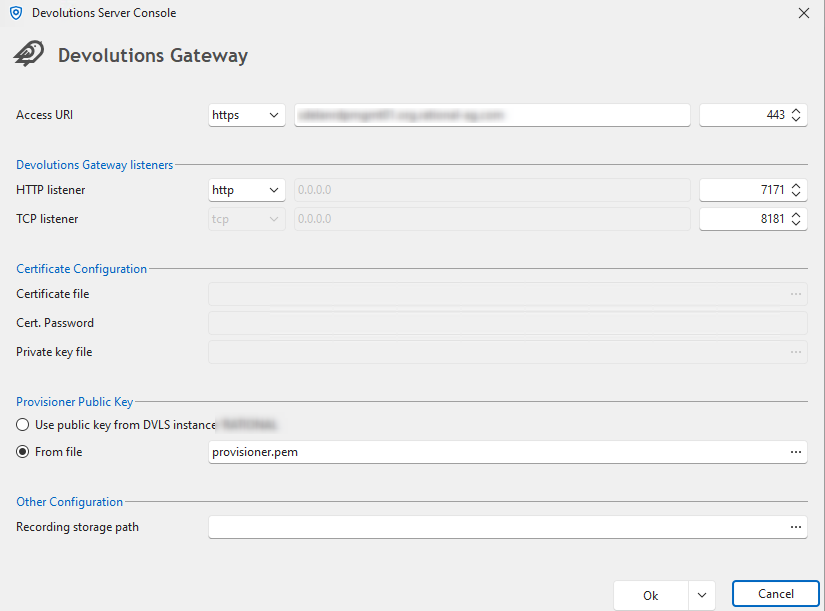
An entry was also created automatically, but it is not accessible.
The message says: “Devolutions Gateway ‘Devolutions Gateway’ could not be pinged.”
Unfortunately, I can't find any logs that say anything and would help.
ca953447-3625-46e1-808a-f2698e098ab7.png
3ff235c4-fe5f-4460-b214-0acfdc00e92b.png
All Comments (7)
i habe received a error message mail:
Error:
GatewayUnreachableException - Devolutions Gateway ist
nicht erreichbar. Bitte stellen Sie sicher, dass es läuft. at
Devolutions.Server.Managers.Gateway.GatewayManager.GetGatewayClock(Gateway
gateway) at Devolutions.Server.Managers.Gateway.GatewayManager.GetGatewayClock(Guid
id) at
Devolutions.Server.Managers.Gateway.GatewayManager.GetGatewayClockDrift(Guid
id) at
Devolutions.Server.Managers.Gateway.GatewayManager.GetGatewayDiagnostic(Gateway
gateway) at Devolutions.Server.Managers.Gateway.DefaultGatewayManager.GetGatewayDiagnostic(Gateway
gateway) at
Devolutions.Server.Controllers.APIControllers.Gateway.GatewayApiController.GetGatewayDiagnostic(Guid
id) ------------------------------------------ ApiException - Error calling
GetClockDiagnostic: The SSL connection could not be established, see inner
exception. at
Devolutions.Gateway.Client.Api.DiagnosticsApi.GetClockDiagnosticWithHttpInfo(Int32
operationIndex) at
Devolutions.Gateway.Client.Api.DiagnosticsApi.GetClockDiagnostic(Int32
operationIndex) at Devolutions.Server.Managers.Gateway.GatewayManager.GetGatewayClock(Gateway
gateway) --- DevolutionsGateway
Hi adillinger,
It seems you followed the steps for integration with Devolutions Server, and more specifically for a "Side-by-side" installation with Devolutions Server.
This assumes an infrastructure where Devolutions Server and Devolutions Gateway are running together on the same machine.
This setup notably uses IIS as a reverse proxy, handling TLS instead of the Devolutions Gateway.
For Business Hub, please follow the instructions on the page dedicated to it: https://docs.devolutions.net/dgw/hub/hub-business-configuration/
Best regards,
Benoit Cortier
ok i will try, but where i get the MSI Files.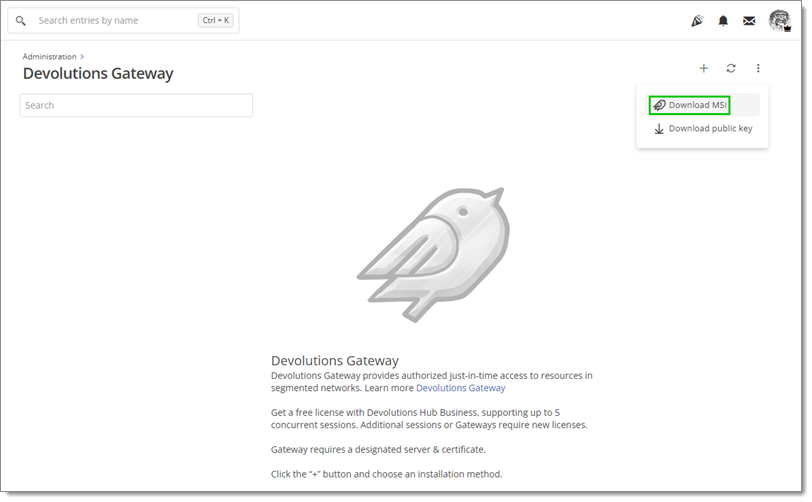
i cant see the "Download MSI" Button.
Hi,
This is suspicious. Just to confirm, did you press the three-dots button?
You can always download from our website otherwise: https://devolutions.net/gateway/download/
Best regards,
Benoit Cortier
I have installed the gateway on the same server as the Business Hub.
I'm sorry, I thought you were using Business Hub, which is a cloud solution, and thus cannot be installed on your server.
Can you confirm that you are not using Business Hub, but Devolutions Server, the on-premises solution?
If that's the case, you were correct in following the instructions found at https://docs.devolutions.net/dgw/server/server-configuration
The "Download MSI" button is not present in Devolutions Server since you are expected to use the console (as you did).
It would make sense that you don't see it in that case.
Now, let's troubleshoot the initial problem you had, using the side-by-side installation instructions for Devolutions Server.
Can you try to access the URL https://your.domain/dvls/jet/health in your browser, and see if you get anything?
I'm sorry for the trouble.
Benoit Cortier
yes we are usung the Devolutions Server. After install the msi the Gateway works :)
thanks
Glad to hear that! :)
Have a great day!
Benoit Cortier