PAM work with variables

Hello everyone,
We work with personalized admin accounts in a tiering model.
Is there a way to work with the variables in RDM?
For a connection in RDM I always have to select a PAM account.
The names of our admin accounts are always the same
admt0username admt1username admt2username.
My idea was to work with a variable. admt0$USERNAME$. Unfortunately there is no possibility to do this in RDM if you select privileged account.
As a rule, RDP and SSH connections are always carried out with your own account. Since the colleagues do not know the password of their own account, I need a way to assign the login name of a connection individually for each user.
thank you
All Comments (8)
Hello,
Thank you for reaching out!
My name is William and I'm here to assist you in any way I can.
When using named account (user based) with the PAM module, I always recommend using the My Privileged Account option when configuring entry credentials.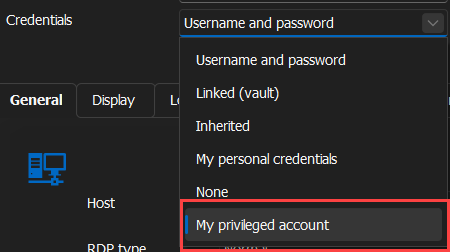
My Privileged Account is a setting in RDM where users can configure their own access to the PAM module just like you would configure the Data Source in RDM. You also have the option to select 1 specific account or be prompted with all available account from the PAM to which you have access.
Here is how to configure this:
In RDM, head over to File > My Account Settings > My Privileged Account and select DVLS Privileged Account in the list of credential entries: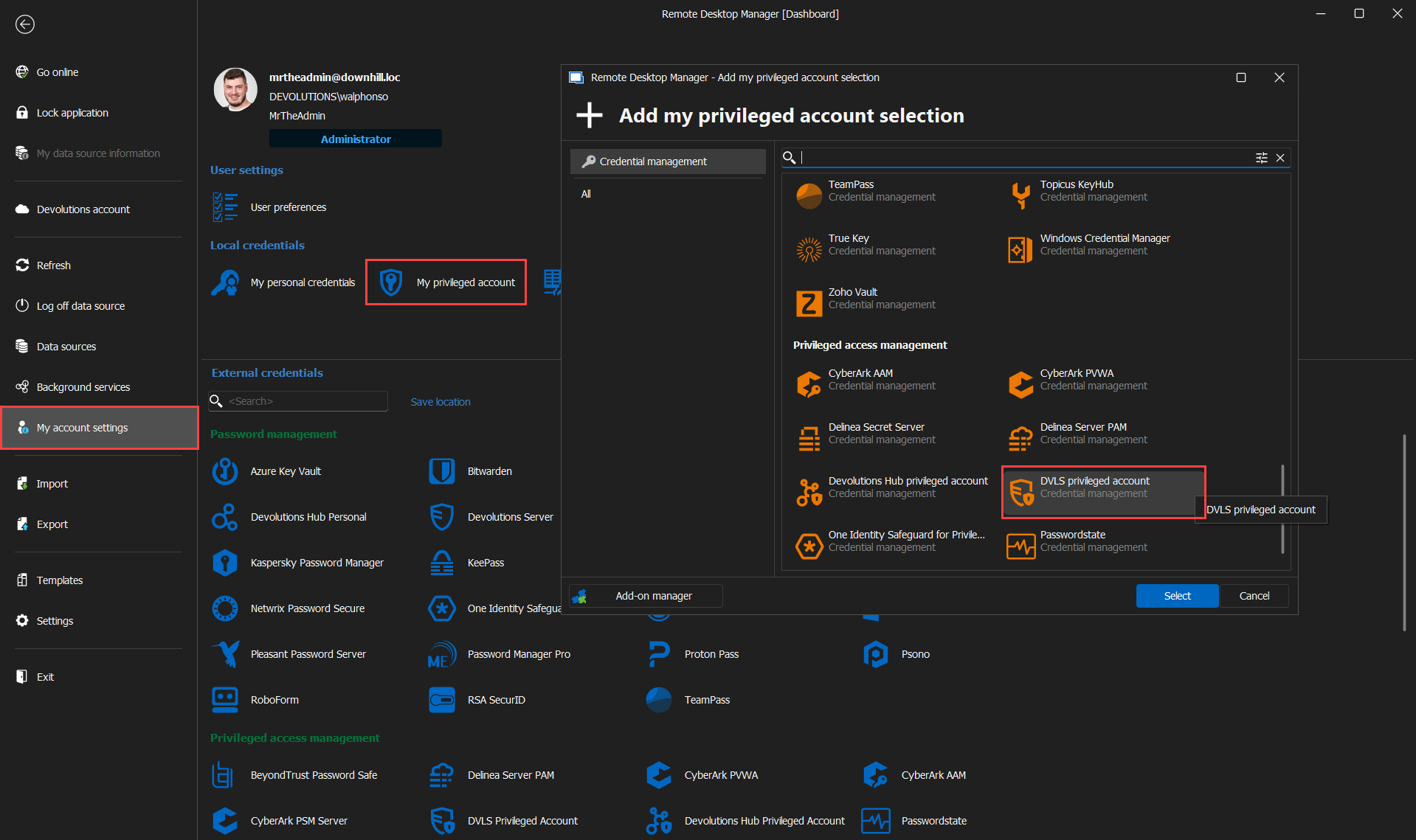
From there, you can configure the entry just like a Devolutions Server Data Source in RDM. Simply fill in the URL to the Devolutions Server and enter your username or select SSO. Since you are using a tiering model for your account I highly recommend using the Always Prompt with List option: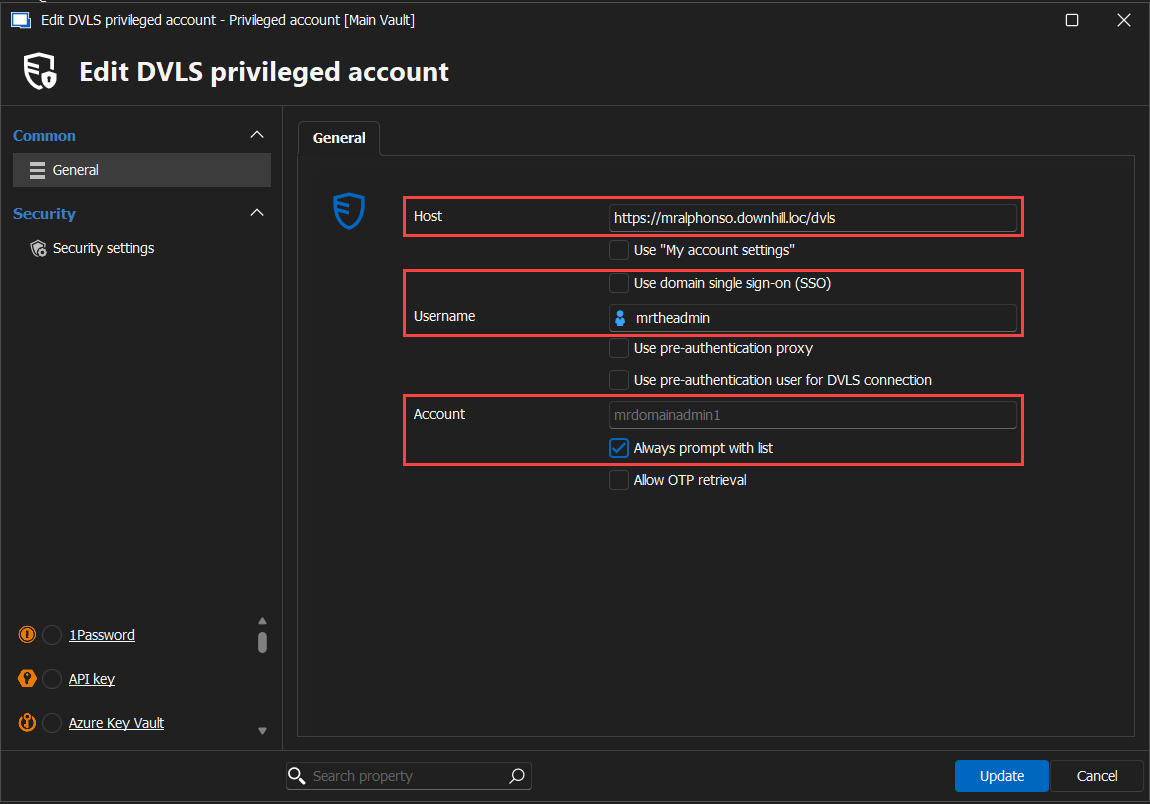
Save the configuration and voilà! Now all entries configured to use My Privileged Account as the credentials, will refer to the configuration you just did in RDM.
Feel free to reach out if you have any questions or need further clarification.
Best regards,
b4f66806-c25b-49f5-a6eb-d1e7c49703be.png
65973ca8-4768-4c82-9aeb-19a9ffbe09db.png
5427d79b-349d-4391-865e-662f3f24c969.png
Hello Wiliam,
Thank you for your detailed reply.
Unfortunately, the checkout window appears immediately despite the “Always prompt with list” checkbox being activated.
There are 2 more questions:
Does each user have to set this manually for themselves under “My privileged account” or can we control this centrally?
And the second question, since we have a lot of server systems, our admins sometimes find it difficult to know which tier level account they are allowed to use to access the server. This means that the admin needs to know that he can access the database with his T1 account, for example, and not with his T2 account.
That was the background to my question about the variable.
Hello,
Can you confirm that the entry you are trying to open is correctly set to My Privileged Account and not Privileged Account?
Each user must configure the My Privileged Account setting individually. There are no admin tools to manage this. I would recommend opening a Feature request for this, I think a lot of users might find this useful.
I would recommend either putting a description or a prefix to the name of servers and entries in your RDM or maybe use folders for different tiers and place the corresponding entries under those.
Best regards,
Yes it was my mistake, I had set a user specific setting on the entry :)
OK we will structure it by folder.
Another question has just arisen. If I check out an account for e.g. 10 minutes and the time has expired, am I not automatically disconnected from the system I am connected to? Do I have to set this somewhere?
Hello,
You are correct, at the moment we do not have control over an active session when the timer on a PAM check-out runs out. I found this feature request thread regarding this if you are interested in showing your interest in the feature: https://forum.devolutions.net/topics/42381/pam-all-session-close
Best regards,
that’s exactly what we are looking for. Is there release date available?
Hello,
Not at the moment, unfortunately.
Best regards,
Hello,
I would invite you to show your interest in the feature on the forum request posted here: https://forum.devolutions.net/topics/42381/pam-all-session-close
Best regards,