JumpHost dosent work

The JumpHost
does not work for us.
If we want to
establish a connection via the JumpHost (Windows Terminal Server 2022), e.g. to
a website or SSH session, we receive the following message: 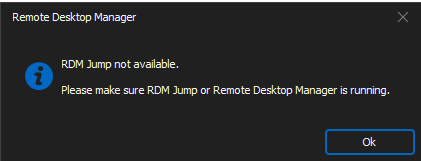
If we go directly to the jumpHost via RDP, the agent status for RDM Jump is green.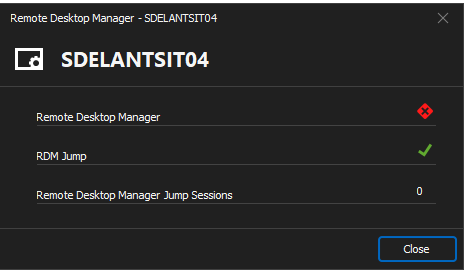
The log of
the RDM Jump follows:
[10.17.2024
9:27:07 ] RDP session started
[10.17.2024
9:27:07 ] RDMJump: 2732200524656
[10.17.2024
9:27:07 ] Buffer (Header) : 0x4700410045004100410041003d003d00
[10.17.2024
9:27:07 ] Buffer (Header) (raw): 18010000
[10.17.2024
9:27:07 ] Buffer (Header) (value): 560
[10.17.2024
9:27:07 ] RDMJump: Received Acknowledge [95b0afb1-9236-4e23-8e6a-31919d9bc8e9]
[10.17.2024
9:27:07 ] BeginRead(1600)
[10.17.2024
10:02:16 ] RDMJump: 2225963248464
[10.17.2024
10:02:16 ] Buffer (Header) : 0x4700410045004100410041003d003d00
[10.17.2024
10:02:16 ] Buffer (Header) (raw): 18010000
[10.17.2024
10:02:16 ] Buffer (Header) (value): 560
[10.17.2024
10:02:16 ] RDMJump: Received Acknowledge [0dd2e3c4-4735-4757-86a3-5fde252f1ffe]
[10.17.2024
10:02:16 ] BeginRead(1600)
[10.17.2024
10:02:16 ] Started
[10.17.2024
10:03:25 ] No process is on the other end of the pipe.
[10.17.2024
10:03:25 ] at System.IO.__Error.WinIOError(Int32 errorCode,
String maybeFullPath)
at System.IO.FileStream.EndRead(IAsyncResult asyncResult)
at
Devolutions.RemoteDesktopManager.Managers.VirtualChannelManager.CallBack(IAsyncResult
asyncResult)
[10.17.2024
10:03:25 ] RDP session closing
[10.17.2024
10:03:29 ] No process is on the other end of the pipe.
[10.17.2024
10:03:29 ] at System.IO.__Error.WinIOError(Int32 errorCode,
String maybeFullPath)
at System.IO.FileStream.EndRead(IAsyncResult asyncResult)
at
Devolutions.RemoteDesktopManager.Managers.VirtualChannelManager.CallBack(IAsyncResult
asyncResult)
[10.17.2024
10:03:29 ] RDP session closing
[10.17.2024
10:24:07 ] RDP session started
[10.17.2024
10:24:08 ] RDMJump: 2225975771840
[10.17.2024
10:24:08 ] Buffer (Header) : 0x4700410045004100410041003d003d00
[10.17.2024
10:24:08 ] Buffer (Header) (raw): 18010000
[10.17.2024
10:24:08 ] Buffer (Header) (value): 560
[10.17.2024
10:24:08 ] RDMJump: Received Acknowledge [8c0db387-73f8-4db9-86cb-b9248381366f]
[10.17.2024
10:24:08 ] BeginRead(1600)
defb93cf-5202-40b3-b314-d5b99fe5b210.png
1167a3c0-d75e-4463-ac80-9ae457d2d87d.png
All Comments (15)
Hi,
From your post above it looks like you've done all the steps outlined here already.
https://docs.devolutions.net/rdm/kb/troubleshooting-articles/jump-rdm-agent-troubleshooting-guide/
What version of RDM Agent & RDM are you running?
Best regards,
Stéfane Lavergne
Hi,
on the TS the latest version run: 2024.3.14.0
RDM Manager on my Client ist also one of the latest: 2024.3.13.0
Troubleshooting Guide dosent help :(
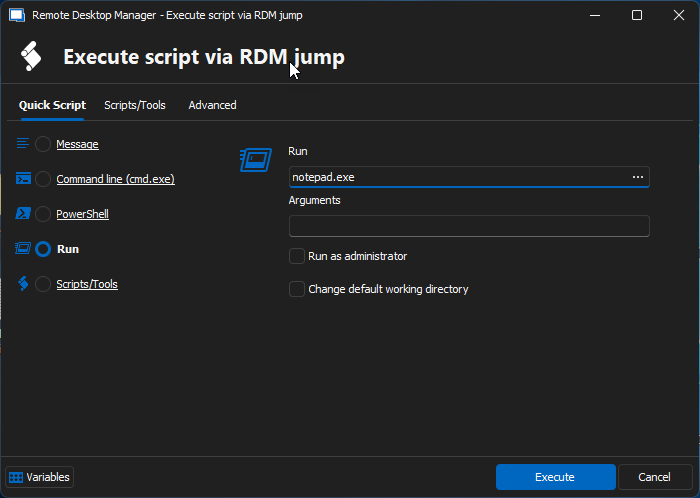
Can you please try the following?
- RDP to the jump host
- Right-click on the tab in RDM
- Execute script via RDM jump
- Select Run
- In the run field enter : notepad.exe
- Notepad should open on the jump host
Best regards,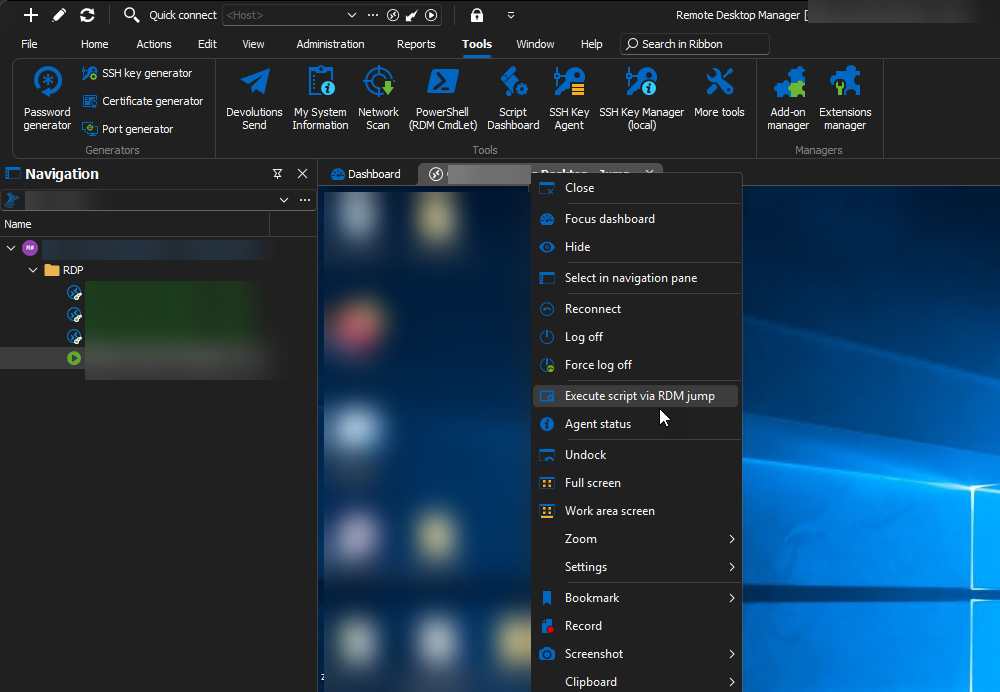
Stéfane Lavergne
8c7a490d-cee1-4861-a0f1-813e930d8853.png
20e4775a-091a-4ef6-95eb-3bee5409a938.png
Yes it works as described
Hello,
Thank you for your response,
Please do not hesitate to contact us for further questions
Best regards,
Tommy Sanders
The notepad work, but the JumpHost doesn’t work :(
OK so RDM Jump was able to process a "simple" command. Now can you please try the following:
- RDP to the jump host
- Enable logging in RDM Jump (if not yet enabled)
- Right-click on status bar icon
- Settings...
- Open the jump log window
- Clear the logs
- Close the RDP (don't log off from Windows if possible)
- Open the RDP to jump host
- Refresh logs - see Log example 1 below
- Clear logs
- Open Jump Session
- Refresh logs - see Log example 2 below
Where do your logs differ from my logs? Can you post them here please.
Log example 1, Note: you can ignore the error (first two logs) this is caused when you close the RDP session, I will try to improve this as it's noise and not helpful.
[10-21-2024 10:03:16 AM] No process is on the other end of the pipe.

[10-21-2024 10:03:16 AM]    at System.IO.__Error.WinIOError(Int32 errorCode, String maybeFullPath)
   at System.IO.FileStream.EndRead(IAsyncResult asyncResult)
   at Devolutions.RemoteDesktopManager.Managers.VirtualChannelManager.CallBack(IAsyncResult asyncResult)
[10-21-2024 10:03:16 AM] RDP session closing
[10-21-2024 10:03:19 AM] RDP session started
[10-21-2024 10:03:19 AM] RDMJump: 2213291628144
[10-21-2024 10:03:19 AM] Buffer (Header) : 0x4700410045004100410041003d003d00
[10-21-2024 10:03:19 AM] Buffer (Header) (raw): 18010000
[10-21-2024 10:03:19 AM] Buffer (Header) (value): 560
[10-21-2024 10:03:19 AM] RDMJump: Received Acknowledge [21ebe189-9a0d-4dbb-9db5-f190c48a5390]
[10-21-2024 10:03:19 AM] BeginRead(1600)
Log example 2
[10-21-2024 10:04:46 AM] Buffer (Header) : 0x4f00420063004100410041003d003d00
[10-21-2024 10:04:46 AM] Buffer (Header) (raw): 38170000
[10-21-2024 10:04:46 AM] Buffer (Header) (value): 11888
[10-21-2024 10:04:46 AM] RDMJump: Received Session [af0d18a0-c888-4550-8e22-bdff526c8822]
[10-21-2024 10:04:46 AM] RDMJump: Filename : C:\Users\{name}\AppData\Local\Temp\427e6f4e-3cab-412f-afdf-9596c8f394de.rdmj
[10-21-2024 10:04:46 AM] BeginRead(1600)
[10-21-2024 10:04:46 AM] RDMJump: RDM Path : C:\Program Files\Devolutions\Remote Desktop Manager\RemoteDesktopManager.exe
[10-21-2024 10:04:46 AM] RDMJump: .rdm(j) not registered
[10-21-2024 10:04:46 AM] RDMJump: .rdm(j) disabled in RDMAgent settings
[10-21-2024 10:04:46 AM] RDMJump: Process.Start("C:\Program Files\Devolutions\Remote Desktop Manager\RemoteDesktopManager.exe", ""C:\Users\{name}\AppData\Local\Temp\427e6f4e-3cab-412f-afdf-9596c8f394de.rdmj"")
[10-21-2024 10:04:46 AM] RDMJump: Process started ID: 8380
Stéfane Lavergne
i see the message in the log: the rdmj is not configured or registrated.
This?
[10-21-2024 10:04:46 AM] RDMJump: .rdm(j) not registered
[10-21-2024 10:04:46 AM] RDMJump: .rdm(j) disabled in RDMAgent settings
That is OK, we no longer use the .rdmj extension as the default method to lauch the jump as it was causing issues. First thing we try is find the RDM.exe in the same dir as the RDMAgent.exe (RDM Jump process) and start it directly from there.
Looks like this in the logs
[10-21-2024 10:04:46 AM] RDMJump: Process.Start("C:\Program Files\Devolutions\Remote Desktop Manager\RemoteDesktopManager.exe", ""C:\Users\{name}\AppData\Local\Temp\427e6f4e-3cab-412f-afdf-9596c8f394de.rdmj"")
[10-21-2024 10:04:46 AM] RDMJump: Process started ID: 8380
Anything else in the logs?
You can send them via private message if you don't want to paste them here..
Stéfane Lavergne
Is RDM installed on the jump host?
If you
- RDP to the jump host
- start RDM
- launch a jump session
Does it work?
Stéfane Lavergne
RDM is not installed on the JumpHost.
On my other JumpHost the RDM is installed. But it dosent work on both server.
is the rdm neassesary?
Yes, RDM must be installed on the jump server. Jump simply automates the passing of the connection from the client RDM to the jump host RDM and the logs back to the client RDM.
Simple tasks like running notapad.exe can be handled by the RDM Jump app but that's about it.
- In RDM
- RDP to the jump host
- start RDM on the jump host
- on the client RDM RDP tab, right-click > status
- you should see RDM & RDM Jump as connected
- start your jump session
- it should open on the jump host
Best regards,
Stéfane Lavergne
Hi,
Status look good RDM and RDM Jump are Green.
when i open the jump session in RDP and open in RDM the Jump Session, he will connect to the JumpHost 😂
So it's working now?
Stéfane Lavergne
it was a timeout problem. The login took so long that the RDM Jump was not yet loaded. I increased the timeout a little and it worked