
IanJSaul
RDM Free 2026.1 — SSH Terminal "Use SSH authentication agent" Does Not Reach 1Password SSH Agent
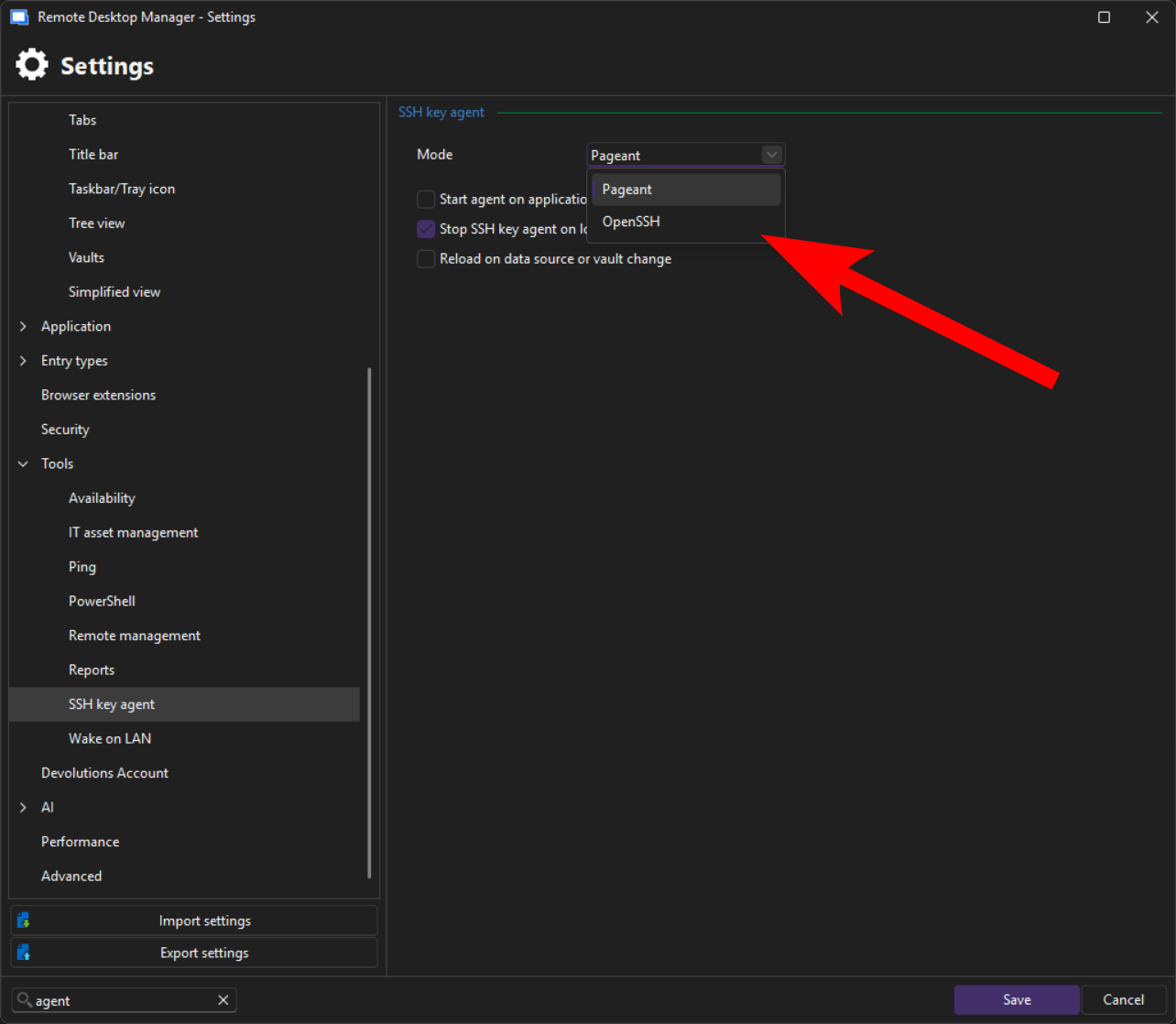
I have resolved it. I need to switch the SSH key agent from pageant to OpenSSH.
SSH-Key Agent not working
Hi,
It should be available on Windows on the free version as well. You simply need to enable "Use SSH authentication agent" under the SSH terminal's advanced settings. There is no need for an additional setting on the Windows version, because 1Password can use the same agent as the keys on your computer.
Best regards,
@Maxim Buisson
That's what I thought as well, however, swapping over to 1Password agent has not worked at all in the RDM sessions, no matter the config that I set up. I opened another thread about it specifically, with some more details, and I'd appreciate it if you have any ideas.
RDM Free 2026.1 — SSH Terminal "Use SSH authentication agent" Does Not Reach 1Password SSH Agent
RDM Free 2026.1 — SSH Terminal "Use SSH authentication agent" Does Not Reach 1Password SSH Agent
Objective:
Use the 1Password SSH agent with RDM's built-in SSH Terminal entries to authenticate via SSH key, with 1Password managing the keys and prompting for authorization on connection.
Environment
RDM Free 2026.1.10.0, 64-bit (.NET 10.0.3)
Windows 11 Enterprise 24H2
1Password latest stable — SSH Agent enabled, "Integrate with other apps" enabled
Windows OpenSSH Authentication Agent service: Disabled (1Password owns the pipe)
SSH targets: Linux hosts with PasswordAuthentication no enforced
What Works
SSH from PowerShell and Windows Terminal works perfectly. 1Password intercepts the connection, displays the key authorization popup, and authenticates via publickey.
The OpenSSH pipe is active and uncontested:
PS> [System.IO.Directory]::GetFiles('\\.\pipe\') | Where-Object { $_ -match 'openssh' }
\\.\pipe\openssh-ssh-agent
PS> Get-Service ssh-agent | Select-Object Name, Status, StartType
Name Status StartType
---- ------ ---------
ssh-agent Stopped Disabled
What Does Not Work
Any SSH Terminal entry in RDM fails with "Permission denied: incorrect credentials or security settings prevent the operation to complete."
1Password never displays its key authorization popup. The 1Password agent does not appear to be contacted at all.
Configuration Tested
SSH Terminal entry configured per Devolutions documentation for agent-based authentication:
Username: populated
Password: empty (confirmed cleared)
SSH key tab → Entry type: No private key
Advanced tab → Use SSH authentication agent: checked
Credentials dropdown tested in both positions:
Username and password — Connection fails with "Permission denied." No 1Password popup.
None — RDM strips the username and prompts with an "Interactive authentication" dialog. After entering the username manually, connection still fails. No 1Password popup.
Question
How do I configure RDM Free's SSH Terminal entries to authenticate through the 1Password SSH agent? Is the "Use SSH authentication agent" option on the Advanced tab compatible with 1Password's SSH agent, or does it require a different agent implementation?
Thanks! -Ian
SSH-Key Agent not working
Is this option for 1Password available on Windows and on the free version, or does it require Mac and Enterprise?
RDM Application Window - Increase Display Size/Scale (Win11)
This is definitely useful, having the Tree size increased is great.
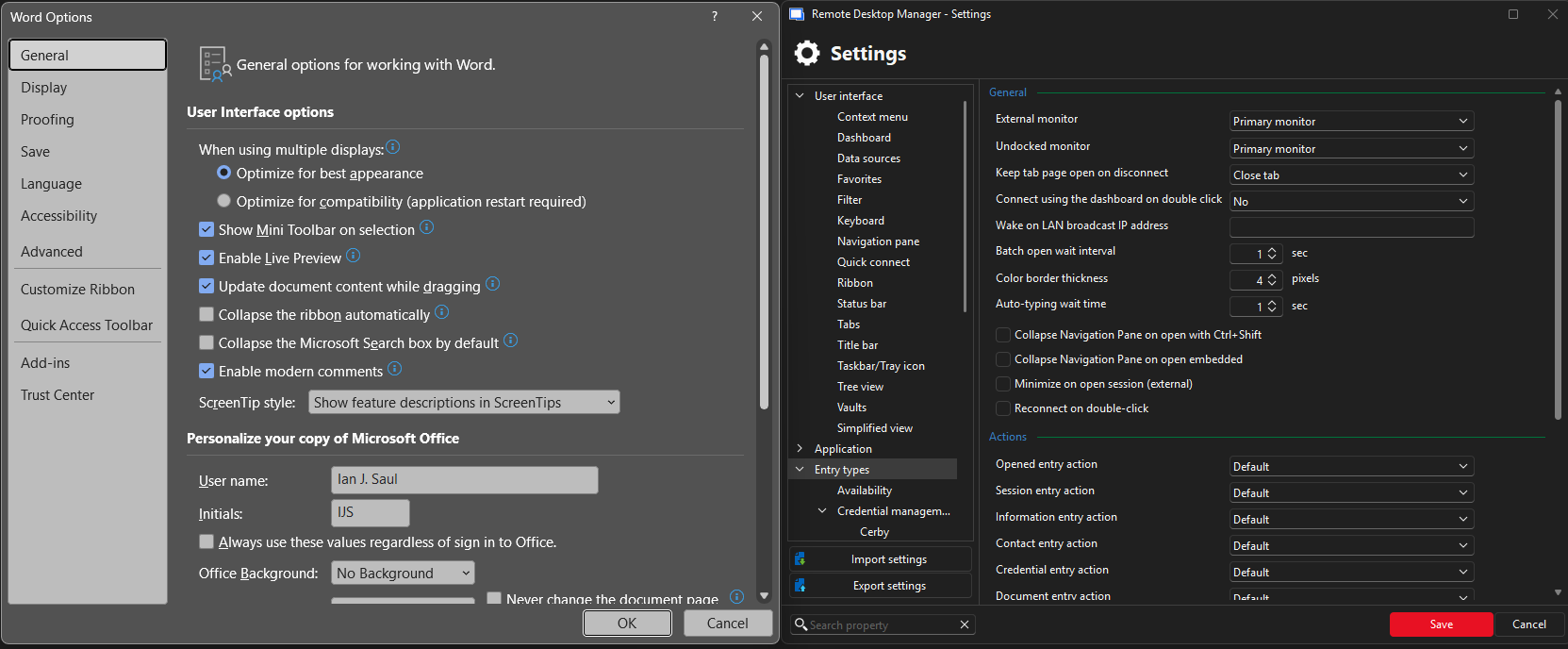
However, is there any way to increase the size of the text/fonts within the Settings area? For example, here is Microsoft Word options, compared to RDM settings modals.
Word is very easy to read, as are other application interfaces, while RDM font size is too small. This is only on 1440p, if increased to true 4K the issue is even more significant.
RDM Application Window - Increase Display Size/Scale (Win11)
Aloha!
For all of us SysAdmins who have been in the trenches for many years, staring at text and interfaces for years on end — vision issues are starting to creep into our lives.
RDM is a wonderful application, but I must admit I'm stumped how to increase the application text/content scaling. This is not related to the size of an RDP session, but instead the actual font/interface sizing. I've experimented with the "Display Scaling" options, DPI-unaware, System aware (default), yet the size is still exceptionally small and hard to read.
I've also flipped the .EXE setting for Change high DPI settings -> Override high DPI scaling behavior -> System (Enhanced).
Is there another setting or option I'm overlooking? This is the only application exhibiting this issue, all other system-aware scaling apps behave correctly, and are legible.
Cheers, -Ian
Embedded SFTP on SSH connection
2- Following the previous question, modify the home path by /
This is exactly what I was looking for, and I'm glad this recent thread surfaced with the information.
I think perhaps a default config to start in the "/" would be helpful.
Cheers!