Embedded SFTP on SSH connection
0 vote

Hello
Will be great if you can have ability to transfer files on ssh connection like Mobaxterm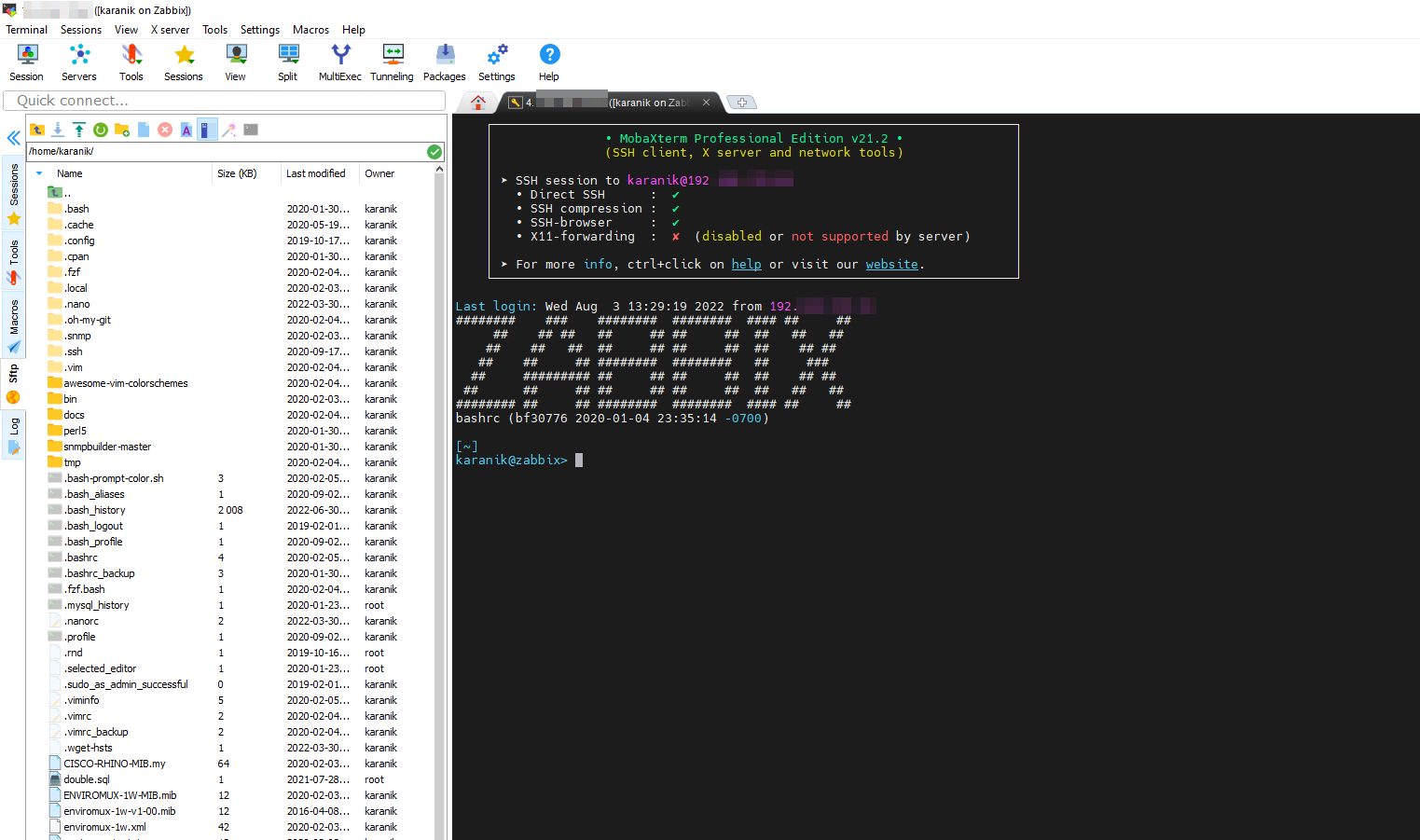
sftp.png
All Comments (21)
Hello,
This is possible by enabling the option "Use SFTP connection for remote file transfer" in Terminal -> Advanced : 
Please let us know if this isn't exactly what you were looking for.
Regards
Jonathan Del Signore
Hi
Thank you very much. It is very usefull with this option. Also need the options Show files in tree view and show hidden files by default.
Hello,
Just to confirm, you would like these option checked by default when you create a new SSH entry, correct?
Best Regards,
Etienne Lord
Hello
Yes. If this possible. Othewise I will duplicate each time the specific entry.
Hello,
For new sessions, you can head over to File - Templates - (Under Local Default Settings) Session - SSH Shell, from there, make sure the option is checked. This way, when you create a new SSH Shell session, the option will be enabled by default.
As for existing sessions, you can head over to View - Search - Advanced Search, search by "Connection Type" - SSH Shell : 
Once your SSH are loaded, select the lot (CTRL + A), make a right-click - Edit - Batch Edit - Edit Entries (Session Type Settings)
Head to the Terminal Tab, check the "Override" box and then enable the option. 
The option will then be enabled for all your existing sessions.
Best Regards,
Etienne Lord
Awesome.
Hello,
Some questions more about your last post.
Can all this settings that I applied on Remote Desktop Manager (about terminal, fonts, colors etc) to tranfer this on another Remote Desktop Manager installation?
Can I do this without database? Can I do also with database?
Sometimes when I open Remote Desktop all connections in the left menu are collapsed and must to expand again. Why this?
Hello,
We do not have a feature to push these settings globally, best thing you could do is to is send you configuration file over to your other user if you want them to have the same local settings as you.
Also, for your second, not quite sure why this would happen but you can always make a right-click in your Navigation pane -> Expand all
Best Regards,
Etienne Lord
Hello
Is a specific file that app store these settings?
Hello,
It would be in your Remote Desktop Manager Configuration file, by default it will be %LocalAppData% - Devolutions - RemoteDesktopManager. The file being RemoteDesktopManager.cfg, you can set it in the same path for your users.
Best Regards,
Etienne Lord
Thank you.
Is this option still available in the latest versions? I can't seem to find it anywhere.
Hello,
The SFTP setting should still be in the same location : In your SSH session's properties, Terminal -> Advanced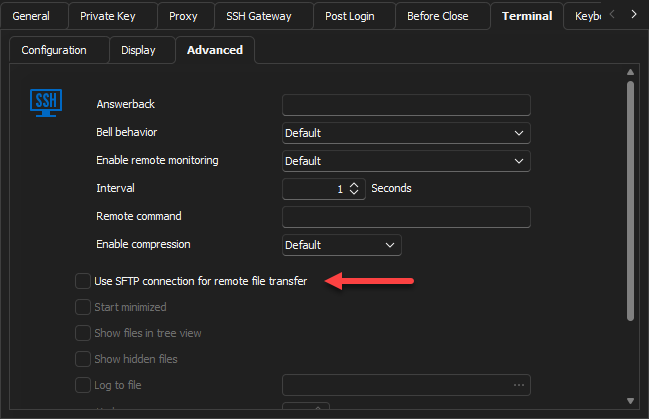
If you still can't see it, please let us know your exact RDM version.
Regards
Jonathan Del Signore
7e4467ce-b212-4cad-9760-f093025b5792.png
Good afternoon, I have some doubts about whether it is possible to do
1- By default the sftp path is the user's /home, but it does not allow level up. Can this be changed by default?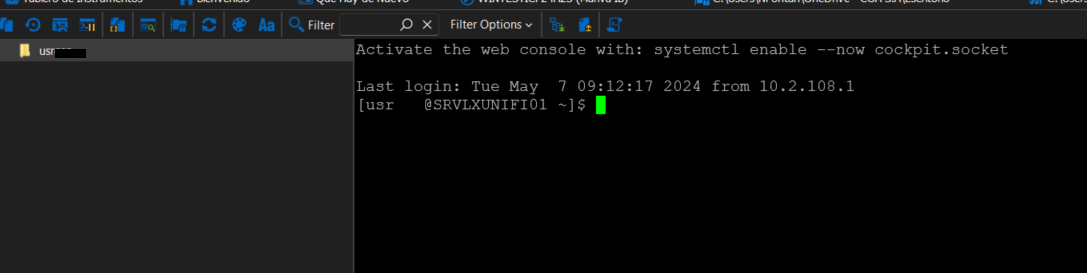
2- Following the previous question, modify the home path by /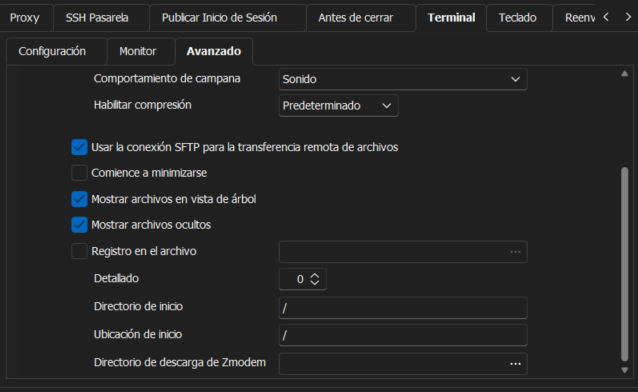
In this way, the behavior is as expected, but the user with whom the session starts does not have permissions to the content of certain folders, for example /root, but in the shell by elevating to root we can access to the previous ones, but not in the SFTP view.
Is there a way to elevate root from the SFTP connection?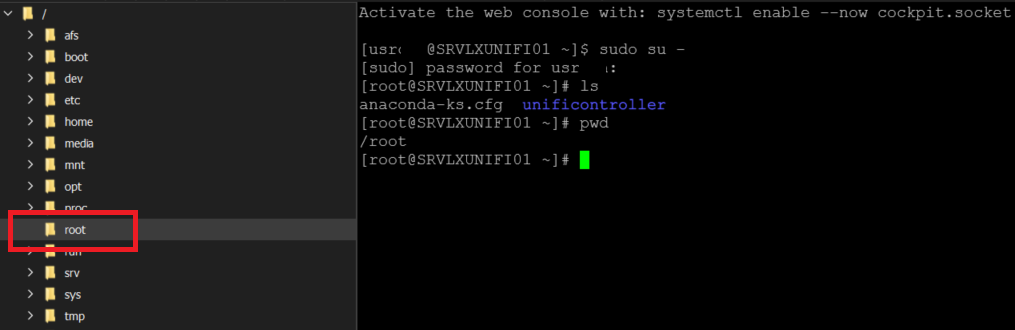
Thanks!!
8ab14e2b-0bd2-4408-ac1b-b232bda71978.png
640e23dd-a50f-4688-a926-d051d3afa889.png
a588a577-3659-4be2-acf4-9a4b7eea9f5f.png
Hello Nahuelfontan,
Thank you for contacting us on that matter!
Regarding your questions:
- Could you provide more details on the "by default?" To my knowledge, if you want to change the settings completely of RDM by default, always to be something other than "/home," this is not possible. But you can always batch-edit every entry and override the settings to be something different in the "Home Directory." If you want to batch-edit the entries, you will need to select all the entries you want > right-click and choose Edit > Batch edit > Edit entries (Session Type Settings) > Terminal.
- Regarding the permission to reflect on the SFTP, I contacted the development team to get more information and will let you know as soon as possible.
If you have any other questions, feel free to let us know.
Best regards,
Maxim Robert
2- Following the previous question, modify the home path by /
This is exactly what I was looking for, and I'm glad this recent thread surfaced with the information.
I think perhaps a default config to start in the "/" would be helpful.
Cheers!
Hello IanJSaul,
Thank you for your post on this forum!
We'll look into it and provide more information as soon as possible.
If you have any other questions, feel free to let us know.
Best regards,
Maxim Robert
Hello,
The SFTP setting should still be in the same location : In your SSH session's properties, Terminal -> Advanced
If you still can't see it, please let us know your exact RDM version.
Regards
Hi,
I am using version 2024.3.14.0 64-bit and I don't see this option.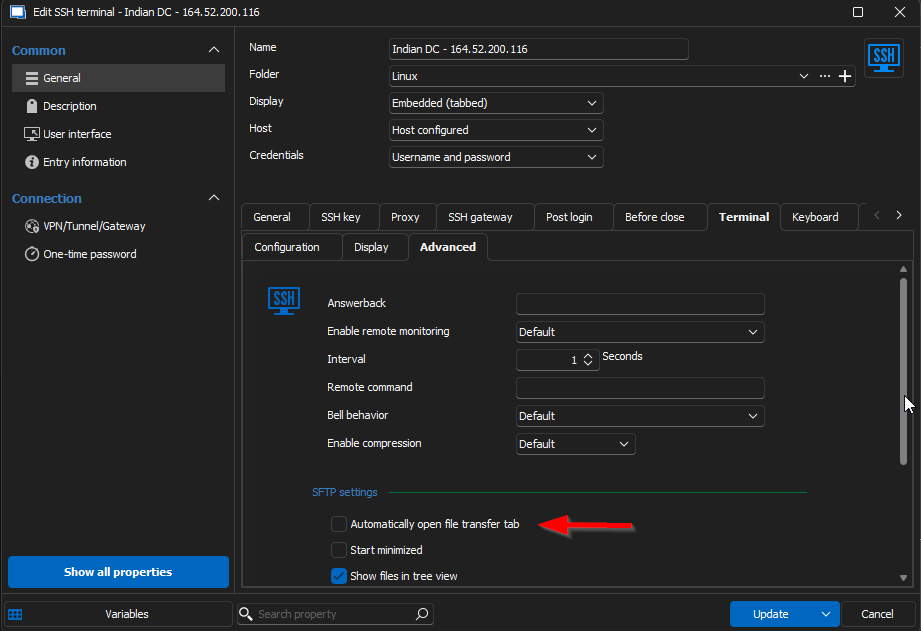
aa6148ab-ade9-4b09-83b9-1153aca3954c.png
Hello,
If you check the option you pointed out, the file transfer tab will open automatically which is what you're looking for. It's also possible to enable it dynamically by clicking the button in the toolbar of your SSH entry: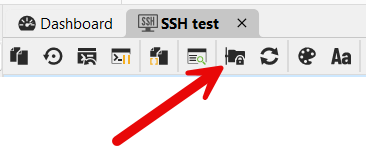
Regards,
Hubert Mireault
2240353d-def2-453c-aaf3-c91dcb8f06f8.png
Thanks. Got it.
It by defaults goto /root folder.
How can I goto / folder?
p.s. I understand that I can change the default folder in settings but if I have already opened the sftp, can I goto / folder?
At the moment the only way to go to a folder higher than the home folder is to set the "home directory" property in the entry: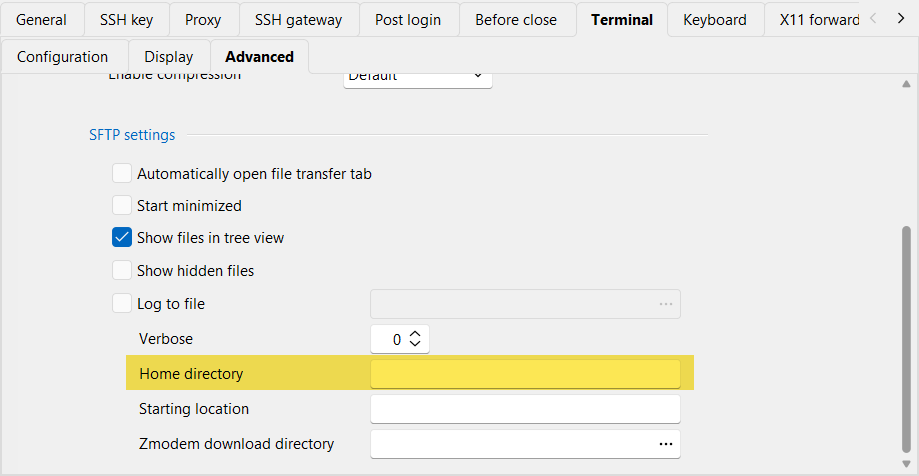
In your case you would need to configure it to "\". This should show the full structure on your remote machine.
I understand this is not the most intuitive behavior, but we are hoping later this year to start a rework of our file explorers (FTP, SFTP, etc) to be more in line with other products like WinSCP for example.
Regards,
Hubert Mireault
aad33b0b-3bec-4835-9102-c03fdf3b7079.png