SSH-Key Agent not working

When i want to start a SSH Terminal with everything configured, i get following error:
But i have local keys installed:
When i open the SSH Key Agent window, it doesnt recognize the keys: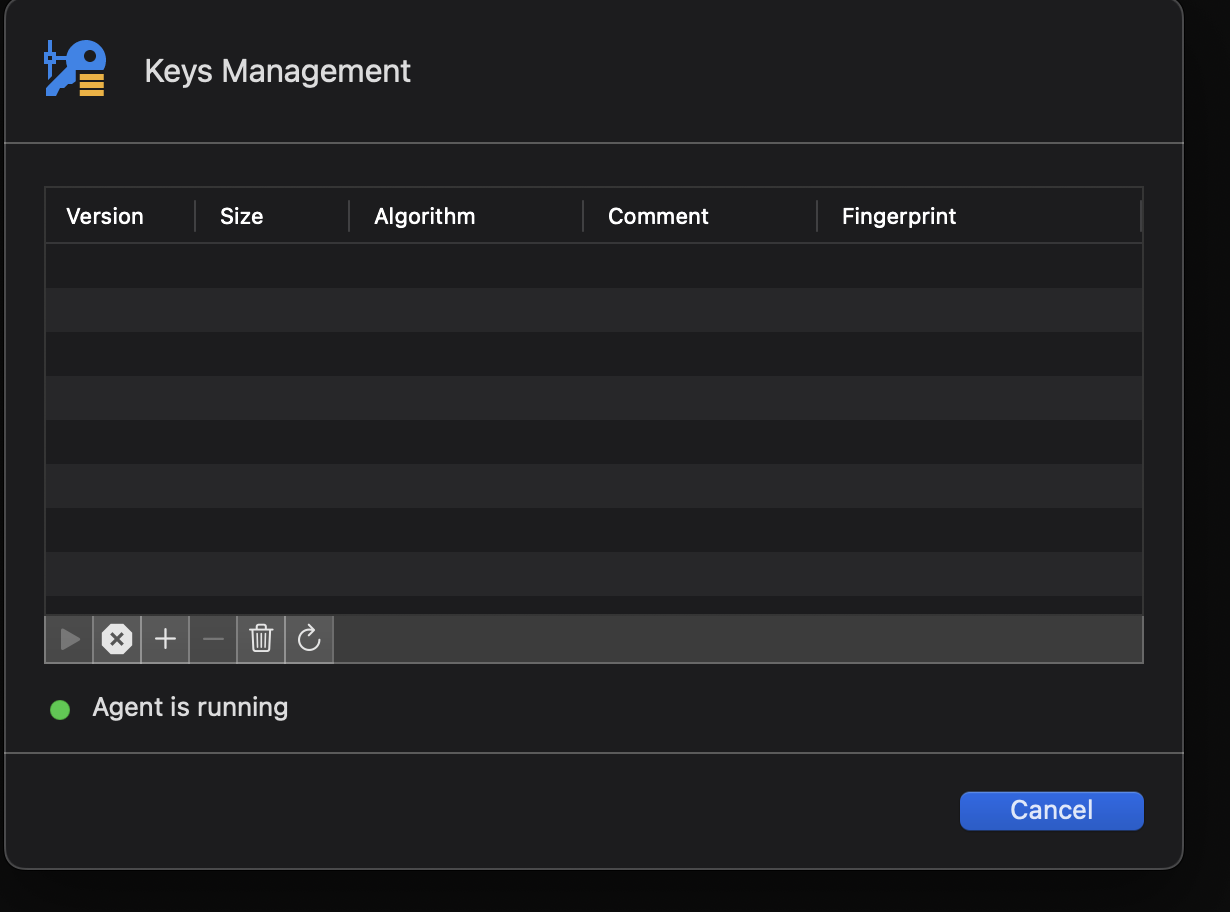
The exact same host (synced) on windows works with ssh key agent.
CleanShot 2024-05-25 at 12.16.57@2x.png
CleanShot 2024-05-25 at 12.14.45@2x.png
CleanShot 2024-05-25 at 12.14.21@2x.png
All Comments (16)
Hi,
In my case, when I add the key in the terminal using ssh-add -K ~/.ssh/key, I see it appear in the keys management window after turning it off and on again. Can you confirm if stopping and restarting the agent makes your keys show up please ?
However, it appears that it is not used when connecting using embedded terminal, only external. We will investigate this issue and let you know when we have updates.
Best regards,
Maxim Buisson
Screenshot 2024-05-27 at 9.22.07 AM.png
Hi again,
After looking into it, we found this setting that needs to be turned on for agent keys to be used:
Have you checked this setting ? If not, please turn it on and try again. Please note that you also need to provide the username for the login either in the General tab using Username & Password credentials or using any other credentials such as linked. When I try it, it works. If it doesn't work for you, please share more information about your ssh config so we can find what is happening.
Best regards,
Maxim Buisson
Screenshot 2024-05-27 at 11.45.54 AM.png
Hi again,
After looking into it, we found this setting that needs to be turned on for agent keys to be used:
Have you checked this setting ? If not, please turn it on and try again. Please note that you also need to provide the username for the login either in the General tab using Username & Password credentials or using any other credentials such as linked. When I try it, it works. If it doesn't work for you, please share more information about your ssh config so we can find what is happening.
Best regards,
Yes, this setting is turned on. I use currently 1P with SSH-Keys and the SSH-Agent. I tried it again and the exact same Host-Config (synced) works perfectly with the 1P Agent on Windows but not in Mac. I also tested the Keys on my Mac with the normal terminal (ssh user@host) and the SSH-Key works without issues. Also in other clients like TSX it works. I have only problems in RDM. I also checked that the RDM-SSH-Agent is turned on.
Hi,
If I understand correctly, you are storing your ssh keys in 1Password and you are using the 1Password SSH key agent and 1Password CLI to use them in the terminal ?
Maxim Buisson
Yes exactly. I use the 1P Agent. And when the agent is running I can use the keys as if they were installed locally on the client.
Hi,
I am unsure if RDM can access the keys from the 1P agent for security reasons, but we will investigate this and let you know when we have updates. If you want to use the keys in RDM, consider adding them to the macOS key agent also.
Best regards,
Maxim Buisson
Okay, if you find something, where can i get updates on this? And on Windows it works perfectly without issues in RDM, so i think it is maybe a Mac-Client focused problem.
Thanks for the information. It is possible that macOS and/or 1Password handles keys differently on macOS vs Windows and that might affect how RDM is able to access them. That is what we will investigate. I opened a ticket linked to this thread so once we have updates, we will let you know in the replies here.
Best regards,
Maxim Buisson
Hi,
I have some news for you. I was able to reproduce your problem. My theory is that on Windows, the 1Password key agent replaces the OpenSSH agent, but on macOS it runs alongside it. On macOS, 1Password uses a feature that integrates directly with the system's Secure Enclave and its SSH agent capabilities. However, RDM cannot access this. Because of this, RDM Windows can use the 1Password keys through the OS agent ( which becomes the 1Password agent ), but RDM with macOS cannot use the 1Password keys through the OS, because they are not in the OS agent.
We will look into ways to possibly integrate the 1Password API into RDM to allow this to work, but so far we can't give an ETA or even be sure it is possible.
In the meanwhile, I suggest you add your keys to the macOS ssh agent or that you open your ssh connections externally.
Best regards,
Maxim Buisson
Hello,
The newest version of RDM Mac (2024.2.7.3) is out
and should contain a fix so 1Password key agent can work properly with the RDM Terminal.
Best regards
Michel Lambert
Hi,
Just a little bit more information for you and people who want to use the 1Password key agent on RDM macOS:
A setting was added under SSH Shell -> Advanced

Checking this will cause the 1Password key agent to be used instead of the macOS agent for this connection. So, keys in the macOS agent will not work on connections where this setting is checked. Only keys in the 1Password will work.
Of course, this requires the 1Password application to be installed and running and the 1Password key agent to be activated under settings -> developper in 1Password.
When trying to connect with this setting, 1Password should ask you to authorize RDM and then allow RDM to use the keys once you accept.
Feel free to let us know if this works as expected for you.
Best regards,
Maxim Buisson
Screenshot 2024-06-18 at 3.46.18 PM.png
Screenshot 2024-06-18 at 3.45.22 PM.png
Thank you very much guys! It works perfectly fine!
Is this option for 1Password available on Windows and on the free version, or does it require Mac and Enterprise?
Hi,
It should be available on Windows on the free version as well. You simply need to enable "Use SSH authentication agent" under the SSH terminal's advanced settings. There is no need for an additional setting on the Windows version, because 1Password can use the same agent as the keys on your computer.
Best regards,
Maxim Buisson
Hi,
It should be available on Windows on the free version as well. You simply need to enable "Use SSH authentication agent" under the SSH terminal's advanced settings. There is no need for an additional setting on the Windows version, because 1Password can use the same agent as the keys on your computer.
Best regards,
@Maxim Buisson
That's what I thought as well, however, swapping over to 1Password agent has not worked at all in the RDM sessions, no matter the config that I set up. I opened another thread about it specifically, with some more details, and I'd appreciate it if you have any ideas.
RDM Free 2026.1 — SSH Terminal "Use SSH authentication agent" Does Not Reach 1Password SSH Agent
When I tested it 2 years ago it worked like this, but it is possible something has changed on our side or on 1Password's side. You did great by opening a new thread, the support team should look into it shortly and either create a ticket or ask for more information. Unfortunately, I don't have any ideas about what the issue is currently...
Best regards,
Maxim Buisson