
agowa
Add Oracle Secure Global Desktop support
Hi,
please add support for the Oracle Secure Global Desktop.
Product pages:
* https://docs.oracle.com/en-us/iaas/secure-desktops/home.htm
* https://docs.oracle.com/en/virtualization/secure-global-desktop/
It has two modes web and native (some installations only have the native mode):
1. Login to web interface (on login page you have if available the choice between web and native)
2. Get a "something.sgd" download
3. Open that file using that oracle client
4. The oracle client opens a callback url in the browser
5. Select destination host/session within the web interface
6. It opens a native window with the remote session in it. It looks like a windowed RDP session (but probably is a custom protocol).
An integration into RDM could look like this:
Import all of the sessions from the web portal
Click on one of these sessions in RDM and have it connect to it within its embedded view.
Also be able to use all of the other features of RDM esp. those in regards to automating the session (like executing a script within it).
SSH VPN/Proxy/Gateway settings bugged?
Does it show the image now? I'm getting that wird 403 and CORS error again when I tried to attach that image to my former reply. Also when I posted the comment initially it I c'n'p-ed the image in and that caused it to show up within that same browser tab (also when reloading) but not within a new one. And when I opened the page using Firefox instead of Safari it only showed up as the text string "forum image"...
SSH VPN/Proxy/Gateway settings bugged?
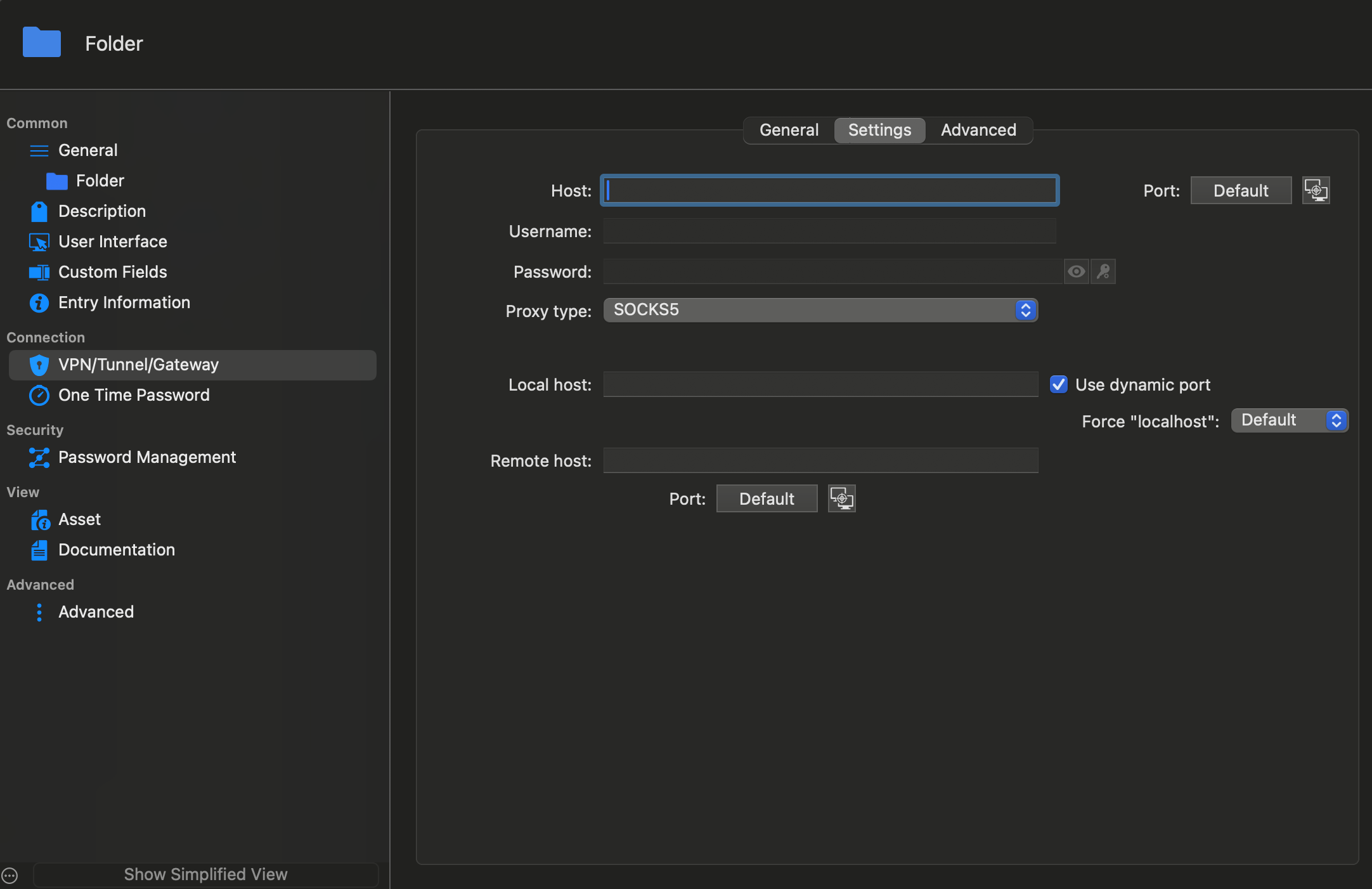
SSH VPN/Proxy/Gateway settings bugged?
It most likely is. The intended setup is kinda trivial though (rest of the complexity is done on the SSHed into host, so out of scope for Remote Desktop Manager).
RDP entry => SSH
Webpage => SSH
as soon as Remote Desktop Manager would open the things through the SSH connection it would work. However I don't know how to properly configure this. The only way I found is using the "SSH Port Forward" object which breaks the Single Sign On as the URL won't be "https://fqdn/" but "https://localhost:forwardedPort/".
Then I tried using other SSH options in the GUI and they always asked for "local and remote" endpoints which I don't have as I do not want to do any portforwarding.
The desired setup (done manually without Remote Desktop Manager) is basically:
open a ssh connection with a dynamic port lets say 1234 ('ssh -D 1234 user@jumpVM.local')
configure e.g. firefox to use localhost:1234 as socks5 proxy with remote dns lookups.
On the Linux and Windows versions the way to properly configure this is slightly different. Also I'm still confused by what these options for using a SOCKS5 proxy actually expect me to enter. It looks like Remote Desktop Manager for Mac wants to do a portforwarding through the SOCKS5 proxy?
Containerized Websites
basically yes.
libvirt support
The currently prebuilt and via brew shipped version of libvirt doesn't include SPICE. aka the MacOS version of libvirt doesn't currently support SPICE. (or better the qemu package doesn't, as libvirt is only an api layer to start/stop it for the most part. The hypervisor framework from apple probably also doesn't use spice but I'm not entirely sure about that). So that shouldn't be an issue until now at least. I tried to compile it with spice but I'm currently stuck at a dependency of a dependency of it and probably need to find some replacement as that library doesn't properly build on/for MacOS. I haven't invested any time since then, but that's probably also the reason why it is currently not included in the version shipped by the (Home)brew project.
Also could you provide some more details about this licensing issue? The libvirt website says it is GNU LGPL licensed, so that should technically be enough. Or not?
VNC none credentials cause credential popup
Hi, the credential option "none" appears to be bugged it still causes RDM to ask for credentials when trying to connect instead of connecting without credentials. This basically makes "None" equal to "Username and Password" but without having them filled. Explicitly selecting "None" for the credentials should suppress this dialog.
ignore auto disconnect if VPN was connected manually
Hi, please add an option to make Remote Desktop Manager ignore the auto disconnect option if I manually connected to the VPN before (aka when I double clicked it in the inventory instead of having it pulled in as a dependency)
libvirt support
Hi, would it be possible to add libvirt support to see the locally running VMs in Remote Desktop Manager? Preferably for both system and user session mode.
MS Teams embedded
Hi, please add a way to embed MS Teams (or zoned/scoped webpages) so that I can be logged in to multiple teams tenants simultaneously and do not have to wait for it to switch between them all the time...
Containerized Websites
Hi, I have multiple projects in my Remote Desktop Manager and especially with Office365 (and other SSO connected ones) connected web sites it is always kinda annoying having to switch back and forth or being already logged in with the wrong tenant. Therefore would it be possible to somehow scope the session data either to the host object or to folders? Similarly to Inherit Host/Credentials?
SSH VPN/Proxy/Gateway settings bugged?
Hi,
I tried to use the VPN, Proxy and Gateway settings and it appears like they're majorly bugged. The only thing that I managed to get working was port forwarding.
It doesn't look like it is possible to configure a Proxy at all the GUI always forces me to enter a local and remote endpoint. Which doesn't make sense for e.g. a Socks5 or HTTPS proxy.
Also when a vpn is invoked as a dependency the "Inherit" option for Host and Credentials is no longer inherited from the parent in the tree but from the calling object. Which is kinda annoying but mostly workaroundable by using $PARENT_HOST$ instead of just checking "Inherit host/credentials".
My environment:
A local jump VM (proprietary VPN client isn't compatible with the host os) via SSH
A proprietary VPN within that VM
Remote endpoints that do not have DNS entries and currently only resolve via /etc/hosts entries on the jump VM.
The remote endpoints are for example:
vCenter (sign in validates the url and fails when port forwarded)
RD Gateway (unclear how to configure within VPN section or within the normal Session properties? RD Gateway object not selectable from within the session properties, so select "none" there and use the VPN ones? Everything I tried failed though)
RDP through the RD-Gateway (or better through SSH, through proprietary VPN, through RD Gateway)
Webpages (that also need to be accessed using the FQDN and that fail because no real proxy functionality is within RDP Manager. I tried using a dynamic port and configuring firefox socks proxy settings towards it and that worked for these at least; However either way the VPN/Proxy settings didn't appear to have any effect meaningful on webpage objects)
My inventory looks something like:
EnvironmentA
(credential) user
Sub-EnvironmentAA
(credential) user
(credential) admin
(Host) vCenter
(credential) administrator@vsphere.local
(Webpage) vCenter
(Remote Management) vCenter
(Host) RDP
(Webpage) RD Web Access
(Microsoft RD Gateway) RD Gateway
(Session) RDP $CollectionName
(Host) $ServerName001
(Session) RDP
(Host) $Switch001
(Session) SSH
EnvironmentB
...
localhost
(Host) XYZ-VM
(credential) user
(credential) root
(Session) SSH
(SSH-Gateway) ssh-port-forward
So is this entirely bugged or am I doing something wrong? I did similar things in the windows and linux version one or two years ago.
SSH VPN/Proxy/Gateway settings bugged?
I got a HTTP-403 () when trying to post my actual bug report. I've tried in multiple browsers (Safari and Google Chrome) so far. So I'm going to try posting this now instead.
Edit: Interestingly it works when posting it in the replies to this post...
Edit2:
Error message in dev tools (Network tab): Failed to load resource: Origin https://forum.devolutions.net is not allowed by Access-Control-Allow-Origin. Status code: 403
URL: https://forum-api.devolutions.net/api/topics
Status: —
Source: —
Initiator:
polyfills.09a59a9168f728be.js:1:171760
FreeRDP missing on macOS?
Ok, good to know. As this is literally the first time I'm using RDP on the Mac version and as I've only used the other versions before I got a bit confused by the option being missing (and the lack of feature parity+settings in general).
Would you mind extending the docs about the Mac version specific details?
I did a search for FreeRDP within them and all I found was two unrelated hits and both describing steps to enable FreeRDP in the other versions but none says anything about it being different for the Mac version.
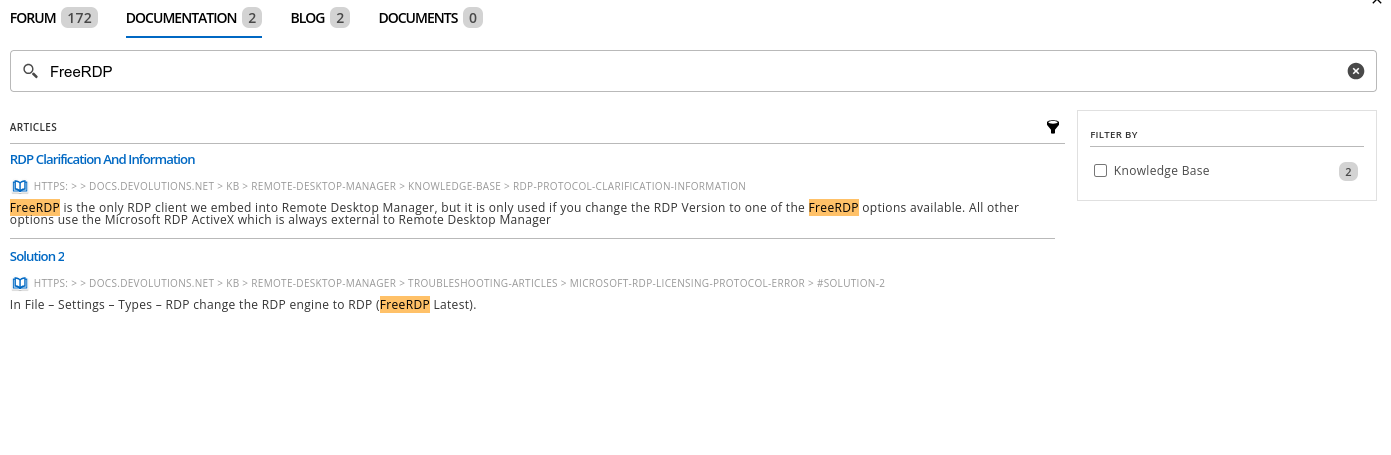
> but it is only used if you change the RDP Version to one of the FreeRDP options available.
> In File – Settings – Types – RDP change the RDP engine to RDP (FreeRDP Latest).
And this page (not within the search but right after the first result in the tree view) shows the option(s) I was looking for: https://docs.devolutions.net/kb/remote-desktop-manager/knowledge-base/rdp-entry-advanced-properties/
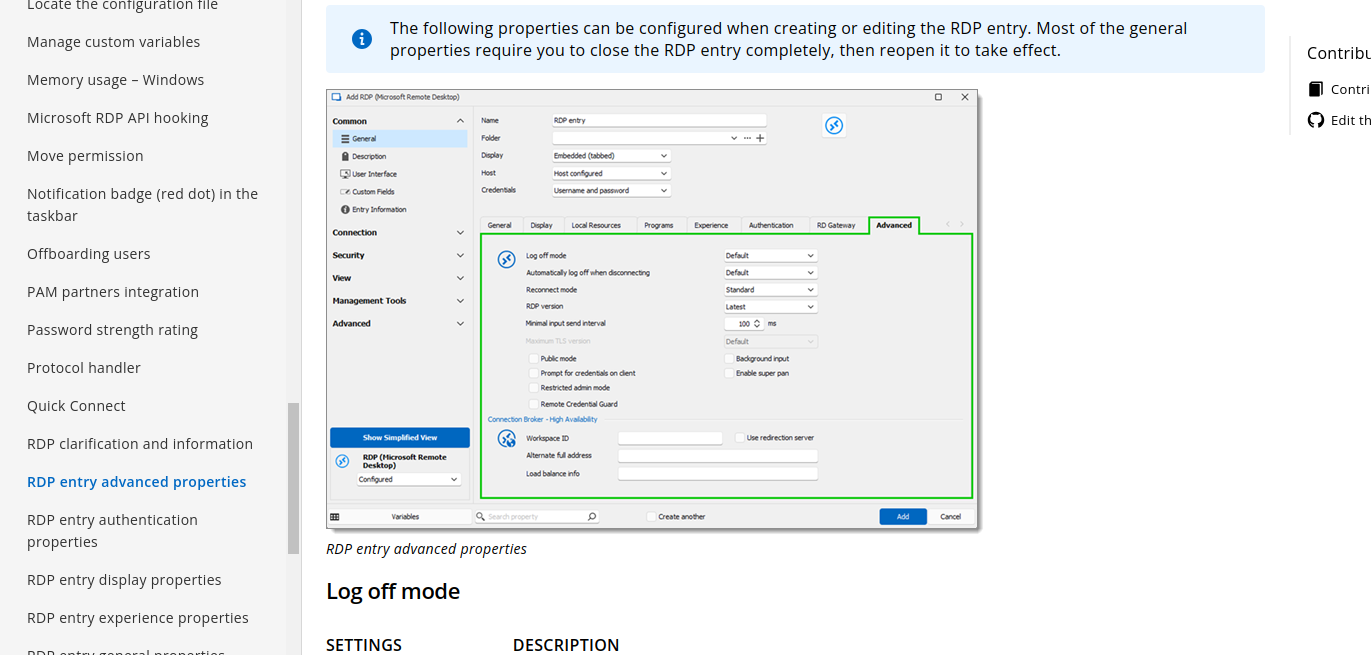
FreeRDP missing on macOS?
I was looking for the option I knew from last time I used Remote Desktop Manager (on Windows and Linux) where you'd select which RDP client to use for the connection. Was that changed to be implicit now? Or is this something specific to the macOS version?
I think it was within the advanced section of the session entry back then.
(Edit: Almost forgot, it works as you said when switching to embedded mode).
FreeRDP missing on macOS?
Hi, as I wasn't able to find any mention of FreeRDP *not* also being supported on macOS therefore I assume it being missing is probably a bug.
I cannot find it anywhere within Remote Desktop Manager neither within the Settings nor within the RDP session entry properties. I can use xfreerdp within a terminal just fine (it appears to be installed properly) however the option is still nowhere to be found within the Remote Desktop Manager. As far as I recall it was available on both Linux and Windows so I assume it is supposed to be available on macOS as well? (If not please move this to feature request and update docs)
(I've installed freerdp using homebrew and I'm using a MacBook Pro 16-inch, Nov 2023 with an Apple M3 Pro, 36 GB RAM and Sonoma 14.4.1)
RDM always on top
Initially it was set to German. But the error did NOT re-occur when I changed it back and forth a few times to try and see if that was the reason for the error.
"the fix" was probably settings getting re-written or re-applied I guess.
RDM always on top
Hi, I've the same issue. Also I didn't need to check/uncheck the "Always on top" setting itself. I changed the UI language to English and just saving that change alone already resolved that issue.
Before that I tried restarting the Remote Desktop Manager as well as restarting my computer both did NOT fix the issue and it persisted.
I think changing any setting and re-saving the options may fix this issue. Also I can confirm that all of the "Always on top" settings were and are unchecked. Namely I checked:
"Always on top"
"Check if online always on top"
'Use "always on top" force foreground window method"
Version info:
Free Version
2023.3.39.0 64-bit with Royal TS and SQL Server Management Studio add-ons loaded.
Check of update says it's the latest version.
The issue however existed for a while now and I think I may have installed one or two updates in the meantime. I installed and updated Remote Desktop Manager via winget.