RDM always on top

Hi
Newer versions of RDM seem to dominate my desktop, IE if it is open I can't get other Windows to pop in front of RDM without minimising RDM - is there a way around this. Can't see anything obvious.
Other applications don't show this behaviour.
All Comments (14)
Hello Neil,
Thank you for reaching out to us regarding this,
I see, If you go under "File" -> "Options" -> "User Interface" is the option "Always on Top" currently enabled?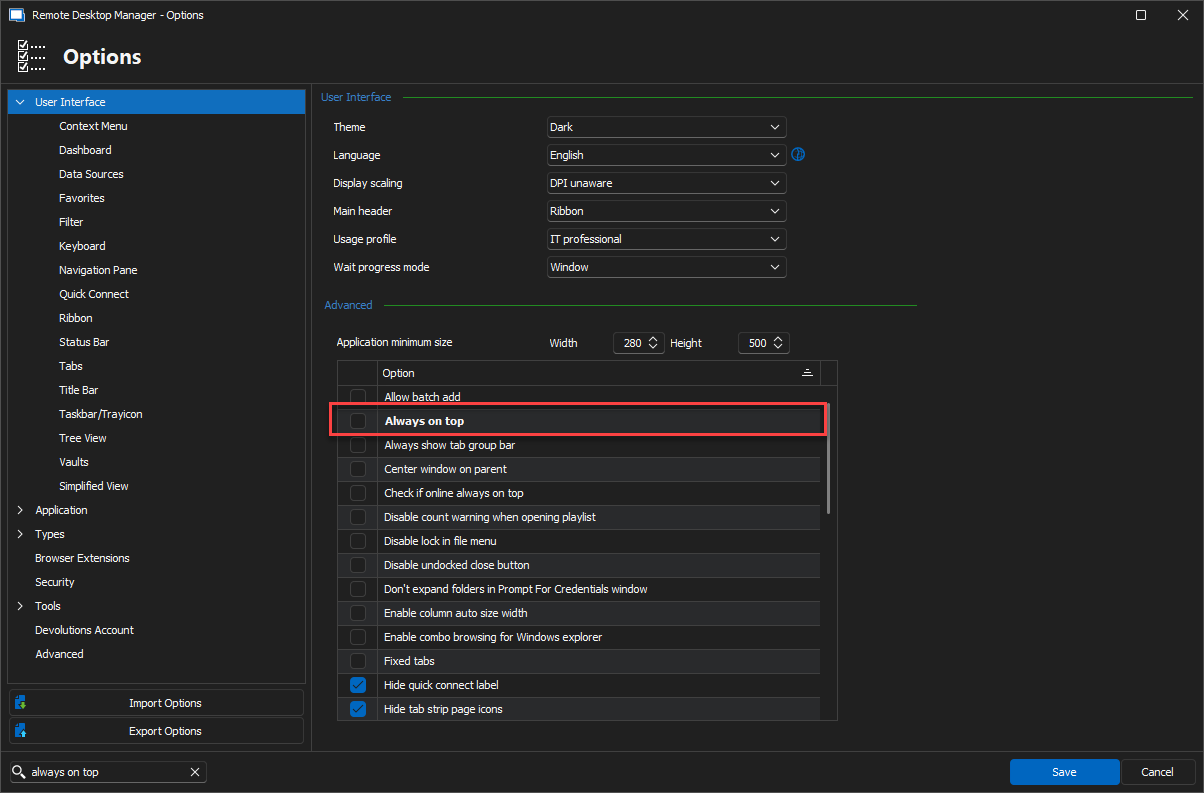
Let me know,
Best regards,
Samuel Dery
1f9e407f-92f2-4d92-9f8a-649e56b95631.png
That option was NOT ticked, but I have ticked, Saved, unticked, Saved again.
I now seem able to bring other apps/windows in front of RDM.
Thanks for the tip - I thought I'd checked it before, and perhaps missing something else.
Hello,
That's great news !
We're happy to read that the issue is resolved !
Best regards,
Hi, I've the same issue. Also I didn't need to check/uncheck the "Always on top" setting itself. I changed the UI language to English and just saving that change alone already resolved that issue.
Before that I tried restarting the Remote Desktop Manager as well as restarting my computer both did NOT fix the issue and it persisted.
I think changing any setting and re-saving the options may fix this issue. Also I can confirm that all of the "Always on top" settings were and are unchecked. Namely I checked:
- "Always on top"
- "Check if online always on top"
- 'Use "always on top" force foreground window method"
Version info:
Free Version
2023.3.39.0 64-bit with Royal TS and SQL Server Management Studio add-ons loaded.
Check of update says it's the latest version.
The issue however existed for a while now and I think I may have installed one or two updates in the meantime. I installed and updated Remote Desktop Manager via winget.
Hello,
Thank you for your reply,
Hopefully, this will help with any others encountering the same behavior, I'd like to attempt to reproduce the issue could you confirm which language your UI was set to when you encountered the issue initially?
Let me know,
Best regards,
Samuel Dery
Initially it was set to German. But the error did NOT re-occur when I changed it back and forth a few times to try and see if that was the reason for the error.
"the fix" was probably settings getting re-written or re-applied I guess.
Mine (Original poster) is in English
Hello,
Thank you for both your replies,
I see, I would have to assume, as you said that simply changing that option reapplied the settings, which resolved the issue.
I will keep this in mind and see if there are additional reports of this behavior as I've not been able to reproduce it so far.
Best regards,
Samuel Dery
Unfortunately, that setting doesn't seem to stick. Every time I start RDM after a reboot it goes always on top even though that's not set in the options. I have to go in and set the "Always on top" option and clear it again to get it to allow other programs to come to the front. Not a huge issue, but just a PIA.
I'm running 2023.3.39.0 64-bit
Hello Jim,
Thank you for your reply,
I see that is indeed odd, Would it be possible for you to create a portable installation of the latest version of RDM and see if this issue still occurs? To do so, you will need to do the following:
1- Download the .zip file below:
https://remotedesktopmanager.com/home/thankyou/rdmbin
2- Create a new folder on your Desktop
3- Extract the content of the .zip file into the folder created at #2
4- Go to this folder once the .zip file has been extracted and run remotedesktopmanager.exe
5- Connect to your data source
Let me know,
Best regards,
Samuel Dery
I know this is a 6 month old thread but this issue has been plaguing me for a while now.
There was another thread that mentioned going into settings and checking/unchecking the always on top option as a workaround, but I've noticed that when it's stuck like that the application hangs trying to open settings and I have to force-quit RDM and start again.
Hello,
Thank you for your reply,
Could you confirm which version of RDM you're currently using?
Let me know,
Best regards,
Samuel Dery
Thanks Samuel.
Currently using 2024.2.19.0 64-bit with .NET 8.0.8
Hello,
Thank you for your reply,
The Always On Top option has been removed in the more recent versions of RDM, the fact that the issue persists for you is odd,
Would it be possible for you to create a portable installation of the latest version of RDM and see if this issue still occurs? To do so, you will need to do the following:
1- Download the .zip file below:
https://remotedesktopmanager.com/home/thankyou/rdmbin
2- Create a new folder on your Desktop
3- Extract the content of the .zip file into the folder created at #2
4- Go to this folder once the .zip file has been extracted and run remotedesktopmanager.exe
5- Connect to your data source
Let me know,
Best regards,
Samuel Dery