SSH VPN/Proxy/Gateway settings bugged?

I got a HTTP-403 () when trying to post my actual bug report. I've tried in multiple browsers (Safari and Google Chrome) so far. So I'm going to try posting this now instead.
Edit: Interestingly it works when posting it in the replies to this post...
Edit2:
Error message in dev tools (Network tab): Failed to load resource: Origin https://forum.devolutions.net is not allowed by Access-Control-Allow-Origin. Status code: 403
URL: https://forum-api.devolutions.net/api/topics
Status: —
Source: —
Initiator:
polyfills.09a59a9168f728be.js:1:171760
All Comments (6)
Hi,
I tried to use the VPN, Proxy and Gateway settings and it appears like they're majorly bugged. The only thing that I managed to get working was port forwarding.
It doesn't look like it is possible to configure a Proxy at all the GUI always forces me to enter a local and remote endpoint. Which doesn't make sense for e.g. a Socks5 or HTTPS proxy.
Also when a vpn is invoked as a dependency the "Inherit" option for Host and Credentials is no longer inherited from the parent in the tree but from the calling object. Which is kinda annoying but mostly workaroundable by using $PARENT_HOST$ instead of just checking "Inherit host/credentials".
My environment:
- A local jump VM (proprietary VPN client isn't compatible with the host os) via SSH
- A proprietary VPN within that VM
- Remote endpoints that do not have DNS entries and currently only resolve via /etc/hosts entries on the jump VM.
- The remote endpoints are for example:
- vCenter (sign in validates the url and fails when port forwarded)
- RD Gateway (unclear how to configure within VPN section or within the normal Session properties? RD Gateway object not selectable from within the session properties, so select "none" there and use the VPN ones? Everything I tried failed though)
- RDP through the RD-Gateway (or better through SSH, through proprietary VPN, through RD Gateway)
- Webpages (that also need to be accessed using the FQDN and that fail because no real proxy functionality is within RDP Manager. I tried using a dynamic port and configuring firefox socks proxy settings towards it and that worked for these at least; However either way the VPN/Proxy settings didn't appear to have any effect meaningful on webpage objects)
- My inventory looks something like:
- EnvironmentA
- (credential) user
- Sub-EnvironmentAA
- (credential) user
- (credential) admin
- (Host) vCenter
- (credential) administrator@vsphere.local
- (Webpage) vCenter
- (Remote Management) vCenter
- (Host) RDP
- (Webpage) RD Web Access
- (Microsoft RD Gateway) RD Gateway
- (Session) RDP $CollectionName
- (Host) $ServerName001
- (Session) RDP
- (Host) $Switch001
- (Session) SSH
- EnvironmentB
- ...
- localhost
- (Host) XYZ-VM
- (credential) user
- (credential) root
- (Session) SSH
- (SSH-Gateway) ssh-port-forward
- (Host) XYZ-VM
- EnvironmentA
So is this entirely bugged or am I doing something wrong? I did similar things in the windows and linux version one or two years ago.
Hi,
This seems like a more complex problem and more specific to your setup. We would appreciate it if you export your entries related to this issue ( without including any credentials or sensitive information ) and send them to service@devolutions.net with a link to this forum thread. They will be able to assist you to fix this issue.
Best regards,
Maxim Buisson
It most likely is. The intended setup is kinda trivial though (rest of the complexity is done on the SSHed into host, so out of scope for Remote Desktop Manager).
RDP entry => SSH
Webpage => SSH
as soon as Remote Desktop Manager would open the things through the SSH connection it would work. However I don't know how to properly configure this. The only way I found is using the "SSH Port Forward" object which breaks the Single Sign On as the URL won't be "https://fqdn/" but "https://localhost:forwardedPort/".
Then I tried using other SSH options in the GUI and they always asked for "local and remote" endpoints which I don't have as I do not want to do any portforwarding.
The desired setup (done manually without Remote Desktop Manager) is basically:
- open a ssh connection with a dynamic port lets say 1234 ('ssh -D 1234 user@jumpVM.local')
- configure e.g. firefox to use localhost:1234 as socks5 proxy with remote dns lookups.
On the Linux and Windows versions the way to properly configure this is slightly different. Also I'm still confused by what these options for using a SOCKS5 proxy actually expect me to enter. It looks like Remote Desktop Manager for Mac wants to do a portforwarding through the SOCKS5 proxy?
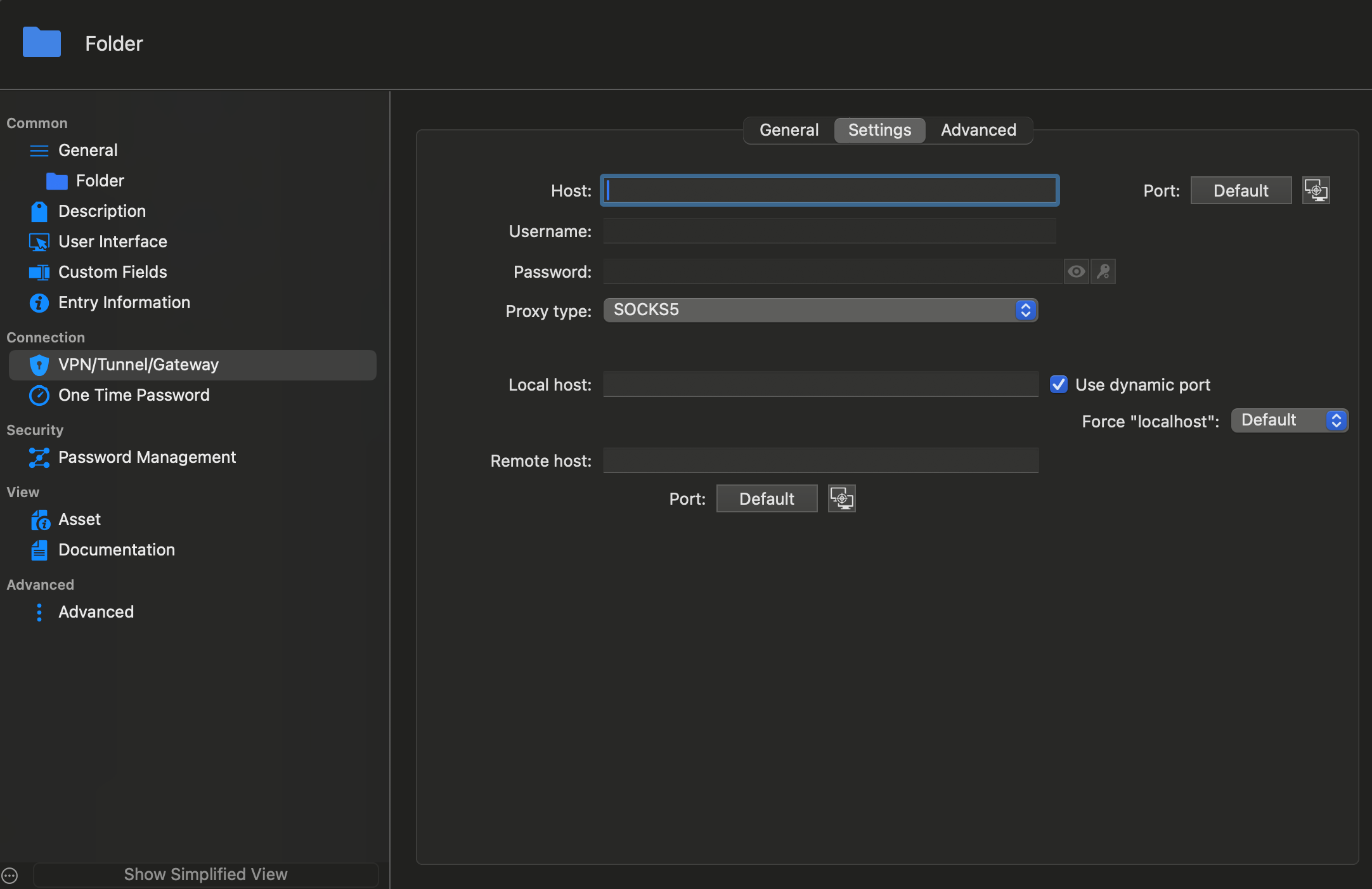
Screenshot 2024-05-24 at 16.31.58.png
Does it show the image now? I'm getting that wird 403 and CORS error again when I tried to attach that image to my former reply. Also when I posted the comment initially it I c'n'p-ed the image in and that caused it to show up within that same browser tab (also when reloading) but not within a new one. And when I opened the page using Firefox instead of Safari it only showed up as the text string "forum image"...
Hi,
like I previously stated, the support team will be able to assist you a lot more with your issues and explain to you how to configure what you want. They know a lot more than me about those things. I suggest that you email them with your questions and a link to this forum thread so they can get the information you have provided so far. If they find bugs linked to your issue, they will let us know and we will work to fix them.
Best regards,
Maxim Buisson