
wpCloudSolutions
Show Macro Toolbar
Hello,
We have released a new version of RDM Mac (2024.1.6.2)
And it should now support SSH Command to the terminal through the Macro bar.
If there's anything don't hesitate to communicate with us.
Best regards,
Hello,
Great job!
Smart Folder
Hello,
Thanks.
Linux version of Devolutions Password Manager
Hello,
Thanks for the answers.
If I can leave a comment (no need to reply). I find it a little strange that Linux is not even in the plans, when it is well known that most developers work on Linux devices. That is, it is not clear to me why you are throwing out the real largest market yourself. But as I stated, this is just my thinking.
Smart Folder
Hello,
When is the 2024.1 release planned for?
Linux version of Devolutions Password Manager
Hello,
I'm completely new to Devolutions (and really like it at first glance), but I'd like someone to clarify a few things for me:
1) Why isn't there (that is, will there be) a Linux version for Workspace?
2) I understood how Data Source works, but I'm not clear enough about Backup:
Namely, if I am not mistaken, if I choose Devolutions (Hub) as a data source, it seems to me that the backup does not make any particular sense, unless the entire Devolutions system experiences a complete disaster. Namely, if we lose access to the account (for whatever reason), access to the backup is also lost. Did I understand correctly?
It seems to me that one backup option is missing, namely the one that should be called Cloud Backup, because what now has that name is actually Devolutions backup (which seems to me meaningless, i.e. duplicated, if data source is Devolutions Hub). Cloud Backup (my reasoning) should enable direct backup to external cloud services, similar to what exists in Data Source. It is now missing as an option, although it can be solved in a workaround, if the external cloud is "mounted" on the OS file system (which is not convenient for all devices). Ultimately, there can be three options (File Backup, Devolutions Backup, Cloud Backup), if Devolutions Backup makes any "technical" sense. Am I wrong in this reasoning about backup?
SSH Snippets
Hello,
Great.
Sorry, but what is that in the picture? There is nothing like "Terminal Command" for me. Is it some new type of Macro/Script entry?
Smart Folder
Hello,
Now I'm even more confused.
SSH Snippets
Hello,
To avoid confusion, by SSH Command I mean a single command, and by SSH Snippets I mean a smaller set of commands with a single purpose.
For example, a simple bash script:
#!/bin/bash

sudo apt update
sudo apt dist-upgrade -y
sudo apt upgrade -y
sudo apt autoremove -y
sudo apt clean
sudo apt autoclean
sudo do-release-upgrade
if [ -f /var/run/reboot-required ]; then
	sudo reboot
fi
QUESTION
What to use to execute this script, because SSH Command does not support multi-line commands (snippet), it simply ends the activity after the first command from the first line of the snippet?
Smart Folder
Hello,
1) It is true that after the crash, only one SSH Shell session remains open.
2) Yes, it's always the same (three times).
3) If you still want, I can make a screenshot (confirm).
Smart Folder
Hello,
I think I figured out an acceptable scenarios, but then RDM crashed (an error report was sent). It should go as follows:
OPTION ONE
1) A Smart Folder is created for all SSH Shell entries for Ubuntu VPS instances.
2) Select all SSH Shell entries in the Smart Folder.
3) Right-click on the desired SSH Snippet (say for system update) and execute it. This is where the fall (breakage) of the RDM occurred.
4) In the Navigation Panel, select "Opened Sessions" for easier navigation in active sessions.
OPTION TWO
1) A Smart Folder is created for all SSH Shell entries for Ubuntu VPS instances.
2) Select all SSH Shell entries in the Smart Folder.
3) Right-click on "Open Selection" and execute. NOTE - RDM waits very long (more than a minute for 12 sessions) to open sessions. That's probably the reason for the crash in the previous option.
4) Use "Broadcast" for manual commands (because SSH Snippets are not supported).
5) In the Navigation Panel, select "Opened Sessions" for easier navigation in active sessions.
CONCLUSION
Thus, the navigation panel largely (effectively) solves the insight into active sessions. An acceptable solution.
NOTE
Both options for maintaining VPS instances are acceptable if the system would not crash.
Playlist missing features
Hello,
Strange, but you're right. Now when I try to execute the command, it opens in the embedded terminal. That is, I am not able to replicate that enchantment of the outer terminal from yesterday. When (if) it happens to me again, I'll remember this ticket and see what I did wrong. Wrong, because everything seems normal to me now.
Smart Folder
Hello,
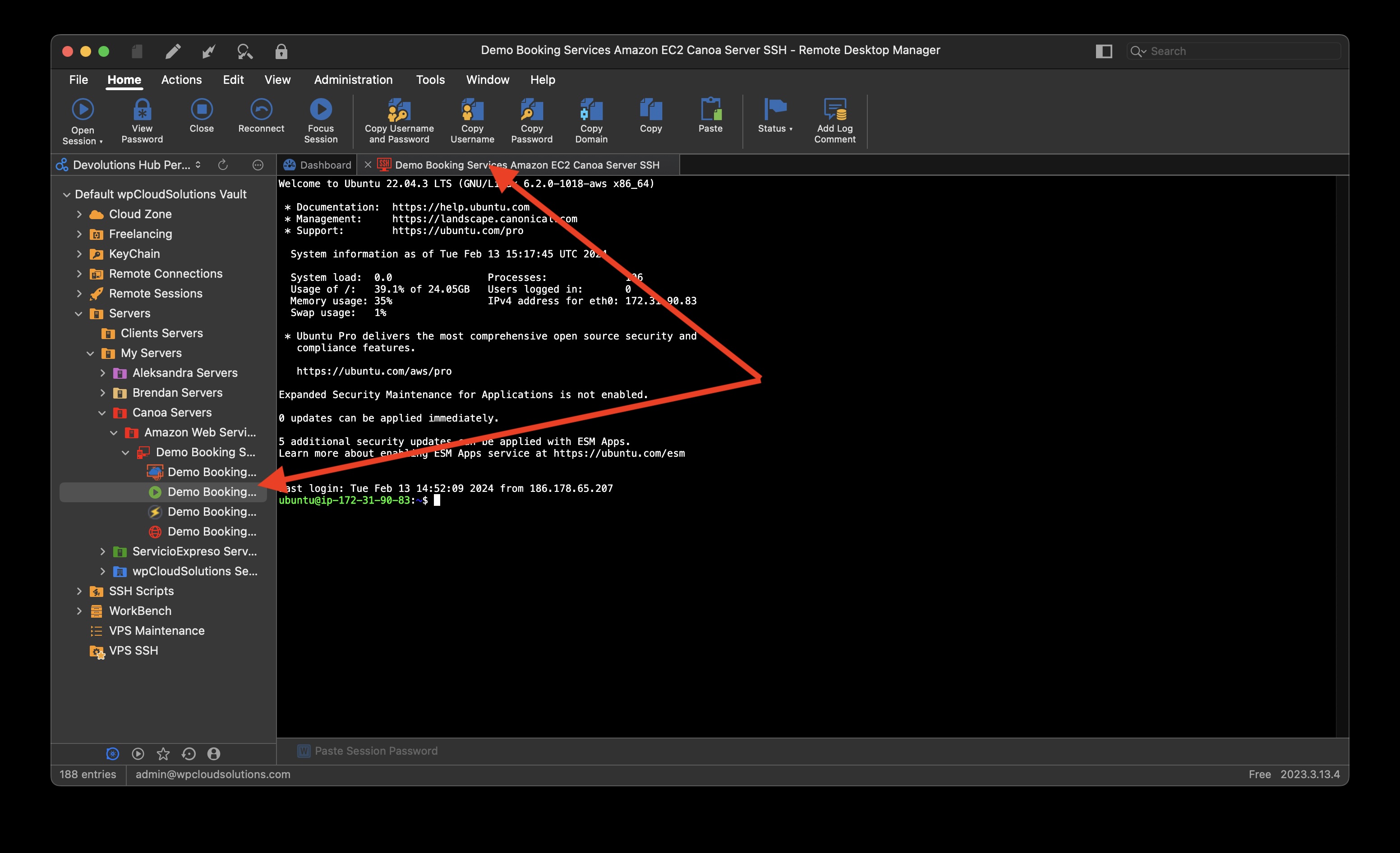
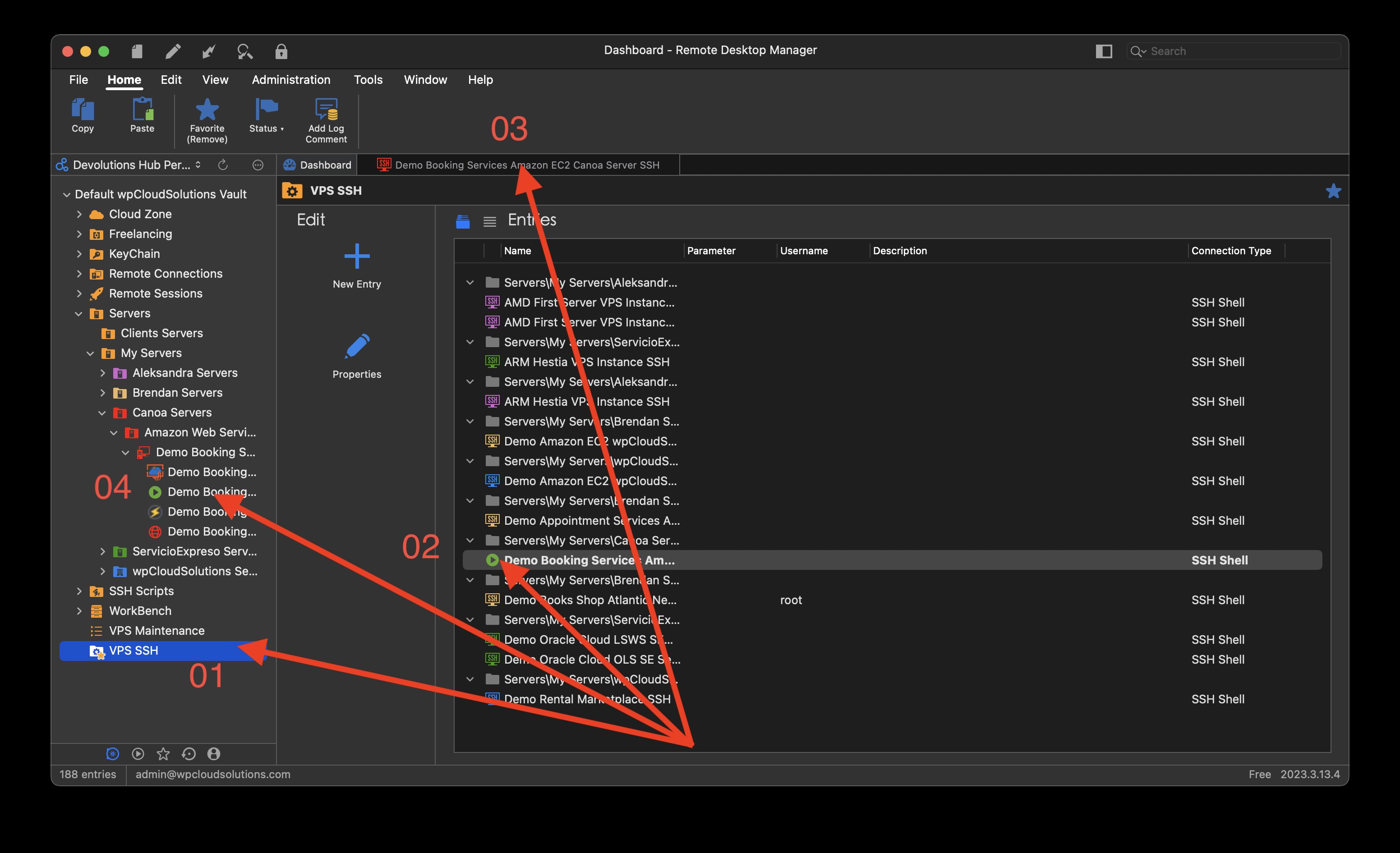
I am talking about the following. Picture 00.jpg shows:
01 -> My Smart Folder (VPS SSH) is selected and active in the dashboard view.
02 -> A "click" was performed on one SSH Shell (from one VPS instance).
03 -> The active SSH session tab is opened in the Smart Folder dashboard.
04 -> However, if that Tab is clicked, RDM takes me to the dashboard folder from the original entries (which is visible in the picture 01.jpg).
So my question is why can't the activity just stay within the tabs open within the Smart Folder dashboard? That is, why does our RDM "walk" through the original dashboard entries?
P.S. - This looks "stupid" when looking at screenshots, however, it is not at all "stupid" in real time, because clicking also changes the focus of the display.
P.S. - Now add "Broadcast" from the other ticket to all this, and you should have a complete picture of the problem.
Show Macro Toolbar
Hello,
I just now realized that the problem is that the Macro Toolbar does not support SSH commands and therefore (most likely) it is not visible, although SSH commands are also classified under Macro. Your colleague Hubert Mireault also noticed this in another ticket ("Playlist missing features
"), because he thinks it's a mistake that SSH commands are not supported.
I think you now see why Broadcast in the second ticket is not quite a complete solution for "Playlist missing features" last answer. Namely, there are no options on how to launch SSH snippets (it should be and/or Playlist, too), in "bulk" mode.
Playlist missing features
Hello,
1) Yes, you are right. Broadcast is most likely a good solution. Well, it depends on the solution to the problem from my second ticket.
2) Yes, I understand it as well (and do), the only thing is that my external Mac terminal opens, not the embedded one. Where is it set?
Smart Folder
Hello,
I have created a "Smart Folder" with all my SSH Shell VPS instances. However, when I click on the SSH Shell (link) inside the "Smart Folder", it opens an SSH session in the "dashboard" of its original instance, instead of inside the "dashboard" of the "Smart Folder". It means:
1) That I cannot have visible tabs within the "dashboard" of the "Smart Folder" (because they are in the original one), which makes navigation not only impractical, but essentially unusable.
2) That even if I accept it as ":normal", I have to keep "returning" to the "Smart Folder" "dashboard", which makes the "Smart Folder" itself completely pointless.
Am I doing something wrong or am I right? If I am right, how to solve it?
Playlist missing features
Hello,
You wrote
A few clarifications as well, you can already run a single SSH command through the context menu. If you right click your SSH Shell entry and go in the "Macro/script/tools" submenu, you should see your command:
When I try to run the command, it opens my Mac terminal (which shouldn't have been the idea), not the embedded terminal.
How to solve it?
Playlist missing features
Hello,
I admit I'm a little confused because I can't believe I'm right.
Namely, I tried various variants, and I did not find a way in which I can quickly, easily, simply (with a minimum of actions) perform the most common update (via SSH) of 50 Ubuntu VPS instances.
I would really like someone to explain to me how to do this.
Show Macro Toolbar
Hello,
I try to activate (display) "Show Macro Toolbar", but it is not there.
1) In Settings, I enabled the option in "Type".
2) In the Toolbar I have the option (button) "Show Macro Toolbar" but nothing happens when I click on it.
What am I doing wrong?
Termius migration SSH issue
Hello,
Nothing else. Thanks. You can close ticket.
Termius migration SSH issue
Hello,
I can confirm how it works after today update.
TeamViewer
Hello,
Thanks.
Playlist missing features
Hello,
You are right. I missed Macros (RDM is still new to me). Thanks.
SSH command variable BUG
Hello,
Thanks.
TeamViewer
Hello,
Thank you. This is already better (more understandable). I would like some more clarification if possible. Namely, from the above, it seems to me that for a simplified approach it is wisest to choose VNC (the only one that supports all OS platforms) and "force" clients to use VNC. The only question here is what you mean by "FreeVNC", as "UltraVNC" is only for Windows. Is "FreeVNC" RealVNC® Connect Home?
Playlist missing features
And I forgot. for "Run ..." "Playlist" there should be three options:
- Existing Playlist (named in the menu as "Playlist" only) with its already existing set of commands.
- Existing Playlist (name in the menu as "Reordered Playlist") with the option to specify a new command execution order.
- Completely new (non-existing) so-called "one time' Playlist" (named in the menu as "Custom Playlist") that the user creates for execution exclusively for that occasion of execution (and which will not be saved in existing Playlists).