Smart Folder

Hello,
I have created a "Smart Folder" with all my SSH Shell VPS instances. However, when I click on the SSH Shell (link) inside the "Smart Folder", it opens an SSH session in the "dashboard" of its original instance, instead of inside the "dashboard" of the "Smart Folder". It means:
1) That I cannot have visible tabs within the "dashboard" of the "Smart Folder" (because they are in the original one), which makes navigation not only impractical, but essentially unusable.
2) That even if I accept it as ":normal", I have to keep "returning" to the "Smart Folder" "dashboard", which makes the "Smart Folder" itself completely pointless.
Am I doing something wrong or am I right? If I am right, how to solve it?
Best Regards,
Ljubomir Manojlovic
All Comments (13)
Hi,
Unfortunately, this is how the Smart Folder works. And I don't believe there is any plans to add support for nesting tabs inside of the dashboard itself, which would be anything but trivial.
What I could imagine as a solution, and tell me if it seems acceptable for you, is a way to "launch" the Smart Folder inside it's own tab (instead of just in the dashboard). This would allow you to either undock this tab and put it elsewhere (e.g. another screen) or split the dashboard area to keep your smart folder the only tab of it's context. Tell me if this sounds acceptable.
Best regards,
Xavier Fortin
Hello,
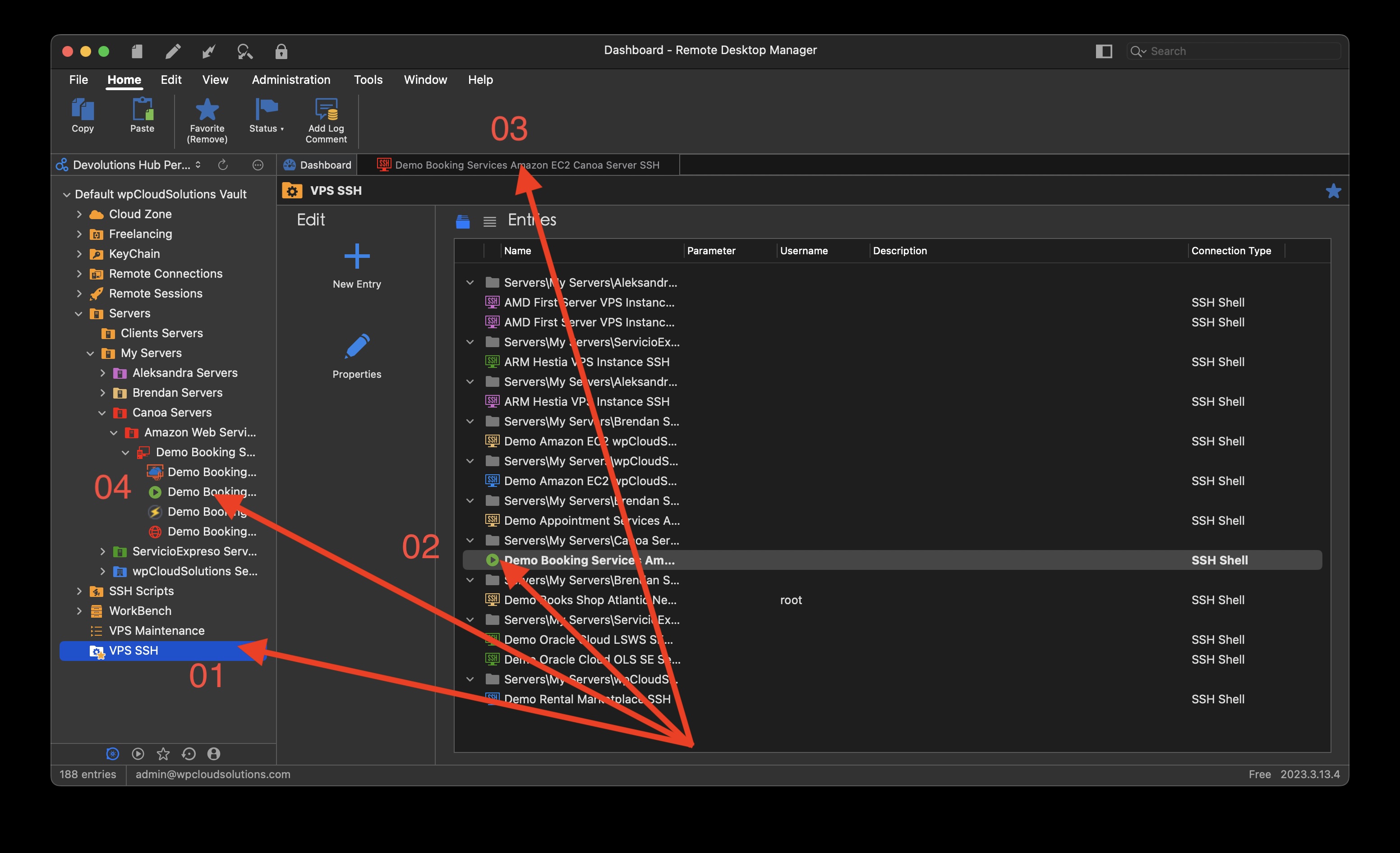
I am talking about the following. Picture 00.jpg shows:
01 -> My Smart Folder (VPS SSH) is selected and active in the dashboard view.
02 -> A "click" was performed on one SSH Shell (from one VPS instance).
03 -> The active SSH session tab is opened in the Smart Folder dashboard.
04 -> However, if that Tab is clicked, RDM takes me to the dashboard folder from the original entries (which is visible in the picture 01.jpg).
So my question is why can't the activity just stay within the tabs open within the Smart Folder dashboard? That is, why does our RDM "walk" through the original dashboard entries?
P.S. - This looks "stupid" when looking at screenshots, however, it is not at all "stupid" in real time, because clicking also changes the focus of the display.
P.S. - Now add "Broadcast" from the other ticket to all this, and you should have a complete picture of the problem.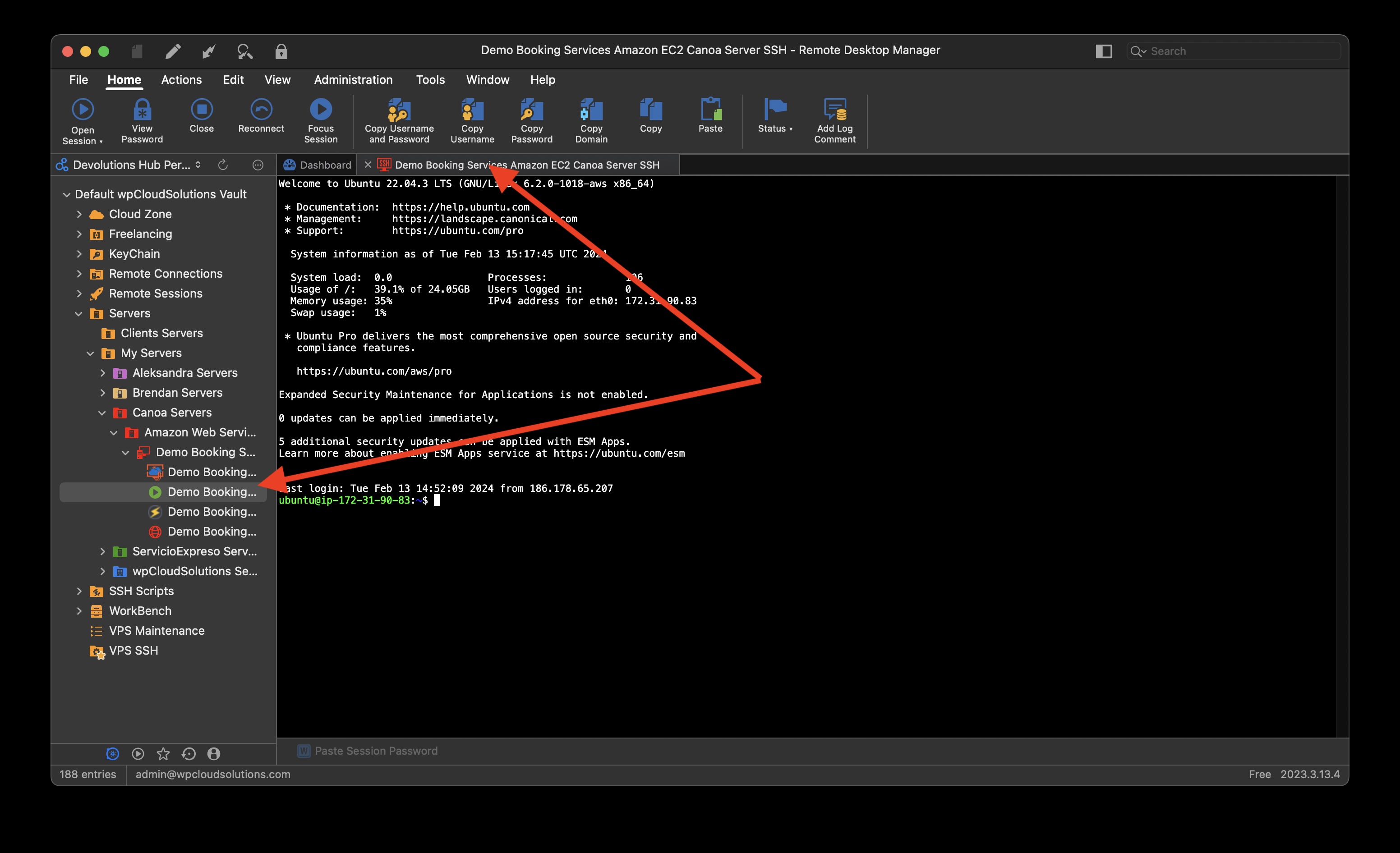
Best Regards,
Ljubomir Manojlovic
01.jpg
00.jpg
I understood what you meant. What I'm saying is that it is how the dashboard works. It's one of the tab of the tab area, and if anything else opens a tab (e.g. launching a session) the dashboard tab loses the focus and the new tab gets it. It's just how the whole thing is designed.
You can compare the Smart Folder to a regular Folder. Their dashboard are pretty identical actually. The same thing occurs with the regular Folder dashboard, if you double click an entry in its entry list, this entry will open in the main tab pane and takes the focus from the Dashboard.
Adding an entire new tab area, which handles multiple settings, presumably handle navigation shortcuts, must be taken into account when the app tries to figure out which entry has the focus, is quite the job. And to add to this, those opened tabs would need to be persisted individually for each specific Smart Folder, which is not how the dashboard works at the moment (i.e. only one Smart Folder dashboard exists which is shared between all Smart Folder, the content change with the selection). That is to say that none of this is a trivial matter, it's ripe with potential issues and expands drastically the scope of the Smart Folder feature. Hence why I suggested the potential alternative earlier, which is more limited and works within the scope of how things already works.
Best regards,
Xavier Fortin
Hello,
I think I figured out an acceptable scenarios, but then RDM crashed (an error report was sent). It should go as follows:
OPTION ONE
1) A Smart Folder is created for all SSH Shell entries for Ubuntu VPS instances.
2) Select all SSH Shell entries in the Smart Folder.
3) Right-click on the desired SSH Snippet (say for system update) and execute it. This is where the fall (breakage) of the RDM occurred.
4) In the Navigation Panel, select "Opened Sessions" for easier navigation in active sessions.
OPTION TWO
1) A Smart Folder is created for all SSH Shell entries for Ubuntu VPS instances.
2) Select all SSH Shell entries in the Smart Folder.
3) Right-click on "Open Selection" and execute. NOTE - RDM waits very long (more than a minute for 12 sessions) to open sessions. That's probably the reason for the crash in the previous option.
4) Use "Broadcast" for manual commands (because SSH Snippets are not supported).
5) In the Navigation Panel, select "Opened Sessions" for easier navigation in active sessions.
CONCLUSION
Thus, the navigation panel largely (effectively) solves the insight into active sessions. An acceptable solution.
NOTE
Both options for maintaining VPS instances are acceptable if the system would not crash.
Best Regards,
Ljubomir Manojlovic
Hmmm... I've opened a ticket for the crash. At first glance, it seems like we try to close the SelectSessionView and it crashes there. That being said, I fail to see why it would do that. Can you validate if you reproduce consistently? Can you provide a video of what you are trying to do? I've tried selecting multiple entries and launching them with the SSH Command entry, but it only launches the first one, making me think there might be another issue there.
Best regards,
Xavier Fortin
Hello,
1) It is true that after the crash, only one SSH Shell session remains open.
2) Yes, it's always the same (three times).
3) If you still want, I can make a screenshot (confirm).
Best Regards,
Ljubomir Manojlovic
Yeah, I would like to identify what is going on here.
Best regards,
Xavier Fortin
Hello,
Now I'm even more confused.
https://photos.app.goo.gl/36pTER5BQoxFX2gi6
Best Regards,
Ljubomir Manojlovic
The good new is I've reproduced the issue. I've also found why it only execute the first item, we were not properly handling this case. We were also missing the "Allow batch execution" option to enable this.
As for the issue, now that I can reproduce it, it should be fairly easy to fix. It happens because a window to select the entries you want to launch is shown and somehow seems disposed of in an improper context.
I should be able to have this all sorted out for the 2024.1 release.
Best regards,
Xavier Fortin
Hello,
When is the 2024.1 release planned for?
Best Regards,
Ljubomir Manojlovic
Hi,
The version 2024.1 is scheduled to be released the 27th of February.
Best regards,
Xavier Fortin
Hello,
Thanks.
Best Regards,
Ljubomir Manojlovic
Hello,
We have released the latest version of RDM Mac (2024.1.5.1)
And both the issue the Macro/script only launching the first item and the crash should be solved in the version.
If there's anything, don't hesitate to ask.
Best regards,
Michel Lambert