Termius migration SSH issue

I'm trying to switch from Termius to RDM, but I'm stuck with SSH connection to cloud VPS instances. Let's say AWS. By default, AWS uses the username "ubuntu" (I didn't change it on the instance). so the problem is:
1) CREDENTIALS
- I create in RDM a new RSA key at the vault level, where I select Data and add "username", "password", "public key" and "private key" from my Termius settings.
2) HOST
- I create a new AWS EC2 host at the vault level in RDM and just enter the IP from the VPS instance.
3) SSH
- Within the Host created above, I create as a subentry a new SSH Shell that I link to the host and link to the credential.
ISSUE
This works when I click to open an external (Mac) SSH terminal (hence "Open (External)"), but does not work when I click to open a new session (hence "Open Session"). I have a dialog with:
"(-3) Permission denied: incorrect credentials or security settings prevent the operation to complete."
QUESTION
What am I doing wrong?
Best Regards,
Ljubomir Manojlovic
All Comments (12)
Hi,
Could you follow the instruction here to enable the Session Logs: https://docs.devolutions.net/kb/remote-desktop-manager-macos/how-to-articles/rdm-mac-enable-send-rdp-logs/?q=session+logs
Reproduce the issue when opening in embedded mode, and share with us the log file that get generated?
You can simply attach it to a your reply in this thread.
Best regards,
Xavier Fortin
Hello,
[1/26/2024 9:11:49 AM] Devolutions Protocols version: 2023.12.20.1 macOS
[1/26/2024 9:11:49 AM] Terminal font: Menlo [Menlo, fixed=True]
[1/26/2024 9:11:49 AM] Starting SSH, verbose level: 2
[1/26/2024 9:11:49 AM] Setting up connection
[1/26/2024 9:11:49 AM] Connecting to port: 22 (IP any)
[1/26/2024 9:11:49 AM] SSH banner: SSH-2.0-OpenSSH_8.9p1 Ubuntu-3ubuntu0.6
[1/26/2024 9:11:49 AM] Sending kex init
[1/26/2024 9:11:49 AM] Received kex init
[1/26/2024 9:11:49 AM] Selected algorithms: curve25519-sha256, ssh-ed25519, chacha20-poly1305@openssh.com, chacha20-poly1305@openssh.com, implicit by cipher, implicit by cipher, none, none
[1/26/2024 9:11:49 AM] Sending Ed25519 kex init
[1/26/2024 9:11:49 AM] Received Ed25519 kex reply
[1/26/2024 9:11:49 AM] Successfully authentified server
[1/26/2024 9:11:49 AM] Sending new keys message
[1/26/2024 9:11:49 AM] Received new keys message
[1/26/2024 9:11:49 AM] Sending userauth service request
[1/26/2024 9:11:49 AM] Received extension info message
[1/26/2024 9:11:49 AM] Server accepts public key types: ssh-ed25519,sk-ssh-ed25519@openssh.com,ssh-rsa,rsa-sha2-256,rsa-sha2-512,ssh-dss,ecdsa-sha2-nistp256,ecdsa-sha2-nistp384,ecdsa-sha2-nistp521,sk-ecdsa-sha2-nistp256@openssh.com,webauthn-sk-ecdsa-sha2-nistp256@openssh.com
[1/26/2024 9:11:49 AM] Received service accepted message
[1/26/2024 9:11:49 AM] Using provided key data
[1/26/2024 9:11:49 AM] Unsupported encryption: AES-256-CBC
[1/26/2024 9:11:49 AM] Error parsing private key
[(-7) Invalid arguments: this is generally the result of a bug, but it can also be the result of incorrect user inputs.]
[1/26/2024 9:11:49 AM] Unable to use the key
[1/26/2024 9:11:49 AM] Sending userauth init request
[1/26/2024 9:11:49 AM] Received userauth failure: publickey
[1/26/2024 9:11:49 AM] No authentication method available
[1/26/2024 9:11:49 AM] The server does not accept interactive authentication
[1/26/2024 9:11:49 AM] The server does not accept password authentication
[1/26/2024 9:11:49 AM] Disconnection in progress
[1/26/2024 9:11:49 AM] Bytes sent: 1240, Bytes received: 1765
[1/26/2024 9:11:49 AM] Packets sent: 5, Packets received: 6
[1/26/2024 9:11:49 AM] Kex completed: 1
[1/26/2024 9:11:49 AM] Disconnecting
Best regards,
Ljuba
Best Regards,
Ljubomir Manojlovic
So, Log should to display that I first launched external terminal and there I entered passphrase and get success. After that I launched embeded session, but failed.
Best Regards,
Ljubomir Manojlovic
Could you try checking the following checkbox in the application settings and retrying?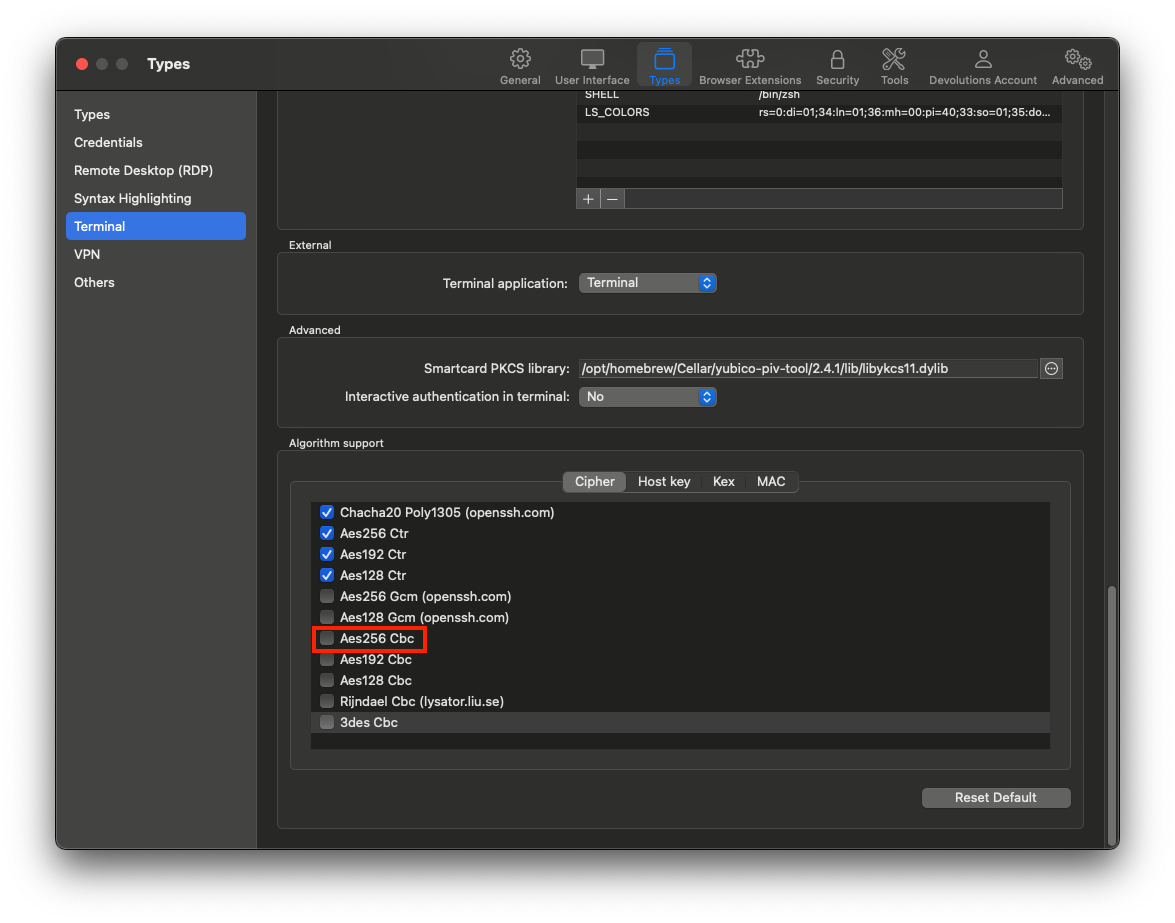
Please, do tell us how it goes.
Best regards,
Xavier Fortin
AES256CBC.png
Hello,
Failed. Here is "clean" log.
[1/26/2024 9:38:15 AM] Devolutions Protocols version: 2023.12.20.1 macOS
[1/26/2024 9:38:15 AM] Terminal font: Menlo [Menlo, fixed=True]
[1/26/2024 9:38:15 AM] Starting SSH, verbose level: 2
[1/26/2024 9:38:15 AM] Setting up connection
[1/26/2024 9:38:15 AM] Connecting to port: 22 (IP any)
[1/26/2024 9:38:15 AM] SSH banner: SSH-2.0-OpenSSH_8.9p1 Ubuntu-3ubuntu0.6
[1/26/2024 9:38:15 AM] Sending kex init
[1/26/2024 9:38:15 AM] Received kex init
[1/26/2024 9:38:15 AM] Selected algorithms: curve25519-sha256, ssh-ed25519, chacha20-poly1305@openssh.com, chacha20-poly1305@openssh.com, implicit by cipher, implicit by cipher, none, none
[1/26/2024 9:38:15 AM] Sending Ed25519 kex init
[1/26/2024 9:38:15 AM] Received Ed25519 kex reply
[1/26/2024 9:38:15 AM] Successfully authentified server
[1/26/2024 9:38:15 AM] Sending new keys message
[1/26/2024 9:38:15 AM] Received new keys message
[1/26/2024 9:38:15 AM] Sending userauth service request
[1/26/2024 9:38:15 AM] Received extension info message
[1/26/2024 9:38:15 AM] Server accepts public key types: ssh-ed25519,sk-ssh-ed25519@openssh.com,ssh-rsa,rsa-sha2-256,rsa-sha2-512,ssh-dss,ecdsa-sha2-nistp256,ecdsa-sha2-nistp384,ecdsa-sha2-nistp521,sk-ecdsa-sha2-nistp256@openssh.com,webauthn-sk-ecdsa-sha2-nistp256@openssh.com
[1/26/2024 9:38:15 AM] Received service accepted message
[1/26/2024 9:38:15 AM] Using provided key data
[1/26/2024 9:38:15 AM] Unsupported encryption: AES-256-CBC
[1/26/2024 9:38:15 AM] Error parsing private key
[(-7) Invalid arguments: this is generally the result of a bug, but it can also be the result of incorrect user inputs.]
[1/26/2024 9:38:15 AM] Unable to use the key
[1/26/2024 9:38:15 AM] Sending userauth init request
[1/26/2024 9:38:15 AM] Received userauth failure: publickey
[1/26/2024 9:38:15 AM] No authentication method available
[1/26/2024 9:38:15 AM] The server does not accept interactive authentication
[1/26/2024 9:38:15 AM] The server does not accept password authentication
[1/26/2024 9:38:15 AM] Disconnection in progress
[1/26/2024 9:38:15 AM] Bytes sent: 1256, Bytes received: 1765
[1/26/2024 9:38:15 AM] Packets sent: 5, Packets received: 6
[1/26/2024 9:38:15 AM] Kex completed: 1
[1/26/2024 9:38:15 AM] Disconnecting
Best Regards,
Ljubomir Manojlovic
Hi,
I just got in touch with the engineer in charge of the SSH component, it seems we don't support AES-256-CBC for the Private Key decryption at the moment, hence why this does not work. I will open a ticket so we can add the support for it and we will post back when this is done.
Best regards,
Xavier Fortin
Hello,
Thanks. Any idea about estimated time?
Best Regards,
Ljubomir Manojlovic
Not as of yet. It's not usually very long to fix, but it will also depends on when the next version releases.
Best regards,
Xavier Fortin
Hello,
Thanks. So, I'll wait.
Best regards,
Ljuba
Best Regards,
Ljubomir Manojlovic
Hello,
I can confirm how it works after today update.
Best Regards,
Ljubomir Manojlovic
Hello,
Nice to know everything work.
If there's anything else don't hesitate to communicate with us.
Best regards,
Michel Lambert
Hello,
Nothing else. Thanks. You can close ticket.
Best Regards,
Ljubomir Manojlovic