Playlist missing features
0 vote

Hello,
I found that, for me, two relatively extremely simple (but significant) options related to significantly increased productive use of the Playlist, are missing.
1) "Run SSH"
I am surprised that there is no "Run SSH" item in the Context menu under the "Playlist" item (there are three items) or under "SSH" (none). Namely, the scenario is (probably very common) the following:
- I have an organizational structure of entries oriented with clients in focus.
- Accordingly, somewhere in the hierarchy is the SSH Shell entries belonging to the client's server.
- I expected as logical items in the Context Menu also something like "Run Playlist", where a dialog should popup with the selection of the Playlist to be executed. However, there is nothing like it (if I'm not mistaken).
P. S. - Similarly, I would expect that there is also a "Run SSH command" item in the Context Menu with a selection (multicheck) of several existing commands (dialog like from Playlist, with "Order" option).
2) Combined SSH execution
Such a dialog that appears on the "Run ..." command should have the option for additional (un)checking items and "Order", because most often the scenario is not identical, because in my case, a lot depends on the cloud provider.
FINAL
I would like to see comments and opinions from others (unless I missed something).
Best Regards,
Ljubomir Manojlovic
All Comments (15)
Hello,
Would it be possible for you to add screenshots to your request? It would help better understand what kind of workflow you would like.
We already have playlist entries you can create, and configure within them which entry they will be running. They could be all SSH entries, or a mix of SSH and other types (RDP for example). That way, you can create different playlists based on your needs. But I'm not sure that this is what you're looking for.
Regards,
Hubert Mireault
Hello,
I hope it will be clearer now (sorry for my bad English).
https://photos.app.goo.gl/PobPQ4DFJLb9bHAj7
Best Regards
Best Regards,
Ljubomir Manojlovic
Hello,
Thank you for the video, it's very useful. I think I understand what you mean.
Your environment is the following:
- You have multiple SSH Commands
- You have playlists that contain these SSH Commands
- You have multiple SSH Shell entries
- You want to execute the playlist so that the SSH Commands are executed on the SSH Shell entries
I've replicated a simplified version of the environment, like this: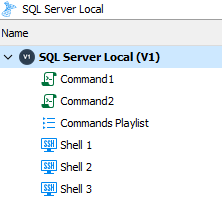
From there, you would like the workflow to be like this:
- Select one or more SSH shell entries
- Right click, "run playlist against". This would be a new button that executes the playlist against a specific selection.
- Be prompted if you would like to keep the same order for the execution of the playlist
- RDM will then execute the multiple commands in the correct order on each SSH entry selected
Am I understanding correctly?
Regards
Hubert Mireault
4033ee7d-46f2-4ec0-8101-8e0782a133b1.png
Hello,
Yes, that's the point. In the right context menu, the "root" item "Run..." and sub-items, "SSH command" and "Playlist" are missing (maybe some other items, I don't think now what are all the possible scenarios). The point is that the item that enables the execution of an entry within an already active "entry" is missing. Termius has a completely different GUI concept, but the attached screenshot shows this execution approach inside an active SSH session (snippets are on the right, which is your code equivalent for SSH commands and Playlist).
SUMMARY
RDM's current concept is based on thinking that the content of an "entry" (here a Playlist) is executed on another "entry", and that approach is 100% OK.
However, the option is missing that an "entry" (SSH command, Playlist, ...) can be executed inside an already active "entry" (SSH Shell, Host, VPN session, ...), especially in the scenario you mentioned, when there is several active entries) for example under Shared Folder (however, also when there is only one active entry).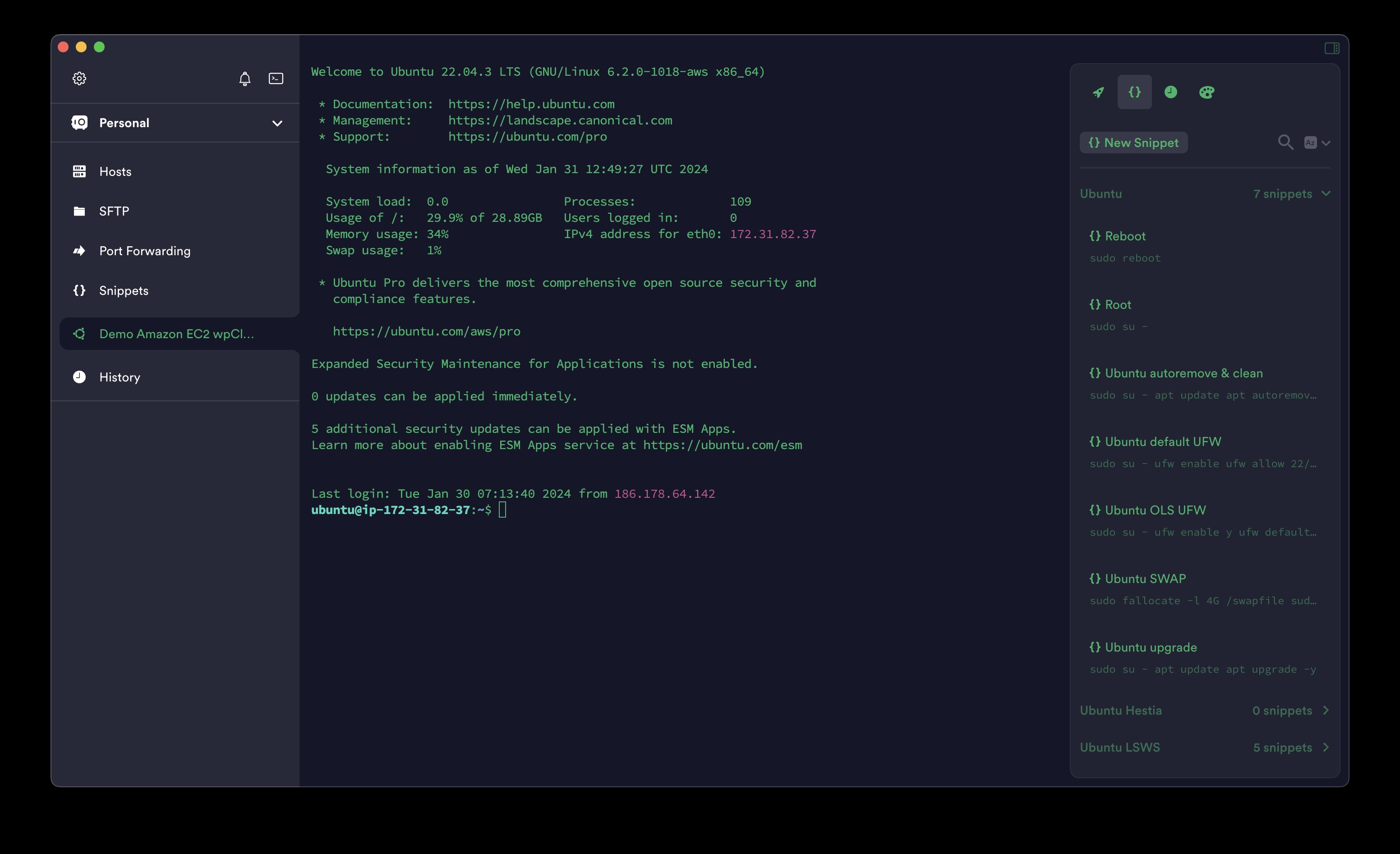
Best Regards,
Ljubomir Manojlovic
Termius.jpg
And I forgot. for "Run ..." "Playlist" there should be three options:
- Existing Playlist (named in the menu as "Playlist" only) with its already existing set of commands.
- Existing Playlist (name in the menu as "Reordered Playlist") with the option to specify a new command execution order.
- Completely new (non-existing) so-called "one time' Playlist" (named in the menu as "Custom Playlist") that the user creates for execution exclusively for that occasion of execution (and which will not be saved in existing Playlists).
Best Regards,
Ljubomir Manojlovic
Hello,
Thank you for the additional information. We will see what we can do.
A few clarifications as well, you can already run a single SSH command through the context menu. If you right click your SSH Shell entry and go in the "Macro/script/tools" submenu, you should see your command: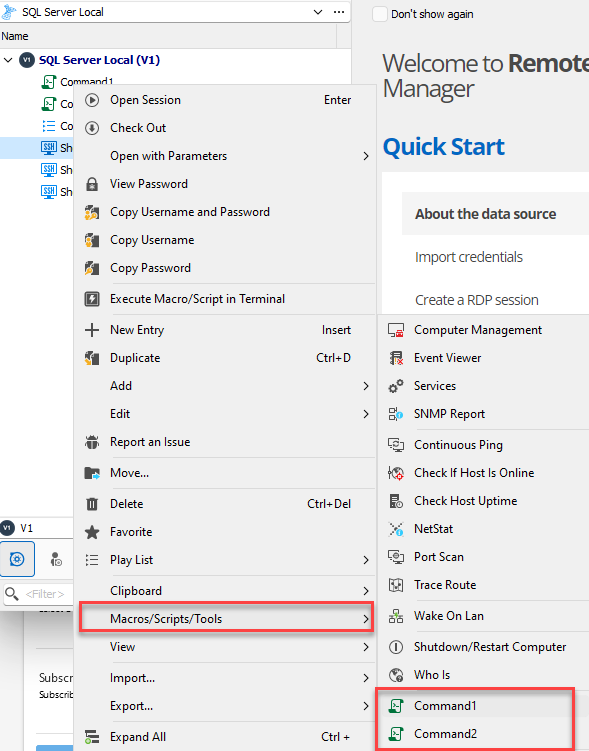
Simply clicking on the command should execute it on the entry.
There is also a macro bar you can configure in the SSH Shell entry which shows the typing macro entries (though I think we should improve it to also show SSH Command entries).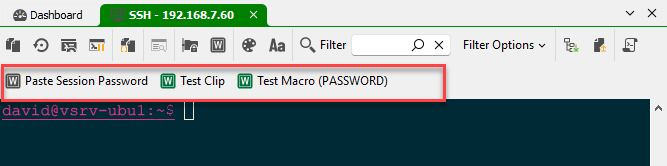
In our upcoming 2024.1 version, we also have included a "command palette" feature to more easily execute SSH commands in your terminal.
I hope these features can be a good workaround in the mean time.
Regards,
Hubert Mireault
a8284dc7-6c9d-4c14-aae3-12a2264d4b14.png
95f07a78-ca2d-48c9-a514-60c6953ff6e8.png
Hello,
You are right. I missed Macros (RDM is still new to me). Thanks.
Best Regards,
Ljubomir Manojlovic
Hello,
I admit I'm a little confused because I can't believe I'm right.
Namely, I tried various variants, and I did not find a way in which I can quickly, easily, simply (with a minimum of actions) perform the most common update (via SSH) of 50 Ubuntu VPS instances.
I would really like someone to explain to me how to do this.
Best Regards,
Ljubomir Manojlovic
Hello,
You wrote
A few clarifications as well, you can already run a single SSH command through the context menu. If you right click your SSH Shell entry and go in the "Macro/script/tools" submenu, you should see your command:
When I try to run the command, it opens my Mac terminal (which shouldn't have been the idea), not the embedded terminal.
How to solve it?
Best Regards,
Ljubomir Manojlovic
Hi,
I did not find a way in which I can quickly, easily, simply (with a minimum of actions) perform the most common update (via SSH) of 50 Ubuntu VPS instances.
For this, you can probably use the Terminal Broadcast feature. I've attached a little video demonstrating how it works (ManagedBroadcast.mp4). You can managed broadcast terminal entries from the View -> Manage Broadcast window.
When I try to run the command, it opens my Mac terminal (which shouldn't have been the idea), not the embedded terminal.
Is your entry configured to launch externally? I've tried it on my side and it seems to open the terminal entry in embedded mode and run the command. I've attached a second video demonstrating this (Command.mp4).
Best regards,
Xavier Fortin
Command.mp4
ManageBroadcast.mp4
Hello,
1) Yes, you are right. Broadcast is most likely a good solution. Well, it depends on the solution to the problem from my second ticket.
2) Yes, I understand it as well (and do), the only thing is that my external Mac terminal opens, not the embedded one. Where is it set?
Best Regards,
Ljubomir Manojlovic
1) Yes, you are right. Broadcast is most likely a good solution. Well, it depends on the solution to the problem from my second ticket.
I've opened a ticket for the SSH Command not being available in the Macro Bar.
2) Yes, I understand it as well (and do), the only thing is that my external Mac terminal opens, not the embedded one. Where is it set?
I've just looked at the code, and so far, nowhere. It shouldn't even be possible to launch an SSH Command in external mode, it's hard coded to open an entry in embedded mode. Even if the SSH entry was configured to launch externally, the settings would be ignored if launched through an SSH Command entry. Could you provide a small video demonstrating the issue? I feel like I'm missing something.
Best regards,
Xavier Fortin
Hello,
Strange, but you're right. Now when I try to execute the command, it opens in the embedded terminal. That is, I am not able to replicate that enchantment of the outer terminal from yesterday. When (if) it happens to me again, I'll remember this ticket and see what I did wrong. Wrong, because everything seems normal to me now.
Best Regards,
Ljubomir Manojlovic
Weird indeed. Also, as a side note, the default behavior of the SSH Command entry will change with the release of RDM Mac 2024.1. It won't launch the session automatically anymore unless an option (Description -> Other -> Automatically open target connection). I've just realized this while investigating this. The option is not available currently, but I'll make it so for the official release of RDM Mac 2024.1.
Best regards,
Xavier Fortin
Hello,
Just a reminder that as of the latest version, the behavior of the terminal command entry have changed and the session won't launch automatically anymore unless the option "Automatically open target connection" is checked. It is available in the Advanced tab > Macro/script/Tools menu as follow:
Michel Lambert
Screenshot 2024-03-05 at 9.36.39 AM.png