
DR
YubiKey offline - 2FA
Hello,
is there a way to use YubiKey offline (i.e. the server has no internet connection) as a second factor when logging in from the Remote Desktop manager.
Lokaler msi installataions Fehler
Im Registrierungs-Editor alles mit RDM löschen.
Computer\HKEY_CLASSES_ROOT\Installer\Products
Frage zum Verbindungsverlust des RDM bei einem Teammitglied
Hallo zusammen,
wir haben aktuell das Problem, dass unser Remote Desktop Manager (RDM) nur bei einem bestimmten Teammitglied nach einer gewissen Zeit die Verbindung zum Gateway verliert. Bei den anderen Nutzern tritt dieser Fehler nicht auf.
Gibt es ein Log oder eine Möglichkeit, das genauer zu prüfen, um herauszufinden, warum die Verbindung nur bei diesem einen Nutzer abbricht?
Falls jemand einen Ansatz hat, wie wir das weiter eingrenzen oder diagnostizieren können, wäre ich sehr dankbar!
Beste Grüße
Lokaler msi installataions Fehler

RDM - V.2024.1.32.0 uninstalls itself
Hello, thanks for the feedback. I will test this. The key is not currently there.
RDM - V.2024.1.32.0 uninstalls itself

It is rolled out on a group with the SSCM, on one computer it occurs again and again that the RDM is no longer installed.
The only thing we could find in the event log was that MS Teams wrote that "RDM is suspended"
The installation is the same for all of them, including the location: C:\Program Files\Devolutions\Remote Desktop Manager
What could be the cause?
Updates vom RDM Manager unterbinden
Danke
Merkwürdes Verhalten von RDM beim wechseln von Fenstern
Hallo, habe das Problem auch mit Version 2024.1.24.0.
Basic Installation
Yes, that worked.
Basic Installation
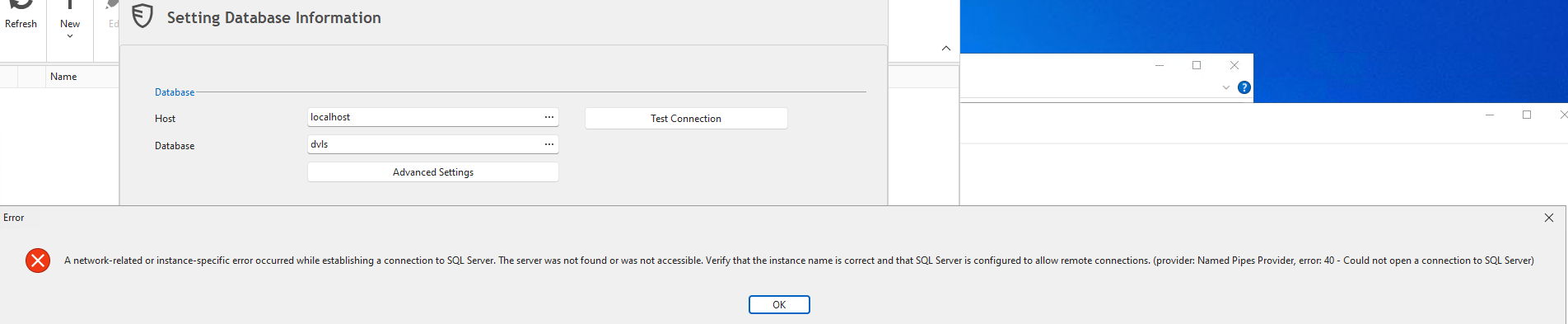
The SQL server cannot be found.
I assume it is only installed with the Basic installation?
Basic Installation
I have a
Problem with the Basic Server installation.
SQL Express installed successfully
Saving passwords file...
File containing passwords saved to: C:\Admin\Devolution -
RDM\dvls_2024-01-19_passwords.txt
Done!
Validating Arguments...
A network-related or instance-specific error occurred while establishing a
connection to SQL Server. The server was not found or was not accessible.
Verify
that the instance name is correct and that SQL Server is configured to allow
remote connections. (provider: SQL Network Interfaces, error: 26 - Error
Locating Server/Instance Specified)
Invalid
credentials for database connection.
Install failed. Initiating rollback...
The login information was created in the setup, a self-signed certificate was selected,
but I also tried without it.
What could be the issue?
The installation's account has doiman admin rights and is also local admin.
The server currently has no internet connection.
Where can I find the log?