
nbeauregard
Multiple Vault Import into a local data source
Hello everyone,
This improvement is now completed and will be available in the next major release (2024.3.0.0).
Best regards,
Nathan Beauregard
Attachments as list
Hello Johan,
Simply right-click in the Attachments List and select "Details" as display mode :
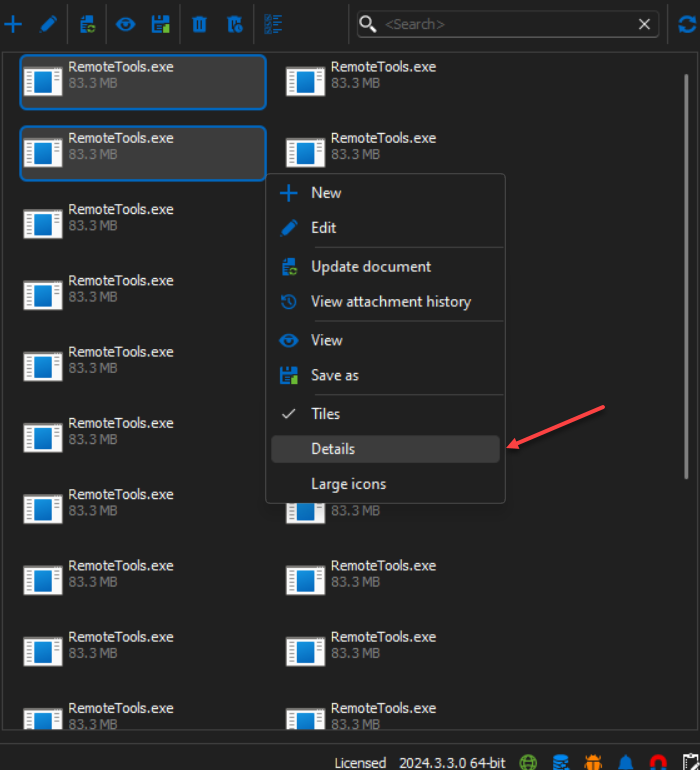
It will be displayed as followed :
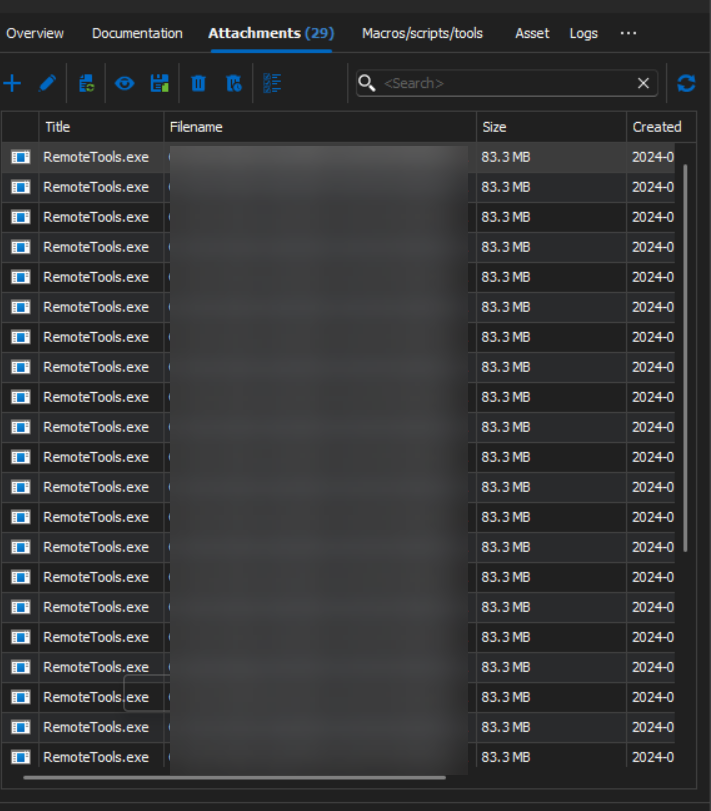
Best regards,
Nathan Beauregard
Edit files over SCP not uploading after edit
Hello Rob,
Following your feedbacks, we decided to improve the "Direction" information shown when an action is performed. You will now be able to see "Download (edit)" whenever an action performed will modify a file on the FTP/SFTP distant server.

This will be available on WinSCP, FTP and SFTP entries. It will be release in the next major update (2024.3.0.0).
Thank you again for your feedbacks.
Best regards,
Nathan Beauregard
Website Auto Login via Windows Security
Hello Jimmy,
We now have removed the credentials from the URL for the basic authentication method. The authentication process is now made through the header that is protected by HTTPS encryption.
Thank you for your feedbacks, if you have any more questions feal free to ask !
Best regards,
Nathan Beauregard
Edit files over SCP not uploading after edit
Hello Rob,
The problem you are enouncing is in fact not a bug (I am assuming that you reproduced this behavior by double-clicking on the file you want to edit). The actual behavior for a double-click on a file is to download it. So when you are editing this file, you are in fact modifying it and saving it locally rather than uploading the result.
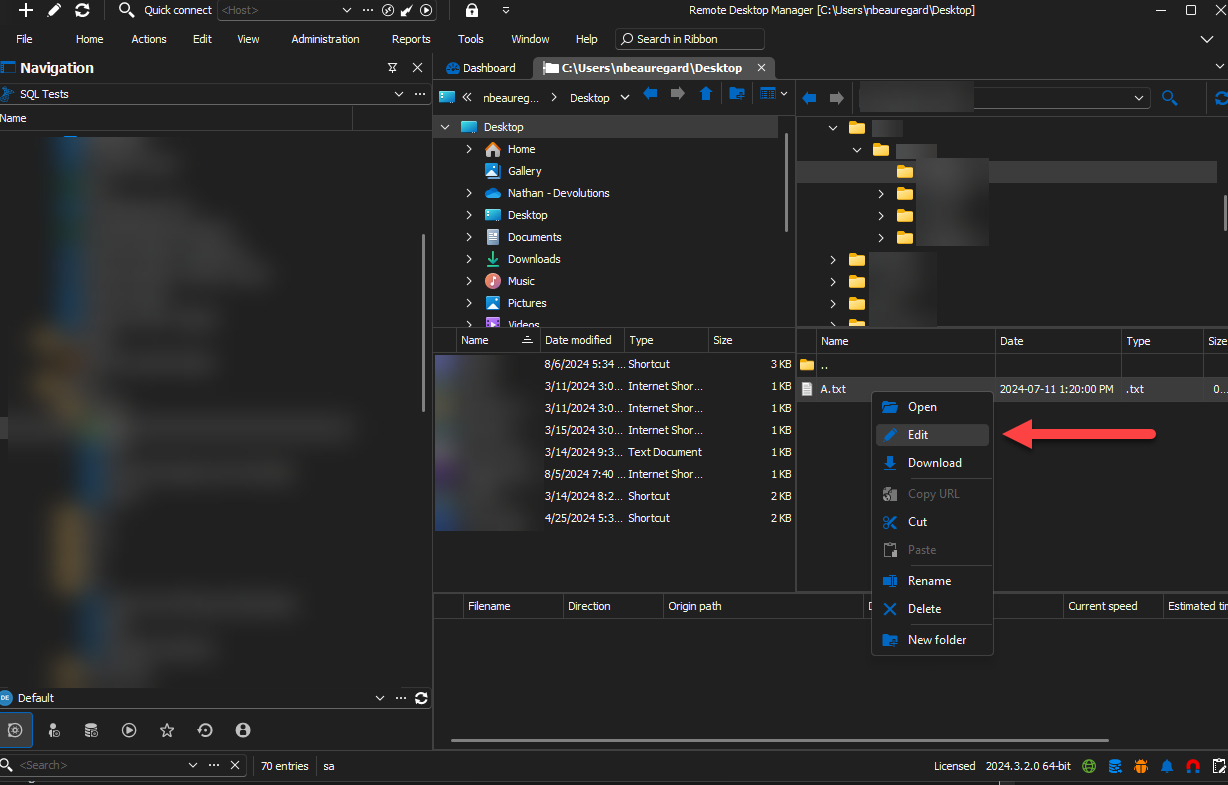
To trigger the modification event, simply right-click on the file and press the "Edit" button. This will download the file, and when you will save it and close the file, it will be uploaded to the current FTP/SFTP server.
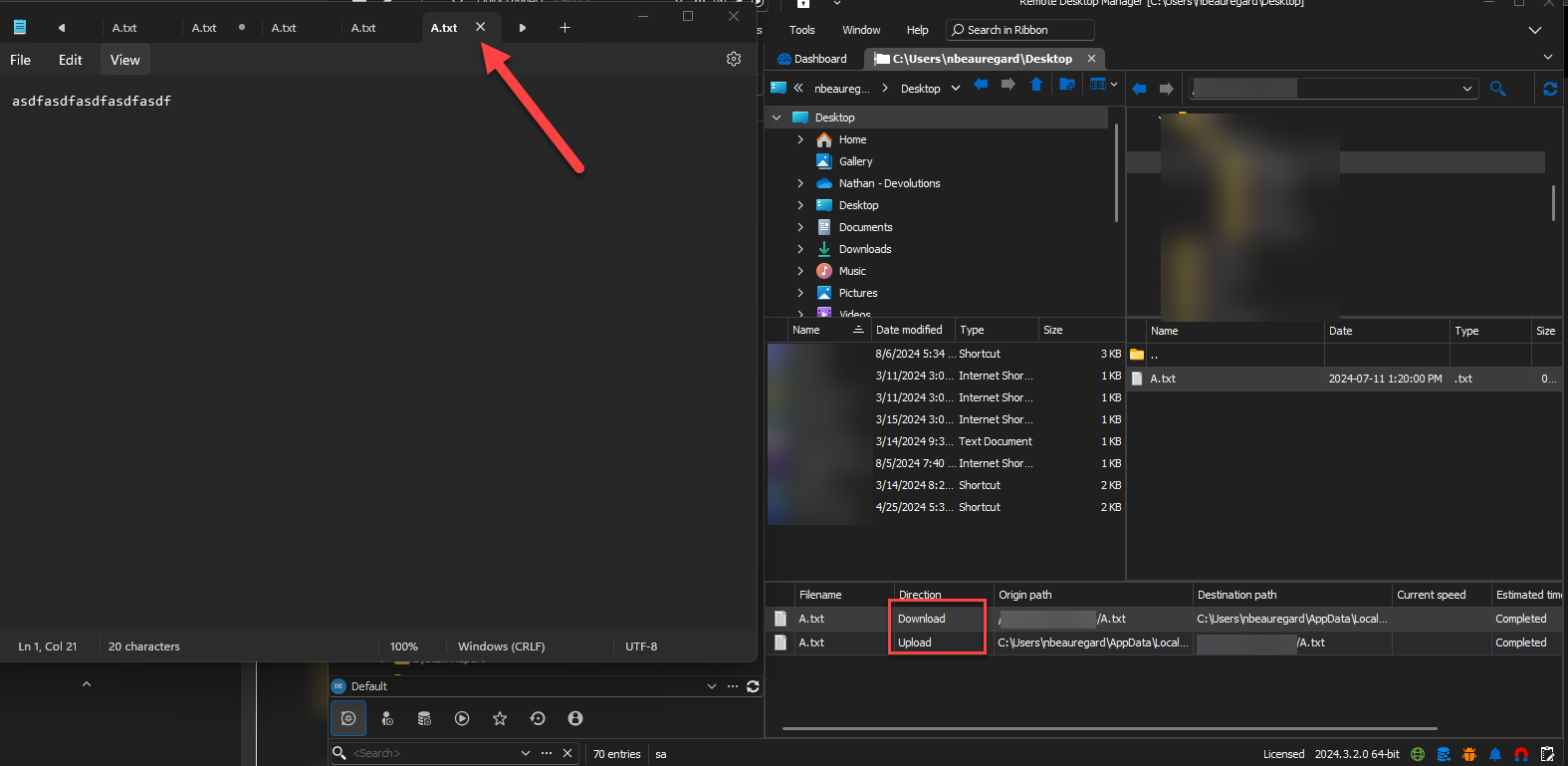
If your issue is not caused by a double-click of the entry, please correct me and explain the steps used to reproduce this issue.
Thank you for your feedback, if you have any other questions feal free to ask !
Best regards,
Nathan Beauregard
Right-click not working if session is open
Hello Ton,
I was able to reproduce your issue with Winbox and Putty. I will open a ticket and post back here when the fix will be made.
Just so you are aware about this, Winbox has previously shown some unwanted behaviors and seemed to be caused by it's interaction with Windows OS (which we cannot control) as it is an old application. Therefore there are chances that a fix will not be possible.
As a temporary fix, you can open your Putty and Winbox entries in "External" mode. This should fix the loss of focus in the mean time.
I will keep you updated, thank you for your feedbacks. If you have any other question(s) / bug report(s) feel free to ask !
Best regards,
Nathan Beauregard
Right-click not working if session is open
Hello Ton,
Can you specify which entry you are using ? We already had similar issues with PowerShell sessions and Winbox entries, but theses have been fixed.
Thank you for your feedback.
Best regards,
Nathan Beauregard
Windows Terminal...not working since update to 2024.1.29.0 64-bit
Hello,
I just realized that it is completely normal that the Command Line entry cannot launch our integration of the Windows Terminal. It is due to the fact that our integration of the Windows Terminal is only designed to work while using other terminal entries which offer "Application" choice (Console host or Windows Terminal). Theses entries launch our integration correctly using specific parameters (if not used correctly, the terminal would not launch/work properly).
You can validate that an entry (in that example a PowerShell (Local)) has the "Application" choice. Simply chose the "Windows Terminal" option.
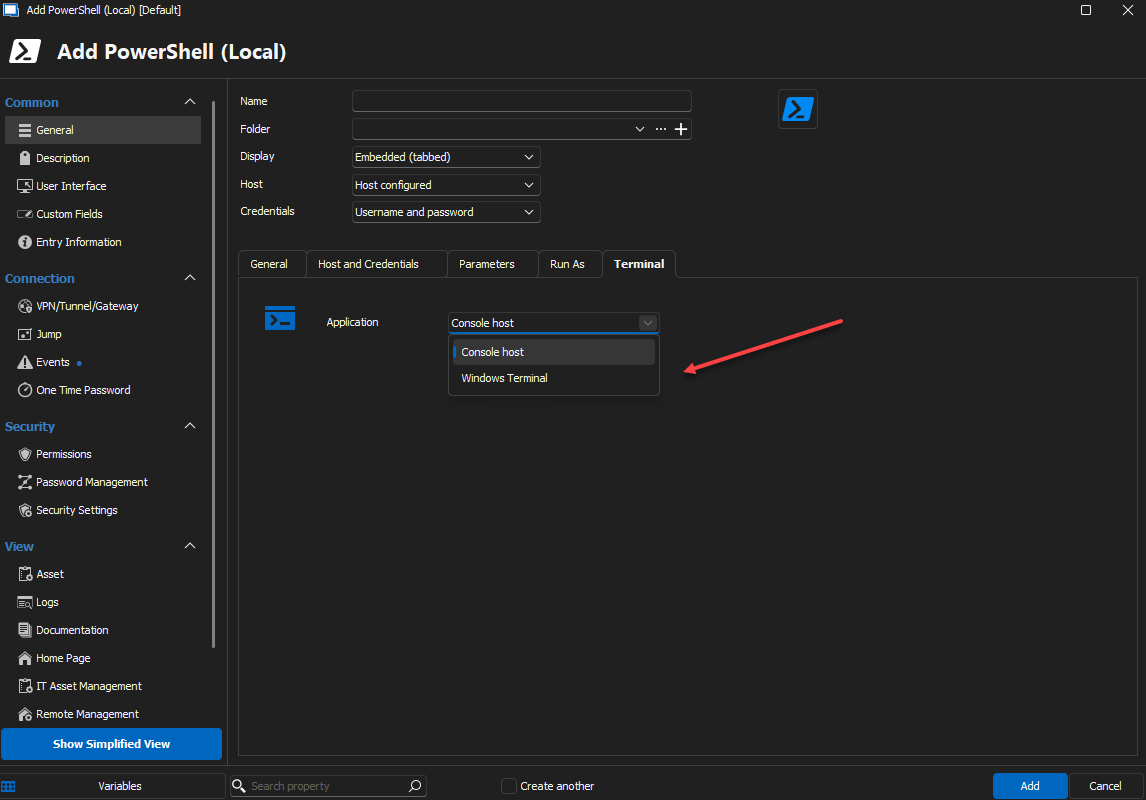
In that case our integration of the Windows Terminal will be launched and embedded successfully into RDM.
So to make everything clearer about this forum case :
The first problem you guys were experiencing was due to a faulty file in the Windows Terminal application.
This will be fixed in the 2024.2.18.0 minor release (for any future clients experiencing the problem)
For Jeremy and Jens, this is already fixed as you guys manually changed the version of your Windows Terminal application.
The new "problem" stated by Jens was due to a misuse of the Windows Terminal application --> simply use a PowerShell (Local) entry and select "Windows Terminal" application use.
Thank you for your feedbacks, and if you have any problems let us know !
Best regards,
Nathan Beauregard
Windows Terminal...not working since update to 2024.1.29.0 64-bit
Hello Jeremy,
First of all, thank you for the precision, this entry is in fact using cmd.exe (which is Console Host). It is good to know that the Windows Terminal does not work for you either, we were curious as to why it was not working only for one person. As said previously, we are working on the problem and will get back to you soon.
Secondly, you mentioned an error prompt. Could you send us a screenshot of the prompt with the steps you did to recreate this issue ?
Thank you all for your time.
Best regards,
Nathan Beauregard
Centralize Terminal Syntax Highlight settings
Hello Benjamin,
It is now possible to move the syntax highlighting items to the top or to the bottom of the grid view. It will be available in the next major release (2024.3.0.0).
Thank you for your feedbacks.
Best regards,
Nathan Beauregard
support 256 color in terminal and background transparent
Hello Neilson,
The support for custom colors and background transparency has been added to syntax highlighting ! It will be available in the next major release (2024.3.0.0).
Thank you for your feedbacks !
Best regards,
Nathan Beauregard
default session color for syntax-highlighting
Hello,
Custom colors have now been implemented for syntax highlighting. It will be available in the next major release (2024.3.0.0).
Thank you for your feedback.
Best regards,
Nathan Beauregard
Case insensitive regexp for syntax highlighting
Hello Dmytro,
The support for case insensitive has been added and will be available in the next major release (2024.3.0.0).
Thank you for your feedback.
Best regards,
Nathan Beauregard
Windows Terminal...not working since update to 2024.1.29.0 64-bit
Hello Jens,
I am glad to hear that it works now. It is in fact normal that the Native Windows Terminal application launches not embedded into RDM because of it's architecture. As a temporary fix, you could launch the Console Host application (this one will be embedded into RDM).
We are currently working on the problem you are facing with our build of Windows Terminal. We will get back to you when there will be an advancement.
Thank you for your time and get back to us if you experience any other problems, your feedbacks are important for us !
Best regards,
Nathan Beauregard
Windows Terminal...not working since update to 2024.1.29.0 64-bit
Hello,
I am glad to hear that it works for you Jeremy ! On your end Jens, I think you should try to launch the Windows Terminal that is natively installed on Windows rather than launching our version.
To do so, please modify the "Run" parameter (shown in your screenshot) and replace it with the Native Windows Terminal executable path.
Let us know if it works, thanks in advance.
Best regards,
Nathan Beauregard
Text Formatting Configuration in Terminal Environments
Hello Alex,
It was a pleasure ! If there is anything else, get back to us !
Best regards,
Nathan Beauregard
Text Formatting Configuration in Terminal Environments
Hello Alex,
The support for bold characters in syntax highlighting has been added and will be available in the next major release (2024.3.1.0).
If you have any questions, do not hesitate !
Best regards,
Nathan Beauregard
Template not working when opened from URL
Hello Fer,
This feature is now authorized by default for all Data Sources that don't support "Data Source Settings". It will be available in the next minor release (2024.2.14.0).
If you have any questions or you encounter other problems, get back to us !
Best regards,
Nathan Beauregard
Template not working when opened from URL
Hello Fer,
In your case it will be normal. I will implement a fix soon that will allow it in your case.
I will post back here when it will be available. In the mean time, get back to us if needed !
Best regards,
Nathan Beauregard
Windows Terminal...not working since update to 2024.1.29.0 64-bit
Hello,
Unfortunately the developers of the Windows Terminal did not come back on the situation. We are still waiting on them to correct the bug their terminal is facing (you can find the thread here). We will post back here when the changes will be done.
Regards,
Nathan Beauregard
Template not working when opened from URL
Hello Fer,
Thank you for being patient again.
This behavior is completely normal when it comes to Web URL's. There exists an option to allow the "Host Override" which you can find under Administration > System Settings > Security Settings > Allow host override.
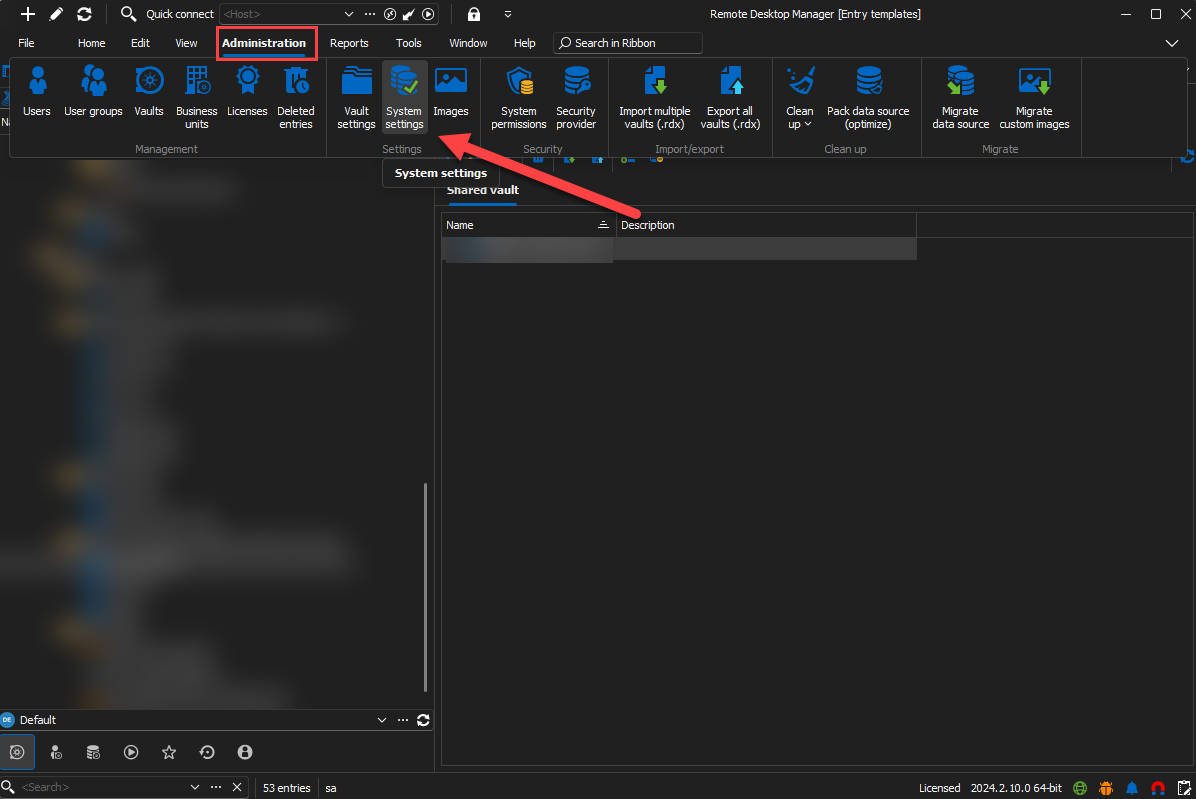
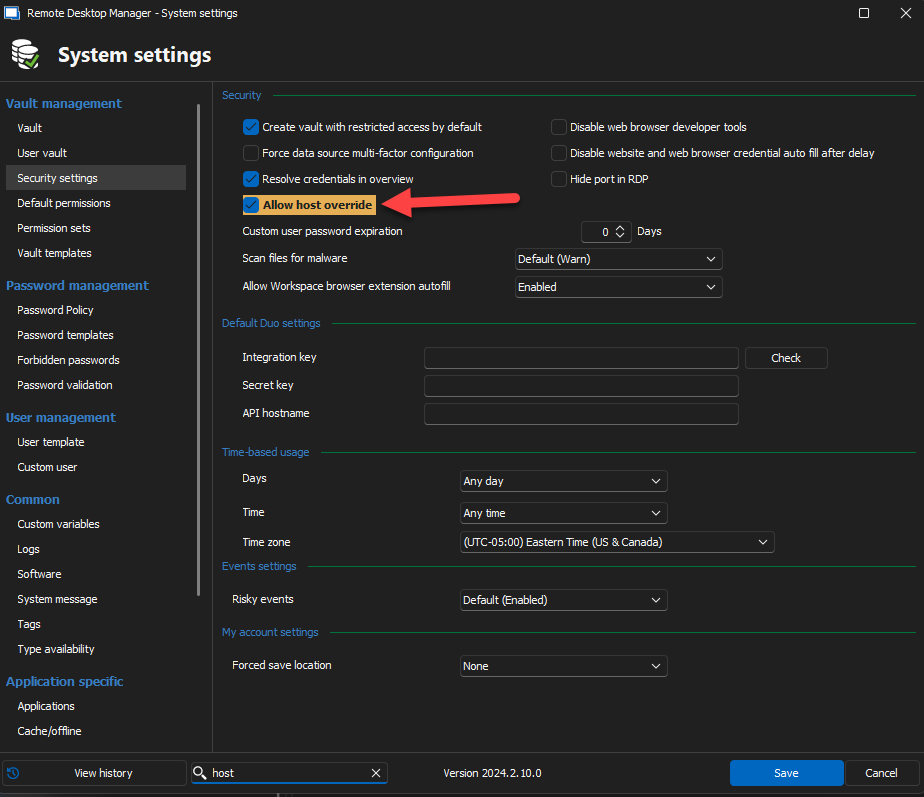
This option is disabled by default for security purposes. When it will be checked you should be able to enter your destination host in the URL and the RDP should open normally.
Best regards,
Nathan Beauregard
FortiGate login screen and "m" key presses
Hello Martin,
Glad to here so ! Get back to us if there is any other problem.
Best Regards,
Nathan Beauregard
M key in SSH sessions
Hello Jus,
Ultimately we won't need, your response regarding the last question asked ! After some hard work we were finally able to find the problem. The fix will be available in the 2024.2.9.0.
Thanks again for your feedbacks.
Best regards,
Nathan Beauregard
FortiGate login screen and "m" key presses
Hello Martin,
Thank you again for your patience ! After some hard work we were finally able to find the problem. The fix will be available in the 2024.2.9.0.
Thanks again for your feedbacks.
Best regards,
Nathan Beauregard
Windows Terminal...not working since update to 2024.1.29.0 64-bit
Hello,
First of all, thank you for your patience. After some investigation we were able to pinpoint the faulting .dll in the Windows Terminal and are working with the developers to provide them as much information on the problem we are facing. We will get back to you when a fix will be made.
Thanks again for your feedbacks.
Best regards,
Nathan Beauregard