Windows Terminal...not working since update to 2024.1.29.0 64-bit
Windows Terminal...not working since update to 2024.1.29.0 64-bit
Since updating to RDM 2024.1.29.0 64-bit (via winget upgrade --all), Windows Terminal support in RDM is now broken for me (on at least two machines tested so far).
I can't get it to open at all - the tab appears but is not switch to, and then a few seconds later disappears. Have been using this profile for a couple years now quite happily.
I cannot find any useful logs or visibility on what is happening in RDM.
I see this in your Changelog and suspect it might be responsible:
Fixed an issue where wrong Windows Terminal would be launched in certain circumstances
wsl.exe --update in a powershell window reports WSL is up to date, and there's no issue opening the profile in Windows terminal itself. It's a Ubuntu 22.04 installation.
All Comments (39)
(Should not that no profile works, i.e. it is not just the Ubuntu profile that doesn't work - my Powershell, Command Prompt etc. also don't work - the issue very much seems to be that RDM can't start Windows Terminal itself anymore.
Hello,
We will investigate this issue.
Could you give us the following additional information, as that might help us pinpoint what exactly is causing this:
- What version were you on before updating to 2024.1.29.0?
- Do you reproduce the same behavior with 2024.1.28.0 and 2024.1.23.0?
- Could you post a screenshot of one of your entries that isn't working? Please blank out any sensitive information like credentials or hosts.
- Do you run RDM with elevated privileges (administrator)?
Regards,
Hubert Mireault
Not completely sure which version I was on before, sorry, although I do update regularly (either when prompted by RDM itself, or every month or so I run winget upgrade)
Is there an easy way to re-install older versions without stuffing up my config - running the installers just exits with a message about a newer version being installed.
I do not run RDM with elevated priviliges - I am only using it for SSH/Windows Terminal and WinSCP and with all of those I use a private key to log in etc. (if needed, it's not on Windows Terminal/WSL obviously)
Screenshots: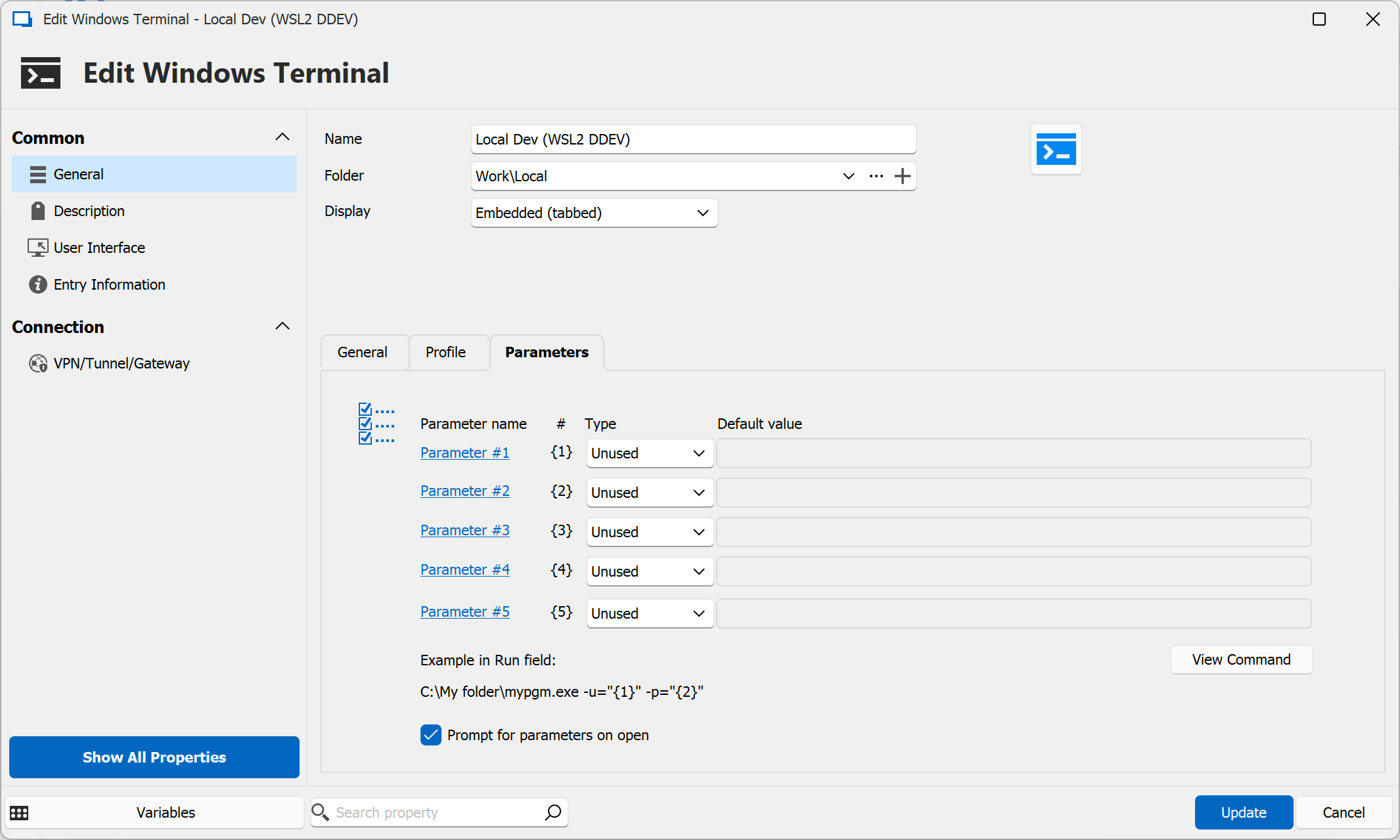
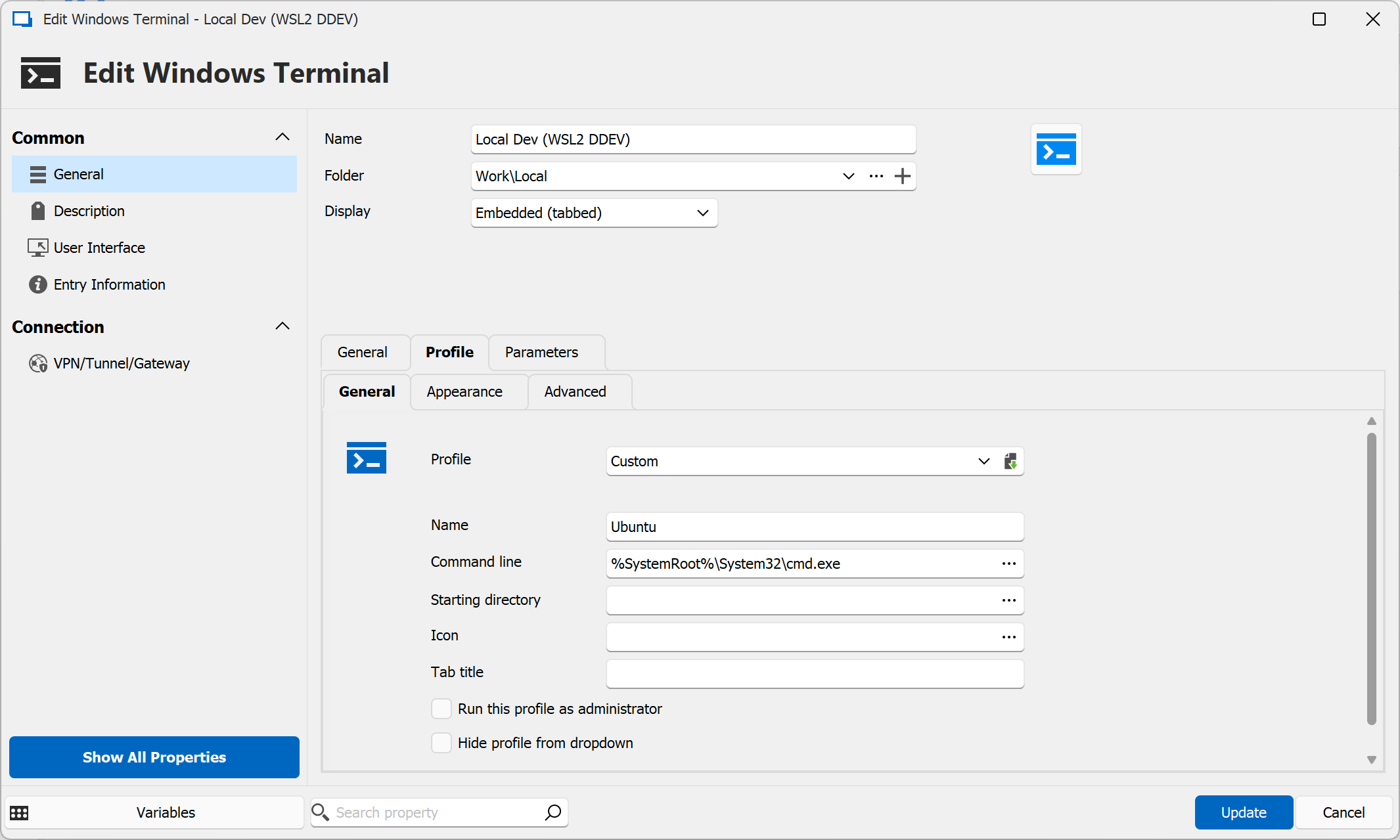
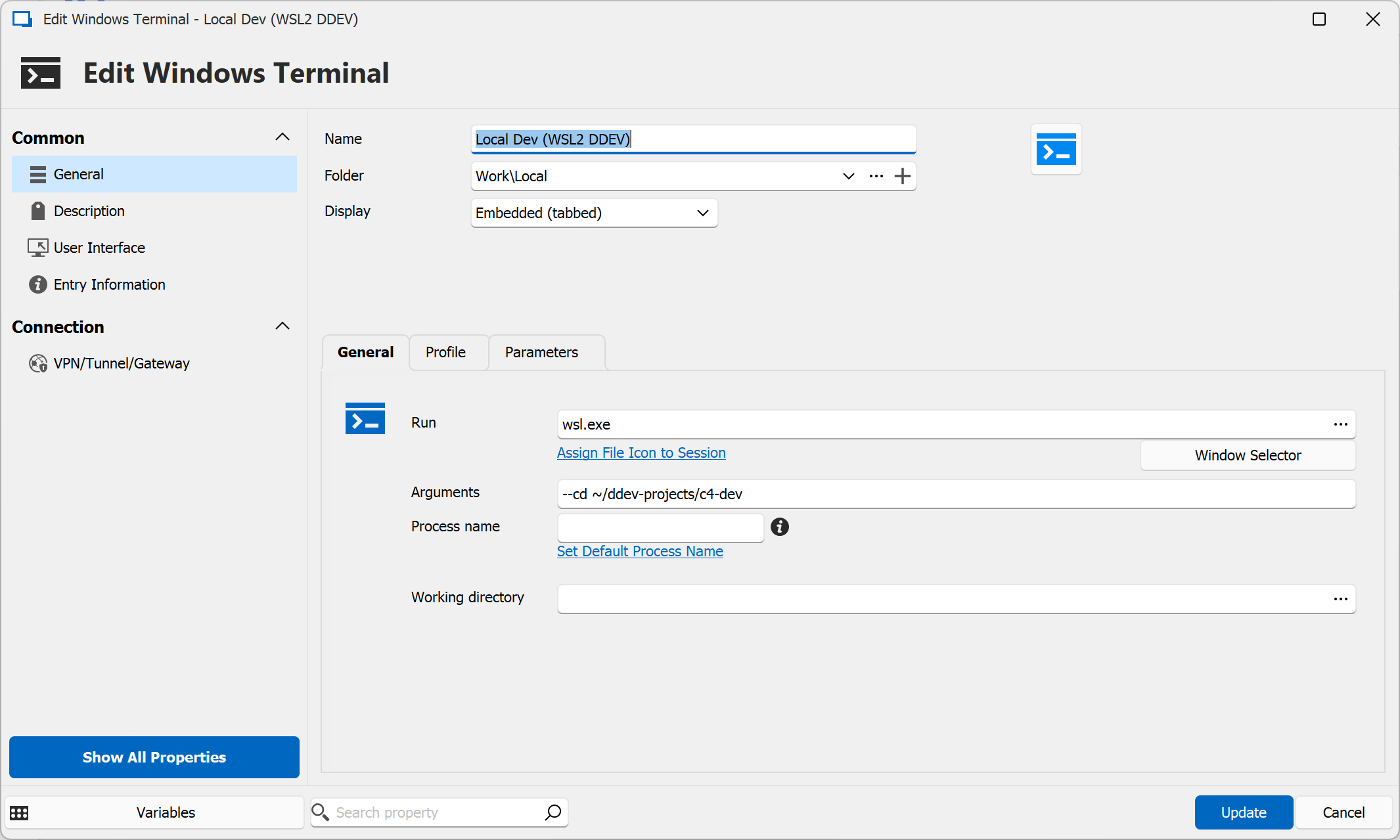
3.png
2.png
1.png
(Note I have also tried a bunch of new setups with Windows Terminal as the type, can't get anything to work - they all do the same 'tab appears in background then disappears' thing.)
Hello,
Thank you for the additional information, I will add this to our ticket.
For your question:
> Is there an easy way to re-install older versions without stuffing up my config - running the installers just exits with a message about a newer version being installed.
On the download page for RDM, select "binary file" instead of "setup installer". This will give you a zip file. You can unzip this configuration anywhere on your machine and then run the RDM executable. This should not affect your installation's configuration, but you will have to enter your information to connect to your datasource again if you are for example using Devolutions Server, Hub or SQL Server.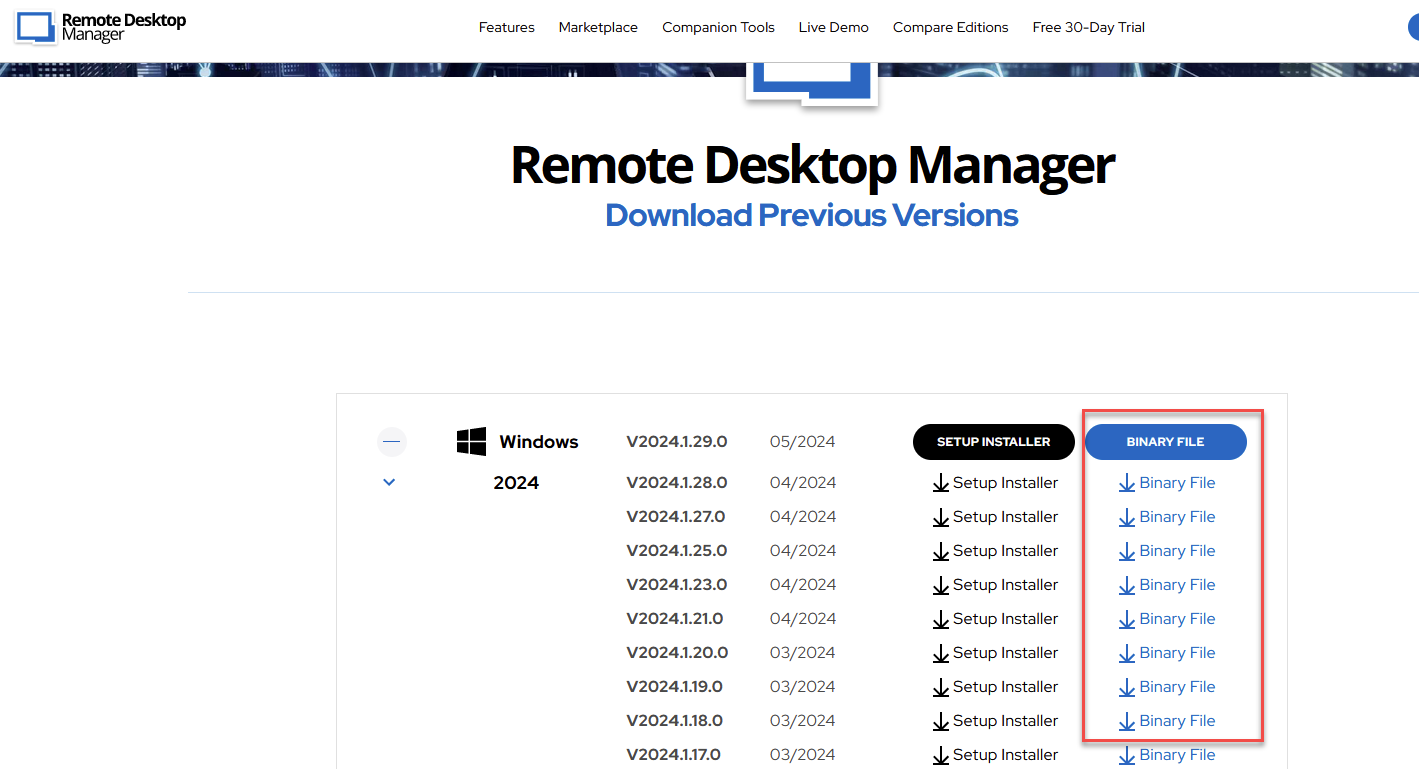
Regards,
Hubert Mireault
c6bf9bb1-c544-4446-ad4a-7e401eefcbd5.png
Hmm, no, those older versions don't solve the issue.
So either the new version somehow corrupted the setup (don't think so, and again I can't re-create a new one that works - I store my connections in a connections.xml file and have also tried to revert to prior versions of that without it solving the issue) - or some change has come along to Windows/WSL2 that RDM is not yet ready for.
This machine here at home is Win 23H2 22631.3593 and I expect my other one at work is the same.
Surely there is a way to see what is happening, some logs or something??
Hello,
Thank you for the tests. Could you also check if 2023.3.39.0 (the latest 2023.3 version) works? There were big changes made in 2024.1 (moving to the .NET 8 framework among other things), so if it also doesn't work on that version, we could exclude those changes. Sorry, I should have mentioned this version as well in my original post.
It's possible there might be logs, if you check in the application logs. You can go in the ribbon > Help > Application logs:
As you mention it's also possible that there might have been a change in either the windows terminal or with WSL that breaks the integration. We will keep this in mind when investigating.
Regards,
Hubert Mireault
cb72f4fb-3a11-44f2-8afd-843adac0dc06.png
Also not working with the 2023 version I'm afraid.
Nothing appearing under the logs there (at all?!) - perhaps something to conisder, logging all the commands you use to open external things in there, would obviously help a lot in such a scenario as this.
I saw today's version: 2024.1.30.0 64-bit - and got excited as apparently there was a Terminal related fix in it, but still no go I'm afraid.
Hello,
Thank you for the test, at least it confirms that this isn't the .NET8 changes, so it should be something else. I suspect a change as you mentioned with WSL or a windows update breaking the windows terminal integration. And as you mention, unfortunately the fixes in 2024.1.30.0 don't affect this issue.
I have asked our support team to open a case with you, as it will be easier for us to gather information and try to reproduce the issue this way. They will contact you when they can.
Regards,
Hubert Mireault
Hello,
As mentioned by my colleague, we would like to open a case for you regarding this,
Would the email used for your account be the correct one to use in this case? If not, let me know and I will reach out to you via private message so that you can provide me with the correct email.
Let me know,
Best regards,
Samuel Dery
Yes the email here is fine, thanks
Hello,
since today my windows terminal session don't work anymore. Yesterday it was fine and at working end i have closed the RDM with two opened tabs (1x rdp, 1x Windows Terminal).
Today i have opened RDM and i was asked to open the two sessions. After confirmation the rdp session is up and running, but the terminal tab disappears.
It looks like the same behaviour as with "bossanova808".
I have deleted the Terminal Session entry and created a new one without success. Also i have updated RDM to 2024.1.31.0 64-bit (from 2024.1.30.0 64-bit).
When i add a new "Windows Terminal" session entry (embedded (tabbed)) with no additional parameters, i get the error "unable to execute the applicaton".
When i configure the "Run" with "C:\Program Files\WindowsApps\Microsoft.WindowsTerminal_1.20.11381.0_x64__8wekyb3d8bbwe\WindowsTerminal.exe", the session starts (in tab) but disappears.
I am on Windows 11 Pro 22H2
Best regards
Jens
I thought it would only be a matter of time for others to run into this.
I have sent requested materials via the support case, but not heard much back yet. Fingers crossed they are working on it!
I still suspect this:
>> I see this in your Changelog and suspect it might be responsible:
>> Fixed an issue where wrong Windows Terminal would be launched in certain circumstances
But maybe check your Windows updates to see what has landed recently? Here are mine - the issues started around the 15th of May or so IIRC, so might be a clue there?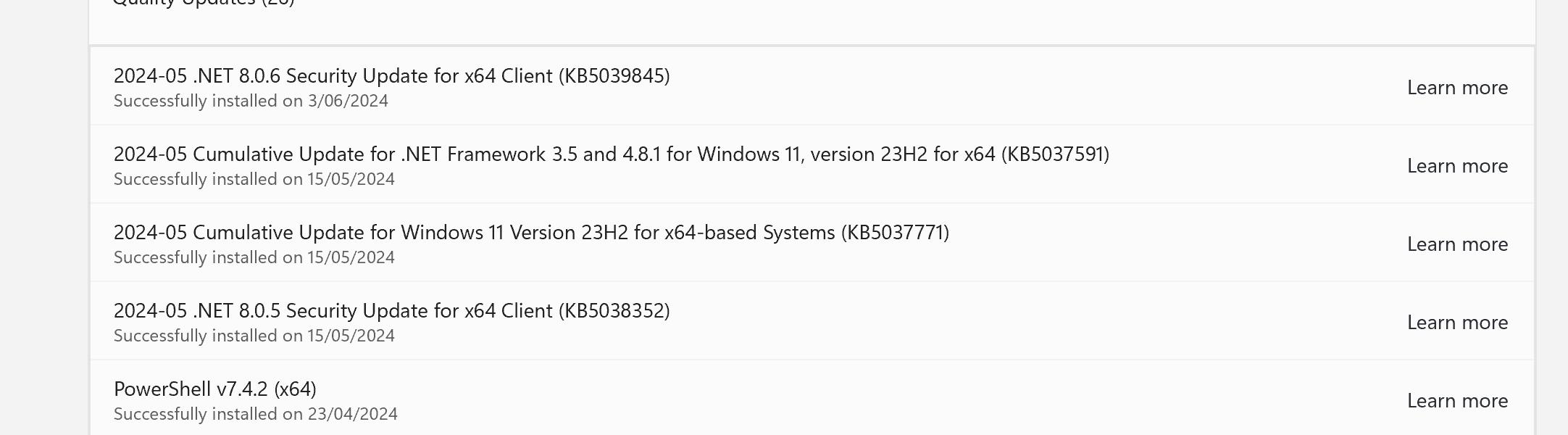
4822be43-f115-4293-97df-07e39cfc5f0f.png
My last Windows Update was on 01/04/2024, so it should not be the problem. I have some updates to be done. I will check it again after that.
Hi,
I have had the same issue since yesterday, my version was 2024.1.29 and I updated it to 2024.1.31 and it did not resolve the issue. as mentioned earlier I tried older versions and the result was the same. I only have this issue with entries of type "windows terminal". I have tried creating powershell and cmd entries and they worked fine.
OS: win 11 pro, ver. 10.0.22631
Thanks!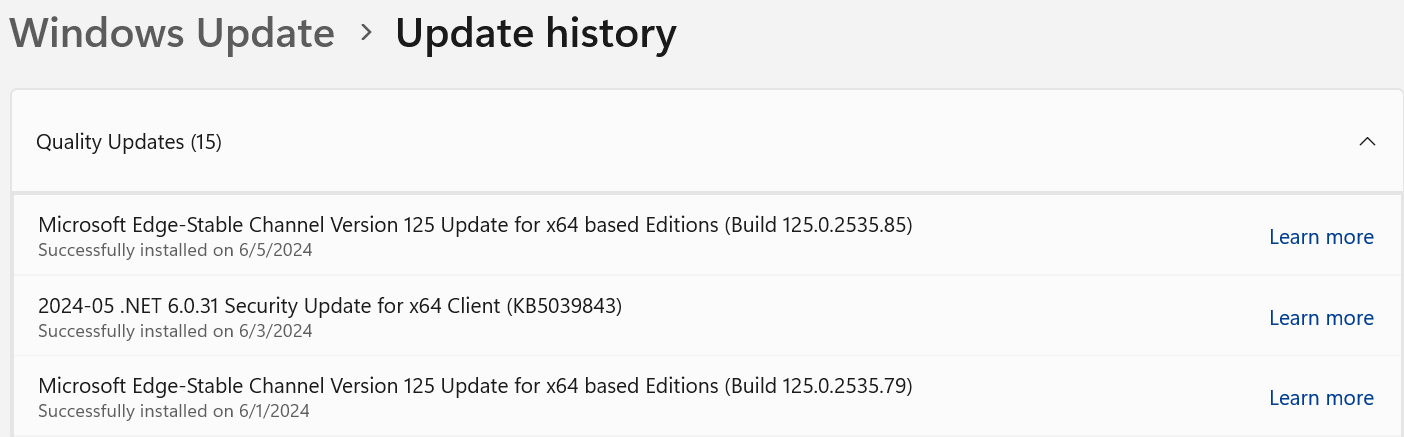
c674e8e5-5917-4fa0-a0f6-4c7454613f07.png
Hi,
This looks like a memory corruption issue possibly surfaced by a recent Windows update. While we build our own Windows Terminal distribution to ship with Remote Desktop Manager, it appears that some users have recently encountered similar problems with the official Windows Terminal distribution: https://github.com/microsoft/terminal/issues/17255
Can you try Windows Terminal separately from Remote Desktop Manager to see if you can get it to sometimes crash in a similar way, as reported in the GitHub issue?
Best regards,
Marc-André Moreau
Hi,
i can start "windows terminal" outside from RDM without problems. Run: wt -> opens Terminal, also Start -> Search "Terminal" will also start normally.
Best regards
Jens
Have been using Windows Terminal outside of RDM extensively (on three machines all showing this RDM issue), with no problems (so far anyway!)

Hello,
First of all, thank you for your patience. After some investigation we were able to pinpoint the faulting .dll in the Windows Terminal and are working with the developers to provide them as much information on the problem we are facing. We will get back to you when a fix will be made.
Thanks again for your feedbacks.
Best regards,
Nathan Beauregard
Hello,
a little update from me. I have updated RDM to 2024.2.12.0 64-bit.
But the problem is still there. Terminal does not open.
Jens
Hello,
Unfortunately the developers of the Windows Terminal did not come back on the situation. We are still waiting on them to correct the bug their terminal is facing (you can find the thread here). We will post back here when the changes will be done.
Regards,
Nathan Beauregard
Hi,
I did some testing again today, and Windows Terminal crashes for me with v1.18.2822.0, the current build included in RDM, but it doesn't crash with v1.20.11271.0: https://github.com/Devolutions/wt-distro/releases/tag/v1.20.11271.0
Can you replace the installed Windows Terminal from RDM with the newer copy and see if it resolves the issue for you as well? I don't think the root cause of the problem has been found, but sometimes just a different build can hide the problem. I've tried to identify the cause of the crash in Windows Terminal but it still eludes me, and the bug remains open on the Microsoft side.
Download https://github.com/Devolutions/wt-distro/releases/download/v1.20.11271.0/WindowsTerminal-1.20.11271.0-x64.zip and replace the contents of "C:\Program Files\Devolutions\Remote Desktop Manager\runtimes\win-x64\native\wt" with it to manually change the Windows Terminal build used in RDM. This is our Windows Terminal distribution with the patches required for the integration.
If you can confirm that the issue goes away for you, we'll just update the build and cross fingers the issue doesn't come back.
Best regards,
Marc-André Moreau
Have only tried one machine (of 3 where I use this) - but it worked for me on that first one!
Now on a second machine, worked there too.
Ok, have now done this on 4 separate machines (Win 11 and one Win 10) and this fix is working on all those machines. Thanks!
Hello, i have now tried it on my Windows 11 Desktop. But i have no luck. The problem is still there. I have replaced the folder with the content from the ZIP-Archive. When i start the "WindowsTerminal.exe" in that folder, the windows store warning pos up, when i go to continue, the terminal is opened.
When i start a session from RDM, the Terminal Tab opens, but with no prompt. No keyboard input possible.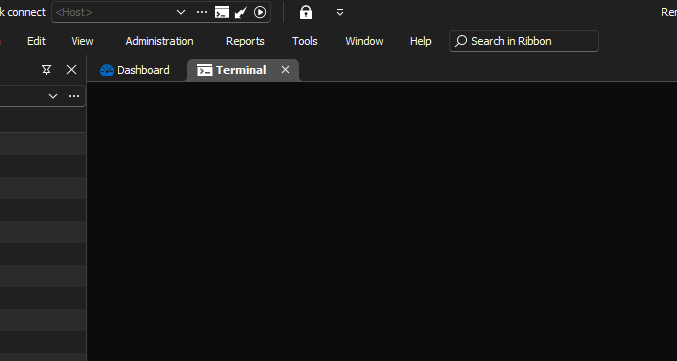
Here the settings from that session: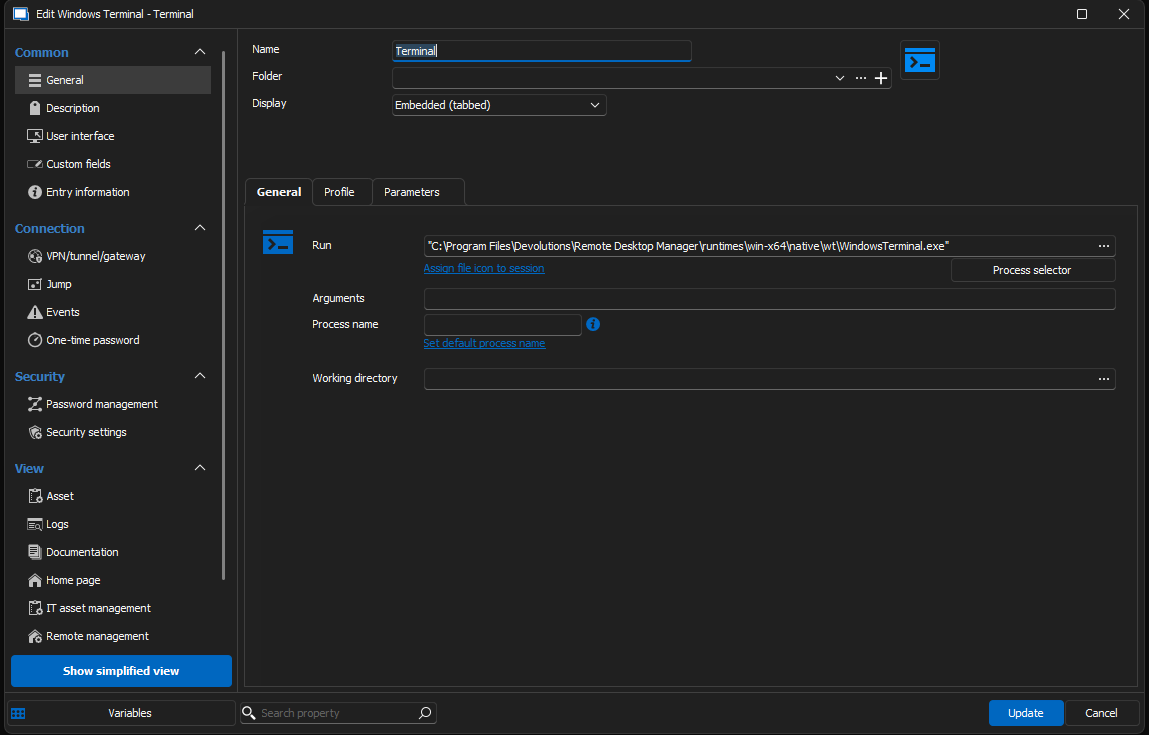
Are there any additional settings that i must configure?
Regards
Jens
2024-07-29 09_26_44-.png
2024-07-29 09_13_15-Remote Desktop Manager [Terminal].png
Hello,
I am glad to hear that it works for you Jeremy ! On your end Jens, I think you should try to launch the Windows Terminal that is natively installed on Windows rather than launching our version.
To do so, please modify the "Run" parameter (shown in your screenshot) and replace it with the Native Windows Terminal executable path.
Let us know if it works, thanks in advance.
Best regards,
Nathan Beauregard
Hello Nathan,
i have changed the "Run" parameter to start the Windows native App. The terminal now starts, but unfortunately only as a separate window. It should actually start integrated in the RDM as a tab (this is also the setting).
Best regards,
Jens
Hello Jens,
I am glad to hear that it works now. It is in fact normal that the Native Windows Terminal application launches not embedded into RDM because of it's architecture. As a temporary fix, you could launch the Console Host application (this one will be embedded into RDM).
We are currently working on the problem you are facing with our build of Windows Terminal. We will get back to you when there will be an advancement.
Thank you for your time and get back to us if you experience any other problems, your feedbacks are important for us !
Best regards,
Nathan Beauregard
Just to be clear - when I say it is working for me - I am using the setup as per this post: https://forum.devolutions.net/topics/42004/windows-terminalnot-working-since-update-to-20241290-64bit#192203 - which embeds the terminal in an RDM tab. It works for now at least. I guess that's the Console Host approach Nathan mentioned.
I can't get a 'Windows Terminal' entry, as such, to work, using either my regular wt.exe or this RDM version - I get a pop up window with an error.
(It would be nice if these different approaches to using Windows Terminal were documented somewhere!)
Hello Jeremy,
First of all, thank you for the precision, this entry is in fact using cmd.exe (which is Console Host). It is good to know that the Windows Terminal does not work for you either, we were curious as to why it was not working only for one person. As said previously, we are working on the problem and will get back to you soon.
Secondly, you mentioned an error prompt. Could you send us a screenshot of the prompt with the steps you did to recreate this issue ?
Thank you all for your time.
Best regards,
Nathan Beauregard
Hello,
I just realized that it is completely normal that the Command Line entry cannot launch our integration of the Windows Terminal. It is due to the fact that our integration of the Windows Terminal is only designed to work while using other terminal entries which offer "Application" choice (Console host or Windows Terminal). Theses entries launch our integration correctly using specific parameters (if not used correctly, the terminal would not launch/work properly).
You can validate that an entry (in that example a PowerShell (Local)) has the "Application" choice. Simply chose the "Windows Terminal" option.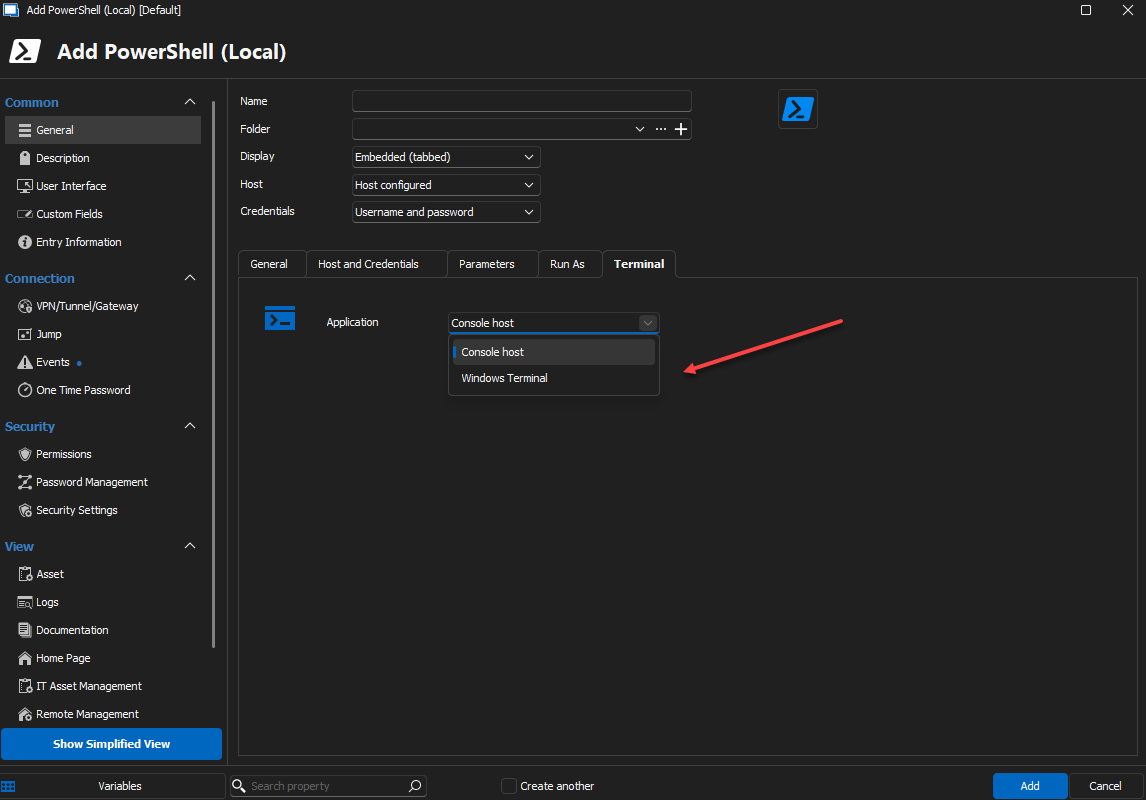
In that case our integration of the Windows Terminal will be launched and embedded successfully into RDM.
So to make everything clearer about this forum case :
- The first problem you guys were experiencing was due to a faulty file in the Windows Terminal application.
- This will be fixed in the 2024.2.18.0 minor release (for any future clients experiencing the problem)
- For Jeremy and Jens, this is already fixed as you guys manually changed the version of your Windows Terminal application.
- The new "problem" stated by Jens was due to a misuse of the Windows Terminal application --> simply use a PowerShell (Local) entry and select "Windows Terminal" application use.
Thank you for your feedbacks, and if you have any problems let us know !
Best regards,
Nathan Beauregard
e1969281-560f-46a0-bd2e-ac232c435f32.png
I'm a bit confused - what then is the point of your 'Windows Terminal' entry type? As this seems to me to be completely non-functional currently.
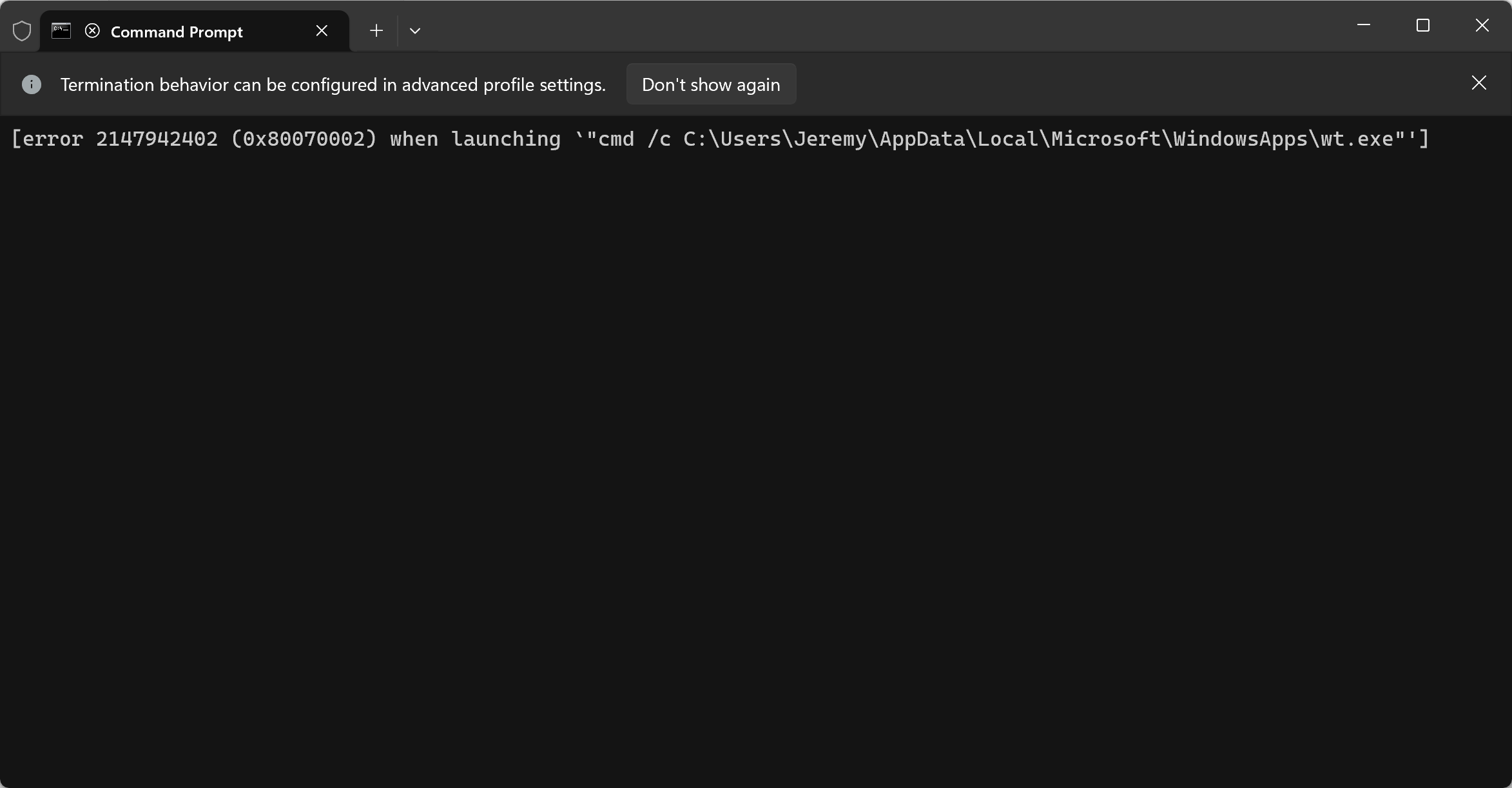
The setting and error I get when using it is this (but this is the same for any version of wt.exe on my system):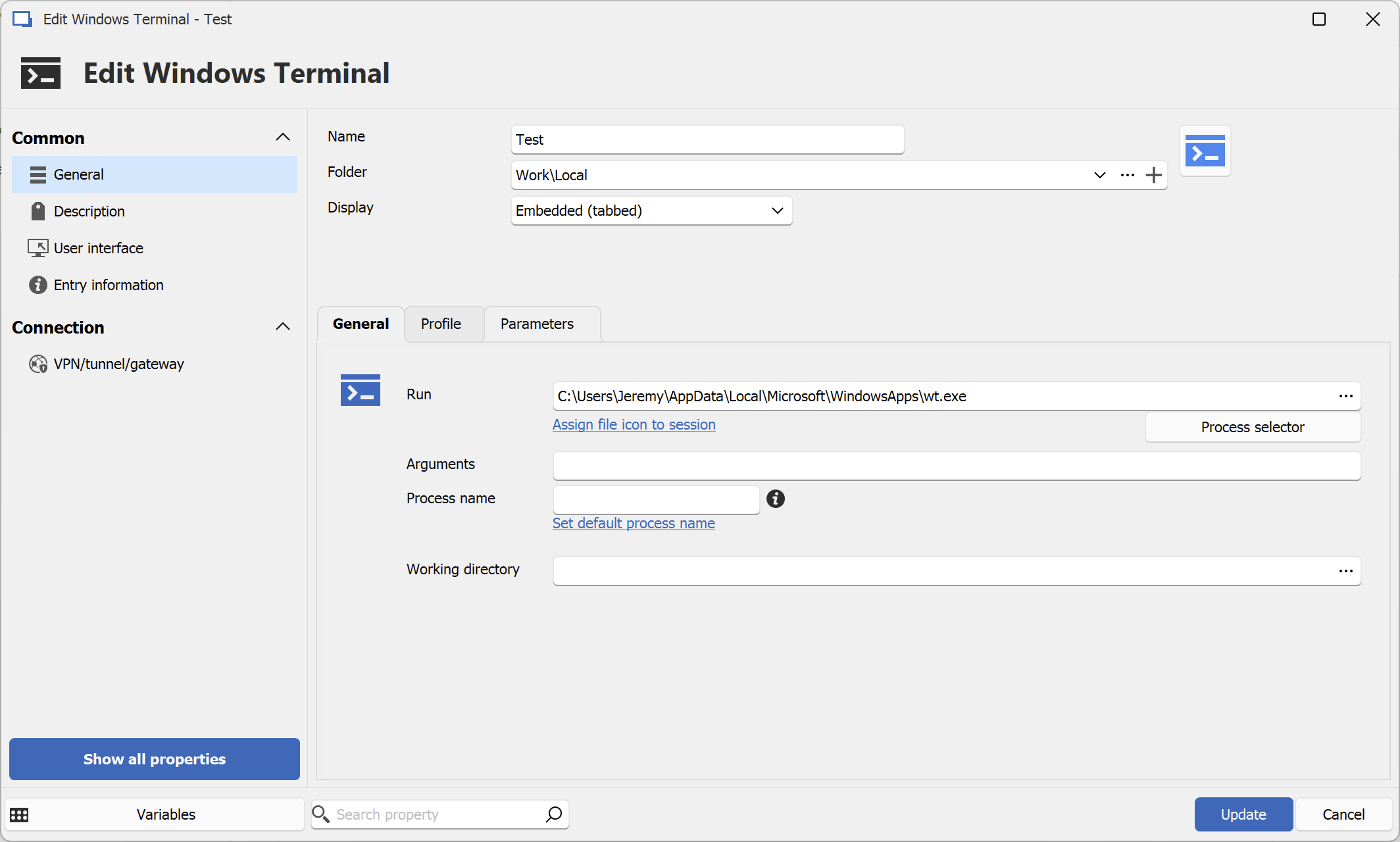
d2c958d7-f394-4c04-b83c-14c922723b1e.png
a59173e1-fe8a-47e5-9723-0e44be6b16dd.png
Hello,
I just realized that it is completely normal that the Command Line entry cannot launch our integration of the Windows Terminal. It is due to the fact that our integration of the Windows Terminal is only designed to work while using other terminal entries which offer "Application" choice (Console host or Windows Terminal). Theses entries launch our integration correctly using specific parameters (if not used correctly, the terminal would not launch/work properly).
You can validate that an entry (in that example a PowerShell (Local)) has the "Application" choice. Simply chose the "Windows Terminal" option.
In that case our integration of the Windows Terminal will be launched and embedded successfully into RDM.
So to make everything clearer about this forum case :
- The first problem you guys were experiencing was due to a faulty file in the Windows Terminal application.
- This will be fixed in the 2024.2.18.0 minor release (for any future clients experiencing the problem)
- For Jeremy and Jens, this is already fixed as you guys manually changed the version of your Windows Terminal application.
- The new "problem" stated by Jens was due to a misuse of the Windows Terminal application --> simply use a PowerShell (Local) entry and select "Windows Terminal" application use.
Thank you for your feedbacks, and if you have any problems let us know !
Best regards,
Nathan Beauregard
Hello Nathan,
Thank you for your explanation. Unfortunately, this is not the solution, because the "Windows Terminal" session type used to work in the past. If I use the "PowerShell (local)" session type, then I also have a PowerShell. These session types have no problem, I was able to continue using them without any problems. If I now create a new session of the type "PowerShell (local)" and then use "Windows Terminal" as the application, then I still have a PowerShell and not the "Windows Terminal". See screenshots.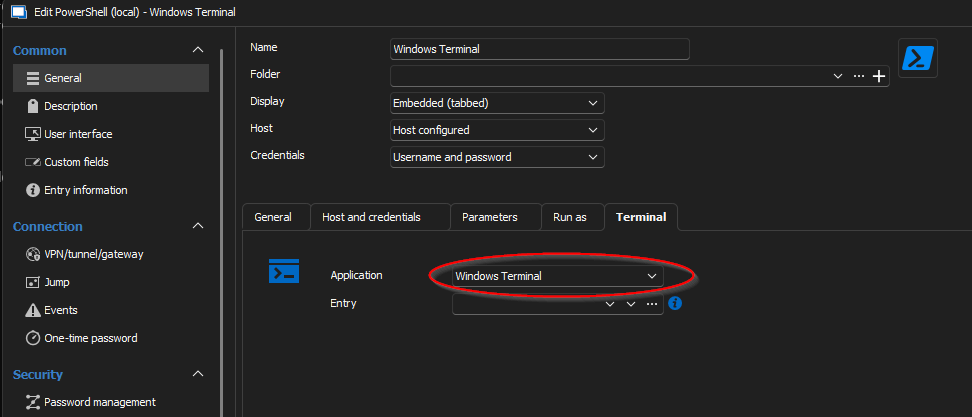
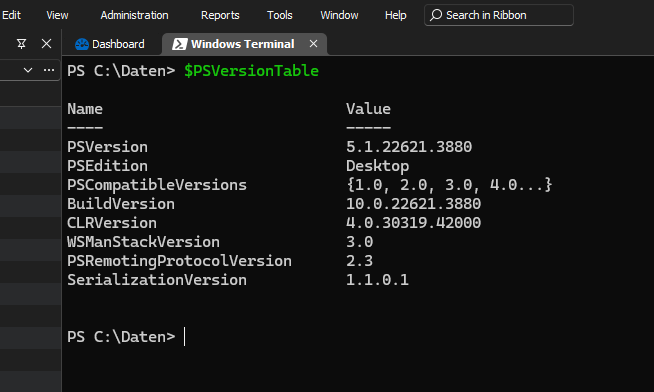
Regards,
Jens
32b87d0f-f9ff-4dbf-be1c-4d1b951a6eae.png
1e112014-5af7-4869-931f-0751f5cb3f23.png
Hi,
Just trying to clarify a few things here so we are on the same page: Windows Terminal is a console host, where the alternative is the classic console host. They can both host PowerShell, the command prompt, or any command-line shells.
If I now create a new session of the type "PowerShell (local)" and then use "Windows Terminal" as the application, then I still have a PowerShell and not the "Windows Terminal"
Reading this, I'm not sure what you are expecting to see: the screenshot shows PowerShell inside Windows Terminal, which is the expected behavior. In the case of PowerShell local or remote connection entries, the shell is forced to PowerShell no matter what, as these entry types require PowerShell. You can, however, select between Windows Terminal and the classic console host.
You can see the Windows Terminal entry as more of a Windows Terminal profile. The shell you want is is in the "Profile" section. You can select one of the existing profile or write a custom profile, here's what it looks like for the command prompt in Windows Terminal: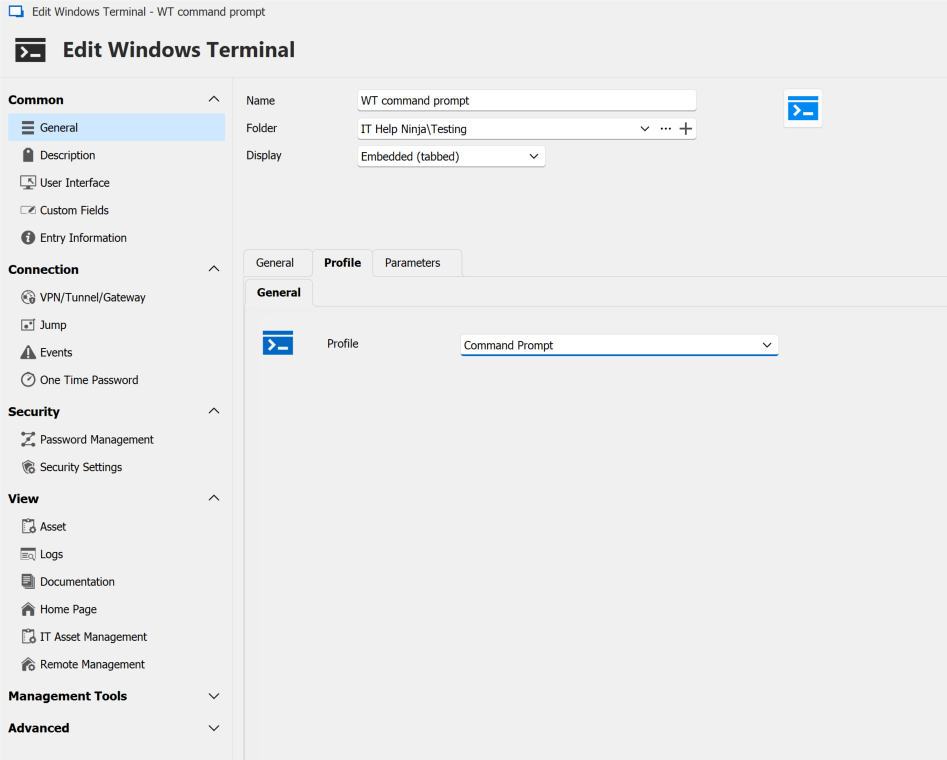
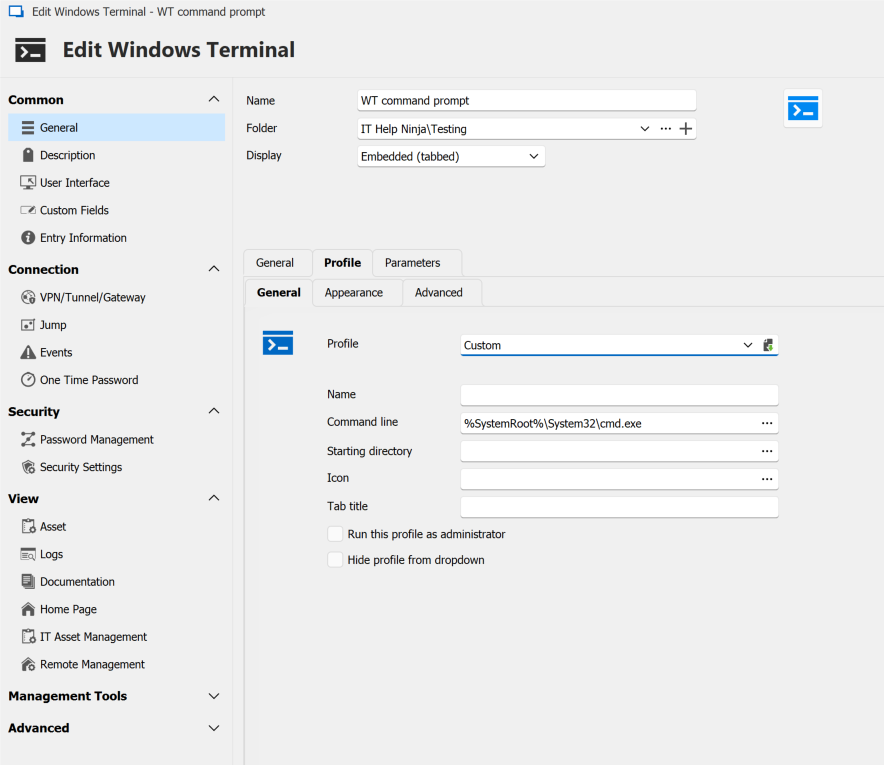
Now you can save the Windows Terminal entry as reference it in other entries that support Windows Terminal, as a way to override the default profile. However, in the case of PowerShell local and remote entries, the shell is always PowerShell. This is more useful if you want to reuse the same font and color preferences for your shell between multiple entries: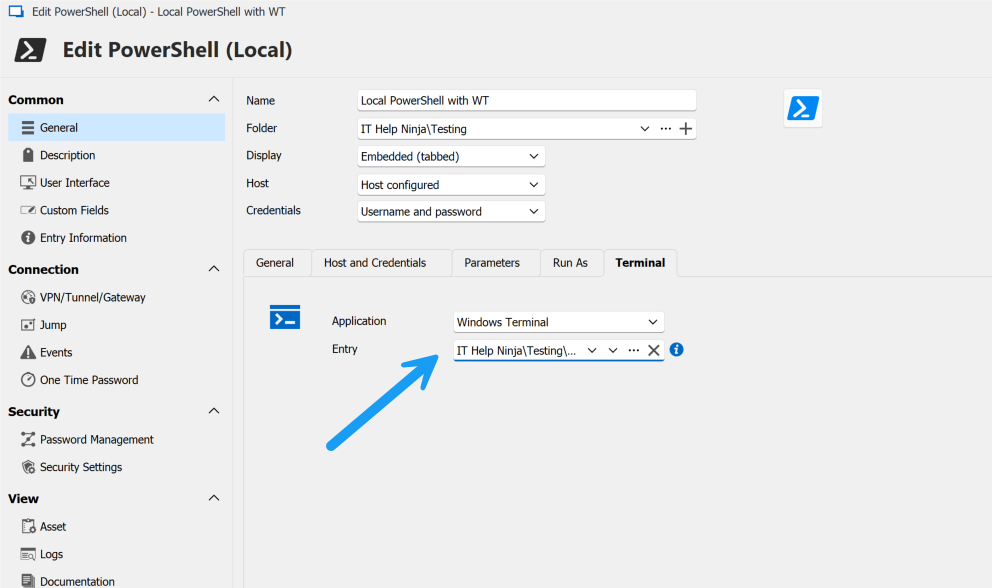
Best regards,
Marc-André Moreau
064c0892-fdbd-4248-a0d7-e309971ec5a9.png
48f4ef5a-83d4-4ccf-9fbd-e8de25ac5bb1.png
8f9108c2-4c68-4776-919a-80f20341b7f9.png
My default profile in Windows Terminal is Ubuntu (WSL2)
I create a new Windows Terminal entry in RDM: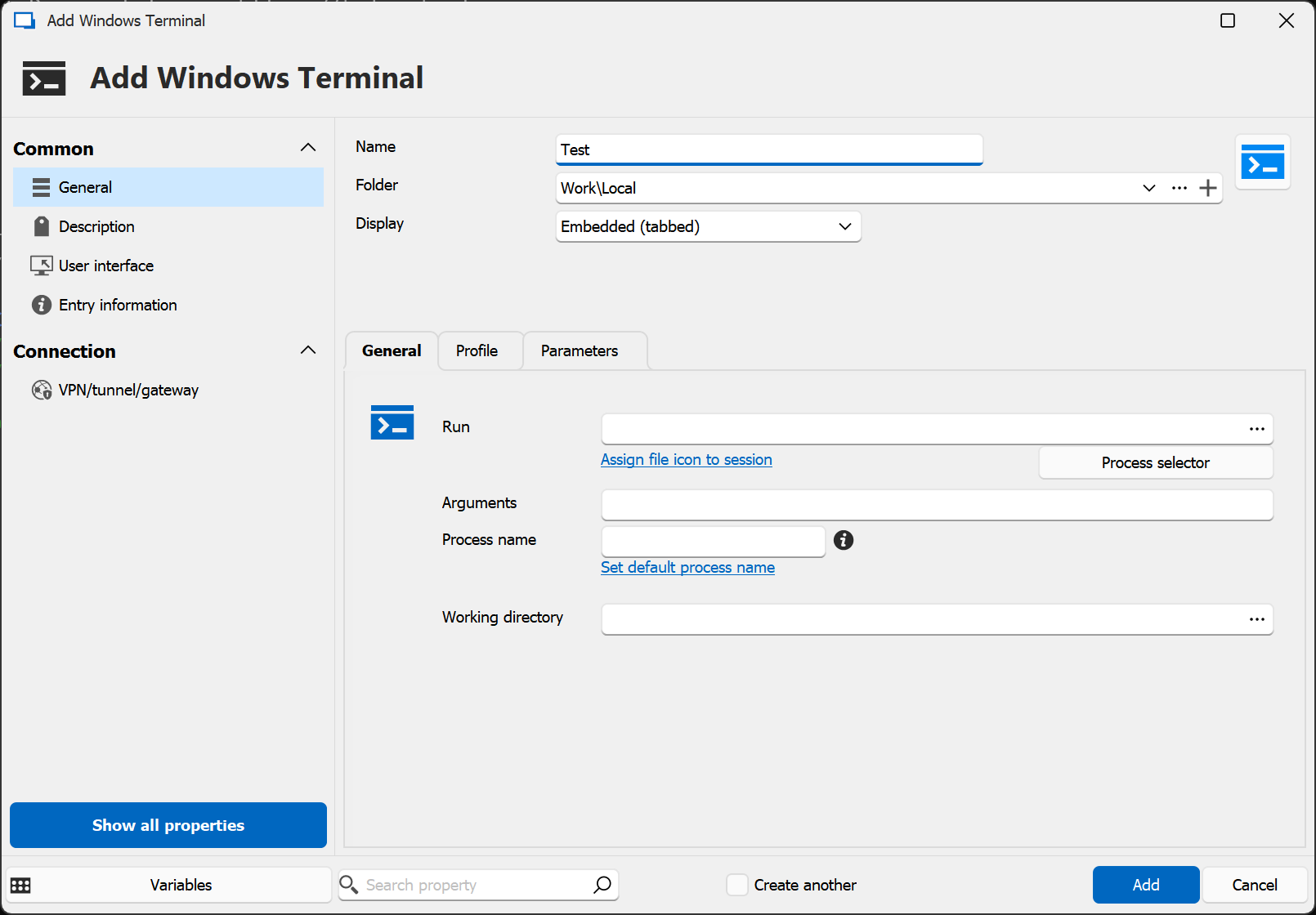
And the profile is set to the default: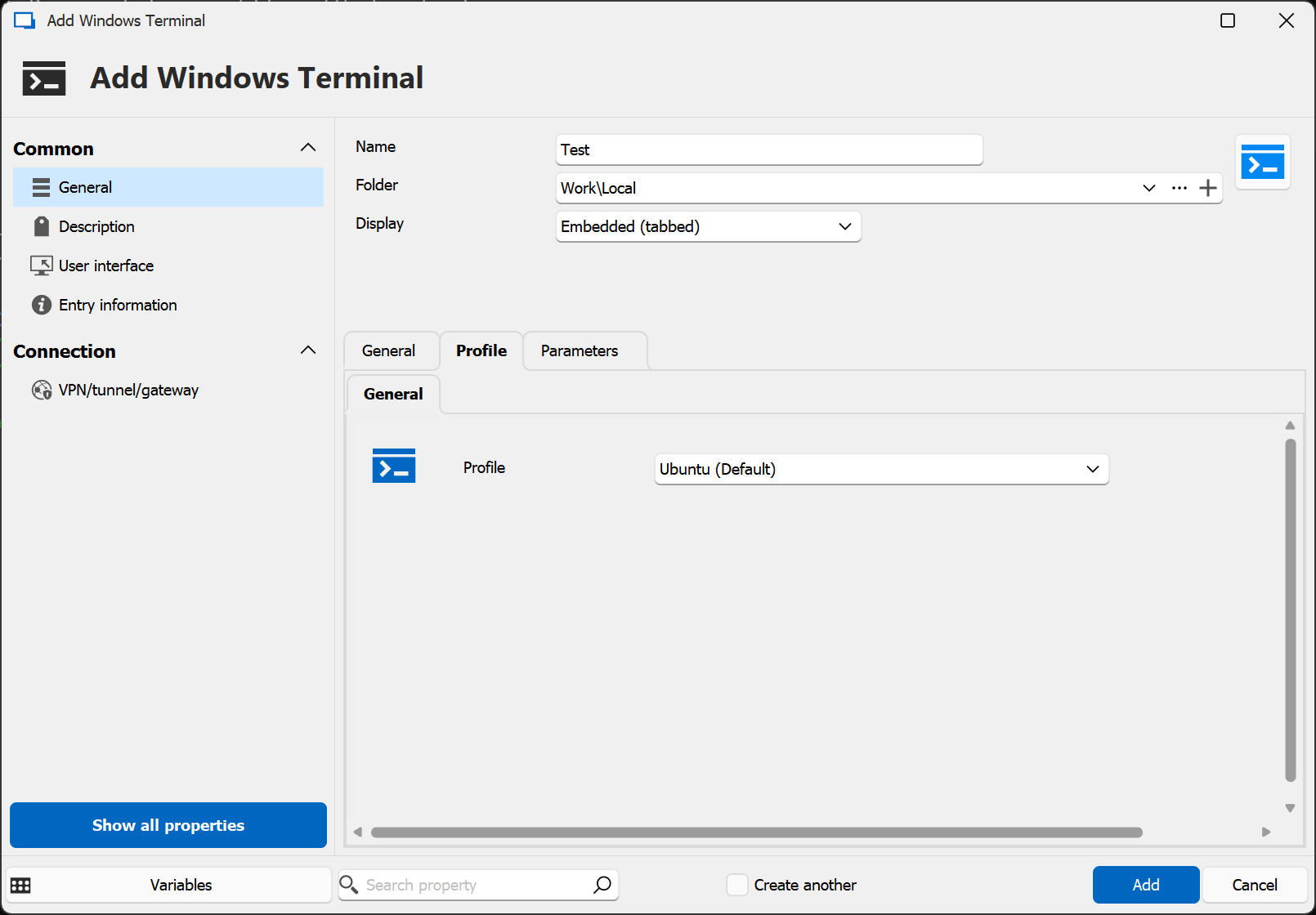
I then get: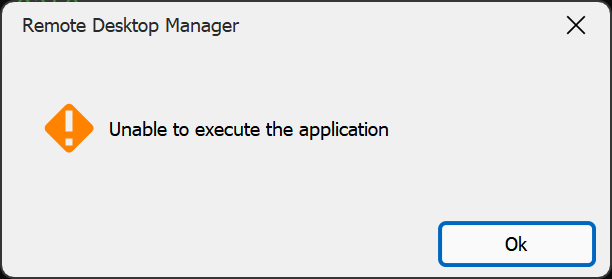
...if I don't put in an explicit reference to wt.exe (but it does not actually work even if I do, with any wt.exe on my system including the one mentioned to download above).
Once again, I ask that you please simply properly document the steps needed to create an entry in RDM that does this - i.e. simply opens an embedded Windows Terminal tab showing the default profile (i.e. Ubuntu for me).
I do understand WT can host multiple profiles etc, but at the moment I can only get an embedded WT using the old console host approach. Yes, that works, but it seems an overly complicated mechanism given there is a WT entry type - surely that should work?
4a700e7c-7a14-4dd6-853b-daff0ae4bb7f.png
17218d7b-bfae-4b72-82da-92eb9d168638.png
31e764ac-5ad5-4eff-bb1a-dd9aaff45106.png
Hi,
The WT entry you created changing nothing more than the selected existing WT profile should normally work, so I suspect maybe there's something off with the existing profile in the WT settings.json file. I tried it and it worked for me with my Ubuntu 22.04 profile: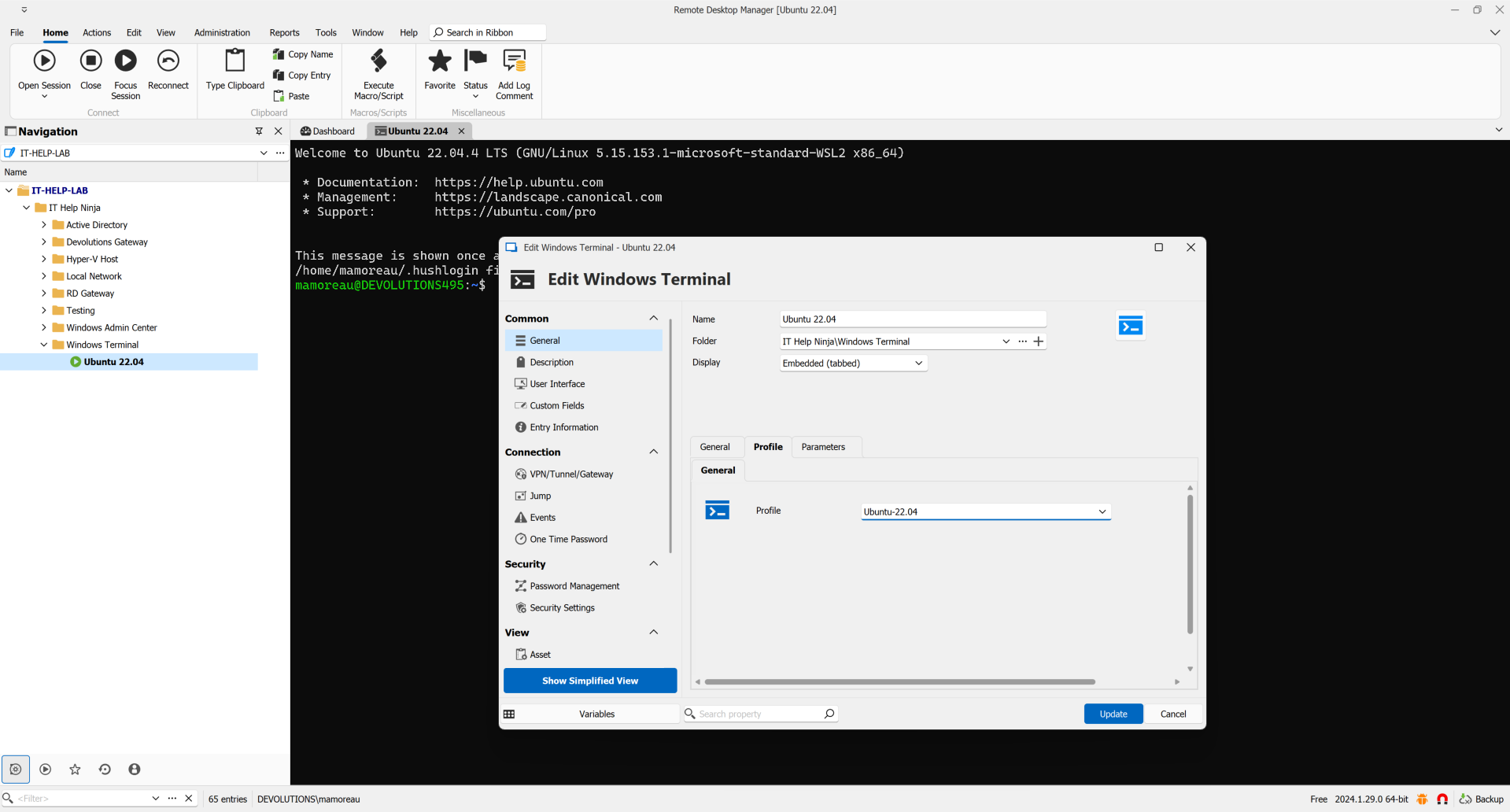
{
    "guid": "{17bf3de4-5353-5709-bcf9-835bd952a95e}",
    "hidden": false,
    "name": "Ubuntu-22.04",
    "source": "Windows.Terminal.Wsl",
    "tabTitle": "Ubuntu 22.04"
},
Now I noticed we haven't mapped the "source" parameter in the GUI, so I couldn't create a custom profile in RDM to reuse "Windows.Terminal.Wsl". I created a custom profile called "Ubuntu-Custom" and used this is the command-line in RDM to obtain a similar result:
wsl.exe --cd ~ -d Ubuntu-22.04
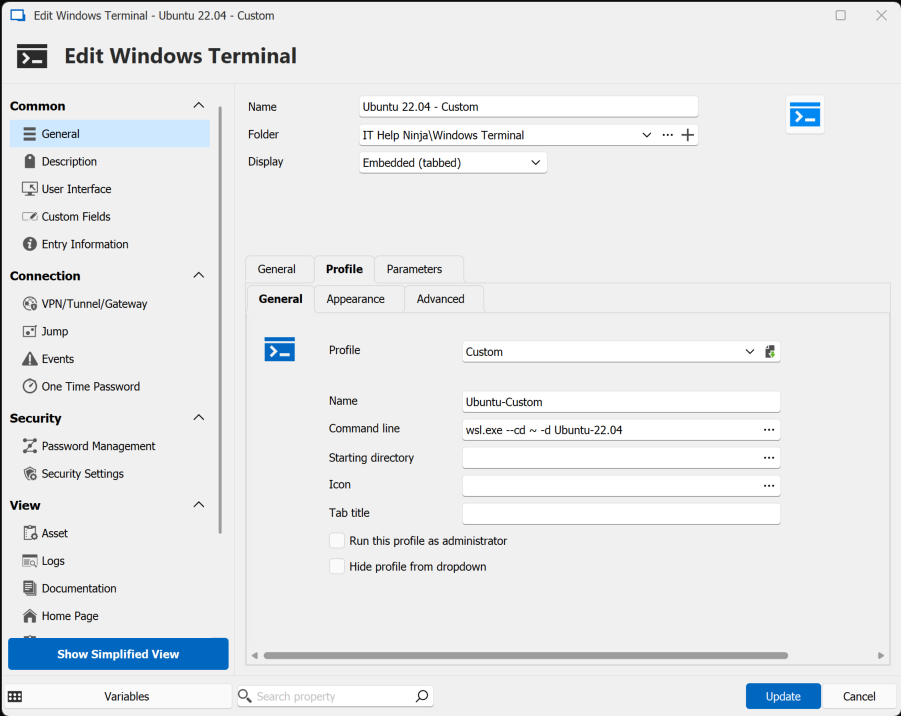
Can you create a custom profile in the same way to see if works around the issue? Can you also send a copy of your WT settings.json? Maybe there's something in there we're not parsing correctly.
Best regards,
Marc-André Moreau
29b689fa-965d-4e75-b5a6-dda37a34e5a0.png
c2f516df-41be-4c29-bf93-c07cfcb10b8d.png
(settings.json attached as requested)
I think you may be right - looking in there I see two things with the same name:
            {
                "guid": "{51855cb2-8cce-5362-8f54-464b92b32386}",
                "hidden": true,
                "name": "Ubuntu",
                "source": "CanonicalGroupLimited.Ubuntu_79rhkp1fndgsc"
            },
            {
                "font":
                {
                    "face": "Fira Code Retina",
                    "size": 11.0
                },
                "guid": "{2c4de342-38b7-51cf-b940-2309a097f518}",
                "hidden": false,
                "name": "Ubuntu",
                "source": "Windows.Terminal.Wsl",
                "startingDirectory": "~"
            },
I don't know why - and I see that if I choose (leave chosen) the default one, it does not work, but if I manually choose the other Ubuntu, it does then work: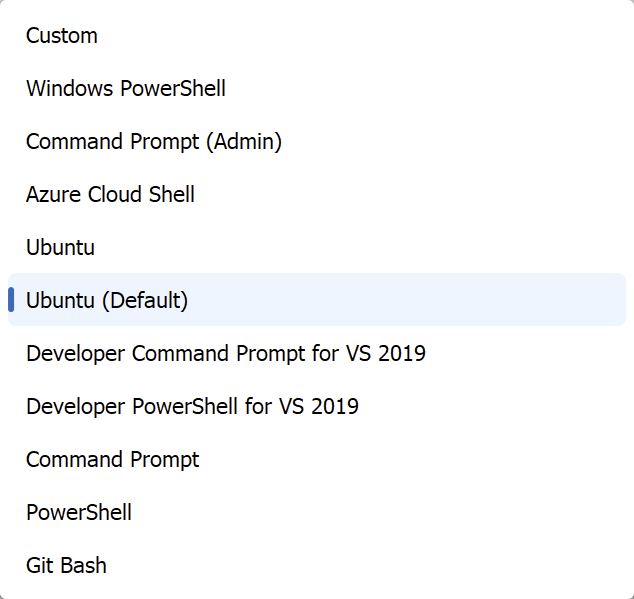
I can see this 'double' Ubuntu entry (one marked 'hidden', the other not) in the settings.json of two machines. On both of those, if I select the 'non-default' Ubuntu, it then works and creates the embedded tab as expected.
I have no real idea why there are two entries there - these are very vanilla WSL2/Ubuntu installations. That said there are a variety of ways of installing such, and I can't explicitly recall what method (E.g. Windows store vs. say: https://learn.microsoft.com/en-us/windows/wsl/install)
These double entires cause no issues in Windows Terminal itself, and I wonder whether you should be perhaps also hiding the 'hidden' profiles...and at least not labelling a hidden one as the default. The hidden entry is NOT the default one as identified in the settings.json file by UID (as you'll see) - so that at least is an incorrect label.
I suspect you're parsing this and using the name as the key, rather than the UID, or something like that, and the two entries are confusing things.
(But I think between the WT version change and this, we're at least getting to the heart of the issues now, and thanks for your help, it's appreciated!)
de40303d-7da2-42ae-a0c8-6e8004b1390a.png
settings.zip