Edit files over SCP not uploading after edit
A client has reported that they're unable to edit files in place on their Azure Linux VM. Now putting aside how risky editing PHP files in place is, it is a handy feature sometimes. I've experimented with it on my home CentOS 8 VM and it works here: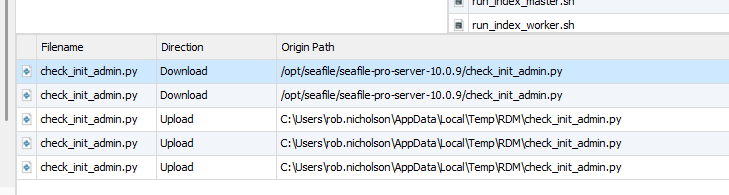
Here you can see me editing check_init_admin.py (download) and the corresponding upload when I save the file. The file is downloaded to %TEMP%\RDM as expected. I'm using VS Code as the default editor but it also works with Notepad++
However, on the client system, the upload never succeeds. The upload event never kicks in.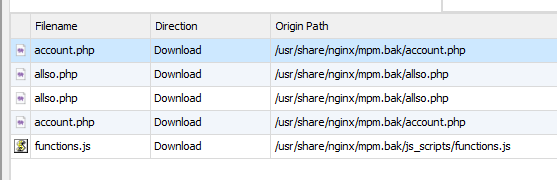
I thought it might be permissions on the files but I made a copy of the folder and setting permissions to 777, i.e. everyone can do everything. Didn't make any different.
X44aPBl[1].png
m9CJSz8[1].png
All Comments (16)
Hello,
Just to clarify. From what I understand, the issue is that someone can't edit their file via SCP, is that right?
Also is the problem on RDM Mac or RDM windows?
Because the screenshot you took seems to come from windows and not Mac.
Best regards,
Michel Lambert
Doh! Picked the wrong category!! Don't think I can edit the topic category.
No problem,
Do you want me to move this thread to the good board?
Michel Lambert
Yes please.
You have been moved to Remote Desktop Manager - Support.
Best regards.
Michel Lambert
Does anyone understand the mechanism used here? So it's clear the RDM downloads the file to %TEMP%\RDM and then instructs Windows to open it with the default editor. Does RDM then periodically check the timestamp on the file and if it changes, attempts to upload back to the source? A Linux server in this instance. If one is able to manually upload the edited file, then is is reasonable to assume it's not a permissions issue?
Hi, i have the same issue. Is there a solution?
Many thanks.
The ticket for this is still open at on our ticketing system - it pops up every month and we check if the fault still occurs. So, no - no solution yet. Never got an answer as to how this mechanism works but I'm assuming my guess isn't far off the mark. FileZilla FTP client does something similar. When you edit, It downloads the file to a temporary folder and opens in the default editor (often Notepad++ for me). FileZilla monitors the timestamp on the temporary file and when it changes, prompts you to upload back via FTP.
As "Edit" is offered as an option in RDM, it would be nice if it worked :-)
Hello,
I apologize for the long wait.
I will personally ensure your case is worked on from now on.
I will attempt to recreate the issue on my end and will keep you informed of my progress.
Best regards.
Carl Marien
Hello,
Good news! I was able to recreate the issue on both Linux and Windows.
I have created a bug report, and for the time being, you could try using the integration of FileZilla or WinSCP.
I apologize again for the delayed response and will keep you informed about any advancements in this case.
Best regards,
Carl Marien
Thanks for the update. At the moment, the client is logging onto the Linux terminal and using Nano which works fine. But getting quick edits via RDM would be great.

Hello Rob,
The problem you are enouncing is in fact not a bug (I am assuming that you reproduced this behavior by double-clicking on the file you want to edit). The actual behavior for a double-click on a file is to download it. So when you are editing this file, you are in fact modifying it and saving it locally rather than uploading the result.
To trigger the modification event, simply right-click on the file and press the "Edit" button. This will download the file, and when you will save it and close the file, it will be uploaded to the current FTP/SFTP server.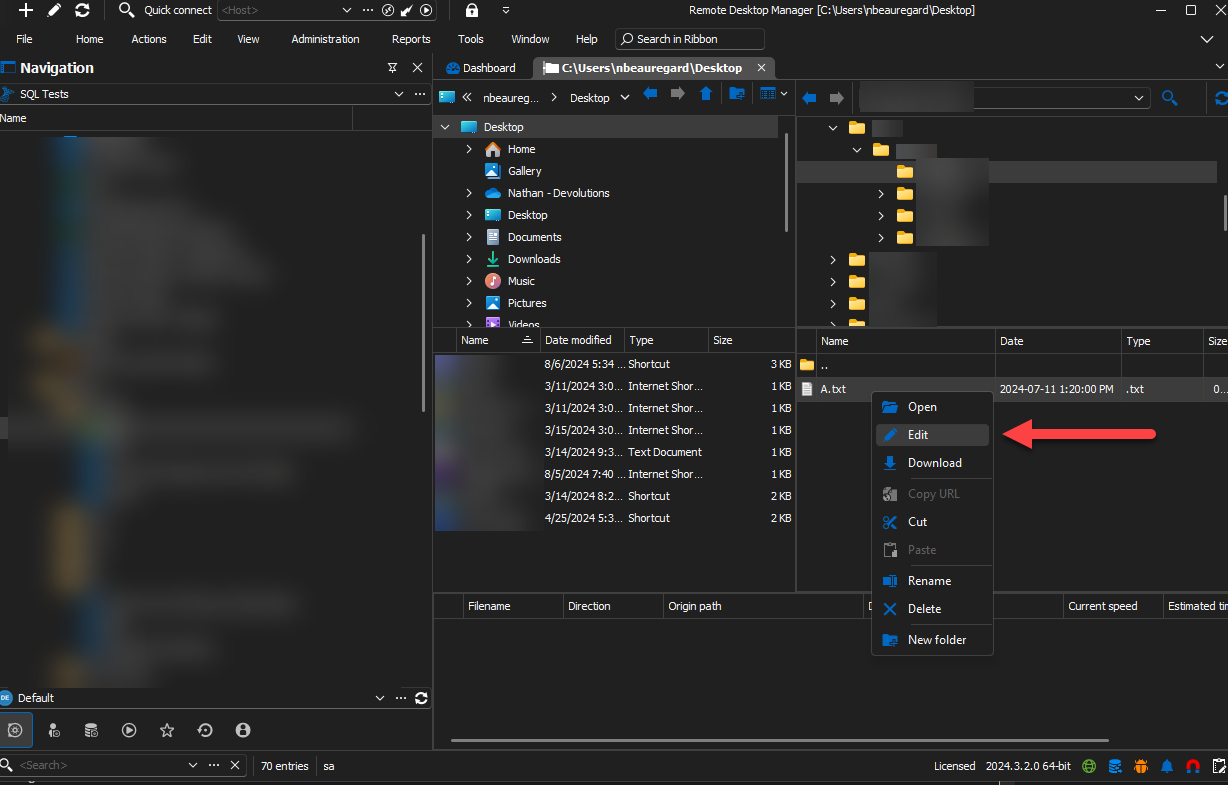
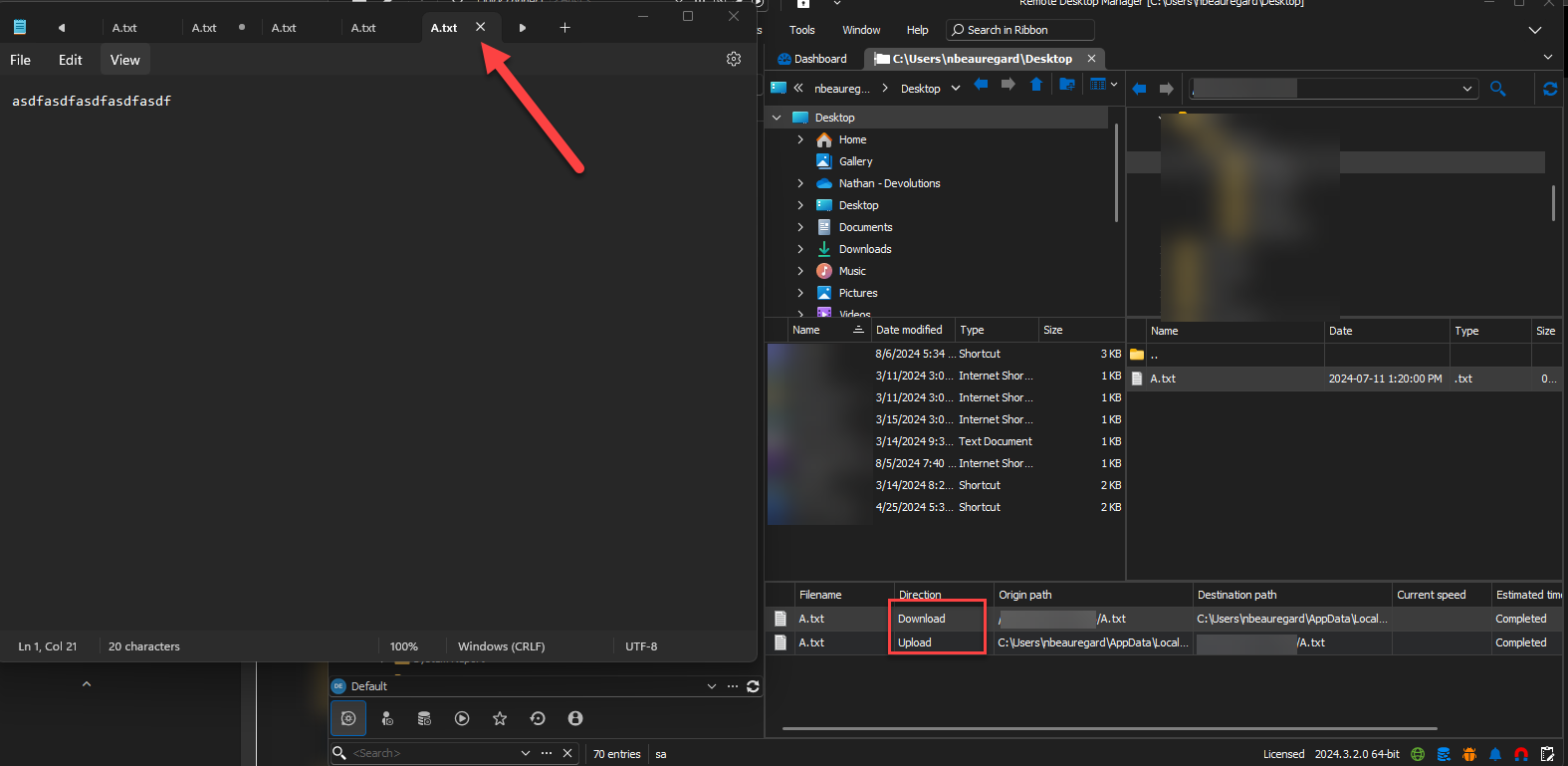
If your issue is not caused by a double-click of the entry, please correct me and explain the steps used to reproduce this issue.
Thank you for your feedback, if you have any other questions feal free to ask !
Best regards,
Nathan Beauregard
194d7bb6-c736-4118-8578-63b5f76eb24a.png
7a2f2c4a-1384-46ad-885d-a412b84850d4.png
Hello Rob,
Following your feedbacks, we decided to improve the "Direction" information shown when an action is performed. You will now be able to see "Download (edit)" whenever an action performed will modify a file on the FTP/SFTP distant server.
This will be available on WinSCP, FTP and SFTP entries. It will be release in the next major update (2024.3.0.0).
Thank you again for your feedbacks.
Best regards,
Nathan Beauregard
ca5325b4-ce6c-4492-bcd3-ace222880cec.png
Thanks for the update. Will keep an eye in the next major update.
Is there any update? There are a few threads with the same topic: https://forum.devolutions.net/topics/42362/edit-file-in-sftp-connection
Hello,
I have requested an update from the developer and will inform you as soon as I receive their response.
Best regards
Carl Marien