
asimard
Passkey configuration not working
Salut Samuel,
Désolé pour le délais.
j'ai tester avec
Chrome Version 155.0.8059.40 et Devolutions Password Manager v2026.3.1.9
Edge Version 155.0.4283.45 et Devolutions Password Manager v2026.3.1.9
voici le message d'erreur que j'obtiens:
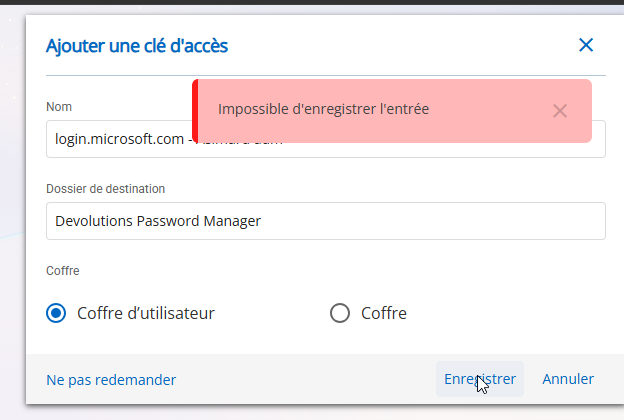
Je vois ensuite dans Devolutions que l'entré à bien ete créé, mais sur le site web ca ne detecte pas la configuration du passkey.
Passkey configuration not working
Hi,
I am encountering issues when trying to configure passkeys on multiple websites.
More and more sites are offering the option to create a passkey, but every time I attempt to set one up, the process fails on the website side. The passkey is successfully saved in Remote Desktop Manager (RDM) or Devolutions Cloud, but the website returns an error and continues prompting me to configure a passkey as if it was never created.
I am experiencing this issue with several services, including:
Microsoft
Salesforce
Amazon
Could you please help investigate this issue?
password generator
Bonjour,
Merci pour l'ajout, c'est grandement apprécié.
Pouvez vous me guider vers la documentation pour savoir comment utilisé la fonctionnalité?
Sinon avez-vous un exemple de la commande à utilisé pour générer des mots de passe?
Merci,
Hide Disabled and archive groups
Thank you!
Password generator - Special Characters in Passphrase
Hi, is there un update on this request?
Thank you
Hide Disabled and archive groups
Thank you for the update.
Hide Disabled and archive groups
Hi,
In the tree view configuration of RDM, it is currently possible to hide Disabled, Archived, and Expired entries. However, only Expired Groups can be hidden.
I would like to request the ability to also hide Archived and Disabled Groups in the tree view.
In Devolutions Hub, when a folder is flagged as Archived, it is automatically hidden. This behavior is not consistent in RDM, where archived folders remain visible.
Thank you for considering this enhancement.
Hide archived folder
Hi @carl marien
I found the option "Hide expired groups. thank you for that, but is it possible to have the same option but for archived and disabled groups?
Thank you
Hide archived folder
Hi,
No matter if the folder is marked as Archived, Disabled or expired, there are still show in RDM
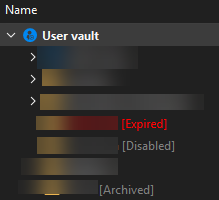
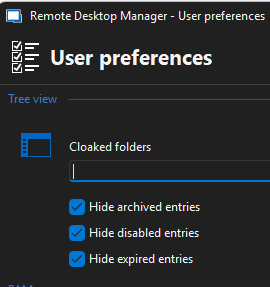
Hide archived folder
For informations, in Devolution hub, archived folder are hiden, but not in RDM
Hide archived folder
I'm using the Devolutions Hub ENT connected to RDM.
I'm a regular user and not an administrator. The archived entries in my personnal vault are hiden, but not the folder itself.
What i woul like is to hide the forlder also and not just the entries in that folder.
Thank you
Hide archived folder
Hi,
is there a way to hide a folder and all sub-entries that as been archived?
I know there is an uption under User preferences to hide archived entries, but it do not hide the parent folder.
If it's not yet possible i would like to place a feature request for it.
Thank you
Password generator - Special Characters in Passphrase
Yes it will be perfect!
Thank you
Password generator - Special Characters in Passphrase
Hi,
is it possible to add the option to include special characters in the passphrase mode in the Password Generator.
Thank you
Retrieve OTP properties from a credential entry in Devolutions Cloud data source using PowerShell
Hello,
Thank you for being so patient.
The Get-HubEntryOTP will be available in the next 2025.2.x version of the Devolutions PowerShell module.
Get-HubEntryOTP -VaultId <vaultId> -EntryId <entryId>
Best regards,
@Erica Poirier
Hi Erica,
Thank you very much for that!
I will try it a soon as possible
Adding OTP to an entry
Bonjour M. Simard,
Finalement, il n'y a pas de méthode pour récupérer le token OTP d'une entrée credential d'une source de données Hub Business.
Je viens de créer cette demande d'amélioration sur le forum pour vous. Je vous suggère d'ajouter votre vote et de vous abonner aux notifications. C'est aussi l'occasion pour notre communauté de montrer l'intérêt qu'elle porte à votre idée. Nous utilisons cet intérêt pour prioriser les fonctionnalités que nous implémentons.
Cordialement,
Merci, je vais définitivement ajouté mon vote.
Adding OTP to an entry
Bonjour,
est-ce que cette commande fonctionne même si nous n'avons pas RDM sur le serveur ou sera exécuter le script? Pour le reste du script, nous, nous utilisons les requetes devolution hub.
Merci,
Adding OTP to an entry
Bonjour @asimard,
Je n'ai pas encore trouvé de méthode pour récupérer le OTP Token d'une entrée Credential dont le OTP a été configuré.
Je vous reviens aussitôt qu'une solution est disponible.
Cordialement,
Bonjour Érica,
Est-ce que vous avez trouvé la méthode pour récupéré le OTP?
MErci,
password generator
Bonjour,
Oui j'utilise RDM, mais sur mon poste de travail. Le script d'automatisation en question sera exécuté à partir d'une autre machine qui n'a pas RDM d'installé, alors dans ce cas oui vous pouvez déplacer la question vers le bon fils de discussion.
Merci,
Adding OTP to an entry
Bonjour @asimard,
Je n'ai pas encore trouvé de méthode pour récupérer le OTP Token d'une entrée Credential dont le OTP a été configuré.
Je vous reviens aussitôt qu'une solution est disponible.
Cordialement,
Merci!
password generator
Bonjour,
J'aimerais savoir si en utilisant le module powershell (avec Devolutions hub) il est possible de générer des mot de passe en utilisant le password générator?
Merci,
Adding OTP to an entry
Bonjour, je crois avoir trouvé la façon de faire:
[Devolutions.Hub.PowerShell.Entities.Hub.PSDecryptedEntry]@{ PsMetadata = [Devolutions.Hub.PowerShell.Entities.Hub.PSEntryMetadata]@{ Name = $Credname; ParentId = $DevolutionParentId; ConnectionType = [Devolutions.RemoteDesktopManager.ConnectionType]::Credential }; Connection = [Devolutions.RemoteDesktopManager.Business.Connection]@{ Credentials = [Devolutions.RemoteDesktopManager.Business.CredentialsConnection]@{ CredentialType = [Devolutions.RemoteDesktopManager.CredentialResolverConnectionType]::ApiKey; APIID = $APIid; APIKey = $APISecret} } }Maintenant je cherche comment récupérer le code du token OTP si je veux l'utiliser pour une connexion.
Merci,
Erreur de type sur commande New-HubEntry
Bonjour Patrick,
Merci pour la réponse.
Adding OTP to an entry
Bonjour Erica Poirier,
J'utilise le module Devolutions.PowerShell pour mon automatisation et j'aimerais savoir comment faire pour ajouter un OTP à un entré crendential?
Actuellement pour créer mon entré j'utilise ce template:
$t = [Devolutions.Hub.PowerShell.Entities.Hub.PSDecryptedEntry]@{PsMetadata = [Devolutions.Hub.PowerShell.Entities.Hub.PSEntryMetadata]@{ Name = "Test Cred"; ParentId = $hubFolderID; ConnectionType = [Devolutions.RemoteDesktopManager.ConnectionType]::Credential }; Connection = [Devolutions.RemoteDesktopManager.Business.Connection]@{Credentials = [Devolutions.RemoteDesktopManager.Business.CredentialsConnection]@{CredentialType = [Devolutions.RemoteDesktopManager.CredentialResolverConnectionType]::Default; Password = "passworddepowershell"}}}Merci,
Erreur de type sur commande New-HubEntry
Bonjour, comment faire pour ajouter un nom d'utilisateur et non seulement un mot de passe lors de la création d'un type credential?
j'ai utilisé cette exemple:
$t = [Devolutions.Hub.PowerShell.Entities.Hub.PSDecryptedEntry]@{PsMetadata = [Devolutions.Hub.PowerShell.Entities.Hub.PSEntryMetadata]@{ Name = "Test Cred"; ParentId = $hubFolderID; ConnectionType = [Devolutions.RemoteDesktopManager.ConnectionType]::Credential }; Connection = [Devolutions.RemoteDesktopManager.Business.Connection]@{Credentials = [Devolutions.RemoteDesktopManager.Business.CredentialsConnection]@{CredentialType = [Devolutions.RemoteDesktopManager.CredentialResolverConnectionType]::Default; Password = "passworddepowershell"}}}Merci,