
ricunhaneves
Disabling the AI Agent for All Users via the Devolutions Console
Hello,
We are currently using version 2026.2 and would like to disable the use of the AI agent for all users until we have internally evaluated its potential applications.
I understand that this can be done via Group Policy (GPO), but is there also a way to configure this through the Devolutions Console?
Kind regards,
LB Kemp autofill not working
Hello Jacob.
Your suggestion worked.
Thank you for your help.
Regards
Ricardo Neves
LB Kemp autofill not working
Hello Jacob.
I've tried using the Discover button with the session UP but it was unable to find the HTML controls.

Regards,
Ricardo Neves
LB Kemp autofill not working
Hello,
I'm trying to configure autofill on a Kemp LoadMaster LTSF load balancer, but the entry is not filling in the login fields as expected.
The device is a Kemp LoadMaster LTSF, and below is the relevant HTML code from the login page:
<table class="tab tabtab">
<tbody><tr><td class="lefttd">User</td>
<td class="righttd"><input class="Focus" id="xuser" type="text" name="user" maxlength="64" tabindex="1" autocomplete="off"
<input type="submit" id="xsub" name="logsub" value="Login" tabindex="3"></td>
</tr>
<tr><td class="lefttd">Password</td>
<td class="righttd"><input type="password" autocomplete="off" id="xpass" name="pass" maxlength="64" tabindex="2"
</tr>
</tbody></table>
Below are the settings I have configured in the entry.


Can you help?
Login attempts via powershell
Thanks Patrick
Login attempts via powershell
Hello.
Is it possible to get the Login attempts to Devolutions Server, using powershell?
I know that there is a Scheduled report in the Devolutions Console, but it only checks every day and i wanted something more recurring.
For context:
I would like to have a script checking it every 5 minutes and send the info into a log.
That log would be consulted by an item in Zabbix and trigger and alarm is there would be any new data (new login attempt).
Thank you
Ricardo Neves
Permissions in RDM
Hi @DMOZ
Our situation mirrors yours, where we have configurations for a vast number of entries across multiple vaults and various teams requiring access. We've configured permissions to ensure each team only sees the servers assigned to them. However, certain servers need to be accessed by more than one team. Essentially, we have extensive trees with numerous folders within each client for different teams.
@Tommy Sanders thank you for your response.
Permissions were set up based on your documentation. We're still encountering issues with entries that have shortcuts in other folders.
Regards
Ricardo Neves
Permissions in RDM
Hi Tommy.
We are using Devolutions Server as Data Source.
Regards,
Ricardo Neves
Permissions in RDM
Hi,
In our RDM we use several folders to split the access to servers. If a server needs to be accessed by 2 teams we will create a shortcut and place it in the folder of the team in need.
But we are encountering a situation were this team also needs to have the permissions to view and connect on the other folder.
Example:
This is want we implemented;
Team A – Team responsible for the client
Team B – Team that needs access to one of the servers
-> Folder 1 – Team A: Full permissions | Team B: View permission
-> Folder 1.1 – Team A: Full permissions | Team B: No permissions
-> Entry A (Shortcut) – Inherits permissions from Folder 1.1
-> Folder 1.2 – Team A: Full permissions | Team B: View and Connect permissions
-> Entry A (Shortcut) – Inherits permissions from Folder 1.2
But what we are seeing is that Team B also needs the View and Connect permissions on Folder 1.1.
Thank you
Ricardo Neves
TimeoutException - The request timed out.
Hello,
Thank you for your feedback.
What DVLS and RDM versions are you using?
Do you see relevant error messages in the DVLS Logs?
Could you send us the DPS_Main.log file you'll find in the App_Data subfolder located in the DVLS web application folder?
Thank you for your collaboration.
Best regards,
Hello Erica
We are using the Devolutions Server - 2024.3.15 and the RDM version is 2024.3.31.
There are no logs about this errors in the DVLS logs.
I've sent the logs via email.
Regards
Ricardo Neves
TimeoutException - The request timed out.
Hello Patrick,
Could you tell me how many entries you have per vault?
We have several vaults with the number of entries varying from 2000 to 7000.
Is the performance issue also happening with the web interface?
No, only in the RDM agent.
What happens if you set this timeout connection to 60 seconds?
Same situation.
Are you connected through a VPN connection?
yes, the Devolutions is only available trough our internal VPN
Are you using the cleanup logs tools from DVLS?
Yes, we are archiving the logs older then 3 months
Regards,
Ricardo Neves
TimeoutException - The request timed out.
Hi.
We are experiencing some situations where the users are getting the "TimeoutException - The request timed out." error message when opening the RDM or changing vaults inside the RDM.
This his the configuration i have in the Devolutions Servers:
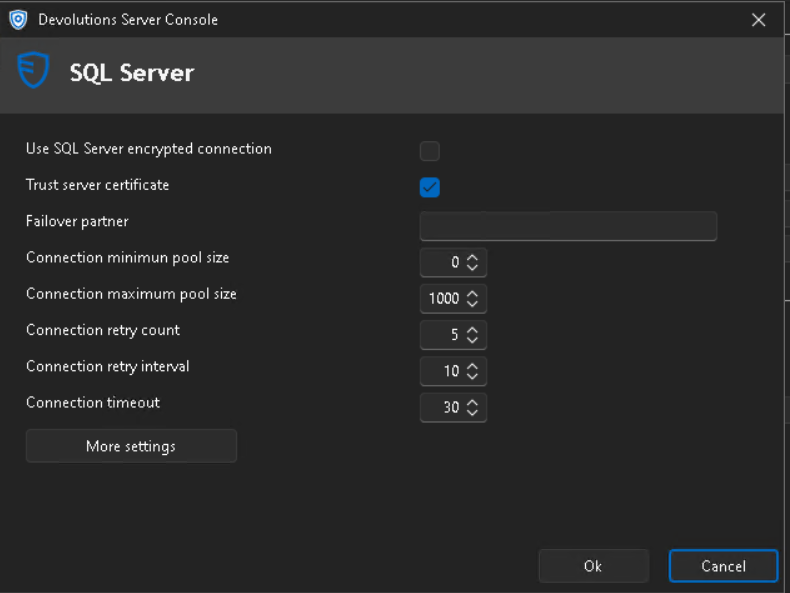
Can you help?
Regards
Ricardo Neves
See pwned passwords in the Report export
Hello.
When i export the Entry security analyser the "Pwned" field doesn't appear.
Is there a way to make it appear?
Regards
Ricardo Neves
Monitoring DVLS service Externally
Hello.
We want to monitor the status of the DVLS application using an external monitoring tool, in this case with Zabbix.
Is there a way to check the status of the service inside the server?
Regards
Ricardo Neves
Using Devolutions gateway to autenticate RDP with Kerberos
Hello.
We are trying to understand if Devolutions gateway can be used to allow RDM to authenticate using Kerberos on a remote network.
Thanks for you assist
Ricardo Neves
Provisioning and deprovisioning users in Devolutions Server using SCIM Entra ID
Hello,
Is it possible to synchronize and automate the provisioning and deprovisioning process of users in Devolutions Server by configuring your Identity Provider with Azure AD SCIM.
Thanks
Ricardo Neves
iDrac8 not connecting
Hello,
There are no differences and the issue exists even using Chrome as a browser.
Regards
Ricardo Neves
iDrac8 not connecting
Hello.
The RDM version is the 2024.2 and the iDrac8 has the Version 2.86.86.86 (Build 06).
We had already opened a support case with you before about this situation, when we upgraded to the 2023.3 version, because using the previous 2023.2 version it was possible to access them and after that upgrade the entries stopped working.
At the time you were unable to help us but this situation is causing some problems in our workflow.
Regards,
Ricardo Neves
iDrac8 not connecting
Hello
So we are trying to create an entry "Website" to access an iDrac8 but when it connects the page appears only with some dots like it is trying to load.
We've use the ip like this http://<ip> and with the https://<ip>/login.html.
We have also tried with the iDrac type entries and those simply don't work.
Thanks
Export of the result from the password analyser
Hello.
Yes, we exported the RDR file and referenced it on the command.
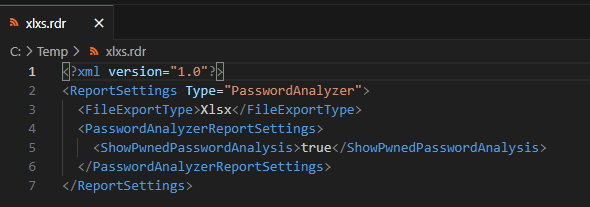
The command:
"C:\Program Files\Devolutions\Remote Desktop Manager\RemoteDesktopManager.exe" /DataSource:********** /report:************ /reportoutput:"C:\Temp\report" /reportsettings:"C:\Temp\xlxs.rdr"
Delete user with query
Hello.
We're trying to automate some of the more simple tasks and for that i wanted to ask if it's possible to delete an user using a direct query to the database
Thank you
Export of the result from the password analyser
Hi.
We have been looking for a way to do an export of the results form the password analyser in a way so that our security team can analyse it.
I have tried to do it following the instructions in this thread: https://forum.devolutions.net/topics/39639/function-to-export-list-of-entires-that-contains-a-compromised-passwords but in the report exported, the information that the password was compromised doesn´t appear.
Can you suggest another way to do it?
Thanks
Version 2023.1.18.0 demands Database Upgrade
Hi,
Thank you for your response.
Also on the release notes, that information is not there, in neither of the versions over 2023.1.10.0
Where exactly are seeing the release notes stop at .10 (so that we can fix them)? On this page we have them all: https://devolutions.net/remote-desktop-manager/release-notes
I think i wasn't clear, what i wanted to say is that on the release notes, there wasn't a reference to the need to upgrade de Database on the most recent versions.
Regards
Ricardo Neves
Version 2023.1.18.0 demands Database Upgrade
Hi,
Why does the version 2023.1.18.0 of RDM demands a Database Upgrade but the version 2023.1.20.0 does not.
Also on the release notes, that information is not there, in neither of the versions over 2023.1.10.0
Need to know this, so to decide if we have to block that version from being installed.
Thank you
Version Management
Hi.
Can anyone tell me what his the purpose of this option in the "System settings/Version Management" menu?
-> Include admins as message recipients
Thanks
